Dependency
Injection Using
Spring
1
Dépendances entre objets
• Toute application Java est une composition
d'objets qui collaborent pour rendre le service
attendu
• Les objets dépendent les uns des autres
• Plus les applications sont grandes, plus on crée
une architecture globale,
• avec une organisation en gros objets, dépendants
entre eux
• Et de petits objets, internes au gros objets, ou servant
de données transmises entre eux
Découplage : rappel
• Couplage : degré de dépendance entre objets
• Plusieurs bonnes pratiques pour traiter ce sujet
ont été répertoriées comme patrons de
conception Factory, Builder, Decorator
– Gestion de la création des objets
– Gestion de la résolution des dépendances
– …
• Mais elles sont implémentées par le développeur
de l'application !
Un Exemple
• Basé sur l'article de référence de Martin Fowler sur
l'injection de dépendance
• Inversion of Control Containers and the Dependency Injection
pattern:
http://martinfowler.com/articles/injection.html
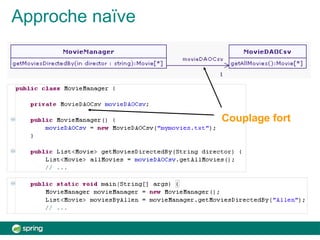
• Une classe de service de films MovieManager
collabore avec une classe d'accès aux films stockés
dans un fichier csv MovieDAOCsv
• MovieManager comporte le seul service de recherche
de film sur le nom de son réalisateur
getMoviesByDirector
• MovieDAOCsv comporte une méthode qui retourne la
liste de tous les films getAllMovies
Approche naïve
Couplage fort
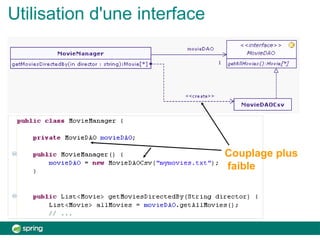
Utilisation d'une interface
Couplage plus
faible
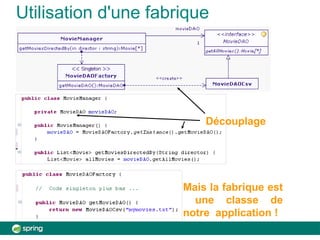
Utilisation d'une fabrique
Découplage
Mais la fabrique est
une classe de
notre application !
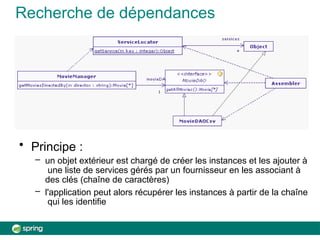
Recherche de dépendances
• Principe :
– un objet extérieur est chargé de créer les instances et les ajouter à
une liste de services gérés par un fournisseur en les associant à
des clés (chaîne de caractères)
– l'application peut alors récupérer les instances à partir de la chaîne
qui les identifie
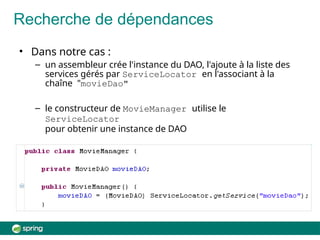
Recherche de dépendances
• Dans notre cas :
– un assembleur crée l'instance du DAO, l'ajoute à la liste des
services gérés par ServiceLocator en l'associant à la
chaîne "movieDao"
– le constructeur de MovieManager utilise le
ServiceLocator
pour obtenir une instance de DAO
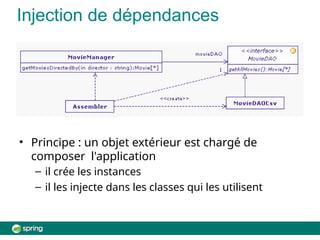
Injection de dépendances
• Principe : un objet extérieur est chargé de
composer l'application
– il crée les instances
– il les injecte dans les classes qui les utilisent
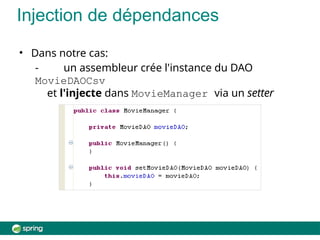
• Dans notre cas:
- un assembleur crée l'instance du DAO
MovieDAOCsv
et l'injecte dans MovieManager via un setter
Injection de dépendances
Inversion de contrôle
• Dans cette dernière approche, l'application ne résout pas
les dépendances, c'est l'objet extérieur d’assemblage
qui en a la charge
• Si l'application s'exécute dans un framework, celui est
représenté par un conteneur à l’exécution :
– celui-ci prend le contrôle du flot d'exécution et gère notamment la
résolution des dépendances
– l'application s'insère dans le cadre qu'il fixe
• Il y a donc inversion de contrôle
• Pour une application JavaEE ou Spring, c'est le conteneur
qui prend ce contrôle
• Le patron d'architecture IoC (Inversion of Control) est
commun à de nombreux frameworks de composants
Conteneur IoC
• Raccourci qui désigne un conteneur basé sur l’injection de
dépendances
• Dispose d'un noyau d’inversion de contrôle qui instancie
et assemble les composants par injection de dépendances
• Plusieurs types d’IoC
– IoC type 1
• Injection à travers une interface spécifique
– IoC type 2 :
• Injection via les mutateurs
– IoC type 3 :
• Injection via les constructeurs
Conteneur IoC de Spring
• IoC type 2 et 3
• Le conteneur gère des beans
• Un bean est un simple objet (POJO: Plain Old Java
Object) qui respecte la convention de nommage des
mutateurs (setNomAttribut)
• Le conteneur utilise des méta-données de configuration
pour instancier, configurer et assembler les beans
• La configuration peut se faire par fichier XML, annotations
dans le code Java, et classes de configuration
Dependency
Injection Using
Spring
1
Introducing the Spring Application Context
and Spring's Java Configuration
capability
@Configuration and ApplicationContext
Topics in this session
2
•
•
•
•
Spring quick start
Creating an application context
Bean scope
Lab
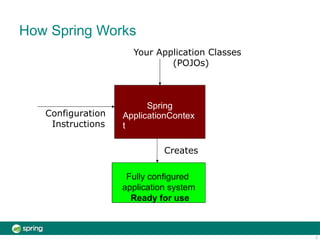
How Spring Works
Configuration
Instructions
Your Application Classes
(POJOs)
Fully configured
application system
Ready for use
Spring
ApplicationContex
t
Creates
3
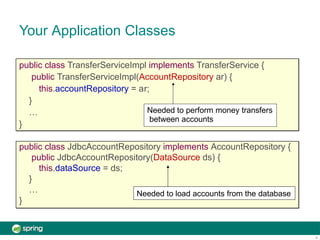
Your Application Classes
public class TransferServiceImpl implements TransferService {
public TransferServiceImpl(AccountRepository ar) {
this.accountRepository = a
}
…
}
public class JdbcAccountRepository implements AccountRepository {
public JdbcAccountRepository(DataSource ds) {
this.dataSource = ds;
}
…
}
Needed to load accounts from the database
r;
Needed to perform money transfers
between accounts
4
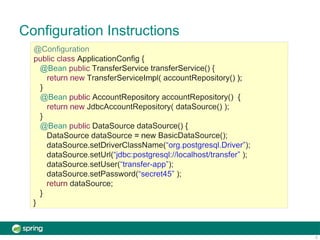
Configuration Instructions
5
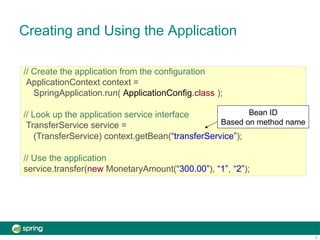
Creating and Using the Application
// Create the application from the configuration
ApplicationContext context =
SpringApplication.run( ApplicationConfig.class );
// Look up the application service interface
TransferService service =
(TransferService) context.getBean(“transferService”);
// Use the application
service.transfer(new MonetaryAmount(“300.00”), “1”, “2”);
Bean ID
Based on method name
6
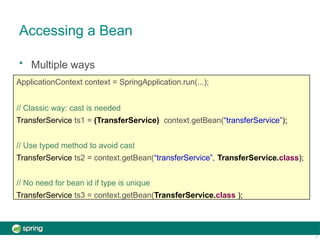
Accessing a Bean
7
• Multiple ways
ApplicationContext context = SpringApplication.run(...);
// Classic way: cast is needed
TransferService ts1 = (TransferService) context.getBean(“transferService”);
// Use typed method to avoid cast
TransferService ts2 = context.getBean(“transferService”, TransferService.class);
// No need for bean id if type is unique
TransferService ts3 = context.getBean(TransferService.class );
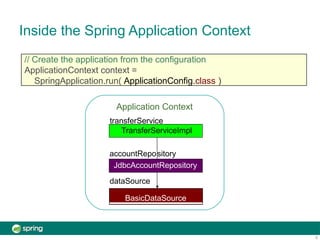
Inside the Spring Application Context
// Create the application from the configuration
ApplicationContext context =
SpringApplication.run( ApplicationConfig.class )
BasicDataSource
TransferServiceImpl
accountRepository
JdbcAccountRepository
dataSource
8
Application Context
transferService
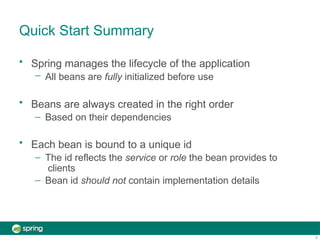
Quick Start Summary
9
• Spring manages the lifecycle of the application
– All beans are fully initialized before use
• Beans are always created in the right order
– Based on their dependencies
• Each bean is bound to a unique id
– The id reflects the service or role the bean provides to
clients
– Bean id should not contain implementation details
Topics in this session
10
•
•
•
•
•
Spring quick start
Creating an application context
Multiple Configuration Files
Bean scope
Lab
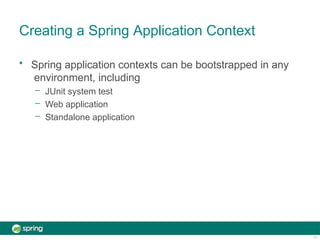
Creating a Spring Application Context
11
• Spring application contexts can be bootstrapped in any
environment, including
– JUnit system test
– Web application
– Standalone application
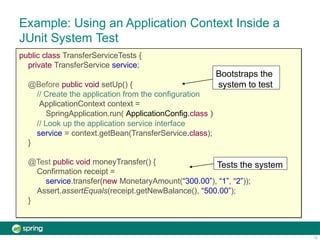
Example: Using an Application Context Inside a
JUnit System Test
public class TransferServiceTests {
private TransferService service;
@Before public void setUp() {
// Create the application from the configuration
ApplicationContext context =
SpringApplication.run( ApplicationConfig.class )
// Look up the application service interface
service = context.getBean(TransferService.class);
}
@Test public void moneyTransfer() {
Confirmation receipt =
service.transfer(new MonetaryAmount(“300.00”), “1”, “2”));
Assert.assertEquals(receipt.getNewBalance(), “500.00”);
}
Bootstraps the
system to test
12
Tests the system
Topics in this session
13
•
•
•
•
•
Spring quick start
Creating an application context
Multiple Configuration Files
Bean scope
Lab
Creating an Application Context from
Multiple Files
@Configuration
public class InfrastructureConfig {
...
}
• Your @Configuration class can get very long
– Instead use multiple files combined with @Import
– Defines a single Application Context
• With beans sourced from multiple files
@Configuration
@Import({InfrastructureConfig.class, WebConfig.class })
public class ApplicationConfig {
...
}
@Configuration
public class WebConfig {
...
}
14
Creating an Application Context from
Multiple Files
• Organize your @Configuration classes however you like
• Best practice: separate out “application” beans from
“infrastructure” beans
– Infrastructure often changes between environments
Service beans
Repository beans
Datasource
Service beans
Repository beans
Datasource
one single class
15
two Spring configuration classes
application
infra-structure
Mixed Configuration
infrastructure bean
application beans
Coupled to a local
Postgres environment
16
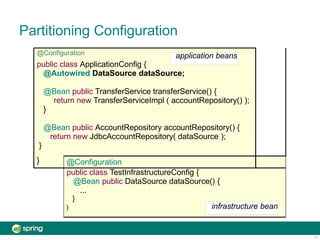
Partitioning Configuration
@Configuration application beans
public class ApplicationConfig {
@Autowired DataSource dataSource;
@Bean public TransferService transferService() {
return new TransferServiceImpl ( accountRepository() );
}
@Bean public AccountRepository accountRepository() {
return new JdbcAccountRepository( dataSource );
}
} @Configuration
public class TestInfrastructureConfig {
@Bean public DataSource dataSource() {
...
}
} infrastructure bean
17
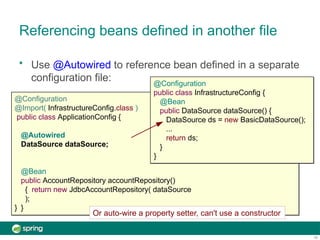
Referencing beans defined in another file
@Configuration
@Import( InfrastructureConfig.class )
public class ApplicationConfig {
@Autowired
DataSource dataSource;
}
• Use @Autowired to reference bean defined in a separate
configuration file: @Configuration
public class InfrastructureConfig {
@Bean
public DataSource dataSource() {
DataSource ds = new BasicDataSource();
...
return ds;
}
}
@Bean
public AccountRepository accountRepository()
{ return new JdbcAccountRepository( dataSource
);
}
Or auto-wire a property setter, can't use a constructor
18
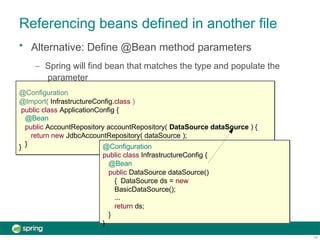
Referencing beans defined in another file
}
• Alternative: Define @Bean method parameters
– Spring will find bean that matches the type and populate the
parameter
@Configuration
@Import( InfrastructureConfig.class )
public class ApplicationConfig {
@Bean
public AccountRepository accountRepository( DataSource dataSource ) {
return new JdbcAccountRepository( dataSource );
} @Configuration
public class InfrastructureConfig {
@Bean
public DataSource dataSource()
{ DataSource ds = new
BasicDataSource();
...
return ds;
}
}
19
Topics in this session
20
•
•
•
•
•
Spring quick start
Creating an application context
Multiple Configuration Files
Bean scope
Lab
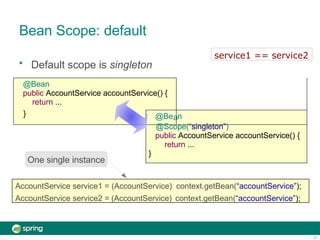
Bean Scope: default
• Default scope is singleton
@Bean
public AccountService accountService() {
return ...
} @Be n
@Scope(“singleton”)
public AccountService accountService() {
return ...
}
a
AccountService service1 = (AccountService) context.getBean(“accountService”);
AccountService service2 = (AccountService) context.getBean(“accountService”);
One single instance
service1 == service2
21
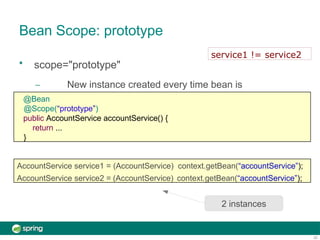
Bean Scope: prototype
• scope="prototype"
– New instance created every time bean is
referenced
AccountService service1 = (AccountService) context.getBean(“accountService”);
AccountService service2 = (AccountService) context.getBean(“accountService”);
2 instances
@Bean
@Scope(“prototype”)
public AccountService accountService() {
return ...
}
22
service1 != service2
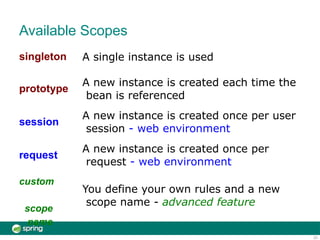
Available Scopes
23
singleton A single instance is used
prototype
session
request
A new instance is created each time the
bean is referenced
A new instance is created once per user
session - web environment
A new instance is created once per
request - web environment
custom
scope
name
You define your own rules and a new
scope name - advanced feature
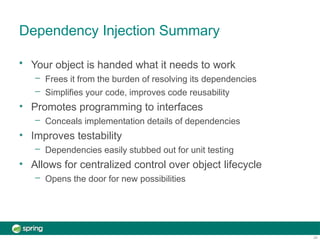
Dependency Injection Summary
24
•
•
•
• Your object is handed what it needs to work
– Frees it from the burden of resolving its dependencies
– Simplifies your code, improves code reusability
Promotes programming to interfaces
– Conceals implementation details of dependencies
Improves testability
– Dependencies easily stubbed out for unit testing
Allows for centralized control over object lifecycle
– Opens the door for new possibilities
Lab
25
Using Spring to Configure an
Application

1.2. Java Configuration1.2. Java Configuration.pptx

  • 1.
  • 2.
    Dépendances entre objets •Toute application Java est une composition d'objets qui collaborent pour rendre le service attendu • Les objets dépendent les uns des autres • Plus les applications sont grandes, plus on crée une architecture globale, • avec une organisation en gros objets, dépendants entre eux • Et de petits objets, internes au gros objets, ou servant de données transmises entre eux
  • 3.
    Découplage : rappel •Couplage : degré de dépendance entre objets • Plusieurs bonnes pratiques pour traiter ce sujet ont été répertoriées comme patrons de conception Factory, Builder, Decorator – Gestion de la création des objets – Gestion de la résolution des dépendances – … • Mais elles sont implémentées par le développeur de l'application !
  • 4.
    Un Exemple • Basésur l'article de référence de Martin Fowler sur l'injection de dépendance • Inversion of Control Containers and the Dependency Injection pattern: http://martinfowler.com/articles/injection.html • Une classe de service de films MovieManager collabore avec une classe d'accès aux films stockés dans un fichier csv MovieDAOCsv • MovieManager comporte le seul service de recherche de film sur le nom de son réalisateur getMoviesByDirector • MovieDAOCsv comporte une méthode qui retourne la liste de tous les films getAllMovies
  • 5.
  • 6.
  • 7.
    Utilisation d'une fabrique Découplage Maisla fabrique est une classe de notre application !
  • 8.
    Recherche de dépendances •Principe : – un objet extérieur est chargé de créer les instances et les ajouter à une liste de services gérés par un fournisseur en les associant à des clés (chaîne de caractères) – l'application peut alors récupérer les instances à partir de la chaîne qui les identifie
  • 9.
    Recherche de dépendances •Dans notre cas : – un assembleur crée l'instance du DAO, l'ajoute à la liste des services gérés par ServiceLocator en l'associant à la chaîne "movieDao" – le constructeur de MovieManager utilise le ServiceLocator pour obtenir une instance de DAO
  • 10.
    Injection de dépendances •Principe : un objet extérieur est chargé de composer l'application – il crée les instances – il les injecte dans les classes qui les utilisent
  • 11.
    • Dans notrecas: - un assembleur crée l'instance du DAO MovieDAOCsv et l'injecte dans MovieManager via un setter Injection de dépendances
  • 12.
    Inversion de contrôle •Dans cette dernière approche, l'application ne résout pas les dépendances, c'est l'objet extérieur d’assemblage qui en a la charge • Si l'application s'exécute dans un framework, celui est représenté par un conteneur à l’exécution : – celui-ci prend le contrôle du flot d'exécution et gère notamment la résolution des dépendances – l'application s'insère dans le cadre qu'il fixe • Il y a donc inversion de contrôle • Pour une application JavaEE ou Spring, c'est le conteneur qui prend ce contrôle • Le patron d'architecture IoC (Inversion of Control) est commun à de nombreux frameworks de composants
  • 13.
    Conteneur IoC • Raccourciqui désigne un conteneur basé sur l’injection de dépendances • Dispose d'un noyau d’inversion de contrôle qui instancie et assemble les composants par injection de dépendances • Plusieurs types d’IoC – IoC type 1 • Injection à travers une interface spécifique – IoC type 2 : • Injection via les mutateurs – IoC type 3 : • Injection via les constructeurs
  • 14.
    Conteneur IoC deSpring • IoC type 2 et 3 • Le conteneur gère des beans • Un bean est un simple objet (POJO: Plain Old Java Object) qui respecte la convention de nommage des mutateurs (setNomAttribut) • Le conteneur utilise des méta-données de configuration pour instancier, configurer et assembler les beans • La configuration peut se faire par fichier XML, annotations dans le code Java, et classes de configuration
  • 15.
    Dependency Injection Using Spring 1 Introducing theSpring Application Context and Spring's Java Configuration capability @Configuration and ApplicationContext
  • 16.
    Topics in thissession 2 • • • • Spring quick start Creating an application context Bean scope Lab
  • 17.
    How Spring Works Configuration Instructions YourApplication Classes (POJOs) Fully configured application system Ready for use Spring ApplicationContex t Creates 3
  • 18.
    Your Application Classes publicclass TransferServiceImpl implements TransferService { public TransferServiceImpl(AccountRepository ar) { this.accountRepository = a } … } public class JdbcAccountRepository implements AccountRepository { public JdbcAccountRepository(DataSource ds) { this.dataSource = ds; } … } Needed to load accounts from the database r; Needed to perform money transfers between accounts 4
  • 19.
  • 20.
    Creating and Usingthe Application // Create the application from the configuration ApplicationContext context = SpringApplication.run( ApplicationConfig.class ); // Look up the application service interface TransferService service = (TransferService) context.getBean(“transferService”); // Use the application service.transfer(new MonetaryAmount(“300.00”), “1”, “2”); Bean ID Based on method name 6
  • 21.
    Accessing a Bean 7 •Multiple ways ApplicationContext context = SpringApplication.run(...); // Classic way: cast is needed TransferService ts1 = (TransferService) context.getBean(“transferService”); // Use typed method to avoid cast TransferService ts2 = context.getBean(“transferService”, TransferService.class); // No need for bean id if type is unique TransferService ts3 = context.getBean(TransferService.class );
  • 22.
    Inside the SpringApplication Context // Create the application from the configuration ApplicationContext context = SpringApplication.run( ApplicationConfig.class ) BasicDataSource TransferServiceImpl accountRepository JdbcAccountRepository dataSource 8 Application Context transferService
  • 23.
    Quick Start Summary 9 •Spring manages the lifecycle of the application – All beans are fully initialized before use • Beans are always created in the right order – Based on their dependencies • Each bean is bound to a unique id – The id reflects the service or role the bean provides to clients – Bean id should not contain implementation details
  • 24.
    Topics in thissession 10 • • • • • Spring quick start Creating an application context Multiple Configuration Files Bean scope Lab
  • 25.
    Creating a SpringApplication Context 11 • Spring application contexts can be bootstrapped in any environment, including – JUnit system test – Web application – Standalone application
  • 26.
    Example: Using anApplication Context Inside a JUnit System Test public class TransferServiceTests { private TransferService service; @Before public void setUp() { // Create the application from the configuration ApplicationContext context = SpringApplication.run( ApplicationConfig.class ) // Look up the application service interface service = context.getBean(TransferService.class); } @Test public void moneyTransfer() { Confirmation receipt = service.transfer(new MonetaryAmount(“300.00”), “1”, “2”)); Assert.assertEquals(receipt.getNewBalance(), “500.00”); } Bootstraps the system to test 12 Tests the system
  • 27.
    Topics in thissession 13 • • • • • Spring quick start Creating an application context Multiple Configuration Files Bean scope Lab
  • 28.
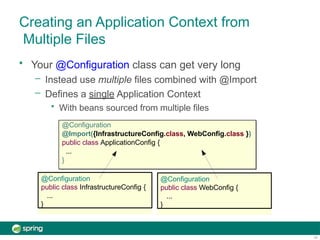
    Creating an ApplicationContext from Multiple Files @Configuration public class InfrastructureConfig { ... } • Your @Configuration class can get very long – Instead use multiple files combined with @Import – Defines a single Application Context • With beans sourced from multiple files @Configuration @Import({InfrastructureConfig.class, WebConfig.class }) public class ApplicationConfig { ... } @Configuration public class WebConfig { ... } 14
  • 29.
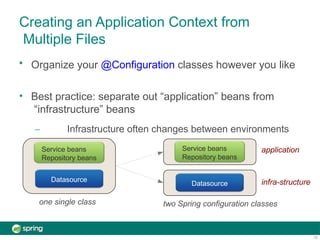
    Creating an ApplicationContext from Multiple Files • Organize your @Configuration classes however you like • Best practice: separate out “application” beans from “infrastructure” beans – Infrastructure often changes between environments Service beans Repository beans Datasource Service beans Repository beans Datasource one single class 15 two Spring configuration classes application infra-structure
  • 30.
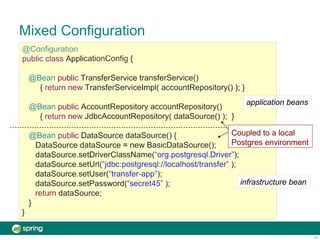
    Mixed Configuration infrastructure bean applicationbeans Coupled to a local Postgres environment 16
  • 31.
    Partitioning Configuration @Configuration applicationbeans public class ApplicationConfig { @Autowired DataSource dataSource; @Bean public TransferService transferService() { return new TransferServiceImpl ( accountRepository() ); } @Bean public AccountRepository accountRepository() { return new JdbcAccountRepository( dataSource ); } } @Configuration public class TestInfrastructureConfig { @Bean public DataSource dataSource() { ... } } infrastructure bean 17
  • 32.
    Referencing beans definedin another file @Configuration @Import( InfrastructureConfig.class ) public class ApplicationConfig { @Autowired DataSource dataSource; } • Use @Autowired to reference bean defined in a separate configuration file: @Configuration public class InfrastructureConfig { @Bean public DataSource dataSource() { DataSource ds = new BasicDataSource(); ... return ds; } } @Bean public AccountRepository accountRepository() { return new JdbcAccountRepository( dataSource ); } Or auto-wire a property setter, can't use a constructor 18
  • 33.
    Referencing beans definedin another file } • Alternative: Define @Bean method parameters – Spring will find bean that matches the type and populate the parameter @Configuration @Import( InfrastructureConfig.class ) public class ApplicationConfig { @Bean public AccountRepository accountRepository( DataSource dataSource ) { return new JdbcAccountRepository( dataSource ); } @Configuration public class InfrastructureConfig { @Bean public DataSource dataSource() { DataSource ds = new BasicDataSource(); ... return ds; } } 19
  • 34.
    Topics in thissession 20 • • • • • Spring quick start Creating an application context Multiple Configuration Files Bean scope Lab
  • 35.
    Bean Scope: default •Default scope is singleton @Bean public AccountService accountService() { return ... } @Be n @Scope(“singleton”) public AccountService accountService() { return ... } a AccountService service1 = (AccountService) context.getBean(“accountService”); AccountService service2 = (AccountService) context.getBean(“accountService”); One single instance service1 == service2 21
  • 36.
    Bean Scope: prototype •scope="prototype" – New instance created every time bean is referenced AccountService service1 = (AccountService) context.getBean(“accountService”); AccountService service2 = (AccountService) context.getBean(“accountService”); 2 instances @Bean @Scope(“prototype”) public AccountService accountService() { return ... } 22 service1 != service2
  • 37.
    Available Scopes 23 singleton Asingle instance is used prototype session request A new instance is created each time the bean is referenced A new instance is created once per user session - web environment A new instance is created once per request - web environment custom scope name You define your own rules and a new scope name - advanced feature
  • 38.
    Dependency Injection Summary 24 • • • •Your object is handed what it needs to work – Frees it from the burden of resolving its dependencies – Simplifies your code, improves code reusability Promotes programming to interfaces – Conceals implementation details of dependencies Improves testability – Dependencies easily stubbed out for unit testing Allows for centralized control over object lifecycle – Opens the door for new possibilities
  • 39.
    Lab 25 Using Spring toConfigure an Application