Slim Soussi   David Thevenin
    Intel       Vinisketch
www.vinisketch.fr
Intro: CSS3 - Une évolution majeure
Nouveau niveau dans la description graphique

Spécification par modules
Font, image, grid, color, media-queries, …
http://www.w3.org/standards/techs/css#w3c_all


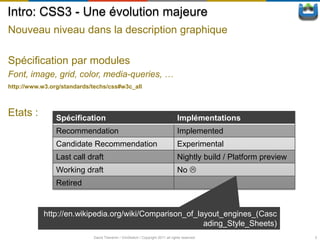
Etats :         Spécification                                                   Implémentations
                Recommendation                                                  Implemented
                Candidate Recommendation                                        Experimental
                Last call draft                                                 Nightly build / Platform preview
                Working draft                                                   No 
                Retired


            http://en.wikipedia.org/wiki/Comparison_of_layout_engines_(Casc
                                                         ading_Style_Sheets)
                            David Thevenin / ViniSketch / Copyright 2011 all rights reserved                       3
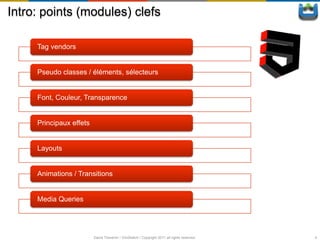
Intro: points (modules) clefs

     Tag vendors


     Pseudo classes / éléments, sélecteurs


     Font, Couleur, Transparence


     Principaux effets


     Layouts


     Animations / Transitions


     Media Queries


                         David Thevenin / ViniSketch / Copyright 2011 all rights reserved   4
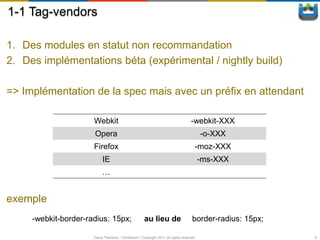
1-1 Tag-vendors

1. Des modules en statut non recommandation
2. Des implémentations béta (expérimental / nightly build)

=> Implémentation de la spec mais avec un préfix en attendant

                      Webkit                                                       -webkit-XXX
                      Opera                                                              -o-XXX
                      Firefox                                                        -moz-XXX
                           IE                                                            -ms-XXX
                           …


exemple
     -webkit-border-radius: 15px;                    au lieu de                     border-radius: 15px;

                      David Thevenin / ViniSketch / Copyright 2011 all rights reserved                     6
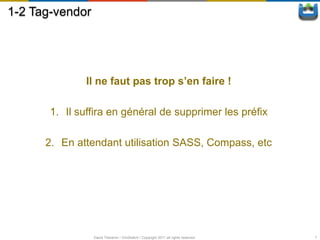
1-2 Tag-vendor


              Il ne faut pas trop s’en faire !

       1. Il suffira en général de supprimer les préfix

      2. En attendant utilisation SASS, Compass, etc


                 David Thevenin / ViniSketch / Copyright 2011 all rights reserved   7
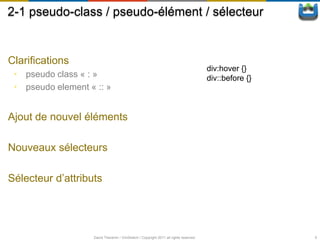
2-1 pseudo-class / pseudo-élément / sélecteur


Clarifications
                                                                                      div:hover {}
 • pseudo class « : »                                                                 div::before {}
 • pseudo element « :: »


Ajout de nouvel éléments

Nouveaux sélecteurs

Sélecteur d’attributs


                   David Thevenin / ViniSketch / Copyright 2011 all rights reserved                    9
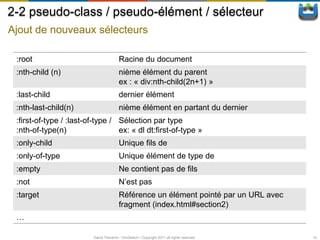
2-2 pseudo-class / pseudo-élément / sélecteur
Ajout de nouveaux sélecteurs

 :root                                   Racine du document
 :nth-child (n)                          nième élément du parent
                                         ex : « div:nth-child(2n+1) »
 :last-child                             dernier élément
 :nth-last-child(n)                      nième élément en partant du dernier
 :first-of-type / :last-of-type / Sélection par type
 :nth-of-type(n)                  ex: « dl dt:first-of-type »
 :only-child                             Unique fils de
 :only-of-type                           Unique élément de type de
 :empty                                  Ne contient pas de fils
 :not                                    N’est pas
 :target                                 Référence un élément pointé par un URL avec
                                         fragment (index.html#section2)
 …

                          David Thevenin / ViniSketch / Copyright 2011 all rights reserved   10
2-3 pseudo-class / pseudo-élément / sélecteur
Sélecteur d’attribut


E[att]        Un élément avec l’attribut att spécifié
E[att=val]    Un élément dont l’attribut att est égale à une certaine valeur
E[att~=val]   Un élément dont l’attribut att est une liste de valeurs séparées par
              un espace et dont une des valeurs est égale à val
              ex : p[class~=‘selected’] => <div class=‘button selected’> … </div>
E[att|=val]   Un élément dont l’attribut att est égale à val ou commence par val
              suivit de ‘-’
              ex : p[lang|=‘en’] => <p lang=‘en-US’> … </p>
E[att^=val]   Un élément dont l’attribut att commence par val
E[att$=val]   Un élément dont l’attribut att se termine par val
E[att*=val]   Un élément dont l’attribut att contient val


                     David Thevenin / ViniSketch / Copyright 2011 all rights reserved   11
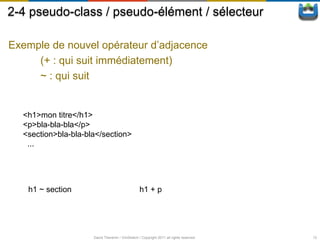
2-4 pseudo-class / pseudo-élément / sélecteur

Exemple de nouvel opérateur d’adjacence
     (+ : qui suit immédiatement)
     ~ : qui suit


  <h1>mon titre</h1>
  <p>bla-bla-bla</p>
  <section>bla-bla-bla</section>
   ...


   h1 ~ section                                  h1 + p


                     David Thevenin / ViniSketch / Copyright 2011 all rights reserved   12
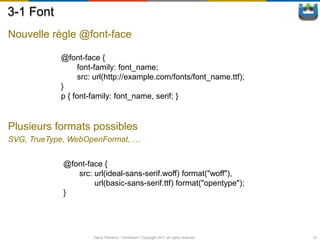
3-1 Font
Nouvelle règle @font-face

            @font-face {
                  font-family: font_name;
                  src: url(http://example.com/fonts/font_name.ttf);
            }
            p { font-family: font_name, serif; }


Plusieurs formats possibles
SVG, TrueType, WebOpenFormat, …


            @font-face {
               src: url(ideal-sans-serif.woff) format("woff"),
                    url(basic-sans-serif.ttf) format("opentype");
            }


                     David Thevenin / ViniSketch / Copyright 2011 all rights reserved   14
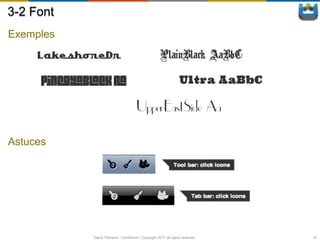
3-2 Font
Exemples


Astuces


           David Thevenin / ViniSketch / Copyright 2011 all rights reserved   15
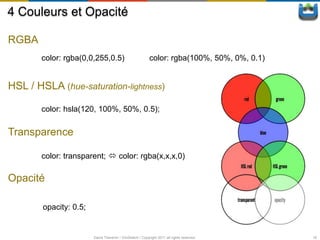
4 Couleurs et Opacité

RGBA
       color: rgba(0,0,255,0.5)                            color: rgba(100%, 50%, 0%, 0.1)


HSL / HSLA (hue-saturation-lightness)

       color: hsla(120, 100%, 50%, 0.5);

Transparence

       color: transparent;  color: rgba(x,x,x,0)

Opacité

        opacity: 0.5;


                        David Thevenin / ViniSketch / Copyright 2011 all rights reserved     16
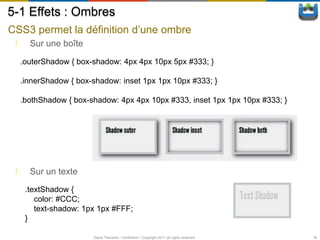
5-1 Effets : Ombres
CSS3 permet la définition d’une ombre
 1. Sur une boîte

  .outerShadow { box-shadow: 4px 4px 10px 5px #333; }

  .innerShadow { box-shadow: inset 1px 1px 10px #333; }

  .bothShadow { box-shadow: 4px 4px 10px #333, inset 1px 1px 10px #333; }


 1. Sur un texte
   .textShadow {
      color: #CCC;
      text-shadow: 1px 1px #FFF;
   }

                     David Thevenin / ViniSketch / Copyright 2011 all rights reserved   18
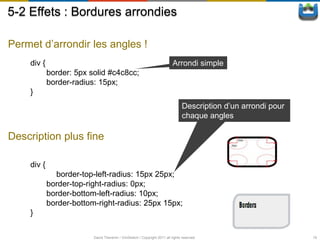
5-2 Effets : Bordures arrondies

Permet d’arrondir les angles !
    div {                                                                 Arrondi simple
            border: 5px solid #c4c8cc;
            border-radius: 15px;
    }
                                                                                Description d’un arrondi pour
                                                                                chaque angles

Description plus fine

    div {
              border-top-left-radius: 15px 25px;
            border-top-right-radius: 0px;
            border-bottom-left-radius: 10px;
            border-bottom-right-radius: 25px 15px;
    }

                         David Thevenin / ViniSketch / Copyright 2011 all rights reserved                       19
5-3 Effets : Bordure d’images

Proposition de la spécification

  border-image-source             url sur l’image à utiliser
  border-image-slice              Offsets pour décomposé
                                  l’images en 9 zones
  border-image-width              Taille des 4 bordures
  border-image-outset             Décalage de l’image
  border-image-repeat             Règle d’application (stretch,
                                  repeat, …)


Ce qui marche :
WebKit, firefox, …


                       border-image: [source] [slice] [repeat];
                       border-width: [width];

                          David Thevenin / ViniSketch / Copyright 2011 all rights reserved   20
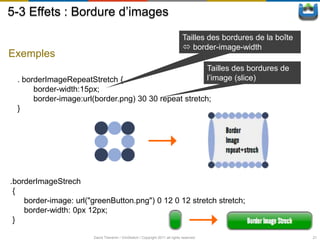
5-3 Effets : Bordure d’images
                                                                               Tailles des bordures de la boîte
                                                                                border-image-width
Exemples
                                                                                          Tailles des bordures de
  . borderImageRepeatStretch {                                                            l’image (slice)
       border-width:15px;
       border-image:url(border.png) 30 30 repeat stretch;
  }


.borderImageStrech
 {
    border-image: url("greenButton.png") 0 12 0 12 stretch stretch;
    border-width: 0px 12px;
 }

                       David Thevenin / ViniSketch / Copyright 2011 all rights reserved                             21
5-4-1 Effets : Fond multiples

Format d’une propriété
 propriété: valeur [, valeur]*;


Les principales propriétés

       background-image                      url sur l’(les) image(s)
       background-position                   position x, y en pourcentage/pixels/…
       background-repeat                     répétition en x et/ou y ou non de chaque
                                             image
       …


                       David Thevenin / ViniSketch / Copyright 2011 all rights reserved   22
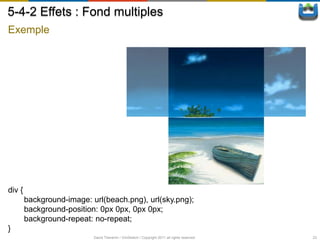
5-4-2 Effets : Fond multiples
Exemple


div {
        background-image: url(beach.png), url(sky.png);
        background-position: 0px 0px, 0px 0px;
        background-repeat: no-repeat;
}
                           David Thevenin / ViniSketch / Copyright 2011 all rights reserved   23
5-5-1 Effets : Gradient
Création d’aplats de couleurs avec dégradés
 1. Linéaire
                   <linear-gradient> = linear-gradient(
                       [ [ <angle> | to <side-or-corner> ] ,]?
                       <color-stop>[, <color-stop>]+

 2. Circulaire
                     <radial-gradient> = radial-gradient(
                       [ [ <shape> || <size> ] [ at <position> ]? , |
                         at <position>,
                       ]?<color-stop> [ , <color-stop> ]+
                     )


 Webkit (safari < 5.1, Chrome < 10) :
                                                                      -webkit-gradient(linear, …
                                                                      -webkit-gradient(radial, …

 FireFox/Opera/Webkit
                                                       [-moz|-o|-webkit]-linear-gradient(…
                                                       [-moz|-o|-webkit]-radial-gradient(…
                     David Thevenin / ViniSketch / Copyright 2011 all rights reserved              24
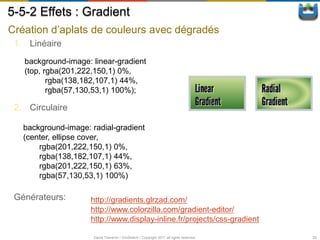
5-5-2 Effets : Gradient
Création d’aplats de couleurs avec dégradés
 1. Linéaire
   background-image: linear-gradient
   (top, rgba(201,222,150,1) 0%,
          rgba(138,182,107,1) 44%,
          rgba(57,130,53,1) 100%);

 2. Circulaire

   background-image: radial-gradient
   (center, ellipse cover,
       rgba(201,222,150,1) 0%,
       rgba(138,182,107,1) 44%,
       rgba(201,222,150,1) 63%,
       rgba(57,130,53,1) 100%)

 Générateurs:        http://gradients.glrzad.com/
                     http://www.colorzilla.com/gradient-editor/
                     http://www.display-inline.fr/projects/css-gradient

                      David Thevenin / ViniSketch / Copyright 2011 all rights reserved   25
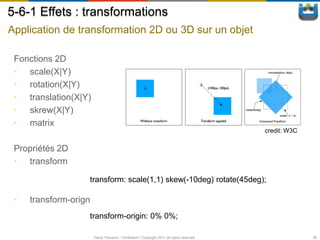
5-6-1 Effets : transformations
Application de transformation 2D ou 3D sur un objet

 Fonctions 2D
 • scale(X|Y)
 • rotation(X|Y)
 • translation(X|Y)
 • skrew(X|Y)
 • matrix
                                                                                          credit: W3C

 Propriétés 2D
 • transform

                   transform: scale(1,1) skew(-10deg) rotate(45deg);

 •   transform-orign
                   transform-origin: 0% 0%;

                       David Thevenin / ViniSketch / Copyright 2011 all rights reserved                 26
5-6-2 Effets : transformations
Application de transformation 2D ou 3D sur un objet

 Fonctions 3D
 • scale(3d|X|Y|Z)
 • rotate(3d|X|Y|Z)
 • translation(3d|X|Y|Z)
 • skrew(X|Y)
 • matrix(3d)
 • perspective


       .parent {
            transform: rotate3d(10,-10,-10,-145deg);
       }
       .parent >*:nth-child(n) {
            transform: rotateY([n*8] deg) translateZ(100px) ;
       }.

                      David Thevenin / ViniSketch / Copyright 2011 all rights reserved   27
5-6-3 Effets : transformations
Application de transformation 2D ou 3D sur un objet

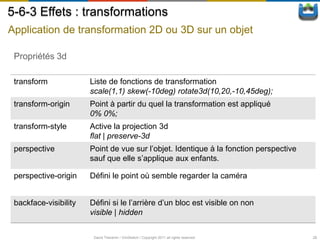
 Propriétés 3d

 transform             Liste de fonctions de transformation
                       scale(1,1) skew(-10deg) rotate3d(10,20,-10,45deg);
 transform-origin      Point à partir du quel la transformation est appliqué
                       0% 0%;
 transform-style       Active la projection 3d
                       flat | preserve-3d
 perspective           Point de vue sur l’objet. Identique à la fonction perspective
                       sauf que elle s’applique aux enfants.

 perspective-origin    Défini le point où semble regarder la caméra


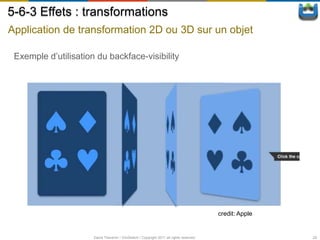
 backface-visibility   Défini si le l’arrière d’un bloc est visible on non
                       visible | hidden

                        David Thevenin / ViniSketch / Copyright 2011 all rights reserved   28
5-6-3 Effets : transformations
Application de transformation 2D ou 3D sur un objet

 Exemple d’utilisation du backface-visibility


                                                                                         credit: Apple


                      David Thevenin / ViniSketch / Copyright 2011 all rights reserved                   29
6-1 Box-model, colonnes et layouts
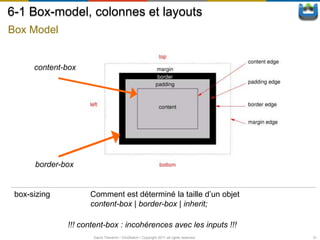
Box Model


      content-box


      border-box


 box-sizing         Comment est déterminé la taille d’un objet
                    content-box | border-box | inherit;

              !!! content-box : incohérences avec les inputs !!!
                     David Thevenin / ViniSketch / Copyright 2011 all rights reserved   31
6-2-1 Box-model, colonnes et layouts
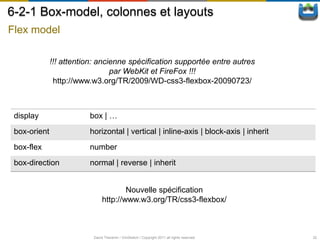
Flex model

              !!! attention: ancienne spécification supportée entre autres
                                 par WebKit et FireFox !!!
               http://www.w3.org/TR/2009/WD-css3-flexbox-20090723/


 display                 box | …
 box-orient              horizontal | vertical | inline-axis | block-axis | inherit
 box-flex                number
 box-direction           normal | reverse | inherit


                                       Nouvelle spécification
                               http://www.w3.org/TR/css3-flexbox/


                          David Thevenin / ViniSketch / Copyright 2011 all rights reserved   32
6-2-2 Box-model, colonnes et layouts
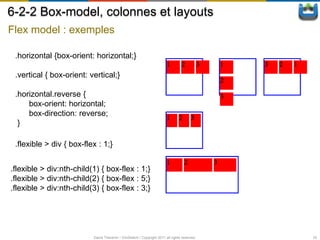
Flex model : exemples

 .horizontal {box-orient: horizontal;}

 .vertical { box-orient: vertical;}

 .horizontal.reverse {
     box-orient: horizontal;
     box-direction: reverse;
  }

 .flexible > div { box-flex : 1;}


.flexible > div:nth-child(1) { box-flex : 1;}
.flexible > div:nth-child(2) { box-flex : 5;}
.flexible > div:nth-child(3) { box-flex : 3;}


                          David Thevenin / ViniSketch / Copyright 2011 all rights reserved   33
6-3-1 Box-model, colonnes et layouts
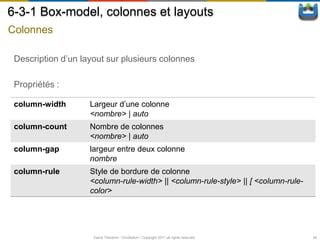
Colonnes

 Description d’un layout sur plusieurs colonnes

 Propriétés :

 column-width       Largeur d’une colonne
                    <nombre> | auto
 column-count       Nombre de colonnes
                    <nombre> | auto
 column-gap         largeur entre deux colonne
                    nombre
 column-rule        Style de bordure de colonne
                    <column-rule-width> || <column-rule-style> || [ <column-rule-
                    color>


                     David Thevenin / ViniSketch / Copyright 2011 all rights reserved   34
6-3-2 Box-model, colonnes et layouts
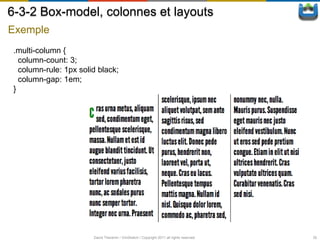
Exemple
 .multi-column {
   column-count: 3;
   column-rule: 1px solid black;
   column-gap: 1em;
 }


                        David Thevenin / ViniSketch / Copyright 2011 all rights reserved   35
6-4 Box-model, colonnes et layouts
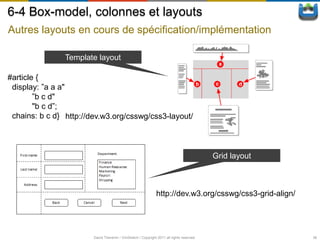
Autres layouts en cours de spécification/implémentation

                Template layout

#article {
 display: ”a a a"
        ”b c d"
        "b c d”;
 chains: b c d} http://dev.w3.org/csswg/css3-layout/


                                                                                           Grid layout


                                                               http://dev.w3.org/csswg/css3-grid-align/


                        David Thevenin / ViniSketch / Copyright 2011 all rights reserved                  36
7-1 Transitions et Animations


Transitions
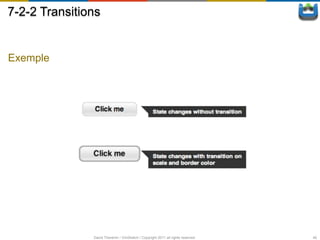
 • animations implicites sur un groupe de propriétés CSS
 • utilisation avec des (speudo)classe / JS


  idéal pour programmer des changements d’états graphiques doux
 par exemple sur un événement utilisateur


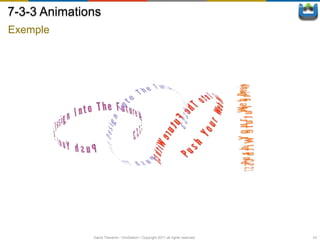
Animations
 • modèle d’animation riche (keyframes, …)


  s’utilise pour animer des objets par exemple dans un jeux ou une pub


                    David Thevenin / ViniSketch / Copyright 2011 all rights reserved   38
7-2-1 Transitions
Les propriétés


    transition-property                                Propriété(s) à animer
    transition-duration                                Durée de la transformation
    transition-timing-function                         Modèle d’interpolation


    transition-delay                                   Retard (avance) sur le départ de
                                                       l’animation


                          David Thevenin / ViniSketch / Copyright 2011 all rights reserved   39
7-2-2 Transitions


Exemple


               David Thevenin / ViniSketch / Copyright 2011 all rights reserved   40
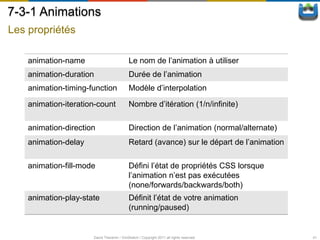
7-3-1 Animations
Les propriétés

    animation-name                          Le nom de l’animation à utiliser
    animation-duration                      Durée de l’animation
    animation-timing-function               Modèle d’interpolation

    animation-iteration-count               Nombre d’itération (1/n/infinite)

    animation-direction                     Direction de l’animation (normal/alternate)
    animation-delay                         Retard (avance) sur le départ de l’animation

    animation-fill-mode                     Défini l’état de propriétés CSS lorsque
                                            l’animation n’est pas exécutées
                                            (none/forwards/backwards/both)
    animation-play-state                    Définit l’état de votre animation
                                            (running/paused)


                      David Thevenin / ViniSketch / Copyright 2011 all rights reserved     41
7-3-2 Animations
Définir une animation (Keyframes)

      @keyframes animation_name {

           0% | from {
             [property: value;]*
           }

           n% {
             [property: value;]*
           }
           ...

           100% | to {
             [property: value;]*
           }
       }


                         David Thevenin / ViniSketch / Copyright 2011 all rights reserved   42
7-3-3 Animations
Exemple


              David Thevenin / ViniSketch / Copyright 2011 all rights reserved   43
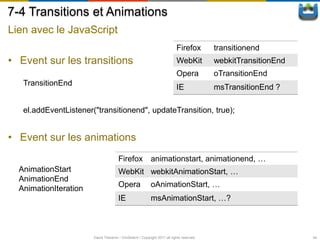
7-4 Transitions et Animations
Lien avec le JavaScript
                                                                           Firefox        transitionend
• Event sur les transitions                                                WebKit         webkitTransitionEnd
                                                                           Opera          oTransitionEnd
   TransitionEnd
                                                                           IE             msTransitionEnd ?

   el.addEventListener("transitionend", updateTransition, true);


• Event sur les animations
                                      Firefox              animationstart, animationend, …
  AnimationStart                      WebKit webkitAnimationStart, …
  AnimationEnd
                                      Opera                oAnimationStart, …
  AnimationIteration
                                      IE                   msAnimationStart, …?


                       David Thevenin / ViniSketch / Copyright 2011 all rights reserved                         44
8-1 Media Queries


Permet d’associer des styles différents en fonction de
contraintes du device

Typiquement :

 ①   Un style pour mobile
 ②   Un style pour tablette
 ③   Un style pour ordinateur de bureau
 ④   Un style pour l’impression


<link rel="stylesheet" type="text/css" media="screen" href="sans-serif.css">
<link rel="stylesheet" type="text/css" media="print" href="serif.css">

                     David Thevenin / ViniSketch / Copyright 2011 all rights reserved   46
8-2 Media Queries

Exemple de contraintes

 •   width, height
 •   device-width, device-height
 •   orientation, aspect-ratio
 •   device-aspect-ratio
 •   resolution
 •   …


            @media (min-width:200px) and (max-width:400px) {
            …
            }


                      David Thevenin / ViniSketch / Copyright 2011 all rights reserved   47
8-3 Media Queries

Syntaxe

     media_query_list
     : S* [media_query [ ',' S* media_query ]* ]?
     ;
     media_query
     : [ONLY | NOT]? S* media_type S* [ AND S* expression ]*
     | expression [ AND S* expression ]*
     ;
     media_type
     : IDENT
     ;
     expression
     : '(' S* media_feature S* [ ':' S* expr ]? ')' S*
     ;
     media_feature
     : IDENT
     ;

                   David Thevenin / ViniSketch / Copyright 2011 all rights reserved   48
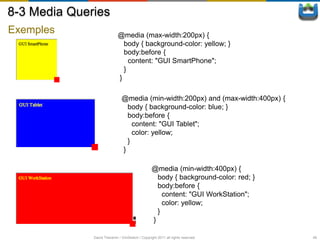
8-3 Media Queries
Exemples                     @media (max-width:200px) {
                               body { background-color: yellow; }
                               body:before {
                                 content: "GUI SmartPhone";
                               }
                             }

                               @media (min-width:200px) and (max-width:400px) {
                                 body { background-color: blue; }
                                 body:before {
                                   content: "GUI Tablet";
                                   color: yellow;
                                 }
                               }

                                                  @media (min-width:400px) {
                                                    body { background-color: red; }
                                                    body:before {
                                                      content: "GUI WorkStation";
                                                      color: yellow;
                                                    }
                                                  }

              David Thevenin / ViniSketch / Copyright 2011 all rights reserved        49
Conclusion


Qui supporte quoi :
http://en.wikipedia.org/wiki/Comparison_of_layout_engines_(Ca
scading_Style_Sheets)


Grosso modo :
Safari4, Chrome 12, FireFox 5, IE 10, …


                 David Thevenin / ViniSketch / Copyright 2011 all rights reserved   50
Liens importants


  Spécifications
  http://www.w3.org/TR/#tr_CSS
  http://dev.w3.org/csswg/
  http://www.w3.org/standards/techs/css

  Exemples & démos
  http://html5demos.com/
  https://developer.mozilla.org/en-US/demos/
  http://www.chromeexperiments.com/
  http://www.css3create.com/
  http://www.alsacreations.com

                David Thevenin / ViniSketch / Copyright 2011 all rights reserved   52
contact__AT__vinisketch.fr

www.vinisketch.fr

CSS3 Intel Webinar

  • 1.
    Slim Soussi David Thevenin Intel Vinisketch
  • 2.
  • 3.
    Intro: CSS3 -Une évolution majeure Nouveau niveau dans la description graphique Spécification par modules Font, image, grid, color, media-queries, … http://www.w3.org/standards/techs/css#w3c_all Etats : Spécification Implémentations Recommendation Implemented Candidate Recommendation Experimental Last call draft Nightly build / Platform preview Working draft No  Retired http://en.wikipedia.org/wiki/Comparison_of_layout_engines_(Casc ading_Style_Sheets) David Thevenin / ViniSketch / Copyright 2011 all rights reserved 3
  • 4.
    Intro: points (modules)clefs Tag vendors Pseudo classes / éléments, sélecteurs Font, Couleur, Transparence Principaux effets Layouts Animations / Transitions Media Queries David Thevenin / ViniSketch / Copyright 2011 all rights reserved 4
  • 6.
    1-1 Tag-vendors 1. Desmodules en statut non recommandation 2. Des implémentations béta (expérimental / nightly build) => Implémentation de la spec mais avec un préfix en attendant Webkit -webkit-XXX Opera -o-XXX Firefox -moz-XXX IE -ms-XXX … exemple -webkit-border-radius: 15px; au lieu de border-radius: 15px; David Thevenin / ViniSketch / Copyright 2011 all rights reserved 6
  • 7.
    1-2 Tag-vendor Il ne faut pas trop s’en faire ! 1. Il suffira en général de supprimer les préfix 2. En attendant utilisation SASS, Compass, etc David Thevenin / ViniSketch / Copyright 2011 all rights reserved 7
  • 9.
    2-1 pseudo-class /pseudo-élément / sélecteur Clarifications div:hover {} • pseudo class « : » div::before {} • pseudo element « :: » Ajout de nouvel éléments Nouveaux sélecteurs Sélecteur d’attributs David Thevenin / ViniSketch / Copyright 2011 all rights reserved 9
  • 10.
    2-2 pseudo-class /pseudo-élément / sélecteur Ajout de nouveaux sélecteurs :root Racine du document :nth-child (n) nième élément du parent ex : « div:nth-child(2n+1) » :last-child dernier élément :nth-last-child(n) nième élément en partant du dernier :first-of-type / :last-of-type / Sélection par type :nth-of-type(n) ex: « dl dt:first-of-type » :only-child Unique fils de :only-of-type Unique élément de type de :empty Ne contient pas de fils :not N’est pas :target Référence un élément pointé par un URL avec fragment (index.html#section2) … David Thevenin / ViniSketch / Copyright 2011 all rights reserved 10
  • 11.
    2-3 pseudo-class /pseudo-élément / sélecteur Sélecteur d’attribut E[att] Un élément avec l’attribut att spécifié E[att=val] Un élément dont l’attribut att est égale à une certaine valeur E[att~=val] Un élément dont l’attribut att est une liste de valeurs séparées par un espace et dont une des valeurs est égale à val ex : p[class~=‘selected’] => <div class=‘button selected’> … </div> E[att|=val] Un élément dont l’attribut att est égale à val ou commence par val suivit de ‘-’ ex : p[lang|=‘en’] => <p lang=‘en-US’> … </p> E[att^=val] Un élément dont l’attribut att commence par val E[att$=val] Un élément dont l’attribut att se termine par val E[att*=val] Un élément dont l’attribut att contient val David Thevenin / ViniSketch / Copyright 2011 all rights reserved 11
  • 12.
    2-4 pseudo-class /pseudo-élément / sélecteur Exemple de nouvel opérateur d’adjacence (+ : qui suit immédiatement) ~ : qui suit <h1>mon titre</h1> <p>bla-bla-bla</p> <section>bla-bla-bla</section> ... h1 ~ section h1 + p David Thevenin / ViniSketch / Copyright 2011 all rights reserved 12
  • 14.
    3-1 Font Nouvelle règle@font-face @font-face { font-family: font_name; src: url(http://example.com/fonts/font_name.ttf); } p { font-family: font_name, serif; } Plusieurs formats possibles SVG, TrueType, WebOpenFormat, … @font-face { src: url(ideal-sans-serif.woff) format("woff"), url(basic-sans-serif.ttf) format("opentype"); } David Thevenin / ViniSketch / Copyright 2011 all rights reserved 14
  • 15.
    3-2 Font Exemples Astuces David Thevenin / ViniSketch / Copyright 2011 all rights reserved 15
  • 16.
    4 Couleurs etOpacité RGBA color: rgba(0,0,255,0.5) color: rgba(100%, 50%, 0%, 0.1) HSL / HSLA (hue-saturation-lightness) color: hsla(120, 100%, 50%, 0.5); Transparence color: transparent;  color: rgba(x,x,x,0) Opacité opacity: 0.5; David Thevenin / ViniSketch / Copyright 2011 all rights reserved 16
  • 18.
    5-1 Effets :Ombres CSS3 permet la définition d’une ombre 1. Sur une boîte .outerShadow { box-shadow: 4px 4px 10px 5px #333; } .innerShadow { box-shadow: inset 1px 1px 10px #333; } .bothShadow { box-shadow: 4px 4px 10px #333, inset 1px 1px 10px #333; } 1. Sur un texte .textShadow { color: #CCC; text-shadow: 1px 1px #FFF; } David Thevenin / ViniSketch / Copyright 2011 all rights reserved 18
  • 19.
    5-2 Effets :Bordures arrondies Permet d’arrondir les angles ! div { Arrondi simple border: 5px solid #c4c8cc; border-radius: 15px; } Description d’un arrondi pour chaque angles Description plus fine div { border-top-left-radius: 15px 25px; border-top-right-radius: 0px; border-bottom-left-radius: 10px; border-bottom-right-radius: 25px 15px; } David Thevenin / ViniSketch / Copyright 2011 all rights reserved 19
  • 20.
    5-3 Effets :Bordure d’images Proposition de la spécification border-image-source url sur l’image à utiliser border-image-slice Offsets pour décomposé l’images en 9 zones border-image-width Taille des 4 bordures border-image-outset Décalage de l’image border-image-repeat Règle d’application (stretch, repeat, …) Ce qui marche : WebKit, firefox, … border-image: [source] [slice] [repeat]; border-width: [width]; David Thevenin / ViniSketch / Copyright 2011 all rights reserved 20
  • 21.
    5-3 Effets :Bordure d’images Tailles des bordures de la boîte  border-image-width Exemples Tailles des bordures de . borderImageRepeatStretch { l’image (slice) border-width:15px; border-image:url(border.png) 30 30 repeat stretch; } .borderImageStrech { border-image: url("greenButton.png") 0 12 0 12 stretch stretch; border-width: 0px 12px; } David Thevenin / ViniSketch / Copyright 2011 all rights reserved 21
  • 22.
    5-4-1 Effets :Fond multiples Format d’une propriété propriété: valeur [, valeur]*; Les principales propriétés background-image url sur l’(les) image(s) background-position position x, y en pourcentage/pixels/… background-repeat répétition en x et/ou y ou non de chaque image … David Thevenin / ViniSketch / Copyright 2011 all rights reserved 22
  • 23.
    5-4-2 Effets :Fond multiples Exemple div { background-image: url(beach.png), url(sky.png); background-position: 0px 0px, 0px 0px; background-repeat: no-repeat; } David Thevenin / ViniSketch / Copyright 2011 all rights reserved 23
  • 24.
    5-5-1 Effets :Gradient Création d’aplats de couleurs avec dégradés 1. Linéaire <linear-gradient> = linear-gradient( [ [ <angle> | to <side-or-corner> ] ,]? <color-stop>[, <color-stop>]+ 2. Circulaire <radial-gradient> = radial-gradient( [ [ <shape> || <size> ] [ at <position> ]? , | at <position>, ]?<color-stop> [ , <color-stop> ]+ ) Webkit (safari < 5.1, Chrome < 10) : -webkit-gradient(linear, … -webkit-gradient(radial, … FireFox/Opera/Webkit [-moz|-o|-webkit]-linear-gradient(… [-moz|-o|-webkit]-radial-gradient(… David Thevenin / ViniSketch / Copyright 2011 all rights reserved 24
  • 25.
    5-5-2 Effets :Gradient Création d’aplats de couleurs avec dégradés 1. Linéaire background-image: linear-gradient (top, rgba(201,222,150,1) 0%, rgba(138,182,107,1) 44%, rgba(57,130,53,1) 100%); 2. Circulaire background-image: radial-gradient (center, ellipse cover, rgba(201,222,150,1) 0%, rgba(138,182,107,1) 44%, rgba(201,222,150,1) 63%, rgba(57,130,53,1) 100%) Générateurs: http://gradients.glrzad.com/ http://www.colorzilla.com/gradient-editor/ http://www.display-inline.fr/projects/css-gradient David Thevenin / ViniSketch / Copyright 2011 all rights reserved 25
  • 26.
    5-6-1 Effets :transformations Application de transformation 2D ou 3D sur un objet Fonctions 2D • scale(X|Y) • rotation(X|Y) • translation(X|Y) • skrew(X|Y) • matrix credit: W3C Propriétés 2D • transform transform: scale(1,1) skew(-10deg) rotate(45deg); • transform-orign transform-origin: 0% 0%; David Thevenin / ViniSketch / Copyright 2011 all rights reserved 26
  • 27.
    5-6-2 Effets :transformations Application de transformation 2D ou 3D sur un objet Fonctions 3D • scale(3d|X|Y|Z) • rotate(3d|X|Y|Z) • translation(3d|X|Y|Z) • skrew(X|Y) • matrix(3d) • perspective .parent { transform: rotate3d(10,-10,-10,-145deg); } .parent >*:nth-child(n) { transform: rotateY([n*8] deg) translateZ(100px) ; }. David Thevenin / ViniSketch / Copyright 2011 all rights reserved 27
  • 28.
    5-6-3 Effets :transformations Application de transformation 2D ou 3D sur un objet Propriétés 3d transform Liste de fonctions de transformation scale(1,1) skew(-10deg) rotate3d(10,20,-10,45deg); transform-origin Point à partir du quel la transformation est appliqué 0% 0%; transform-style Active la projection 3d flat | preserve-3d perspective Point de vue sur l’objet. Identique à la fonction perspective sauf que elle s’applique aux enfants. perspective-origin Défini le point où semble regarder la caméra backface-visibility Défini si le l’arrière d’un bloc est visible on non visible | hidden David Thevenin / ViniSketch / Copyright 2011 all rights reserved 28
  • 29.
    5-6-3 Effets :transformations Application de transformation 2D ou 3D sur un objet Exemple d’utilisation du backface-visibility credit: Apple David Thevenin / ViniSketch / Copyright 2011 all rights reserved 29
  • 31.
    6-1 Box-model, colonneset layouts Box Model content-box border-box box-sizing Comment est déterminé la taille d’un objet content-box | border-box | inherit; !!! content-box : incohérences avec les inputs !!! David Thevenin / ViniSketch / Copyright 2011 all rights reserved 31
  • 32.
    6-2-1 Box-model, colonneset layouts Flex model !!! attention: ancienne spécification supportée entre autres par WebKit et FireFox !!! http://www.w3.org/TR/2009/WD-css3-flexbox-20090723/ display box | … box-orient horizontal | vertical | inline-axis | block-axis | inherit box-flex number box-direction normal | reverse | inherit Nouvelle spécification http://www.w3.org/TR/css3-flexbox/ David Thevenin / ViniSketch / Copyright 2011 all rights reserved 32
  • 33.
    6-2-2 Box-model, colonneset layouts Flex model : exemples .horizontal {box-orient: horizontal;} .vertical { box-orient: vertical;} .horizontal.reverse { box-orient: horizontal; box-direction: reverse; } .flexible > div { box-flex : 1;} .flexible > div:nth-child(1) { box-flex : 1;} .flexible > div:nth-child(2) { box-flex : 5;} .flexible > div:nth-child(3) { box-flex : 3;} David Thevenin / ViniSketch / Copyright 2011 all rights reserved 33
  • 34.
    6-3-1 Box-model, colonneset layouts Colonnes Description d’un layout sur plusieurs colonnes Propriétés : column-width Largeur d’une colonne <nombre> | auto column-count Nombre de colonnes <nombre> | auto column-gap largeur entre deux colonne nombre column-rule Style de bordure de colonne <column-rule-width> || <column-rule-style> || [ <column-rule- color> David Thevenin / ViniSketch / Copyright 2011 all rights reserved 34
  • 35.
    6-3-2 Box-model, colonneset layouts Exemple .multi-column { column-count: 3; column-rule: 1px solid black; column-gap: 1em; } David Thevenin / ViniSketch / Copyright 2011 all rights reserved 35
  • 36.
    6-4 Box-model, colonneset layouts Autres layouts en cours de spécification/implémentation Template layout #article { display: ”a a a" ”b c d" "b c d”; chains: b c d} http://dev.w3.org/csswg/css3-layout/ Grid layout http://dev.w3.org/csswg/css3-grid-align/ David Thevenin / ViniSketch / Copyright 2011 all rights reserved 36
  • 38.
    7-1 Transitions etAnimations Transitions • animations implicites sur un groupe de propriétés CSS • utilisation avec des (speudo)classe / JS idéal pour programmer des changements d’états graphiques doux par exemple sur un événement utilisateur Animations • modèle d’animation riche (keyframes, …) s’utilise pour animer des objets par exemple dans un jeux ou une pub David Thevenin / ViniSketch / Copyright 2011 all rights reserved 38
  • 39.
    7-2-1 Transitions Les propriétés transition-property Propriété(s) à animer transition-duration Durée de la transformation transition-timing-function Modèle d’interpolation transition-delay Retard (avance) sur le départ de l’animation David Thevenin / ViniSketch / Copyright 2011 all rights reserved 39
  • 40.
    7-2-2 Transitions Exemple David Thevenin / ViniSketch / Copyright 2011 all rights reserved 40
  • 41.
    7-3-1 Animations Les propriétés animation-name Le nom de l’animation à utiliser animation-duration Durée de l’animation animation-timing-function Modèle d’interpolation animation-iteration-count Nombre d’itération (1/n/infinite) animation-direction Direction de l’animation (normal/alternate) animation-delay Retard (avance) sur le départ de l’animation animation-fill-mode Défini l’état de propriétés CSS lorsque l’animation n’est pas exécutées (none/forwards/backwards/both) animation-play-state Définit l’état de votre animation (running/paused) David Thevenin / ViniSketch / Copyright 2011 all rights reserved 41
  • 42.
    7-3-2 Animations Définir uneanimation (Keyframes) @keyframes animation_name { 0% | from { [property: value;]* } n% { [property: value;]* } ... 100% | to { [property: value;]* } } David Thevenin / ViniSketch / Copyright 2011 all rights reserved 42
  • 43.
    7-3-3 Animations Exemple David Thevenin / ViniSketch / Copyright 2011 all rights reserved 43
  • 44.
    7-4 Transitions etAnimations Lien avec le JavaScript Firefox transitionend • Event sur les transitions WebKit webkitTransitionEnd Opera oTransitionEnd TransitionEnd IE msTransitionEnd ? el.addEventListener("transitionend", updateTransition, true); • Event sur les animations Firefox animationstart, animationend, … AnimationStart WebKit webkitAnimationStart, … AnimationEnd Opera oAnimationStart, … AnimationIteration IE msAnimationStart, …? David Thevenin / ViniSketch / Copyright 2011 all rights reserved 44
  • 46.
    8-1 Media Queries Permetd’associer des styles différents en fonction de contraintes du device Typiquement : ① Un style pour mobile ② Un style pour tablette ③ Un style pour ordinateur de bureau ④ Un style pour l’impression <link rel="stylesheet" type="text/css" media="screen" href="sans-serif.css"> <link rel="stylesheet" type="text/css" media="print" href="serif.css"> David Thevenin / ViniSketch / Copyright 2011 all rights reserved 46
  • 47.
    8-2 Media Queries Exemplede contraintes • width, height • device-width, device-height • orientation, aspect-ratio • device-aspect-ratio • resolution • … @media (min-width:200px) and (max-width:400px) { … } David Thevenin / ViniSketch / Copyright 2011 all rights reserved 47
  • 48.
    8-3 Media Queries Syntaxe media_query_list : S* [media_query [ ',' S* media_query ]* ]? ; media_query : [ONLY | NOT]? S* media_type S* [ AND S* expression ]* | expression [ AND S* expression ]* ; media_type : IDENT ; expression : '(' S* media_feature S* [ ':' S* expr ]? ')' S* ; media_feature : IDENT ; David Thevenin / ViniSketch / Copyright 2011 all rights reserved 48
  • 49.
    8-3 Media Queries Exemples @media (max-width:200px) { body { background-color: yellow; } body:before { content: "GUI SmartPhone"; } } @media (min-width:200px) and (max-width:400px) { body { background-color: blue; } body:before { content: "GUI Tablet"; color: yellow; } } @media (min-width:400px) { body { background-color: red; } body:before { content: "GUI WorkStation"; color: yellow; } } David Thevenin / ViniSketch / Copyright 2011 all rights reserved 49
  • 50.
    Conclusion Qui supporte quoi: http://en.wikipedia.org/wiki/Comparison_of_layout_engines_(Ca scading_Style_Sheets) Grosso modo : Safari4, Chrome 12, FireFox 5, IE 10, … David Thevenin / ViniSketch / Copyright 2011 all rights reserved 50
  • 52.
    Liens importants Spécifications http://www.w3.org/TR/#tr_CSS http://dev.w3.org/csswg/ http://www.w3.org/standards/techs/css Exemples & démos http://html5demos.com/ https://developer.mozilla.org/en-US/demos/ http://www.chromeexperiments.com/ http://www.css3create.com/ http://www.alsacreations.com David Thevenin / ViniSketch / Copyright 2011 all rights reserved 52
  • 53.