Formation autour de Git/GitLab
26/02/2016 © SQLI GROUP 2016 – Formation autour du Git/GitLab 1
Abdelghani Azri
Sommaire
• Introduction
– VCS: Version Control System
– Git vs SVN
– Historique Git
• Mise en place Git
– Routines Git
– Advanced features Git
• Graphic Tools: Tortoise Git
• GitLab: C’est quoi ?
• GitLab features
– Gestion des branches
– Pull request
– Internal Issue / Review System
• Git Tips
• Demo
226/02/2016 © SQLI GROUP 2016 – Formation autour du Git/GitLab
INTRODUCTION
326/02/2016 © SQLI GROUP 2016 – Formation autour du Git/GitLab
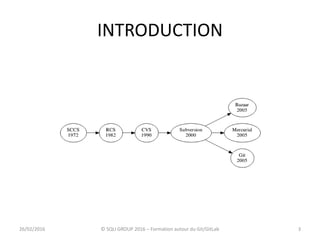
INTRODUCTION
• Deux type de gestion de version:
– Centralized Revision Control System (CVCS )
– Distributed Version Control System (DVCS)
426/02/2016 © SQLI GROUP 2016 – Formation autour du Git/GitLab
GIT VS SVN
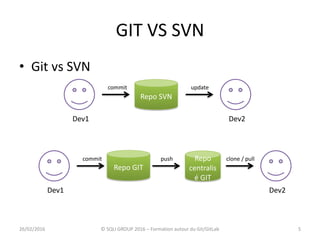
• Git vs SVN
Repo SVN
Dev1 Dev2
commit update
Repo
centralis
é GIT
Dev1 Dev2
commit clone / pull
Repo GIT
push
26/02/2016 5© SQLI GROUP 2016 – Formation autour du Git/GitLab
GIT VS SVN
– Centralized Revision Control System (CVCS )
• CVS, SVN…
• Architecture client serveur
• Un seul repository
• Un serveur central contient toutes les données
• Beaucoup de requêtes entre le client et le serveur
(assez lent)
• Dépendance du serveur ( check out)
626/02/2016 © SQLI GROUP 2016 – Formation autour du Git/GitLab
GIT VS SVN
– Distributed Version Control System (DVCS)
» Git, mercurial…
» Toutes les données sont sur notre machine ;
» Les opérations sont très rapides ;
» Connexion internet seulement pour les pull et push
726/02/2016
© SQLI GROUP 2016 – Formation autour du
Git/GitLab
Historique GIT
• Git History:
– Créé en avril 2005 par Linus Torvalds
– Objectif : gérer le workflow d'intégration des
patches du noyau Linux
– Remplacer BitKeeper
– En Mai 2013, 36 % de professionnels utilise Git
826/02/2016
© SQLI GROUP 2016 – Formation autour du
Git/GitLab
Introduction
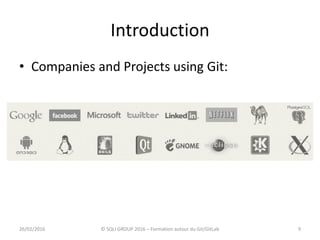
• Companies and Projects using Git:
926/02/2016 © SQLI GROUP 2016 – Formation autour du Git/GitLab
Git configuration
10
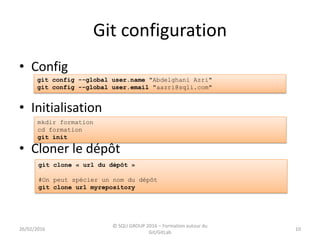
• Config
• Initialisation
• Cloner le dépôt
git config --global user.name "Abdelghani Azri"
git config --global user.email "aazri@sqli.com"
mkdir formation
cd formation
git init
git clone « url du dépôt »
#On peut spécier un nom du dépôt
git clone url myrepository
26/02/2016
© SQLI GROUP 2016 – Formation autour du
Git/GitLab
Git configuration (gitignore)
11
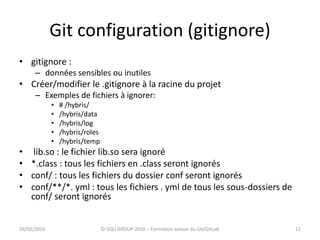
• gitignore :
– données sensibles ou inutiles
• Créer/modifier le .gitignore à la racine du projet
– Exemples de fichiers à ignorer:
• # /hybris/
• /hybris/data
• /hybris/log
• /hybris/roles
• /hybris/temp
• lib.so : le fichier lib.so sera ignoré
• *.class : tous les fichiers en .class seront ignorés
• conf/ : tous les fichiers du dossier conf seront ignorés
• conf/**/*. yml : tous les fichiers . yml de tous les sous-dossiers de
conf/ seront ignorés
26/02/2016 © SQLI GROUP 2016 – Formation autour du Git/GitLab
Git workflow
12
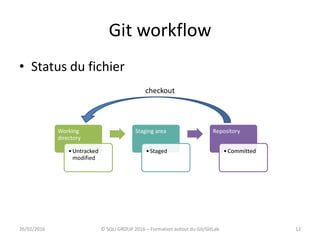
• Status du fichier
Working
directory
•Untracked
modified
Staging area
•Staged
Repository
•Committed
26/02/2016 © SQLI GROUP 2016 – Formation autour du Git/GitLab
checkout
Git workflow
13
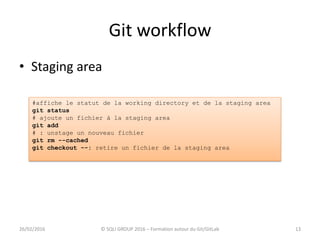
• Staging area
26/02/2016 © SQLI GROUP 2016 – Formation autour du Git/GitLab
#affiche le statut de la working directory et de la staging area
git status
# ajoute un fichier à la staging area
git add
# : unstage un nouveau fichier
git rm --cached
git checkout --: retire un fichier de la staging area
Git workflow
14
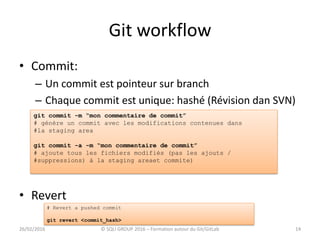
• Commit:
– Un commit est pointeur sur branch
– Chaque commit est unique: hashé (Révision dan SVN)
• Revert
26/02/2016 © SQLI GROUP 2016 – Formation autour du Git/GitLab
git commit -m “mon commentaire de commit”
# génère un commit avec les modifications contenues dans
#la staging area
git commit -a -m “mon commentaire de commit”
# ajoute tous les fichiers modifiés (pas les ajouts /
#suppressions) à la staging areaet commite)
# Revert a pushed commit
git revert <commit_hash>
Git workflow
15
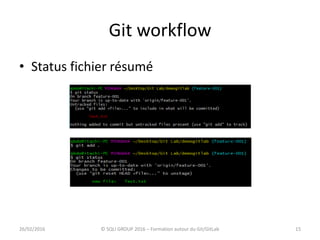
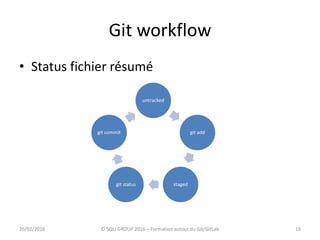
• Status fichier résumé
26/02/2016 © SQLI GROUP 2016 – Formation autour du Git/GitLab
Git workflow
16
• Status fichier résumé
26/02/2016 © SQLI GROUP 2016 – Formation autour du Git/GitLab
untracked
git add
stagedgit status
git commit
Routines Git
17
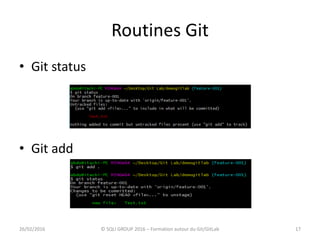
• Git status
• Git add
26/02/2016 © SQLI GROUP 2016 – Formation autour du Git/GitLab
Routines Git
18
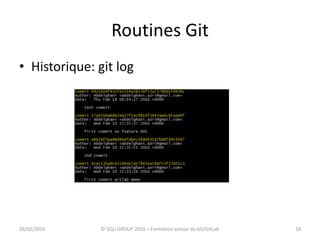
• Historique: git log
26/02/2016 © SQLI GROUP 2016 – Formation autour du Git/GitLab
Routines Git
19
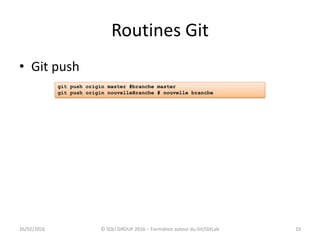
• Git push
26/02/2016 © SQLI GROUP 2016 – Formation autour du Git/GitLab
git push origin master #branche master
git push origin nouvelleBranche # nouvelle branche
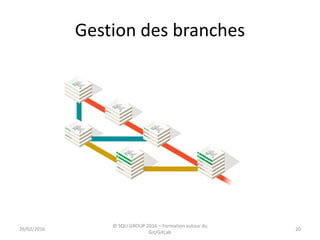
Gestion des branches
2026/02/2016
© SQLI GROUP 2016 – Formation autour du
Git/GitLab
Gestion des branches
21
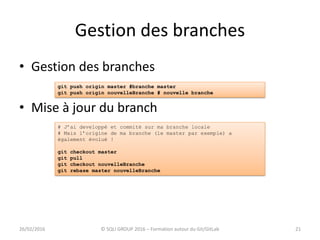
• Gestion des branches
• Mise à jour du branch
26/02/2016 © SQLI GROUP 2016 – Formation autour du Git/GitLab
git push origin master #branche master
git push origin nouvelleBranche # nouvelle branche
# J’ai developpé et commité sur ma branche locale
# Mais l’origine de ma branche (le master par exemple) a
également évolué !
git checkout master
git pull
git checkout nouvelleBranche
git rebase master nouvelleBranche
Gestion des branches
22
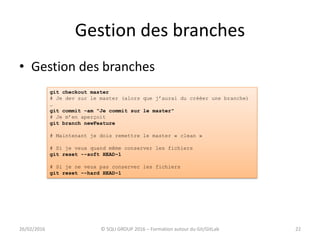
• Gestion des branches
26/02/2016 © SQLI GROUP 2016 – Formation autour du Git/GitLab
git checkout master
# Je dev sur le master (alors que j’aurai du crééer une branche)
…
git commit –am "Je commit sur le master"
# Je m’en aperçoit
git branch newFeature
# Maintenant je dois remettre le master « clean »
# Si je veux quand même conserver les fichiers
git reset --soft HEAD~1
# Si je ne veux pas conserver les fichiers
git reset –-hard HEAD~1
Gestion des branches
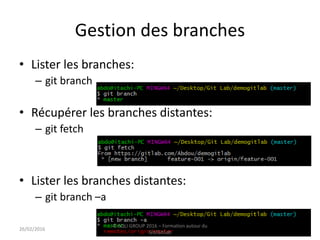
• Lister les branches:
– git branch
• Récupérer les branches distantes:
– git fetch
• Lister les branches distantes:
– git branch –a
2326/02/2016
© SQLI GROUP 2016 – Formation autour du
Git/GitLab
Gestion des branches
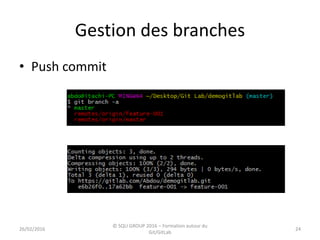
• Push commit
2426/02/2016
© SQLI GROUP 2016 – Formation autour du
Git/GitLab
Gestion des branches
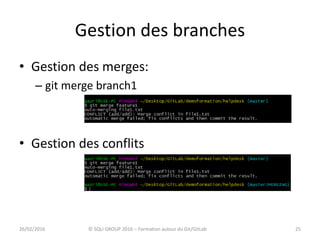
• Gestion des merges:
– git merge branch1
• Gestion des conflits
2526/02/2016 © SQLI GROUP 2016 – Formation autour du Git/GitLab
Gestion des branches
• Gestion des conflits
– git checkout --theirs <fichier>
– git checkout --ours <fichier>
– git add *
– git commit
2626/02/2016 © SQLI GROUP 2016 – Formation autour du Git/GitLab
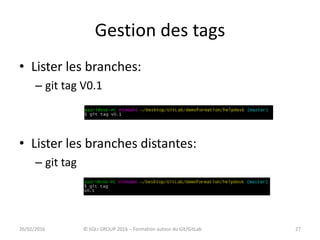
Gestion des tags
• Lister les branches:
– git tag V0.1
• Lister les branches distantes:
– git tag
2726/02/2016 © SQLI GROUP 2016 – Formation autour du Git/GitLab
Migrate svn to git
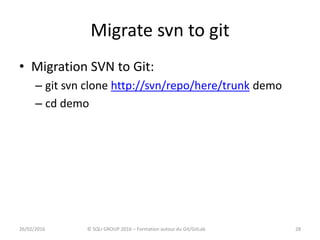
• Migration SVN to Git:
– git svn clone http://svn/repo/here/trunk demo
– cd demo
2826/02/2016 © SQLI GROUP 2016 – Formation autour du Git/GitLab
Migrate svn to git
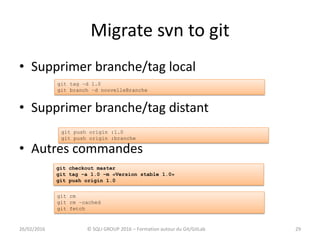
• Supprimer branche/tag local
• Supprimer branche/tag distant
• Autres commandes
2926/02/2016 © SQLI GROUP 2016 – Formation autour du Git/GitLab
git tag –d 1.0
git branch –d nouvelleBranche
git push origin :1.0
git push origin :branche
git rm
git rm –cached
git fetch
git checkout master
git tag –a 1.0 –m «Version stable 1.0»
git push origin 1.0
Outils graphiques
• Plusieurs outils graphiques:
– Alternative to command line: commit, branch…
– Ex: TortoiseGit, SouceTree …
– Plugins eclipse: Egit…
3026/02/2016 © SQLI GROUP 2016 – Formation autour du Git/GitLab
Outils graphiques
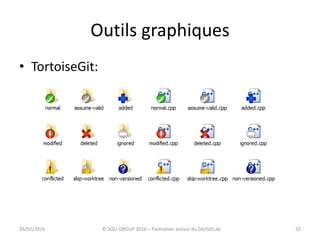
• Tortoise Git:
– Intéressant pour les gens travaillant avec SVN
Tortoise
– User friendly interface
– Intuitive
3126/02/2016 © SQLI GROUP 2016 – Formation autour du Git/GitLab
Outils graphiques
• TortoiseGit:
3226/02/2016 © SQLI GROUP 2016 – Formation autour du Git/GitLab
Tortoise Git
Démo
3326/02/2016 © SQLI GROUP 2016 – Formation autour du Git/GitLab
GitLab
3426/02/2016 © SQLI GROUP 2016 – Formation autour du Git/GitLab
Git Lab
3526/02/2016 © SQLI GROUP 2016 – Formation autour du Git/GitLab
GitLab
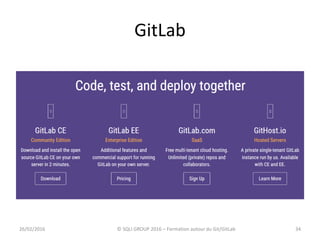
• Interface web pour git
• Clone du GitHub
• Gestion des repos: public, private, interne
• Code review
• Issue tracking
• 25,000 users on a single server
3626/02/2016 © SQLI GROUP 2016 – Formation autour du Git/GitLab
GitLab
• Who uses GitLab ?
– AT&T
– Bell
– CERN
– Fraunhofer
– Interpol
– NASA
– Red Hat
– …
3726/02/2016 © SQLI GROUP 2016 – Formation autour du Git/GitLab
GitLab workflow
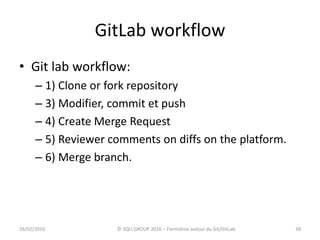
• Git lab workflow:
– 1) Clone or fork repository
– 3) Modifier, commit et push
– 4) Create Merge Request
– 5) Reviewer comments on diffs on the platform.
– 6) Merge branch.
3826/02/2016 © SQLI GROUP 2016 – Formation autour du Git/GitLab
Git Lab
3926/02/2016 © SQLI GROUP 2016 – Formation autour du Git/GitLab
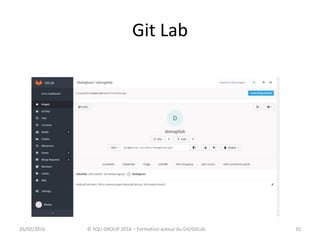
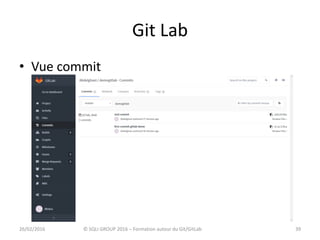
• Vue commit
Git Lab
4026/02/2016 © SQLI GROUP 2016 – Formation autour du Git/GitLab
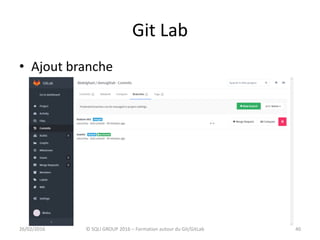
• Ajout branche
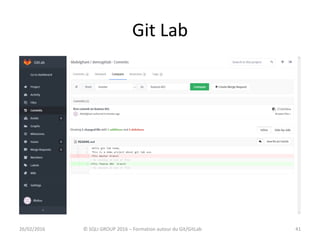
Git Lab
4126/02/2016 © SQLI GROUP 2016 – Formation autour du Git/GitLab
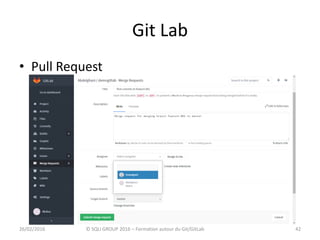
Git Lab
4226/02/2016 © SQLI GROUP 2016 – Formation autour du Git/GitLab
• Pull Request
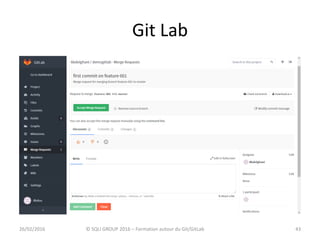
Git Lab
4326/02/2016 © SQLI GROUP 2016 – Formation autour du Git/GitLab
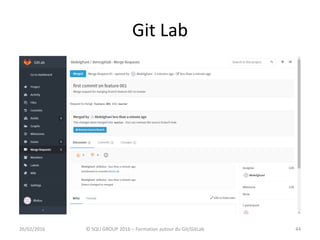
Git Lab
4426/02/2016 © SQLI GROUP 2016 – Formation autour du Git/GitLab
Git Tips
• How to know impushed commit
• How to report a single commit
• Best practices
4526/02/2016
© SQLI GROUP 2016 – Formation autour du
Git/GitLab
Git Tips
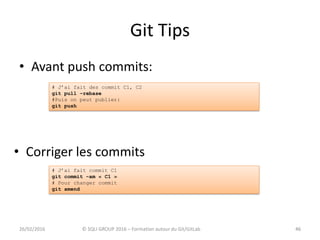
• Avant push commits:
4626/02/2016 © SQLI GROUP 2016 – Formation autour du Git/GitLab
• Corriger les commits
46
# J’ai fait des commit C1, C2
git pull –rebase
#Puis on peut publier:
git push
# J’ai fait commit C1
git commit –am « C1 »
# Pour changer commit
git amend
Git Tips
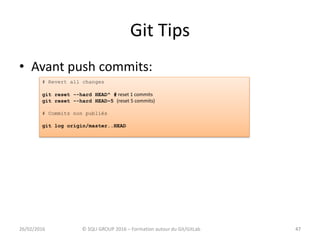
• Avant push commits:
4726/02/2016 © SQLI GROUP 2016 – Formation autour du Git/GitLab 47
# Revert all changes
git reset --hard HEAD^ # reset 1 commits
git reset --hard HEAD~5 (reset 5 commits)
# Commits non publiés
git log origin/master..HEAD
Git Tips
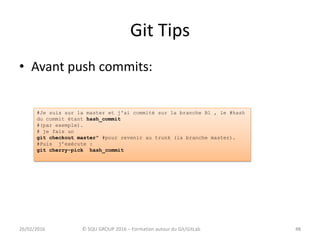
• Avant push commits:
4826/02/2016 © SQLI GROUP 2016 – Formation autour du Git/GitLab 48
#Je suis sur la master et j'ai commité sur la branche B1 , le #hash
du commit étant hash_commit
#(par exemple).
# je fais un
git checkout master" #pour revenir au trunk (la branche master).
#Puis j’exécute :
git cherry-pick hash_commit
Git Tips
• Git log :
• Git grep
4926/02/2016 © SQLI GROUP 2016 – Formation autour du Git/GitLab 49
# Indique l’auteur de chaque ligne d’un fichier
git blame <file>
# Visualier les commit
git log
git log id_commit1..id_commit2 # commit antre id1 et id2
#Visualier le contenu du commit
git show
git diff id_commit # diff entre working copy et commit
git diff id_commit1 id_commit2 # diff entre deux commits
# Rechercher un text dans un fichier
git grep <texte> [<ref>]
Git Tips
5026/02/2016 © SQLI GROUP 2016 – Formation autour du Git/GitLab 50
git checkout brancheRecette
# Je dev quelques corrections mineures...
…
# Evidemment, urgence absolue ! Correction à faire et à pousser
sur le serveur de recette.
git stash
# Je fais mon correctif urgent
…
git commit –am "Correction urgente !«
git push
git stash apply
# Je continue des corrections mineures.
…
# Créer un patch (n derniers commits)
git format-patch [-n]
# Appliquer patch
git apply <patch>
Conclusion
Sites :
› http://git-scm.com/book
› http://www.alexgirard.com/git-book/
› http://wiki.winehq.org/GitWine
› https://help.github.com/articles/fork-a-repo/
› https://tortoisegit.org/docs/tortoisegit/
› http://www.via.ecp.fr/viaform/2013-14/2014%20-%20Formation%20Git.pdf
› http://www.slideshare.net/ippontech/formation-git-gratuite-par-ippon-2014
› https://about.gitlab.com/features/
› http://gitLab.com
› https://about.gitlab.com/gitlab-ci/
› http://doc.gitlab.com/ce/
Site pour simulation manipulation branches sous git
› http://pcottle.github.io/learnGitBranching/?NODEMO
5126/02/2016 © SQLI GROUP 2016 – Formation autour du Git/GitLab
Formation autour de git/gitLab
Merci pour votre
attention
26/02/2016
© SQLI GROUP 2016 – Formation autour du
Git/GitLab
52

Formation autour de git et git lab

  • 1.
    Formation autour deGit/GitLab 26/02/2016 © SQLI GROUP 2016 – Formation autour du Git/GitLab 1 Abdelghani Azri
  • 2.
    Sommaire • Introduction – VCS:Version Control System – Git vs SVN – Historique Git • Mise en place Git – Routines Git – Advanced features Git • Graphic Tools: Tortoise Git • GitLab: C’est quoi ? • GitLab features – Gestion des branches – Pull request – Internal Issue / Review System • Git Tips • Demo 226/02/2016 © SQLI GROUP 2016 – Formation autour du Git/GitLab
  • 3.
    INTRODUCTION 326/02/2016 © SQLIGROUP 2016 – Formation autour du Git/GitLab
  • 4.
    INTRODUCTION • Deux typede gestion de version: – Centralized Revision Control System (CVCS ) – Distributed Version Control System (DVCS) 426/02/2016 © SQLI GROUP 2016 – Formation autour du Git/GitLab
  • 5.
    GIT VS SVN •Git vs SVN Repo SVN Dev1 Dev2 commit update Repo centralis é GIT Dev1 Dev2 commit clone / pull Repo GIT push 26/02/2016 5© SQLI GROUP 2016 – Formation autour du Git/GitLab
  • 6.
    GIT VS SVN –Centralized Revision Control System (CVCS ) • CVS, SVN… • Architecture client serveur • Un seul repository • Un serveur central contient toutes les données • Beaucoup de requêtes entre le client et le serveur (assez lent) • Dépendance du serveur ( check out) 626/02/2016 © SQLI GROUP 2016 – Formation autour du Git/GitLab
  • 7.
    GIT VS SVN –Distributed Version Control System (DVCS) » Git, mercurial… » Toutes les données sont sur notre machine ; » Les opérations sont très rapides ; » Connexion internet seulement pour les pull et push 726/02/2016 © SQLI GROUP 2016 – Formation autour du Git/GitLab
  • 8.
    Historique GIT • GitHistory: – Créé en avril 2005 par Linus Torvalds – Objectif : gérer le workflow d'intégration des patches du noyau Linux – Remplacer BitKeeper – En Mai 2013, 36 % de professionnels utilise Git 826/02/2016 © SQLI GROUP 2016 – Formation autour du Git/GitLab
  • 9.
    Introduction • Companies andProjects using Git: 926/02/2016 © SQLI GROUP 2016 – Formation autour du Git/GitLab
  • 10.
    Git configuration 10 • Config •Initialisation • Cloner le dépôt git config --global user.name "Abdelghani Azri" git config --global user.email "aazri@sqli.com" mkdir formation cd formation git init git clone « url du dépôt » #On peut spécier un nom du dépôt git clone url myrepository 26/02/2016 © SQLI GROUP 2016 – Formation autour du Git/GitLab
  • 11.
    Git configuration (gitignore) 11 •gitignore : – données sensibles ou inutiles • Créer/modifier le .gitignore à la racine du projet – Exemples de fichiers à ignorer: • # /hybris/ • /hybris/data • /hybris/log • /hybris/roles • /hybris/temp • lib.so : le fichier lib.so sera ignoré • *.class : tous les fichiers en .class seront ignorés • conf/ : tous les fichiers du dossier conf seront ignorés • conf/**/*. yml : tous les fichiers . yml de tous les sous-dossiers de conf/ seront ignorés 26/02/2016 © SQLI GROUP 2016 – Formation autour du Git/GitLab
  • 12.
    Git workflow 12 • Statusdu fichier Working directory •Untracked modified Staging area •Staged Repository •Committed 26/02/2016 © SQLI GROUP 2016 – Formation autour du Git/GitLab checkout
  • 13.
    Git workflow 13 • Stagingarea 26/02/2016 © SQLI GROUP 2016 – Formation autour du Git/GitLab #affiche le statut de la working directory et de la staging area git status # ajoute un fichier à la staging area git add # : unstage un nouveau fichier git rm --cached git checkout --: retire un fichier de la staging area
  • 14.
    Git workflow 14 • Commit: –Un commit est pointeur sur branch – Chaque commit est unique: hashé (Révision dan SVN) • Revert 26/02/2016 © SQLI GROUP 2016 – Formation autour du Git/GitLab git commit -m “mon commentaire de commit” # génère un commit avec les modifications contenues dans #la staging area git commit -a -m “mon commentaire de commit” # ajoute tous les fichiers modifiés (pas les ajouts / #suppressions) à la staging areaet commite) # Revert a pushed commit git revert <commit_hash>
  • 15.
    Git workflow 15 • Statusfichier résumé 26/02/2016 © SQLI GROUP 2016 – Formation autour du Git/GitLab
  • 16.
    Git workflow 16 • Statusfichier résumé 26/02/2016 © SQLI GROUP 2016 – Formation autour du Git/GitLab untracked git add stagedgit status git commit
  • 17.
    Routines Git 17 • Gitstatus • Git add 26/02/2016 © SQLI GROUP 2016 – Formation autour du Git/GitLab
  • 18.
    Routines Git 18 • Historique:git log 26/02/2016 © SQLI GROUP 2016 – Formation autour du Git/GitLab
  • 19.
    Routines Git 19 • Gitpush 26/02/2016 © SQLI GROUP 2016 – Formation autour du Git/GitLab git push origin master #branche master git push origin nouvelleBranche # nouvelle branche
  • 20.
    Gestion des branches 2026/02/2016 ©SQLI GROUP 2016 – Formation autour du Git/GitLab
  • 21.
    Gestion des branches 21 •Gestion des branches • Mise à jour du branch 26/02/2016 © SQLI GROUP 2016 – Formation autour du Git/GitLab git push origin master #branche master git push origin nouvelleBranche # nouvelle branche # J’ai developpé et commité sur ma branche locale # Mais l’origine de ma branche (le master par exemple) a également évolué ! git checkout master git pull git checkout nouvelleBranche git rebase master nouvelleBranche
  • 22.
    Gestion des branches 22 •Gestion des branches 26/02/2016 © SQLI GROUP 2016 – Formation autour du Git/GitLab git checkout master # Je dev sur le master (alors que j’aurai du crééer une branche) … git commit –am "Je commit sur le master" # Je m’en aperçoit git branch newFeature # Maintenant je dois remettre le master « clean » # Si je veux quand même conserver les fichiers git reset --soft HEAD~1 # Si je ne veux pas conserver les fichiers git reset –-hard HEAD~1
  • 23.
    Gestion des branches •Lister les branches: – git branch • Récupérer les branches distantes: – git fetch • Lister les branches distantes: – git branch –a 2326/02/2016 © SQLI GROUP 2016 – Formation autour du Git/GitLab
  • 24.
    Gestion des branches •Push commit 2426/02/2016 © SQLI GROUP 2016 – Formation autour du Git/GitLab
  • 25.
    Gestion des branches •Gestion des merges: – git merge branch1 • Gestion des conflits 2526/02/2016 © SQLI GROUP 2016 – Formation autour du Git/GitLab
  • 26.
    Gestion des branches •Gestion des conflits – git checkout --theirs <fichier> – git checkout --ours <fichier> – git add * – git commit 2626/02/2016 © SQLI GROUP 2016 – Formation autour du Git/GitLab
  • 27.
    Gestion des tags •Lister les branches: – git tag V0.1 • Lister les branches distantes: – git tag 2726/02/2016 © SQLI GROUP 2016 – Formation autour du Git/GitLab
  • 28.
    Migrate svn togit • Migration SVN to Git: – git svn clone http://svn/repo/here/trunk demo – cd demo 2826/02/2016 © SQLI GROUP 2016 – Formation autour du Git/GitLab
  • 29.
    Migrate svn togit • Supprimer branche/tag local • Supprimer branche/tag distant • Autres commandes 2926/02/2016 © SQLI GROUP 2016 – Formation autour du Git/GitLab git tag –d 1.0 git branch –d nouvelleBranche git push origin :1.0 git push origin :branche git rm git rm –cached git fetch git checkout master git tag –a 1.0 –m «Version stable 1.0» git push origin 1.0
  • 30.
    Outils graphiques • Plusieursoutils graphiques: – Alternative to command line: commit, branch… – Ex: TortoiseGit, SouceTree … – Plugins eclipse: Egit… 3026/02/2016 © SQLI GROUP 2016 – Formation autour du Git/GitLab
  • 31.
    Outils graphiques • TortoiseGit: – Intéressant pour les gens travaillant avec SVN Tortoise – User friendly interface – Intuitive 3126/02/2016 © SQLI GROUP 2016 – Formation autour du Git/GitLab
  • 32.
    Outils graphiques • TortoiseGit: 3226/02/2016© SQLI GROUP 2016 – Formation autour du Git/GitLab
  • 33.
    Tortoise Git Démo 3326/02/2016 ©SQLI GROUP 2016 – Formation autour du Git/GitLab
  • 34.
    GitLab 3426/02/2016 © SQLIGROUP 2016 – Formation autour du Git/GitLab
  • 35.
    Git Lab 3526/02/2016 ©SQLI GROUP 2016 – Formation autour du Git/GitLab
  • 36.
    GitLab • Interface webpour git • Clone du GitHub • Gestion des repos: public, private, interne • Code review • Issue tracking • 25,000 users on a single server 3626/02/2016 © SQLI GROUP 2016 – Formation autour du Git/GitLab
  • 37.
    GitLab • Who usesGitLab ? – AT&T – Bell – CERN – Fraunhofer – Interpol – NASA – Red Hat – … 3726/02/2016 © SQLI GROUP 2016 – Formation autour du Git/GitLab
  • 38.
    GitLab workflow • Gitlab workflow: – 1) Clone or fork repository – 3) Modifier, commit et push – 4) Create Merge Request – 5) Reviewer comments on diffs on the platform. – 6) Merge branch. 3826/02/2016 © SQLI GROUP 2016 – Formation autour du Git/GitLab
  • 39.
    Git Lab 3926/02/2016 ©SQLI GROUP 2016 – Formation autour du Git/GitLab • Vue commit
  • 40.
    Git Lab 4026/02/2016 ©SQLI GROUP 2016 – Formation autour du Git/GitLab • Ajout branche
  • 41.
    Git Lab 4126/02/2016 ©SQLI GROUP 2016 – Formation autour du Git/GitLab
  • 42.
    Git Lab 4226/02/2016 ©SQLI GROUP 2016 – Formation autour du Git/GitLab • Pull Request
  • 43.
    Git Lab 4326/02/2016 ©SQLI GROUP 2016 – Formation autour du Git/GitLab
  • 44.
    Git Lab 4426/02/2016 ©SQLI GROUP 2016 – Formation autour du Git/GitLab
  • 45.
    Git Tips • Howto know impushed commit • How to report a single commit • Best practices 4526/02/2016 © SQLI GROUP 2016 – Formation autour du Git/GitLab
  • 46.
    Git Tips • Avantpush commits: 4626/02/2016 © SQLI GROUP 2016 – Formation autour du Git/GitLab • Corriger les commits 46 # J’ai fait des commit C1, C2 git pull –rebase #Puis on peut publier: git push # J’ai fait commit C1 git commit –am « C1 » # Pour changer commit git amend
  • 47.
    Git Tips • Avantpush commits: 4726/02/2016 © SQLI GROUP 2016 – Formation autour du Git/GitLab 47 # Revert all changes git reset --hard HEAD^ # reset 1 commits git reset --hard HEAD~5 (reset 5 commits) # Commits non publiés git log origin/master..HEAD
  • 48.
    Git Tips • Avantpush commits: 4826/02/2016 © SQLI GROUP 2016 – Formation autour du Git/GitLab 48 #Je suis sur la master et j'ai commité sur la branche B1 , le #hash du commit étant hash_commit #(par exemple). # je fais un git checkout master" #pour revenir au trunk (la branche master). #Puis j’exécute : git cherry-pick hash_commit
  • 49.
    Git Tips • Gitlog : • Git grep 4926/02/2016 © SQLI GROUP 2016 – Formation autour du Git/GitLab 49 # Indique l’auteur de chaque ligne d’un fichier git blame <file> # Visualier les commit git log git log id_commit1..id_commit2 # commit antre id1 et id2 #Visualier le contenu du commit git show git diff id_commit # diff entre working copy et commit git diff id_commit1 id_commit2 # diff entre deux commits # Rechercher un text dans un fichier git grep <texte> [<ref>]
  • 50.
    Git Tips 5026/02/2016 ©SQLI GROUP 2016 – Formation autour du Git/GitLab 50 git checkout brancheRecette # Je dev quelques corrections mineures... … # Evidemment, urgence absolue ! Correction à faire et à pousser sur le serveur de recette. git stash # Je fais mon correctif urgent … git commit –am "Correction urgente !« git push git stash apply # Je continue des corrections mineures. … # Créer un patch (n derniers commits) git format-patch [-n] # Appliquer patch git apply <patch>
  • 51.
    Conclusion Sites : › http://git-scm.com/book ›http://www.alexgirard.com/git-book/ › http://wiki.winehq.org/GitWine › https://help.github.com/articles/fork-a-repo/ › https://tortoisegit.org/docs/tortoisegit/ › http://www.via.ecp.fr/viaform/2013-14/2014%20-%20Formation%20Git.pdf › http://www.slideshare.net/ippontech/formation-git-gratuite-par-ippon-2014 › https://about.gitlab.com/features/ › http://gitLab.com › https://about.gitlab.com/gitlab-ci/ › http://doc.gitlab.com/ce/ Site pour simulation manipulation branches sous git › http://pcottle.github.io/learnGitBranching/?NODEMO 5126/02/2016 © SQLI GROUP 2016 – Formation autour du Git/GitLab
  • 52.
    Formation autour degit/gitLab Merci pour votre attention 26/02/2016 © SQLI GROUP 2016 – Formation autour du Git/GitLab 52