Talk About
MONITORIN
G
W45ikrwkwyrherjatreatha ewro woig iwegho ihweoihg oiwhn giwh
giwg pwje
Fwefwefwe98 gwe wewefwe we ljfphugbogwnegiwopg;dg;
Context
• A company as a lot of equipment (servers, data centers,
industrial machines...). The company will want to:
• Measure the functionality of each equipment in real time.
• Be aware in time of a problem.
• Do statistics with those equipment (calculate rentability,
found anomalies...).
2 (of many) tools created this
way
Talk About
Open-source metrics and monitoring for our systems and
services
What it does
• Regularly pulls metrics
• Stores time series as dimensional data model
• Delivers metrics on demand
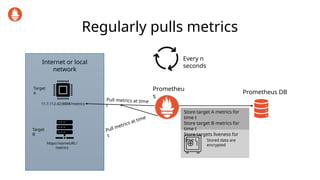
Regularly pulls metrics
Internet or local
network
11.7.112.42:8888/metrics
https://someURL/
metrics
Target
A
Target
B
Prometheu
s
Prometheus DB
Pull metrics at time
t
Every n
seconds
Pull metrics at time
t
Store target A metrics for
time t
Store target B metrics for
time t
Store targets liveness for
time t Stored data are
encrypted
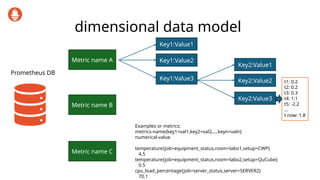
dimensional data model
Prometheus DB
Metric name A
Metric name B
Metric name C
Key1:Value1
Key1:Value2
Key1:Value3
Key2:Value1
Key2:Value2
Key2:Value3
t1: 0.2
t2: 0.2
t3: 0.3
t4: 1.1
t5: -2.2
…
t now: 1.8
Examples or metrics:
metrics-name{key1=val1,key2=val2,…,keyn=valn}
numerical-value
temperature{job=equipment_status,room=labo1,setup=CWP}
4.5
temperature{job=equipment_status,room=labo2,setup=QuCube}
0.5
cpu_load_percentage{job=server_status,server=SERVER2}
70.1
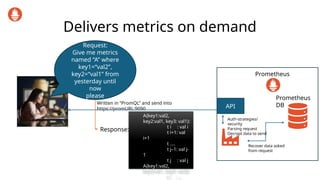
Delivers metrics on demand
Request:
Give me metrics
named “A” where
key1=“val2”,
key2=“val1” from
yesterday until
now
please
Written in “PromQL” and send into
https://promURL:9090
Prometheus
API
Prometheus
DB
A{key1:val2,
key2:val1, key3: val1}:
t i : val i
t i+1: val
i+1
t ….
t j–1: val j-
1
t j : val j
A{key1:val2,
key2:val1, key3: val2}:
t i : …
Response:
Auth-strategies/
security
Parsing request
Decrypt data to send
Recover data asked
from request
Use cases
• Monitoring
• Time related statistics
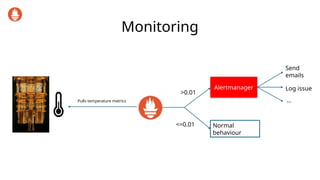
Monitoring
Pulls temperature metrics
>0.01
Alertmanager
Send
emails
Log issue
<=0.01
…
Normal
behaviour
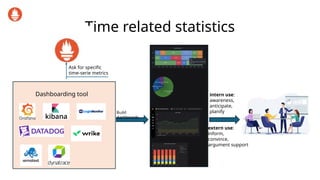
Time related statistics
Dashboarding tool
Ask for specific
time-serie metrics
Build
dashboards
intern use:
awareness,
anticipate,
planify
extern use:
inform,
convince,
argument support
A bit of technical
• Configuration file
• Targets and Data model
• Prometheus HTTP API and PromQL
Configuration file
global:
scrape_interval: 15s
scrape_configs:
- job_name: ‘someJob1’
scrape_interval: 5s
static_configs:
- targets: [‘Some URL1’, ‘Some
URL2’]
labels:
key1: ‘value1’
- targets:[‘Some URL3’]
labels:
key1:’value2’
- job_name:’someJob2’
…
Prometheus configuration = 1file
The data depends only to the targets
responses.
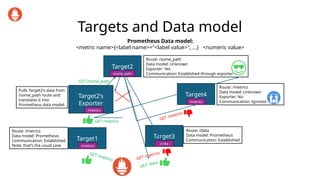
Targets and Data model
Target1
/metrics
Target2
/some_path
Target2’s
Exporter
/metrics
Target3
/data
Target4
/metrics
Route: /metrics
Data model: Prometheus
Communication: Established
Note: that’s the usual case
Route: /data
Data model: Prometheus
Communication: Established
Route: /metrics
Data model: Unknown
Exporter: No
Communication: Ignored
GET /metrics
GET /data
GET /metrics
GET /metrics
GET /metrics
Route: /some_path
Data model: Unknown
Exporter: Yes
Communication: Established through exporter
Pulls Target2’s data from
/some_path route and
translates it into
Prometheus data model.
Prometheus Data model:
<metric name>{<label name>="<label value>", ...} <numeric value>
GET /some_path
More informations
• https://prometheus.io/docs/prometheus/latest/getting_start
ed/
Open-source service to provide and edit dashboards
Talk About
What it does
• Connect to “datasources“ to collect data
• Provides an user interface to edit dashboards
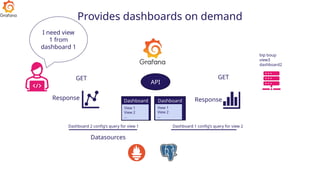
• Provides dashboards on demand
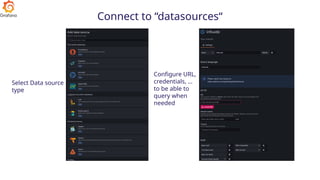
Connect to “datasources“
Select Data source
type
Configure URL,
credentials, …
to be able to
query when
needed
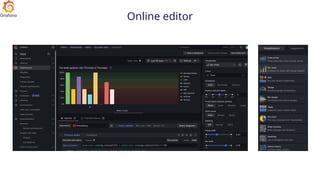
Online editor
Key to build the dashboard you want
1. Connect to the data source having the data needed
2. Learn the data query language of the data source
3. Find the appropriate visualization model
4. Read Grafana documentation and browse forums for accurate
parametrizations
5. Patience
Provides dashboards on demand
Datasources
Dashboard
1
Dashboard
2
I need view
1 from
dashboard 1
View 1
View 2
…
View 1
View 2
…
API
bip boup
view3
dashboard2
GET GET
Dashboard 2 config’s query for view 1 Dashboard 1 config’s query for view 2
Response Response
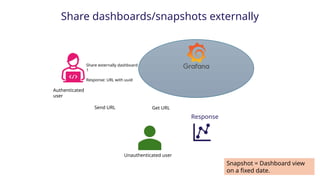
Share dashboards/snapshots externally
Authenticated
user
Share externally dashboard
1
Response: URL with uuid
Send URL Get URL
Response
Unauthenticated user
Snapshot = Dashboard view
on a fixed date.
More information
• https://grafana.com/

Monitoring d'équipements avec Prometheus et Grafana

  • 1.
    Talk About MONITORIN G W45ikrwkwyrherjatreatha ewrowoig iwegho ihweoihg oiwhn giwh giwg pwje Fwefwefwe98 gwe wewefwe we ljfphugbogwnegiwopg;dg;
  • 2.
    Context • A companyas a lot of equipment (servers, data centers, industrial machines...). The company will want to: • Measure the functionality of each equipment in real time. • Be aware in time of a problem. • Do statistics with those equipment (calculate rentability, found anomalies...). 2 (of many) tools created this way
  • 3.
    Talk About Open-source metricsand monitoring for our systems and services
  • 4.
    What it does •Regularly pulls metrics • Stores time series as dimensional data model • Delivers metrics on demand
  • 5.
    Regularly pulls metrics Internetor local network 11.7.112.42:8888/metrics https://someURL/ metrics Target A Target B Prometheu s Prometheus DB Pull metrics at time t Every n seconds Pull metrics at time t Store target A metrics for time t Store target B metrics for time t Store targets liveness for time t Stored data are encrypted
  • 6.
    dimensional data model PrometheusDB Metric name A Metric name B Metric name C Key1:Value1 Key1:Value2 Key1:Value3 Key2:Value1 Key2:Value2 Key2:Value3 t1: 0.2 t2: 0.2 t3: 0.3 t4: 1.1 t5: -2.2 … t now: 1.8 Examples or metrics: metrics-name{key1=val1,key2=val2,…,keyn=valn} numerical-value temperature{job=equipment_status,room=labo1,setup=CWP} 4.5 temperature{job=equipment_status,room=labo2,setup=QuCube} 0.5 cpu_load_percentage{job=server_status,server=SERVER2} 70.1
  • 7.
    Delivers metrics ondemand Request: Give me metrics named “A” where key1=“val2”, key2=“val1” from yesterday until now please Written in “PromQL” and send into https://promURL:9090 Prometheus API Prometheus DB A{key1:val2, key2:val1, key3: val1}: t i : val i t i+1: val i+1 t …. t j–1: val j- 1 t j : val j A{key1:val2, key2:val1, key3: val2}: t i : … Response: Auth-strategies/ security Parsing request Decrypt data to send Recover data asked from request
  • 8.
    Use cases • Monitoring •Time related statistics
  • 9.
  • 10.
    Time related statistics Dashboardingtool Ask for specific time-serie metrics Build dashboards intern use: awareness, anticipate, planify extern use: inform, convince, argument support
  • 11.
    A bit oftechnical • Configuration file • Targets and Data model • Prometheus HTTP API and PromQL
  • 12.
    Configuration file global: scrape_interval: 15s scrape_configs: -job_name: ‘someJob1’ scrape_interval: 5s static_configs: - targets: [‘Some URL1’, ‘Some URL2’] labels: key1: ‘value1’ - targets:[‘Some URL3’] labels: key1:’value2’ - job_name:’someJob2’ … Prometheus configuration = 1file The data depends only to the targets responses.
  • 13.
    Targets and Datamodel Target1 /metrics Target2 /some_path Target2’s Exporter /metrics Target3 /data Target4 /metrics Route: /metrics Data model: Prometheus Communication: Established Note: that’s the usual case Route: /data Data model: Prometheus Communication: Established Route: /metrics Data model: Unknown Exporter: No Communication: Ignored GET /metrics GET /data GET /metrics GET /metrics GET /metrics Route: /some_path Data model: Unknown Exporter: Yes Communication: Established through exporter Pulls Target2’s data from /some_path route and translates it into Prometheus data model. Prometheus Data model: <metric name>{<label name>="<label value>", ...} <numeric value> GET /some_path
  • 14.
  • 15.
    Open-source service toprovide and edit dashboards Talk About
  • 16.
    What it does •Connect to “datasources“ to collect data • Provides an user interface to edit dashboards • Provides dashboards on demand
  • 17.
    Connect to “datasources“ SelectData source type Configure URL, credentials, … to be able to query when needed
  • 18.
  • 19.
    Key to buildthe dashboard you want 1. Connect to the data source having the data needed 2. Learn the data query language of the data source 3. Find the appropriate visualization model 4. Read Grafana documentation and browse forums for accurate parametrizations 5. Patience
  • 20.
    Provides dashboards ondemand Datasources Dashboard 1 Dashboard 2 I need view 1 from dashboard 1 View 1 View 2 … View 1 View 2 … API bip boup view3 dashboard2 GET GET Dashboard 2 config’s query for view 1 Dashboard 1 config’s query for view 2 Response Response
  • 21.
    Share dashboards/snapshots externally Authenticated user Shareexternally dashboard 1 Response: URL with uuid Send URL Get URL Response Unauthenticated user Snapshot = Dashboard view on a fixed date.
  • 22.