http://blogs.msdn.com/davrous
http://blogs.msdn.com/eternalcoding
Peu de slides et beaucoup de demos!
SVG
Scalable Vector Graphics
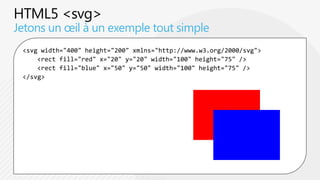
Jetons un œil à un exemple tout simple
 <svg width="400" height="200" xmlns="http://www.w3.org/2000/svg">
     <rect fill="red" x="20" y="20" width="100" height="75" />
     <rect fill="blue" x="50" y="50" width="100" height="75" />
 </svg>
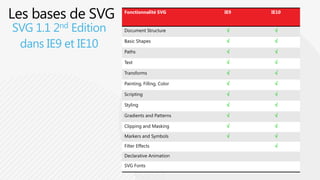
Fonctionnalité SVG         IE9   IE10


SVG 1.1 2nd Edition   Document Structure               


 dans IE9 et IE10     Basic Shapes

                      Paths
                                                 

                                                 
                                                        

                                                        

                      Text                             

                      Transforms                       

                      Painting, Filling, Color         

                      Scripting                        

                      Styling                          

                      Gradients and Patterns           

                      Clipping and Masking             

                      Markers and Symbols              

                      Filter Effects                    

                      Declarative Animation

                      SVG Fonts
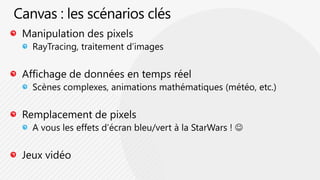
Canvas
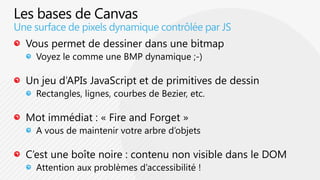
Une surface de pixels dynamique contrôlée par JS
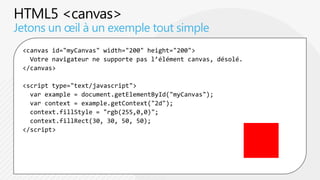
Jetons un œil à un exemple tout simple
 <canvas id="myCanvas" width="200" height="200">
   Votre navigateur ne supporte pas l’élément canvas, désolé.
 </canvas>

 <script type="text/javascript">
   var example = document.getElementById("myCanvas");
   var context = example.getContext("2d");
   context.fillStyle = "rgb(255,0,0)";
   context.fillRect(30, 30, 50, 50);
 </script>
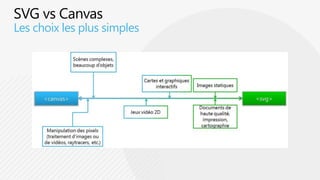
Comment faire son choix ?
Les choix les plus simples
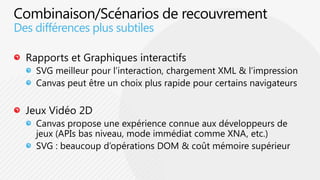
Des différences plus subtiles
L’outillage
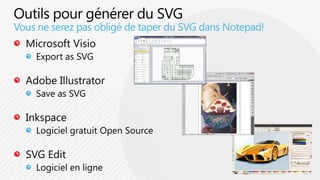
Vous ne serez pas obligé de taper du SVG dans Notepad!
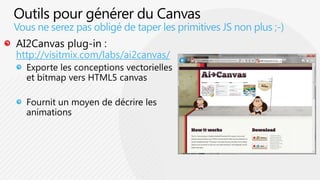
Vous ne serez pas obligé de taper les primitives JS non plus ;-)

http://visitmix.com/labs/ai2canvas/
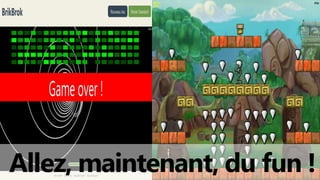
Allez, maintenant, du fun !
1ère étape : un jeu simple !
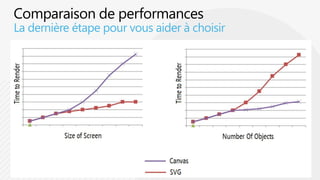
La dernière étape pour vous aider à choisir
Revue de jeux plus complexes
http://blogs.msdn.com/davrous/archive/2011/05/09/introduction-aux-apis-
graphiques-d-html5-svg-amp-canvas-1-4.aspx


http://blogs.msdn.com/davrous/archive/2011/09/09/html5-platformer-portage-
complet-du-jeu-xna-vers-lt-canvas-gt-gr-226-ce-224-easeljs.aspx


http://blogs.msdn.com/eternalcoding/archive/2011/07/13/retours-sur-un-d-233-
veloppement-html5-amp-javascript.aspx


http://blogs.msdn.com/b/eternalcoding/archive/2011/09/02/cahier-de-
vacances-html-5-d-233-velopper-son-propre-jeu-de-casse-briques-en-html-5-
avec-canvas-et-svg.aspx
questions?
AMDEV: Graphismes avec html5 grâce à canvas et svg

AMDEV: Graphismes avec html5 grâce à canvas et svg

Notes de l'éditeur

  • #3 http://www.w3.org/2010/Talks/03-schepers-mix/themepark-train.svg
  • #5 Bing Maps : http://www.bing.com/maps/#JmNwPTQ3LjY3ODY3NjU0NTYxOTk2fi0xMjIuMTEzMDg1Mzg5MTM3MjcmbHZsPTEyJnN0eT1yJnJ0cD1wb3MuNDcuNjM5NzU3Xy0xMjIuMTI5OTM0XzElMjBNaWNyb3NvZnQlMjBXYXklMkMlMjBSZWRtb25kJTJDJTIwV0ElMjA5ODA1Mi04MzAwX19fZV9+cG9zLjQ3LjcxNzU0Nl8tMTIyLjA5ODY2MV8xOD Complex Document : http://ie.microsoft.com/testdrive/Graphics/RealWorldDataAndDiagrams/Default.xhtmlAnimation : Raphael.js : http://raphaeljs.com Charting : http://www.highcharts.com &amp; http://www.w3.org/2010/Talks/03-schepers-mix/chart.htmlAccessibility : http://people.mozilla.com/~dbolter/svg-checkbox-test.html
  • #25 http://themaninblue.com/experiment/AnimationBenchmark/svg/?particles=1000
  • #26 http://www.catuhe.com/ms/index.htm#gameZone
  • #27 http://david.blob.core.windows.net/html5platformerscale/index.html