E R Y K B U D I P R A T A M A
T I F L A B A S S I S T A N T – I N F O R M A T I C S E N G I N E E R I N G
ORACLE DATABASE
SEQUENCE
DEFINITION
• Just like tables, views, indexes, and
synonyms, a sequence is a type of database
object.
• Sequences are used to generate unique,
sequential integer values that are used as
primary key values in database tables.
• The sequence of numbers can be
generated in either ascending or
descending order.
SEQUENCE SYNTAX
CREATE SEQUENCE <sequence name>
[INCREMENT BY <number>]
[START WITH <start value number>]
[MAXVALUE <MAXIMUM VLAUE NUMBER>]
[NOMAXVALUE]
[MINVALUE <minimum value number>]
[CYCLE]
[NOCYCLE]
[CACHE <number of sequence value to cache>]
[NOCACHE]
[ORDER]
[NOORDER];
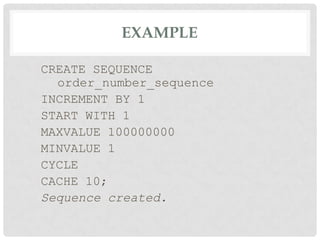
EXAMPLE
CREATE SEQUENCE
order_number_sequence
INCREMENT BY 1
START WITH 1
MAXVALUE 100000000
MINVALUE 1
CYCLE
CACHE 10;
Sequence created.
ACCESSING SEQUENCE VALUES
• Sequence values are generated through the use of
two pseudocolumns named currval and nextval.
• A pseudocolumn behaves like a table column, but
psuedocolumns are not actually stored in a table.
• We can select values from pseudocolumns but
cannot perform manipulations on their values.
• The first time you select the nextval pseudocolumn,
the initial value in the sequence is returned.
• Subsequent selections of the nextval pseudocolumn
will cause the sequence to increment as specified
by the INCREMENT BY clause and will return the
newly generated sequence value.
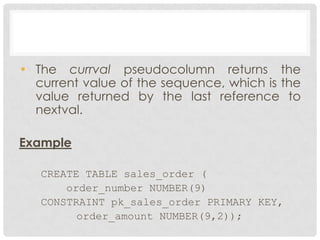
• The currval pseudocolumn returns the
current value of the sequence, which is the
value returned by the last reference to
nextval.
Example
CREATE TABLE sales_order (
order_number NUMBER(9)
CONSTRAINT pk_sales_order PRIMARY KEY,
order_amount NUMBER(9,2));
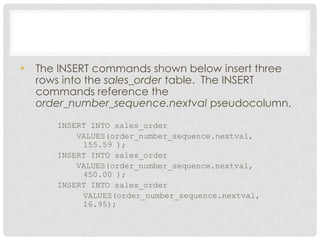
• The INSERT commands shown below insert three
rows into the sales_order table. The INSERT
commands reference the
order_number_sequence.nextval pseudocolumn.
INSERT INTO sales_order
VALUES(order_number_sequence.nextval,
155.59 );
INSERT INTO sales_order
VALUES(order_number_sequence.nextval,
450.00 );
INSERT INTO sales_order
VALUES(order_number_sequence.nextval,
16.95);
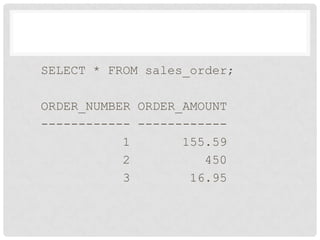
SELECT * FROM sales_order;
ORDER_NUMBER ORDER_AMOUNT
------------ ------------
1 155.59
2 450
3 16.95
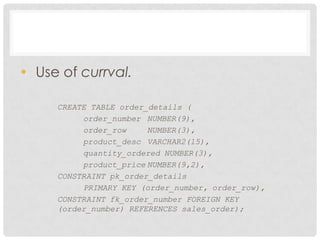
• Use of currval.
CREATE TABLE order_details (
order_number NUMBER(9),
order_row NUMBER(3),
product_desc VARCHAR2(15),
quantity_ordered NUMBER(3),
product_price NUMBER(9,2),
CONSTRAINT pk_order_details
PRIMARY KEY (order_number, order_row),
CONSTRAINT fk_order_number FOREIGN KEY
(order_number) REFERENCES sales_order);
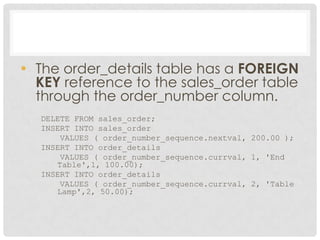
• The order_details table has a FOREIGN
KEY reference to the sales_order table
through the order_number column.
DELETE FROM sales_order;
INSERT INTO sales_order
VALUES ( order_number_sequence.nextval, 200.00 );
INSERT INTO order_details
VALUES ( order_number_sequence.currval, 1, 'End
Table',1, 100.00);
INSERT INTO order_details
VALUES ( order_number_sequence.currval, 2, 'Table
Lamp',2, 50.00);
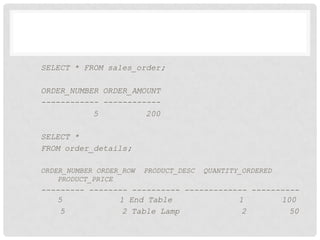
SELECT * FROM sales_order;
ORDER_NUMBER ORDER_AMOUNT
------------ ------------
5 200
SELECT *
FROM order_details;
ORDER_NUMBER ORDER_ROW PRODUCT_DESC QUANTITY_ORDERED
PRODUCT_PRICE
--------- -------- ---------- ------------- ----------
5 1 End Table 1 100
5 2 Table Lamp 2 50
ALTERING A SEQUENCE
• A sequence is usually altered when it is desirable to
set or eliminate the values of the MINVALUE or
MAXVALUE parameters, or to change the
INCREMENT BY value, or to change the number of
cached sequence numbers.
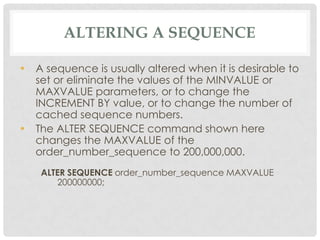
• The ALTER SEQUENCE command shown here
changes the MAXVALUE of the
order_number_sequence to 200,000,000.
ALTER SEQUENCE order_number_sequence MAXVALUE
200000000;
ALTERING A SEQUENCE
• When specifying a MINVALUE clause, the
specified value should be less than the
MAXVALUE where a sequence generates
ascending numbers.
• In the case of a descending sequence, the
MAXVALUE should be less than the
MINVALUE.
VIEWING SEQUENCE PROPERTIES
• You may need to review the names and
properties of your sequences.
• You can do this by querying the
USER_SEQUENCES system view with a SELECT
command.This view is part of the database's
data dictionary.
SELECT * FROM USER_SEQUENCES;
SEQUENCE_NAME MIN_VAL MAX_VALUE INCRE C O
CACHE_SIZE Last_N
---------------- ------ ---------- ----- -- -- --------
-----
ORDER_NUMBER_SEQUENCE 1 200000000 1 Y N 10 6
DROPPING A SEQUENCE
• DROP SEQUENCE command is used to drop
sequences that need to be recreated or are
no longer needed.
• The general format is shown here along with
an example that drops the
order_number_sequence object.
DROP SEQUENCE <sequence name>;
DROP SEQUENCE order_number_sequence;
Sequence dropped.
Q&A

Oracle Database Sequence

  • 1.
    E R YK B U D I P R A T A M A T I F L A B A S S I S T A N T – I N F O R M A T I C S E N G I N E E R I N G ORACLE DATABASE SEQUENCE
  • 2.
    DEFINITION • Just liketables, views, indexes, and synonyms, a sequence is a type of database object. • Sequences are used to generate unique, sequential integer values that are used as primary key values in database tables. • The sequence of numbers can be generated in either ascending or descending order.
  • 3.
    SEQUENCE SYNTAX CREATE SEQUENCE<sequence name> [INCREMENT BY <number>] [START WITH <start value number>] [MAXVALUE <MAXIMUM VLAUE NUMBER>] [NOMAXVALUE] [MINVALUE <minimum value number>] [CYCLE] [NOCYCLE] [CACHE <number of sequence value to cache>] [NOCACHE] [ORDER] [NOORDER];
  • 4.
    EXAMPLE CREATE SEQUENCE order_number_sequence INCREMENT BY1 START WITH 1 MAXVALUE 100000000 MINVALUE 1 CYCLE CACHE 10; Sequence created.
  • 5.
    ACCESSING SEQUENCE VALUES •Sequence values are generated through the use of two pseudocolumns named currval and nextval. • A pseudocolumn behaves like a table column, but psuedocolumns are not actually stored in a table. • We can select values from pseudocolumns but cannot perform manipulations on their values. • The first time you select the nextval pseudocolumn, the initial value in the sequence is returned. • Subsequent selections of the nextval pseudocolumn will cause the sequence to increment as specified by the INCREMENT BY clause and will return the newly generated sequence value.
  • 6.
    • The currvalpseudocolumn returns the current value of the sequence, which is the value returned by the last reference to nextval. Example CREATE TABLE sales_order ( order_number NUMBER(9) CONSTRAINT pk_sales_order PRIMARY KEY, order_amount NUMBER(9,2));
  • 7.
    • The INSERTcommands shown below insert three rows into the sales_order table. The INSERT commands reference the order_number_sequence.nextval pseudocolumn. INSERT INTO sales_order VALUES(order_number_sequence.nextval, 155.59 ); INSERT INTO sales_order VALUES(order_number_sequence.nextval, 450.00 ); INSERT INTO sales_order VALUES(order_number_sequence.nextval, 16.95);
  • 8.
    SELECT * FROMsales_order; ORDER_NUMBER ORDER_AMOUNT ------------ ------------ 1 155.59 2 450 3 16.95
  • 9.
    • Use ofcurrval. CREATE TABLE order_details ( order_number NUMBER(9), order_row NUMBER(3), product_desc VARCHAR2(15), quantity_ordered NUMBER(3), product_price NUMBER(9,2), CONSTRAINT pk_order_details PRIMARY KEY (order_number, order_row), CONSTRAINT fk_order_number FOREIGN KEY (order_number) REFERENCES sales_order);
  • 10.
    • The order_detailstable has a FOREIGN KEY reference to the sales_order table through the order_number column. DELETE FROM sales_order; INSERT INTO sales_order VALUES ( order_number_sequence.nextval, 200.00 ); INSERT INTO order_details VALUES ( order_number_sequence.currval, 1, 'End Table',1, 100.00); INSERT INTO order_details VALUES ( order_number_sequence.currval, 2, 'Table Lamp',2, 50.00);
  • 11.
    SELECT * FROMsales_order; ORDER_NUMBER ORDER_AMOUNT ------------ ------------ 5 200 SELECT * FROM order_details; ORDER_NUMBER ORDER_ROW PRODUCT_DESC QUANTITY_ORDERED PRODUCT_PRICE --------- -------- ---------- ------------- ---------- 5 1 End Table 1 100 5 2 Table Lamp 2 50
  • 12.
    ALTERING A SEQUENCE •A sequence is usually altered when it is desirable to set or eliminate the values of the MINVALUE or MAXVALUE parameters, or to change the INCREMENT BY value, or to change the number of cached sequence numbers. • The ALTER SEQUENCE command shown here changes the MAXVALUE of the order_number_sequence to 200,000,000. ALTER SEQUENCE order_number_sequence MAXVALUE 200000000;
  • 13.
    ALTERING A SEQUENCE •When specifying a MINVALUE clause, the specified value should be less than the MAXVALUE where a sequence generates ascending numbers. • In the case of a descending sequence, the MAXVALUE should be less than the MINVALUE.
  • 14.
    VIEWING SEQUENCE PROPERTIES •You may need to review the names and properties of your sequences. • You can do this by querying the USER_SEQUENCES system view with a SELECT command.This view is part of the database's data dictionary. SELECT * FROM USER_SEQUENCES; SEQUENCE_NAME MIN_VAL MAX_VALUE INCRE C O CACHE_SIZE Last_N ---------------- ------ ---------- ----- -- -- -------- ----- ORDER_NUMBER_SEQUENCE 1 200000000 1 Y N 10 6
  • 15.
    DROPPING A SEQUENCE •DROP SEQUENCE command is used to drop sequences that need to be recreated or are no longer needed. • The general format is shown here along with an example that drops the order_number_sequence object. DROP SEQUENCE <sequence name>; DROP SEQUENCE order_number_sequence; Sequence dropped.
  • 16.