




Gaetan Bouveret
@gbouveret
Olivier Carpentier
@olivierc
Le nouveau SharePoint
Framework (SPFx)
Agenda
Découvrir SPFx
Client Side Web Parts
ALM (Application Lifecycle Management)
Questions / Réponses
Découvrir SPFx
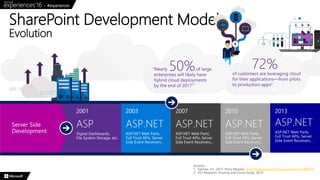
SharePoint Development Model
Evolution
Sources:
1. Gartner, Inc. 2013. Press Release: http://www.gartner.com/newsroom/id/2599315
2. 451 Research, Hosting and Cloud Study, 2014
SharePoint is the place where your Teams will go to work. A refreshing change which places our beloved platform back as the
leader in its space, especially when you consider the integrations with the rest of the Office 365 Suite. – Benjamin Niaulin, Sharegate
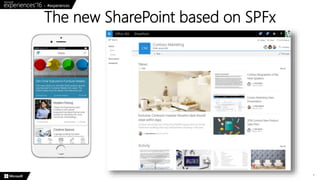
The new SharePoint based on SPFx
7
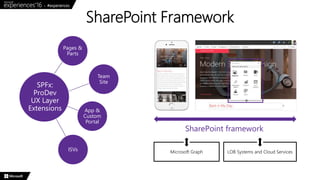
SharePoint Framework
Team
Site
Pages &
Parts
App &
Custom
Portal
ISVs
SPFx:
ProDev
UX Layer
Extensions
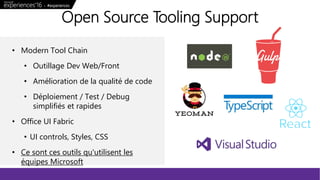
• Modern Tool Chain
• Outillage Dev Web/Front
• Amélioration de la qualité de code
• Déploiement / Test / Debug
simplifiés et rapides
• Office UI Fabric
• UI controls, Styles, CSS
• Ce sont ces outils qu'utilisent les
équipes Microsoft
Open Source Tooling Support
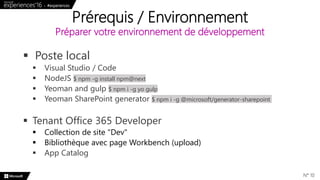
 Poste local
 Visual Studio / Code
 NodeJS $ npm -g install npm@next
 Yeoman and gulp $ npm i -g yo gulp
 Yeoman SharePoint generator $ npm i -g @microsoft/generator-sharepoint
 Tenant Office 365 Developer
 Collection de site "Dev"
 Bibliothèque avec page Workbench (upload)
 App Catalog
Prérequis / Environnement
Préparer votre environnement de développement
N° 10
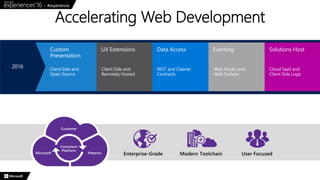
Accelerating Web Development
Client Side Web Parts
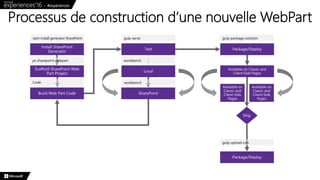
Processus de construction d’une nouvelle WebPart
Texte
• Texte courant
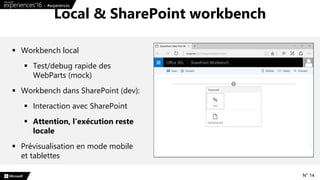
Local & SharePoint workbench
N° 14
 Workbench local
 Test/debug rapide des
WebParts (mock)
 Workbench dans SharePoint (dev):
 Interaction avec SharePoint
 Attention, l'exécution reste
locale
 Prévisualisation en mode mobile
et tablettes
N° 15
Démo : Web Part Build
Flow
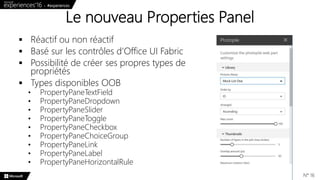
Le nouveau Properties Panel
N° 16
 Réactif ou non réactif
 Basé sur les contrôles d’Office UI Fabric
 Possibilité de créer ses propres types de
propriétés
 Types disponibles OOB
• PropertyPaneTextField
• PropertyPaneDropdown
• PropertyPaneSlider
• PropertyPaneToggle
• PropertyPaneCheckbox
• PropertyPaneChoiceGroup
• PropertyPaneLink
• PropertyPaneLabel
• PropertyPaneHorizontalRule
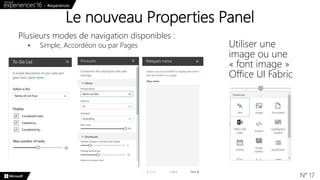
Le nouveau Properties Panel
N° 17
Plusieurs modes de navigation disponibles :
• Simple, Accordéon ou par Pages Utiliser une
image ou une
« font image »
Office UI Fabric
 Modèles standards: React, Knockout, no framework
 Possible d’ajouter un Fx JS externe (jQuery, Angular v2, …) ou
autres
 Présence en standard de React
 Office UI Fabric est basé sur React
(https://github.com/OfficeDev/office-ui-fabric-react/)
 DocumentCard, Persona
 DatePicker, Dialog, Panel
 Etc.
Intégrer un Framework JavaScript
N° 18
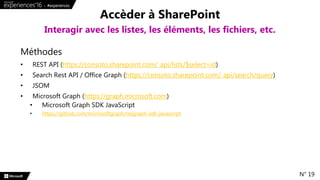
Méthodes
• REST API (https://consoto.sharepoint.com/_api/lists/$select=id)
• Search Rest API / Office Graph (https://consoto.sharepoint.com/_api/search/query)
• JSOM
• Microsoft Graph (https://graph.microsoft.com)
• Microsoft Graph SDK JavaScript
• https://github.com/microsoftgraph/msgraph-sdk-javascript
Accèder à SharePoint
Interagir avec les listes, les éléments, les fichiers, etc.
N° 19
N° 20
Démo : Advanced Web
Parts
ALM
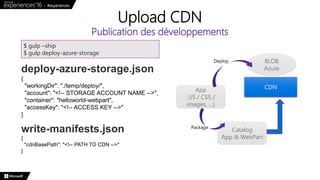
Upload CDN
Publication des développements
$ gulp –ship
$ gulp deploy-azure-storage
deploy-azure-storage.json
{
"workingDir": "./temp/deploy/",
"account": "<!-- STORAGE ACCOUNT NAME -->",
"container": "helloworld-webpart",
"accessKey": "<!-- ACCESS KEY -->"
}
write-manifests.json
{
"cdnBasePath": "<!-- PATH TO CDN -->"
}
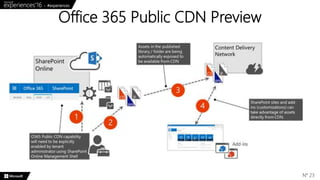
CDN
BLOB
Azure
App
(JS / CSS /
images, …)
Catalog
App & WebPart
Deploy
Package
Office 365 Public CDN Preview
N° 23
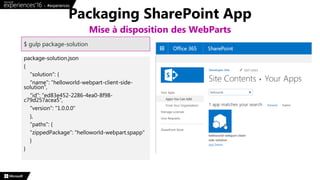
package-solution.json
{
"solution": {
"name": "helloworld-webpart-client-side-
solution",
"id": "ed83e452-2286-4ea0-8f98-
c79d257acea5",
"version": "1.0.0.0"
},
"paths": {
"zippedPackage": "helloworld-webpart.spapp"
}
}
Packaging SharePoint App
Mise à disposition des WebParts
$ gulp package-solution
• http://dev.office.com/sharepoint
• https://github.com/SharePoint
• https://channel9.msdn.com/blogs/OfficeDevPnP
• http://dev.office.com/sharepoint/docs/spfx/web-parts/get-
started/build-a-hello-world-web-part
• https://github.com/SharePoint/sp-dev-fx-webparts
• https://sharepoint.github.io/modules/_sp_client_preview_.html
• https://github.com/oliviercc/sp-client-custom-fields
• https://github.com/oliviercc/spfx-40-fantastics
Pour aller plus loin
Les ressources indispensables
N° 25
N° 26
@microsoftfrance @Technet_France @msdev_fr
N° 27
N° 28

SharePoint Framework : le développement SharePoint nouvelle génération

  • 2.
  • 3.
    Agenda Découvrir SPFx Client SideWeb Parts ALM (Application Lifecycle Management) Questions / Réponses
  • 4.
  • 5.
    SharePoint Development Model Evolution Sources: 1.Gartner, Inc. 2013. Press Release: http://www.gartner.com/newsroom/id/2599315 2. 451 Research, Hosting and Cloud Study, 2014
  • 6.
    SharePoint is theplace where your Teams will go to work. A refreshing change which places our beloved platform back as the leader in its space, especially when you consider the integrations with the rest of the Office 365 Suite. – Benjamin Niaulin, Sharegate
  • 7.
    The new SharePointbased on SPFx 7
  • 8.
    SharePoint Framework Team Site Pages & Parts App& Custom Portal ISVs SPFx: ProDev UX Layer Extensions
  • 9.
    • Modern ToolChain • Outillage Dev Web/Front • Amélioration de la qualité de code • Déploiement / Test / Debug simplifiés et rapides • Office UI Fabric • UI controls, Styles, CSS • Ce sont ces outils qu'utilisent les équipes Microsoft Open Source Tooling Support
  • 10.
     Poste local Visual Studio / Code  NodeJS $ npm -g install npm@next  Yeoman and gulp $ npm i -g yo gulp  Yeoman SharePoint generator $ npm i -g @microsoft/generator-sharepoint  Tenant Office 365 Developer  Collection de site "Dev"  Bibliothèque avec page Workbench (upload)  App Catalog Prérequis / Environnement Préparer votre environnement de développement N° 10
  • 11.
  • 12.
  • 13.
    Processus de constructiond’une nouvelle WebPart
  • 14.
    Texte • Texte courant Local& SharePoint workbench N° 14  Workbench local  Test/debug rapide des WebParts (mock)  Workbench dans SharePoint (dev):  Interaction avec SharePoint  Attention, l'exécution reste locale  Prévisualisation en mode mobile et tablettes
  • 15.
    N° 15 Démo :Web Part Build Flow
  • 16.
    Le nouveau PropertiesPanel N° 16  Réactif ou non réactif  Basé sur les contrôles d’Office UI Fabric  Possibilité de créer ses propres types de propriétés  Types disponibles OOB • PropertyPaneTextField • PropertyPaneDropdown • PropertyPaneSlider • PropertyPaneToggle • PropertyPaneCheckbox • PropertyPaneChoiceGroup • PropertyPaneLink • PropertyPaneLabel • PropertyPaneHorizontalRule
  • 17.
    Le nouveau PropertiesPanel N° 17 Plusieurs modes de navigation disponibles : • Simple, Accordéon ou par Pages Utiliser une image ou une « font image » Office UI Fabric
  • 18.
     Modèles standards:React, Knockout, no framework  Possible d’ajouter un Fx JS externe (jQuery, Angular v2, …) ou autres  Présence en standard de React  Office UI Fabric est basé sur React (https://github.com/OfficeDev/office-ui-fabric-react/)  DocumentCard, Persona  DatePicker, Dialog, Panel  Etc. Intégrer un Framework JavaScript N° 18
  • 19.
    Méthodes • REST API(https://consoto.sharepoint.com/_api/lists/$select=id) • Search Rest API / Office Graph (https://consoto.sharepoint.com/_api/search/query) • JSOM • Microsoft Graph (https://graph.microsoft.com) • Microsoft Graph SDK JavaScript • https://github.com/microsoftgraph/msgraph-sdk-javascript Accèder à SharePoint Interagir avec les listes, les éléments, les fichiers, etc. N° 19
  • 20.
    N° 20 Démo :Advanced Web Parts
  • 21.
  • 22.
    Upload CDN Publication desdéveloppements $ gulp –ship $ gulp deploy-azure-storage deploy-azure-storage.json { "workingDir": "./temp/deploy/", "account": "<!-- STORAGE ACCOUNT NAME -->", "container": "helloworld-webpart", "accessKey": "<!-- ACCESS KEY -->" } write-manifests.json { "cdnBasePath": "<!-- PATH TO CDN -->" } CDN BLOB Azure App (JS / CSS / images, …) Catalog App & WebPart Deploy Package
  • 23.
    Office 365 PublicCDN Preview N° 23
  • 24.
    package-solution.json { "solution": { "name": "helloworld-webpart-client-side- solution", "id":"ed83e452-2286-4ea0-8f98- c79d257acea5", "version": "1.0.0.0" }, "paths": { "zippedPackage": "helloworld-webpart.spapp" } } Packaging SharePoint App Mise à disposition des WebParts $ gulp package-solution
  • 25.
    • http://dev.office.com/sharepoint • https://github.com/SharePoint •https://channel9.msdn.com/blogs/OfficeDevPnP • http://dev.office.com/sharepoint/docs/spfx/web-parts/get- started/build-a-hello-world-web-part • https://github.com/SharePoint/sp-dev-fx-webparts • https://sharepoint.github.io/modules/_sp_client_preview_.html • https://github.com/oliviercc/sp-client-custom-fields • https://github.com/oliviercc/spfx-40-fantastics Pour aller plus loin Les ressources indispensables N° 25
  • 26.
  • 27.
  • 28.

Notes de l'éditeur

  • #6 OCA
  • #7 OCA
  • #8 OCA
  • #9 OCA
  • #10 GB
  • #11 GB
  • #12 GB Le Fx SP est avant tout un accélérateur des pratiques déjà courantes. Il intègre des composants standardisés et open source pour le code et l'interface,.simplifie les accès aux données(accès REST avec client Http déjà présent + digest). C'est aussi plus largement tout ce qui va toucher à la gestion des événements via les Web Hooks et les Web Sockets afin de pouvoir réagir aux actions des utilisatuers et bien sûr la capacité à héberger et gérer ses couches métiers en mode SaaS, par exemple par le biais de Web Apps Azure
  • #13 GB
  • #14 GB
  • #15 GB Insister sur le mode local(à voir en démo) et dans son workbench Prévisualisation => différents modèles dispos, permet de travailler le responsive +simplement
  • #16 GB Montrer yo/sharepoint Montrer la structure du projet Code continue Montrer l’exécution debug local workbench Montrer l’exécution debug sharepoint workbench Test de l’environnement / contexte Principe de base de la web part (render, JSX, localisation) Packaging / CDN ?
  • #17 OCA
  • #18 OCA
  • #19 OCA
  • #20 OCA
  • #21 OCA Ajouter la web part Montrer les propriétés de web parts Montrer la requête REST Montrer les mocks Montrer l’apple à JS externe (jquery) => module Montrer le rendu final
  • #22 GB
  • #23 GB
  • #25 GB
  • #26 GB
  • #27 QUESTIONS / REPONSES