
Introduction à l’utilisation de
Sharepoint 2013
Module 4 : Personnalisation
Mostefai Mohammed Amine
Architecte Senior
2020
Personnalisation
2
Personnalisation
--------------------------------------------------------------
UtilisationdeSharepoint|Personnalisation
©MostefaiMohahhedAmine2017
Options de Personnalisation
3
Au niveau
liste
Au niveau
page
Au niveau
site
Personnalisation
--------------------------------------------------------------
UtilisationdeSharepoint|Personnalisation
©MostefaiMohahhedAmine2017
Personnalisation de Listes
4
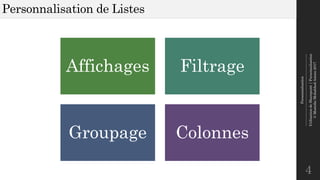
Affichages Filtrage
Groupage Colonnes
Personnalisation
--------------------------------------------------------------
UtilisationdeSharepoint|Personnalisation
©MostefaiMohahhedAmine2017
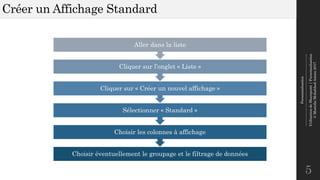
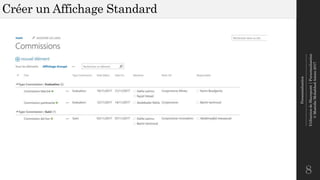
Créer un Affichage Standard
5
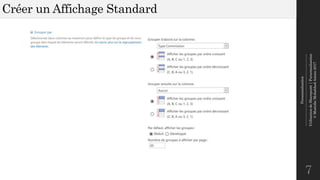
Choisir éventuellement le groupage et le filtrage de données
Choisir les colonnes à affichage
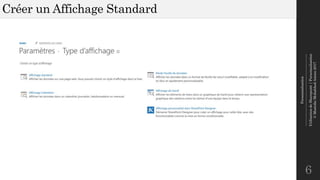
Sélectionner « Standard »
Cliquer sur « Créer un nouvel affichage »
Cliquer sur l’onglet « Liste »
Aller dans la liste
Personnalisation
--------------------------------------------------------------
UtilisationdeSharepoint|Personnalisation
©MostefaiMohahhedAmine2017
Créer un Affichage Standard
6
Personnalisation
--------------------------------------------------------------
UtilisationdeSharepoint|Personnalisation
©MostefaiMohahhedAmine2017
Créer un Affichage Standard
7
Personnalisation
--------------------------------------------------------------
UtilisationdeSharepoint|Personnalisation
©MostefaiMohahhedAmine2017
Créer un Affichage Standard
8
Personnalisation
--------------------------------------------------------------
UtilisationdeSharepoint|Personnalisation
©MostefaiMohahhedAmine2017
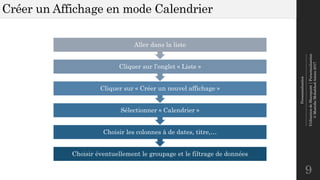
Créer un Affichage en mode Calendrier
9
Choisir éventuellement le groupage et le filtrage de données
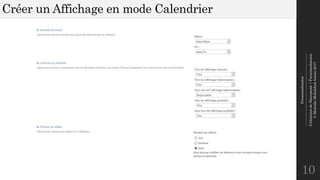
Choisir les colonnes à de dates, titre,…
Sélectionner « Calendrier »
Cliquer sur « Créer un nouvel affichage »
Cliquer sur l’onglet « Liste »
Aller dans la liste
Personnalisation
--------------------------------------------------------------
UtilisationdeSharepoint|Personnalisation
©MostefaiMohahhedAmine2017
Créer un Affichage en mode Calendrier
10
Personnalisation
--------------------------------------------------------------
UtilisationdeSharepoint|Personnalisation
©MostefaiMohahhedAmine2017
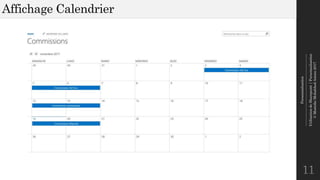
Affichage Calendrier
11
Personnalisation
--------------------------------------------------------------
UtilisationdeSharepoint|Personnalisation
©MostefaiMohahhedAmine2017
Atelier
12
Créer des
Affichages
Personnalisés
(10 minutes)
Personnalisation
--------------------------------------------------------------
UtilisationdeSharepoint|Personnalisation
©MostefaiMohahhedAmine2017
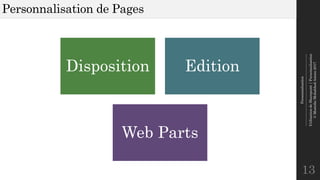
Personnalisation de Pages
13
Disposition Edition
Web Parts
Personnalisation
--------------------------------------------------------------
UtilisationdeSharepoint|Personnalisation
©MostefaiMohahhedAmine2017
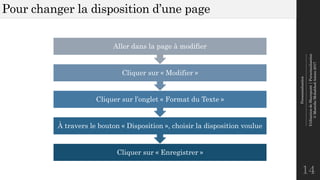
Pour changer la disposition d’une page
14
Cliquer sur « Enregistrer »
À travers le bouton « Disposition », choisir la disposition voulue
Cliquer sur l’onglet « Format du Texte »
Cliquer sur « Modifier »
Aller dans la page à modifier
Personnalisation
--------------------------------------------------------------
UtilisationdeSharepoint|Personnalisation
©MostefaiMohahhedAmine2017
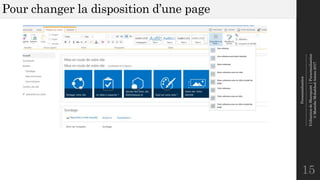
Pour changer la disposition d’une page
15
Personnalisation
--------------------------------------------------------------
UtilisationdeSharepoint|Personnalisation
©MostefaiMohahhedAmine2017
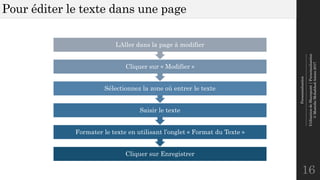
Pour éditer le texte dans une page
16
Cliquer sur Enregistrer
Formater le texte en utilisant l’onglet « Format du Texte »
Saisir le texte
Sélectionnez la zone où entrer le texte
Cliquer sur « Modifier »
LAller dans la page à modifier
Personnalisation
--------------------------------------------------------------
UtilisationdeSharepoint|Personnalisation
©MostefaiMohahhedAmine2017
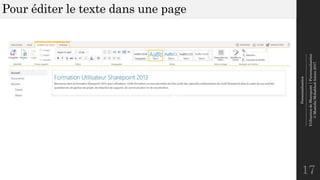
Pour éditer le texte dans une page
17
Personnalisation
--------------------------------------------------------------
UtilisationdeSharepoint|Personnalisation
©MostefaiMohahhedAmine2017
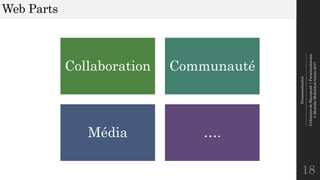
Web Parts
18
Collaboration Communauté
Média ….
Personnalisation
--------------------------------------------------------------
UtilisationdeSharepoint|Personnalisation
©MostefaiMohahhedAmine2017
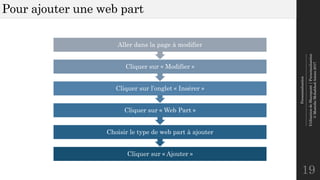
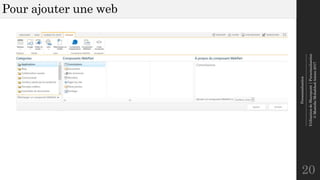
Pour ajouter une web part
19
Cliquer sur « Ajouter »
Choisir le type de web part à ajouter
Cliquer sur « Web Part »
Cliquer sur l’onglet « Insérer »
Cliquer sur « Modifier »
Aller dans la page à modifier
Personnalisation
--------------------------------------------------------------
UtilisationdeSharepoint|Personnalisation
©MostefaiMohahhedAmine2017
Pour ajouter une web
20
Personnalisation
--------------------------------------------------------------
UtilisationdeSharepoint|Personnalisation
©MostefaiMohahhedAmine2017
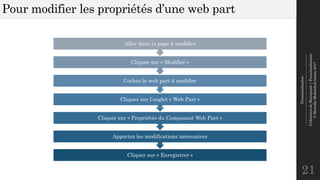
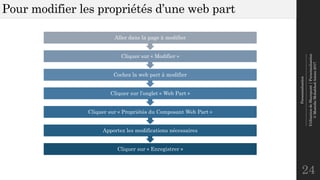
Pour modifier les propriétés d’une web part
21
Cliquer sur « Enregistrer »
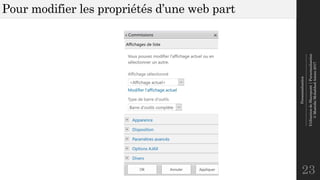
Apportez les modifications nécessaires
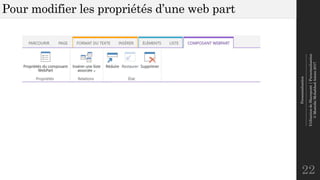
Cliquer sur « Propriétés du Composant Web Part »
Cliquer sur l’onglet « Web Part »
Cochez la web part à modifier
Cliquer sur « Modifier »
Aller dans la page à modifier
Personnalisation
--------------------------------------------------------------
UtilisationdeSharepoint|Personnalisation
©MostefaiMohahhedAmine2017
Pour modifier les propriétés d’une web part
22
Personnalisation
--------------------------------------------------------------
UtilisationdeSharepoint|Personnalisation
©MostefaiMohahhedAmine2017
Pour modifier les propriétés d’une web part
23
Personnalisation
--------------------------------------------------------------
UtilisationdeSharepoint|Personnalisation
©MostefaiMohahhedAmine2017
Pour modifier les propriétés d’une web part
24
Cliquer sur « Enregistrer »
Apportez les modifications nécessaires
Cliquer sur « Propriétés du Composant Web Part »
Cliquer sur l’onglet « Web Part »
Cochez la web part à modifier
Cliquer sur « Modifier »
Aller dans la page à modifier
Personnalisation
--------------------------------------------------------------
UtilisationdeSharepoint|Personnalisation
©MostefaiMohahhedAmine2017
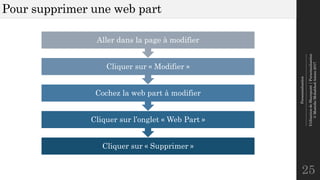
Pour supprimer une web part
25
Cliquer sur « Supprimer »
Cliquer sur l’onglet « Web Part »
Cochez la web part à modifier
Cliquer sur « Modifier »
Aller dans la page à modifier
Personnalisation
--------------------------------------------------------------
UtilisationdeSharepoint|Personnalisation
©MostefaiMohahhedAmine2017
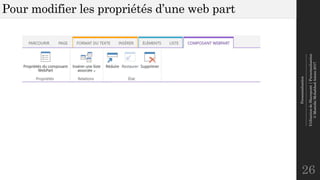
Pour modifier les propriétés d’une web part
26
Personnalisation
--------------------------------------------------------------
UtilisationdeSharepoint|Personnalisation
©MostefaiMohahhedAmine2017
Atelier
27
Personnaliser la
Page
(10 minutes)
Personnalisation
--------------------------------------------------------------
UtilisationdeSharepoint|Personnalisation
©MostefaiMohahhedAmine2017
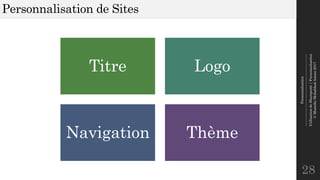
Personnalisation de Sites
28
Titre Logo
Navigation Thème
Personnalisation
--------------------------------------------------------------
UtilisationdeSharepoint|Personnalisation
©MostefaiMohahhedAmine2017
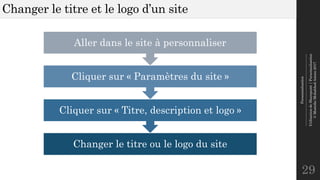
Changer le titre et le logo d’un site
29
Changer le titre ou le logo du site
Cliquer sur « Titre, description et logo »
Cliquer sur « Paramètres du site »
Aller dans le site à personnaliser
Personnalisation
--------------------------------------------------------------
UtilisationdeSharepoint|Personnalisation
©MostefaiMohahhedAmine2017
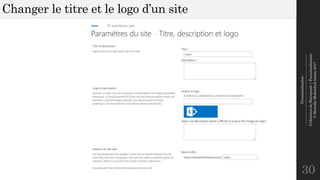
Changer le titre et le logo d’un site
30
Personnalisation
--------------------------------------------------------------
UtilisationdeSharepoint|Personnalisation
©MostefaiMohahhedAmine2017
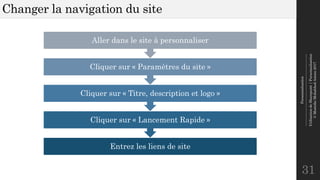
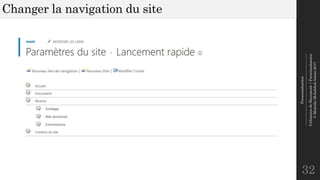
Changer la navigation du site
31
Entrez les liens de site
Cliquer sur « Lancement Rapide »
Cliquer sur « Titre, description et logo »
Cliquer sur « Paramètres du site »
Aller dans le site à personnaliser
Personnalisation
--------------------------------------------------------------
UtilisationdeSharepoint|Personnalisation
©MostefaiMohahhedAmine2017
Changer la navigation du site
32
Personnalisation
--------------------------------------------------------------
UtilisationdeSharepoint|Personnalisation
©MostefaiMohahhedAmine2017
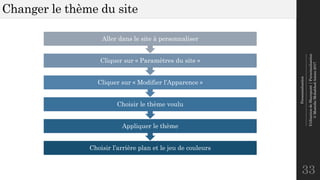
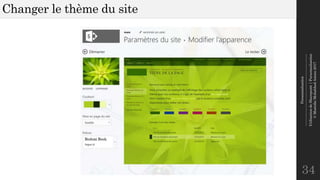
Changer le thème du site
33
Choisir l’arrière plan et le jeu de couleurs
Appliquer le thème
Choisir le thème voulu
Cliquer sur « Modifier l’Apparence »
Cliquer sur « Paramètres du site »
Aller dans le site à personnaliser
Personnalisation
--------------------------------------------------------------
UtilisationdeSharepoint|Personnalisation
©MostefaiMohahhedAmine2017
Changer le thème du site
34
Personnalisation
--------------------------------------------------------------
UtilisationdeSharepoint|Personnalisation
©MostefaiMohahhedAmine2017
Atelier
35
Personnalisation
de Site
(10 minutes)
Merci pour votre attention !
36

Utilisation de Sharepoint 2013 - Personnalisation