Commandes Cisco
CCNA Exploration (Revisité)
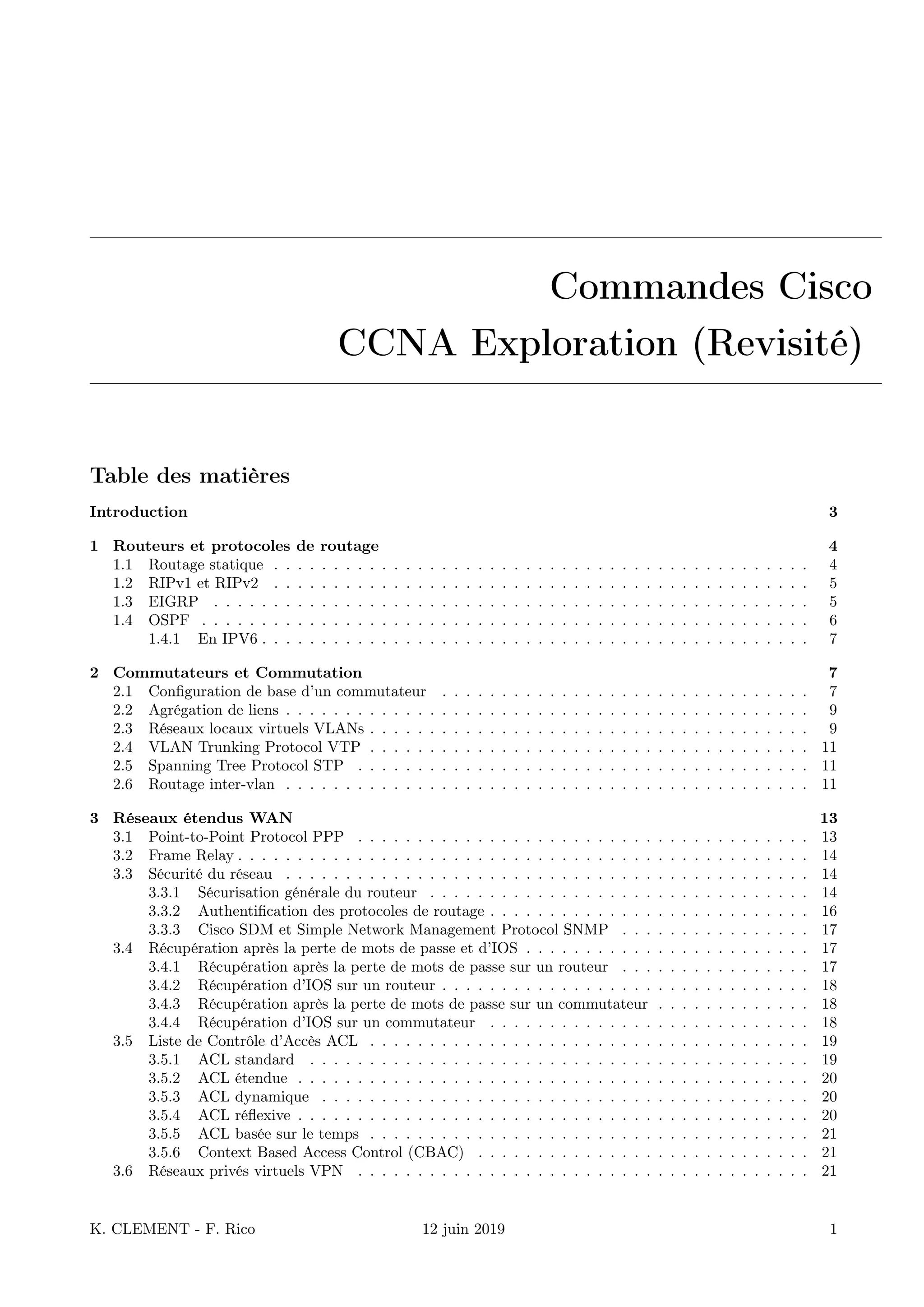
Table des matières
Introduction 3
1 Routeurs et protocoles de routage 4
1.1 Routage statique . . . . . . . . . . . . . . . . . . . . . . . . . . . . . . . . . . . . . . . . . . . . . 4
1.2 RIPv1 et RIPv2 . . . . . . . . . . . . . . . . . . . . . . . . . . . . . . . . . . . . . . . . . . . . . 5
1.3 EIGRP . . . . . . . . . . . . . . . . . . . . . . . . . . . . . . . . . . . . . . . . . . . . . . . . . . 5
1.4 OSPF . . . . . . . . . . . . . . . . . . . . . . . . . . . . . . . . . . . . . . . . . . . . . . . . . . . 6
1.4.1 En IPV6 . . . . . . . . . . . . . . . . . . . . . . . . . . . . . . . . . . . . . . . . . . . . . . 7
2 Commutateurs et Commutation 7
2.1 Configuration de base d’un commutateur . . . . . . . . . . . . . . . . . . . . . . . . . . . . . . . 7
2.2 Agrégation de liens . . . . . . . . . . . . . . . . . . . . . . . . . . . . . . . . . . . . . . . . . . . . 9
2.3 Réseaux locaux virtuels VLANs . . . . . . . . . . . . . . . . . . . . . . . . . . . . . . . . . . . . . 9
2.4 VLAN Trunking Protocol VTP . . . . . . . . . . . . . . . . . . . . . . . . . . . . . . . . . . . . . 11
2.5 Spanning Tree Protocol STP . . . . . . . . . . . . . . . . . . . . . . . . . . . . . . . . . . . . . . 11
2.6 Routage inter-vlan . . . . . . . . . . . . . . . . . . . . . . . . . . . . . . . . . . . . . . . . . . . . 11
3 Réseaux étendus WAN 13
3.1 Point-to-Point Protocol PPP . . . . . . . . . . . . . . . . . . . . . . . . . . . . . . . . . . . . . . 13
3.2 Frame Relay . . . . . . . . . . . . . . . . . . . . . . . . . . . . . . . . . . . . . . . . . . . . . . . . 14
3.3 Sécurité du réseau . . . . . . . . . . . . . . . . . . . . . . . . . . . . . . . . . . . . . . . . . . . . 14
3.3.1 Sécurisation générale du routeur . . . . . . . . . . . . . . . . . . . . . . . . . . . . . . . . 14
3.3.2 Authentification des protocoles de routage . . . . . . . . . . . . . . . . . . . . . . . . . . . 16
3.3.3 Cisco SDM et Simple Network Management Protocol SNMP . . . . . . . . . . . . . . . . 17
3.4 Récupération après la perte de mots de passe et d’IOS . . . . . . . . . . . . . . . . . . . . . . . . 17
3.4.1 Récupération après la perte de mots de passe sur un routeur . . . . . . . . . . . . . . . . 17
3.4.2 Récupération d’IOS sur un routeur . . . . . . . . . . . . . . . . . . . . . . . . . . . . . . . 18
3.4.3 Récupération après la perte de mots de passe sur un commutateur . . . . . . . . . . . . . 18
3.4.4 Récupération d’IOS sur un commutateur . . . . . . . . . . . . . . . . . . . . . . . . . . . 18
3.5 Liste de Contrôle d’Accès ACL . . . . . . . . . . . . . . . . . . . . . . . . . . . . . . . . . . . . . 19
3.5.1 ACL standard . . . . . . . . . . . . . . . . . . . . . . . . . . . . . . . . . . . . . . . . . . 19
3.5.2 ACL étendue . . . . . . . . . . . . . . . . . . . . . . . . . . . . . . . . . . . . . . . . . . . 20
3.5.3 ACL dynamique . . . . . . . . . . . . . . . . . . . . . . . . . . . . . . . . . . . . . . . . . 20
3.5.4 ACL réflexive . . . . . . . . . . . . . . . . . . . . . . . . . . . . . . . . . . . . . . . . . . . 20
3.5.5 ACL basée sur le temps . . . . . . . . . . . . . . . . . . . . . . . . . . . . . . . . . . . . . 21
3.5.6 Context Based Access Control (CBAC) . . . . . . . . . . . . . . . . . . . . . . . . . . . . 21
3.6 Réseaux privés virtuels VPN . . . . . . . . . . . . . . . . . . . . . . . . . . . . . . . . . . . . . . 21
K. CLEMENT - F. Rico 12 juin 2019 1
3.7 Services d’adressage IP . . . . . . . . . . . . . . . . . . . . . . . . . . . . . . . . . . . . . . . . . . 21
3.7.1 Protocole DHCP . . . . . . . . . . . . . . . . . . . . . . . . . . . . . . . . . . . . . . . . . 21
3.7.2 Protocole DHCP IPv6 . . . . . . . . . . . . . . . . . . . . . . . . . . . . . . . . . . . . . . 22
3.7.3 Evolutivité des réseaux avec NAT . . . . . . . . . . . . . . . . . . . . . . . . . . . . . . . 23
3.8 Adressage IPv6 . . . . . . . . . . . . . . . . . . . . . . . . . . . . . . . . . . . . . . . . . . . . . . 25
K. CLEMENT - F. Rico 12 juin 2019 2
Introduction
Cette documentation regroupe toutes les commandes utilisées sur les routeurs et commutateurs CISCO et
vues dans les cours du CCNA Exploration. En introduction seront présentées les commandes permettant de
configurer les bases du routeur et du commutateur tels que nom de l’équipement, mots de passe, bannière,
commandes de sauvegarde, de visualisation et configuration basique d’interfaces.
Par la suite, les commandes spécifiques aux routeurs et aux commutateurs seront présentées respectivement
dans les prochaines sections.
Convention d’écriture :
italics indique des arguments dans lesquels l’utilisateur fournit des valeurs
[X] indique un élément facultatif
| indique un choix facultatif ou obligatoire
[X|Y] indique un choix facultatif
{X|Y} indique un choix obligatoire
Commandes pour changer de mode d’exécution et de configuration :
Router> enable
Router# configure terminal
Router(config)#
Router(config)# exit | end | ˆC | ˆZ
Router# disable
Router>
Router# ?
Outils de diagnostic :
Router# ping ip-address
Router# traceroute ip-address
Visualisation de l’état de l’équipement :
Router# show version
Router# show flash
Router# show memory
Router# show interfaces
Switch# show history
Switch# terminal history {size number }
Visualisation et sauvegarde de la configuration :
Router# show running-config
Router# show startup-config
Router# copy running-config startup-config
Router# copy running-config tftp:
Switch# copy system:running-config tftp:[[[//location ]/directory ]/filename ]
Switch# copy nvram:startup-config tftp:[[[//location ]/directory ]/filename ]
Suppression du fichier de configuration :
Router# erase nvram:startup-config
Router# erase startup-config
K. CLEMENT - F. Rico 12 juin 2019 3
Configuration de base d’un équipement CISCO :
Router(config)# hostname router-name
Router(config)# enable password password
Router(config)# enable secret password
Router(config)# banner motd # message #
Router(config)# banner login # message #
Configuration de la console et du terminal virtuel :
Router(config)# line console 0
Router(config-line)# password password
Router(config-line)# login
Router(config-line)# logging synchronous
Router(config)# line vty 0 4
Switch(config)# line vty 0 15
Router(config-line)# password password
Router(config-line)# login
Router(config)# service password-encryption
1 Routeurs et protocoles de routage
Configuration des interfaces sur un routeur :
Router(config)# interface type port
Router(config-if)# ip address ip-address subnet-mask
Router(config-if)# description description
Router(config-if)# clock rate rate
Router(config-if)# no shutdown
Router(config-if)# exit
Router# show ip interface brief
Router# show ip interface
1.1 Routage statique
Cisco Discovery Protocol (CDP) :
Router# show cdp neighbors
Router# show cdp neighbors detail
Router(config)# no cdp run
Router(config-if)# no cdp enable
Configuration de routes statiques et route statique par défaut :
Router(config)# ip route prefix mask {ip-address | interface-type interface-number
[ip-address ]} [distance ] [name ] [permanent] [tag tag ]
Router(config)# ip route network-address subnet-mask {ip-address |
exit-interface }
Router(config)# ip route 0.0.0.0 0.0.0.0 [exit-interface | ip-address ]
K. CLEMENT - F. Rico 12 juin 2019 4
Commandes de visualisation et de dépannage pour le routage, valable pour tous les protocoles de routage :
Router# ping ip-address
Router# traceroute ip-address
Router# show ip route
Router# show ip interface brief
Router# show running-config
Router# show cdp neighbors detail
Router# debug ip routing
Router# undebug ip routing
Router# undebug all
1.2 RIPv1 et RIPv2
Configuration de RIPv1 :
Router(config)# router rip
Router(config-router)# version 1
Router(config-router)# network directly-connected-classful-address
Router(config-router)# passive-interface interface-type interface-number
Configuration de RIPv2 :
Router(config)# router rip
Router(config-router)# version 2
Router(config-router)# network directly-connected-classful-address
Router(config-router)# passive-interface interface-type interface-number
Router(config-router)# no auto-summary
Redistribution de route statique et propagation de la route par défaut :
Router(config-router)# redistribute static
Router(config-router)# default-information originate
Dépannage de RIP :
Router# show ip route
Router# show ip rip database
Router# show ip protocols
Router# debug ip rip
Comportement du routage par classe et sans classe :
Router(confi)# ip classless
Router(confi)# no ip classless
1.3 EIGRP
Configuration d’EIGRP :
Router(config)# router eigrp autonomous-system
Router(config-router)# network network-address [wildcard-mask ]
Router(config-router)# passive-interface interface-type interface-number
Router(config-router)# no auto-summary
K. CLEMENT - F. Rico 12 juin 2019 5
Propagation de la route par défaut et résumé de réseaux :
Router(config)# ip route 0.0.0.0 0.0.0.0 [exit-interface | ip-address ]
Router(config-router)# redistribute static
Router(config)# ip default-network network-address
Router(config-if)# ip summary-address eigrp as-number network-address subnet-mask
Configuration de bande passante et autres caractéristiques pour le calcul de la métrique d’EIGRP :
Router(config-router)# metric weights tos k1 k2 k3 k4 k5
Router(config-if)# bandwidth bw-kbps
Router(config-if)# ip bandwidth-percent eigrp as-number percent
Router# show interface interface-type interface-number
Router(config-if)# ip hello-interval eigrp as-number seconds
Router(config-if)# ip hold-time eigrp as-number seconds
Visualisation et dépannage d’EIGRP :
Router# show ip eigrp neighbors
Router# show ip eigrp topology [network | all-links]
Router# show ip route
Router# show ip interface brief
Router# show interface interface-type interface-number
Router# show ip protocols
Router# debug eigrp fsm
1.4 OSPF
Configuration d’OSPF :
Router(config)# router ospf process-id
Router(config-router)# network network-address wildcard-mask area area-id
Router(config-router)# passive-interface interface-type interface-number
Configuration de l’ID du routeur en configurant une interface de bouclage (Loopback) ou avec la commande
router-id :
Router(config-router)# router-id ip-address
Router(config-if)#ip ospf priority {0 – 255 }
Router(config)#interface loopback number
Router(config-if)#ip address ip-address subnet-mask
Router#clear ip ospf process
Configuration de la bande passante ou du coût pour le calcul de la métrique d’OSPF :
Router(config-router)# auto-cost reference-bandwidth value-mbps
Router(config-if)# bandwidth bw-kbps
Router(config-if)# ip ospf cost cost
Router# show interface interface-type interface-number
Router(config-if)# ip ospf hello-interval seconds
Router(config-if)# ip ospf dead-interval seconds
Propagation de la route par défaut :
Router(config)# ip route 0.0.0.0 0.0.0.0 [exit-interface | ip-address ]
Router(config-router)# default-information originate
K. CLEMENT - F. Rico 12 juin 2019 6
Visualisation et dépannage d’OSPF :
Router# show ip route
Router# show ip interface brief
Router# show ip ospf [interface interface-type interface-number ]
Router# show ip ospf neighbor
Router# show interface interface-type interface-number
Router# show ip protocols
1.4.1 En IPV6
En IPV6 il y a quelques différences, il faut activer le routage ipv6
Router(config)# ipv6 unicast-routing
La commande de configuration est différente :
Router(config)# ipv6 router ospf num. de processus
Router(config-rtr)# !! il faut un identifiant
Router(config-rtr)# router-id addresseIPV4
Router(config-rtr)# passive-interface type numero
Il n’y a pas de network ..., on déclare chaque interface dans sa configuration
Router(config)# interface type numero
Router(config-if)# ipv6 ospf num area numarea
2 Commutateurs et Commutation
2.1 Configuration de base d’un commutateur
Configuration de l’interface de gestion sur un commutateur :
Switch(config)# interface vlan vlan-id
Switch(config-if)# ip address ip-address subnet-mask
Switch(config-if)# no shutdown
Switch(config-if)# exit
Switch(config)# interface type port
Switch(config)# interface range type port - port
Switch(config-if)# switchport mode access
Switch(config-if)# switchport access vlan vlan-id
Switch(config-if)# end
Switch(config)# ip default-gateway ip-address
Switch# show ip interface brief
Switch# show ip interface
Configuration d’options sur un port du commutateur :
Switch(config-if)# duplex {auto | full | half}
Switch(config-if)# speed {auto | value-bps }
Switch(config-if)# mdix auto
Possibilité d’activer l’interface web pour la configuration du commutateur :
Switch(config)# ip http authentication enable
Switch(config)# ip http server
K. CLEMENT - F. Rico 12 juin 2019 7
Gestion de la table d’adresse MAC du commutateur :
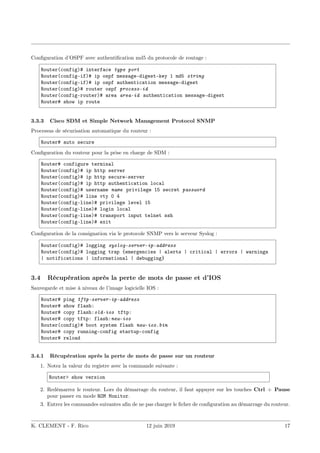
Switch# show mac address-table
Switch(config)# mac address-table static MAC-address vlan {1-4096 | ALL} interface
interface-id
Configuration de la sécurité sur les commutateurs. La configuration de Secure Shell SSH est traitée dans la
prochaine section. Configuration de la surveillance DHCP :
Switch(config)# ip dhcp snooping
Switch(config)# ip dhcp snooping vlan number [number ]
Switch(config-if)# ip dhcp snooping trust
Switch(config-if)# ip dhcp snooping limit rate value
Switch# show ip dhcp snooping
K. CLEMENT - F. Rico 12 juin 2019 8
Configuration de la sécurité des ports :
Switch(config-if)# switchport port-security
Switch(config-if)# switchport port-security maximum number
Switch(config-if)# switchport port-security mac-address mac-address
Switch(config-if)# switchport port-security mac-address sticky [mac-address ]
Switch(config-if)# switchport port-security violation {shutdown | restrict |
protect}
Switch# show port-security [interface interface-id ]
Switch# show port-security address
2.2 Agrégation de liens
L’agrégation permet de répartir la charge sur plusieurs liens.
— PAgP (prop. Cisco) : Protocol Agrégation Port, modes compatibles desirable+desirable ou desirable+auto.
— LACP (ouvert) : Link Agregation Protocol, active+passive ou active+active.
— Choisir la méthode de répartition
Switch(config)# port-channel load-balance [dst-ip|dst-mac|src-dst-ip|src-dst-mac|src-ip|src-mac]
— Configurer les ports (sur les 2 commutateurs)
! on peut faire une configuration par lot
Switch(config)# interface range fa0/1 - 4
Switch(config-if-range)# channel-group 1-6 mode (on|active|passive|desirable|auto)
Switch(config-if-range)# exit
— La commande précedante crée une interface « port-channel » qu’il faut configurer
Switch(config)# interface port-channel 1
Switch(config-if)# description liaison agrégée vers ...
Switch(config-if)# ...
— Vérification de la configuration
!!! afficher les infos de l’interface virtuelle Port-channel
Switch# show interface Port-channel
!!! afficher les interfaces physiques utilisant etherchannel
Switch# show interfaces etherchannel
!!! afficher des informations sur etherchannel
Switch# show etherchannel [summary|port-channel]
2.3 Réseaux locaux virtuels VLANs
Configuration de VLANs :
Switch(config)# vlan vlan-id
Switch(config-vlan)# name vlan-name
Switch# show vlan [brief | id vlan-id | name vlan-name | summary]
Switch# show interfaces [interface-id | vlan vlan-id ] | switchport
Switch# delete flash:vlan.dat
Configuration de base de VLANs avec VLAN VoIP :
K. CLEMENT - F. Rico 12 juin 2019 9
Switch(config)# interface type port
Switch(config-if)# switchport mode access
Switch(config-if)# switchport access vlan vlan-id
Switch(config-if)# mls qos trust cos
Switch(config-if)# switchport voice vlan voice-vlan-id
Configuration l’agrégation de VLANs (Trunk) :
Switch(config)# interface type port
Switch(config-if)# switchport mode trunk
Switch(config-if)# switchport trunk native vlan vlan-id
Switch(config-if)# switchport trunk allowed vlan vlan-id [,vlan-id,vlan-id ...]
Switch(config-if)# switchport trunk allowed vlan add vlan-id
Switch# show interfaces id-interface switchport
Switch# show interfaces trunk
Dynamic Trunking Protocol DTP :
Switch(config)# interface type port
Switch(config-if)# switchport mode access
Switch(config-if)# switchport mode trunk
Switch(config-if)# switchport mode dynamic auto
Switch(config-if)# switchport mode dynamic desirable
Switch(config-if)# switchport nonegociate
Switch# show dtp interface type port
K. CLEMENT - F. Rico 12 juin 2019 10
2.4 VLAN Trunking Protocol VTP
Configuration de VTP :
Switch(config)# vtp mode {server | client | transparent }
Switch(config)# vtp domain domain-name
Switch(config)# vtp password password
Switch(config)# vtp version {1 | 2}
Switch(config)# vtp pruning
Switch# show vtp status
Switch# show vtp counters
Switch# show interfaces trunk
2.5 Spanning Tree Protocol STP
Configuration de la sélection du pont racine et des ports racines, désignés et non-désignés :
Switch(config)# spanning-tree vlan vlan-id root primary
Switch(config)# spanning-tree vlan vlan-id root secondary
Switch(config)# spanning-tree vlan vlan-id priority value
Switch(config-if)# spanning-tree cost value
Switch(config-if)# spanning-tree port-priority value
Switch# show spanning-tree [detail | active]
Les ports d’accès (qui ne sont pas reliés à des switch) peuvent être activé sans calculer de spanning tree (portfast).
Mais dans ce cas, il faut sécuriser le cas où on branche un switch par erreur. Par exemple en coupant le port si
on voit passer un paquet bpdu (qui servent au calcul de spanning tree) :
# pour une interface
Switch(config-if)# spanning-tree portfast
Switch(config-if)# spanning-tree bpduguard
# pour le faire par défaut sur tout les port d’accès
Switch(config)# spanning-tree portfast default
Switch(config)# spanning-tree portfast bpduguard
# le port est coupé, on peut le réactiver automatiquement après un certain temps
Switch(config)# errdisable recovery cause bpduguard
Switch(config)# errdisable recovery interval 400
Configuration de Rapid-PVST+ :
Switch(config)# spanning-tree mode rapid-pvst
Switch(config)# interface type port
Switch(config-if)# spanning-tree link-type point-to-point
Switch(config-if)# end
Switch# clear spanning-tree detected-protocols
2.6 Routage inter-vlan
Configuration de sous-interfaces sur un Router-on-a-stick :
Router(config)# interface type interface-number
Router(config-if)# no shutdown
Router(config-if)# interface type interface-number.subinterface-number
Router(config-subif)# encapsulation dot1q vlan-id
Router(config-subif)# ip address ip-address subnet-mask
K. CLEMENT - F. Rico 12 juin 2019 11
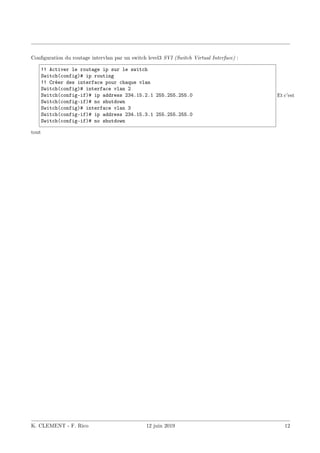
Configuration du routage intervlan par un switch level3 SVI (Switch Virtual Interface) :
!! Activer le routage ip sur le switch
Switch(config)# ip routing
!! Créer des interface pour chaque vlan
Switch(config)# interface vlan 2
Switch(config-if)# ip address 234.15.2.1 255.255.255.0
Switch(config-if)# no shutdown
Switch(config)# interface vlan 3
Switch(config-if)# ip address 234.15.3.1 255.255.255.0
Switch(config-if)# no shutdown
Et c’est
tout
K. CLEMENT - F. Rico 12 juin 2019 12
3 Réseaux étendus WAN
3.1 Point-to-Point Protocol PPP
Activation du protocole hdlc sur une interface série :
Router(config-if)# encapsulation hdlc
Activation du protocole ppp sur une interface série :
Router(config-if)# encapsulation ppp
Router(config-if)# compress [predictor | stac]
Router(config-if)# ppp quality percentage
Fonction de rappel PPP (A quoi cela sert-il ? ? ?) :
# ppp callback [accept | request]
Protocole d’authentification du mot de pass PAP et CHAP :
Router(config-if)# ppp authentication {chap | chap pap | pap chap | pap}
[if-needed] [list-name | default] [callin]
Router(config)# username name password password
Router(config-if)# ppp pap sent-username name password password
Exemple de configuration de PAP entre deux routeurs R1 et R2 :
R1(config)# username User2 password User2-password
R1(config-if)# encapsulation ppp
R1(config-if)# ppp authentication pap
R1(config-if)# ppp pap sent-username User1 password User1-password
R2(config)# username User1 password User1-password
R2(config-if)# encapsulation ppp
R2(config-if)# ppp authentication pap
R2(config-if)# ppp pap sent-username User2 password User2-password
Même exemple mais en utilisant CHAP :
R1(config)# username User2 password User2-password
R1(config-if)# encapsulation ppp
R1(config-if)# ppp authentication chap
R1(config-if)# ppp chap hostname User1
R1(config-if)# ppp chap password User1-password
R2(config)# username User1 password User1-password
R2(config-if)# encapsulation ppp
R2(config-if)# ppp authentication chap
R2(config-if)# ppp chap hostname User2
R2(config-if)# ppp chap password User2-password
Visualisation et dépannage d’une interface série :
Router# show interfaces serial interface-number
Router# show controllers
Router# debug ppp {packet | negotiation | error | authentification | compression |
cbcp}
K. CLEMENT - F. Rico 12 juin 2019 13
3.2 Frame Relay
Configuration de Frame Relay avec mappage statique :
Router(config-if)# encapsulation frame-relay [cisco | ietf]
Router(config-if)# bandwidth bw-kbps
Router(config-if)# no frame-relay inverse-arp
Router(config-if)# frame-relay map protocol protocol-address dlci [broadcast]
[ietf] [cisco]
Router# show frame-relay map
Interface de supervision locale LMI :
Router# show frame-relay lmi
Router# frame-relay lmi-type [cisco | ansi | q933a]
Configuration de sous-interfaces Frame Relay :
Router(config)# interface serial interface
Router(config-if)# encapsulation frame-relay
Router(config-if)# interface serial subinterface_number [multipoint |
point-to-point]
Router(config-subif)# ip address ip-address subnet-mask
Router(config-subif)# frame-relay interface-dlci dlci-number
Router(config-if)# no shutdown
Visualisation et dépannage de Frame Relay :
Router# show interfaces
Router# show frame-relay lmi
Router# show frame-relay pvc [interface interface ] [dlci]
Router # clear counters
Router # show frame-relay map
Router # clear frame-relay-inarp
Router # debug frame-relay lmi
3.3 Sécurité du réseau
3.3.1 Sécurisation générale du routeur
Configuration de mots de passe sécurisés et authentification AAA :
Router(config)# aaa new-model
Router(config)# aaa authentication login LOCAL_AUTH local
Router(config)# line console 0
Router(config-line)# login authentication LOCAL_AUTH
Router(config-line)# line vty 0 4
Router(config-line)# login authentication LOCAL_AUTH
Router# username username password password
Router# username username secret password
Router(config)# service password-encryption
Router(config)# security passwords min-length number
K. CLEMENT - F. Rico 12 juin 2019 14
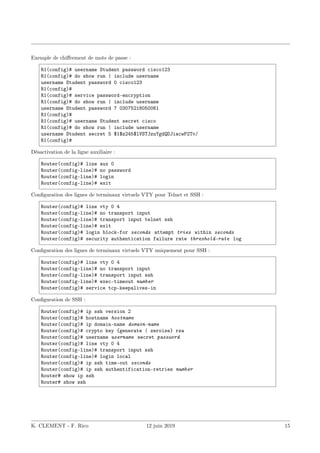
Exemple de chiffrement de mots de passe :
R1(config)# username Student password cisco123
R1(config)# do show run | include username
username Student password 0 cisco123
R1(config)#
R1(config)# service password-encryption
R1(config)# do show run | include username
username Student password 7 03075218050061
R1(config)#
R1(config)# username Student secret cisco
R1(config)# do show run | include username
username Student secret 5 $1$z245$lVSTJzuYgdQDJiacwP2Tv/
R1(config)#
Désactivation de la ligne auxiliaire :
Router(config)# line aux 0
Router(config-line)# no password
Router(config-line)# login
Router(config-line)# exit
Configuration des lignes de terminaux virtuels VTY pour Telnet et SSH :
Router(config)# line vty 0 4
Router(config-line)# no transport input
Router(config-line)# transport input telnet ssh
Router(config-line)# exit
Router(config)# login block-for seconds attempt tries within seconds
Router(config)# security authentication failure rate threshold-rate log
Configuration des lignes de terminaux virtuels VTY uniquement pour SSH :
Router(config)# line vty 0 4
Router(config-line)# no transport input
Router(config-line)# transport input ssh
Router(config-line)# exec-timeout number
Router(config)# service tcp-keepalives-in
Configuration de SSH :
Router(config)# ip ssh version 2
Router(config)# hostname hostname
Router(config)# ip domain-name domain-name
Router(config)# crypto key {generate | zeroise} rsa
Router(config)# username username secret password
Router(config)# line vty 0 4
Router(config-line)# transport input ssh
Router(config-line)# login local
Router(config)# ip ssh time-out seconds
Router(config)# ip ssh authentification-retries number
Router# show ip ssh
Router# show ssh
K. CLEMENT - F. Rico 12 juin 2019 15
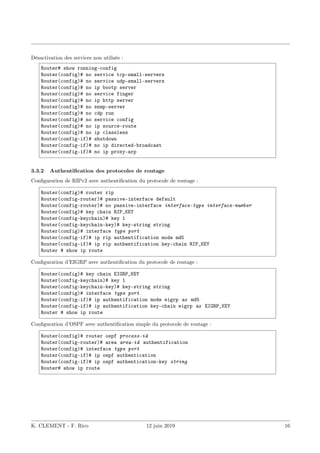
Désactivation des services non utilisés :
Router# show running-config
Router(config)# no service tcp-small-servers
Router(config)# no service udp-small-servers
Router(config)# no ip bootp server
Router(config)# no service finger
Router(config)# no ip http server
Router(config)# no snmp-server
Router(config)# no cdp run
Router(config)# no service config
Router(config)# no ip source-route
Router(config)# no ip classless
Router(config-if)# shutdown
Router(config-if)# no ip directed-broadcast
Router(config-if)# no ip proxy-arp
3.3.2 Authentification des protocoles de routage
Configuration de RIPv2 avec authentification du protocole de routage :
Router(config)# router rip
Router(config-router)# passive-interface default
Router(config-router)# no passive-interface interface-type interface-number
Router(config)# key chain RIP_KEY
Router(config-keychain)# key 1
Router(config-keychain-key)# key-string string
Router(config)# interface type port
Router(config-if)# ip rip authentification mode md5
Router(config-if)# ip rip authentification key-chain RIP_KEY
Router # show ip route
Configuration d’EIGRP avec authentification du protocole de routage :
Router(config)# key chain EIGRP_KEY
Router(config-keychain)# key 1
Router(config-keychain-key)# key-string string
Router(config)# interface type port
Router(config-if)# ip authentification mode eigrp as md5
Router(config-if)# ip authentification key-chain eigrp as EIGRP_KEY
Router # show ip route
Configuration d’OSPF avec authentification simple du protocole de routage :
Router(config)# router ospf process-id
Router(config-router)# area area-id authentification
Router(config)# interface type port
Router(config-if)# ip ospf authentication
Router(config-if)# ip ospf authentication-key string
Router# show ip route
K. CLEMENT - F. Rico 12 juin 2019 16
Configuration d’OSPF avec authentification md5 du protocole de routage :
Router(config)# interface type port
Router(config-if)# ip ospf message-digest-key 1 md5 string
Router(config-if)# ip ospf authentication message-digest
Router(config)# router ospf process-id
Router(config-router)# area area-id authentication message-digest
Router# show ip route
3.3.3 Cisco SDM et Simple Network Management Protocol SNMP
Processus de sécurisation automatique du routeur :
Router# auto secure
Configuration du routeur pour la prise en charge de SDM :
Router# configure terminal
Router(config)# ip http server
Router(config)# ip http secure-server
Router(config)# ip http authentication local
Router(config)# username name privilege 15 secret password
Router(config)# line vty 0 4
Router(config-line)# privilege level 15
Router(config-line)# login local
Router(config-line)# transport input telnet ssh
Router(config-line)# exit
Configuration de la consignation via le protocole SNMP vers le serveur Syslog :
Router(config)# logging syslog-server-ip-address
Router(config)# logging trap {emergencies | alerts | critical | errors | warnings
| notifications | informational | debugging}
3.4 Récupération après la perte de mots de passe et d’IOS
Sauvegarde et mise à niveau de l’image logicielle IOS :
Router# ping tftp-server-ip-address
Router# show flash:
Router# copy flash:old-ios tftp:
Router# copy tftp: flash:new-ios
Router(config)# boot system flash new-ios.bin
Router# copy running-config startup-config
Router# reload
3.4.1 Récupération après la perte de mots de passe sur un routeur
1. Notez la valeur du registre avec la commande suivante :
Router> show version
2. Redémarrez le routeur. Lors du démarrage du routeur, il faut appuyer sur les touches Ctrl + Pause
pour passer en mode ROM Monitor.
3. Entrez les commandes suivantes afin de ne pas charger le ficher de configuration au démarrage du routeur.
K. CLEMENT - F. Rico 12 juin 2019 17
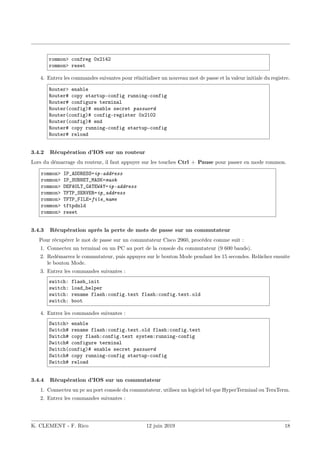
rommon> confreg 0x2142
rommon> reset
4. Entrez les commandes suivantes pour réinitialiser un nouveau mot de passe et la valeur initiale du registre.
Router> enable
Router# copy startup-config running-config
Router# configure terminal
Router(config)# enable secret password
Router(config)# config-register 0x2102
Router(config)# end
Router# copy running-config startup-config
Router# reload
3.4.2 Récupération d’IOS sur un routeur
Lors du démarrage du routeur, il faut appuyer sur les touches Ctrl + Pause pour passer en mode rommon.
rommon> IP_ADDRESS=ip-address
rommon> IP_SUBNET_MASK=mask
rommon> DEFAULT_GATEWAY=ip-address
rommon> TFTP_SERVER=ip_address
rommon> TFTP_FILE=file_name
rommon> tftpdnld
rommon> reset
3.4.3 Récupération après la perte de mots de passe sur un commutateur
Pour récupérer le mot de passe sur un commutateur Cisco 2960, procédez comme suit :
1. Connectez un terminal ou un PC au port de la console du commutateur (9 600 bauds).
2. Redémarrez le commutateur, puis appuyez sur le bouton Mode pendant les 15 secondes. Relâchez ensuite
le bouton Mode.
3. Entrez les commandes suivantes :
switch: flash_init
switch: load_helper
switch: rename flash:config.text flash:config.text.old
switch: boot
4. Entrez les commandes suivantes :
Switch> enable
Switch# rename flash:config.text.old flash:config.text
Switch# copy flash:config.text system:running-config
Switch# configure terminal
Switch(config)# enable secret password
Switch# copy running-config startup-config
Switch# reload
3.4.4 Récupération d’IOS sur un commutateur
1. Connectez un pc au port console du commutateur, utilisez un logiciel tel que HyperTerminal ou TeraTerm.
2. Entrez les commandes suivantes :
K. CLEMENT - F. Rico 12 juin 2019 18
switch:
switch: set BAUD 115200
switch: copy xmodem: flash:/ios.bin
ou
switch: xmodem [-cyr] [ios.bin ]
3. Configurez le logiciel pour une vitesse de ligne de 115200 bauds.
4. Le commutateur se met en attente ; il est prêt à recevoir l’IOS par xmodem.
5. Cherchez le fichier avec le menu du logiciel et envoyez-le par Xmodem.
6. Redémarrez :
switch: reset
7. Après redémarrage, reconfigurez la vitesse de la ligne de console en 9600 bauds :
Switch(config)# line console 0
Switch(config-line)# speed 9600
3.5 Liste de Contrôle d’Accès ACL
3.5.1 ACL standard
Configuration d’une ACL standard :
Router(config)# access-list access-list-number {permit | deny | remark remark }
source [source-wildcard ] [log]
Router(config)# no access-list acces-list-number
Router(config-if)# ip access-group {access-list-number | access-list-name }
{in | out}
Router# show access-lists [acces-list-number | NAME ]
Configuration d’une ACL standard nommée :
Router(config)# ip access-list standard NAME
Router(config-std-nacl)# sequence-number [permit|deny|remark] source
[source-wildcard ] [log]
Router(config-if)# ip access-group access-list-name {in | out}
Router# show access-lists [NAME ]
Utilisation d’une ACL pour contrôler l’accès aux lignes virtuelles VTY :
Router(config)# access-list access-list-number {deny | permit} source
[source-wildcard ]
Router(config)# line vty 0 4
Router(config-line)# access-class access-list-number in [vrf-also] | out
K. CLEMENT - F. Rico 12 juin 2019 19
3.5.2 ACL étendue
Configuration d’une ACL étendue :
Router(config)# access-list access-list-number {permit | deny | remark}
protocol source [source-wildcard ] [operator operand ] [port port-number or name ]
destination [destination-wildcard [operator operand ] [port port-number or name ]
[established]
Router(config)# access-list access-list-number {permit | deny} protocol source
source-wildcard destination destination-wildcard {eq | neq | gt | lt | range}
protocol-number [established]
Router(config-if)# ip access-group {access-list-number | access-list-name }
{in | out}
Router# show access-lists [acces-list-number | NAME ]
Configuration d’une ACL étendue nommée :
Router(config)# ip access-list extended NAME
Router(config-ext-nacl)# sequence-number [permit | deny | remark] protocol source
[source-wildcard ] destination [destination-wildcard ] {eq | neq | gt | lt | range}
protocol-number [established]
Router(config-if)# ip access-group access-list-name {in | out}
Router# show access-lists [NAME ]
3.5.3 ACL dynamique
Permet de lancer une ACL (par exemple pour ouvrir un port) suite à un accès telnet au routeur. Exemple de
configuration d’une ACL dynamique :
Router(config)# username name password password
Router(config)# access-list access-list-number dynamic dynamic-name [timeout
minutes ] permit telnet source source-wildcard destination destination-wildcard
Router(config-if)# ip access-group access-list-number in
Router(config)# line vty 0 4
Router(config-line)# autocommand access-enable host timeout minutes
3.5.4 ACL réflexive
Exemple de configuration d’une ACL réflexive :
Router(config)# ip access-list extended OUT-NAME
Router(config-ext-nacl)# permit protocol source source-wildcard destination
destination-wildcard reflect reflect-NAME
Router(config)# ip access-list extended IN-NAME
Router(config-ext-nacl)# evaluate reflect-NAME
Router(config-if)# ip access-group IN-NAME in
Router(config-if)# ip access-group OUT-NAME out
K. CLEMENT - F. Rico 12 juin 2019 20
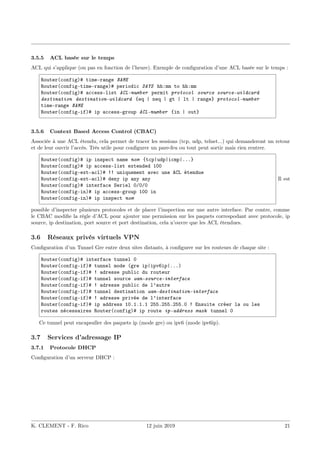
3.5.5 ACL basée sur le temps
ACL qui s’applique (ou pas en fonction de l’heure). Exemple de configuration d’une ACL basée sur le temps :
Router(config)# time-range NAME
Router(config-time-range)# periodic DAYS hh:mm to hh:mm
Router(config)# access-list ACL-number permit protocol source source-wildcard
destination destination-wildcard {eq | neq | gt | lt | range} protocol-number
time-range NAME
Router(config-if)# ip access-group ACL-number {in | out}
3.5.6 Context Based Access Control (CBAC)
Associée à une ACL étendu, cela permet de tracer les sessions (tcp, udp, telnet...) qui demanderont un retour
et de leur ouvrir l’accès. Très utile pour configurer un pare-feu ou tout peut sortir mais rien rentrer.
Router(config)# ip inspect name nom {tcp|udp|icmp|...}
Router(config)# ip access-list extended 100
Router(config-ext-acl)# !! uniquement avec une ACL étendue
Router(config-ext-acl)# deny ip any any
Router(config)# interface Seriel 0/0/0
Router(config-in)# ip access-group 100 in
Router(config-in)# ip inspect nom
Il est
possible d’inspecter plusieurs protocoles et de placer l’inspection sur une autre interface. Par contre, comme
le CBAC modifie la règle d’ACL pour ajouter une permission sur les paquets correspodant avec protocole, ip
source, ip destination, port source et port destination, cela n’ouvre que les ACL étendues.
3.6 Réseaux privés virtuels VPN
Configuration d’un Tunnel Gre entre deux sites distants, à configurer sur les routeurs de chaque site :
Router(config)# interface tunnel 0
Router(config-if)# tunnel mode (gre ip|ipv6ip|...)
Router(config-if)# ! adresse public du routeur
Router(config-if)# tunnel source wan-source-interface
Router(config-if)# ! adresse public de l’autre
Router(config-if)# tunnel destination wan-destination-interface
Router(config-if)# ! adresse privée de l’interface
Router(config-if)# ip address 10.1.1.1 255.255.255.0 ! Ensuite créer la ou les
routes nécessaires Router(config)# ip route ip-address mask tunnel 0
Ce tunnel peut encapsuller des paquets ip (mode gre) ou ipv6 (mode ipv6ip).
3.7 Services d’adressage IP
3.7.1 Protocole DHCP
Configuration d’un serveur DHCP :
K. CLEMENT - F. Rico 12 juin 2019 21
Router(config)# service dhcp
Router(config)# ip dhcp excluded-address low-address [high-address ]
Router(config)# ip dhcp pool pool-name
Router(dhcp-config)# network network-number [mask | /prefix-length ]
Router(dhcp-config)# default-router address [address2 ...address8 ]
Router(dhcp-config)# dns-server address [address2 ...address8 ]
Router(dhcp-config)# domain-name domain
Router(dhcp-config)# lease {days [hours ] [minutes ] | infinite }
Router(dhcp-config)# netbios-name-server address [address2 ...address8 ]
Configuration d’un relais DHCP :
Router(config-if)# ip helper-address server-address Visua-
lisation et dépannage de DHCP :
Router# show ip dhcp binding
Router# show ip dhcp server statistics
Router# show ip dhcp server pool
Router# show ip dhcp conflict
Router# debug ip dhcp server events
3.7.2 Protocole DHCP IPv6
Il est possible de le faire soit
— sans état : seul les informations annexes sont transmises via DHCP, les client utilisent le protocole
d’autoconfiguration pour les adresses.
— avec état : plus proche du fonctionnement IPv4, les client sont prévenu de ne pas utiliser les RA et
obtiennent adresse et information depuis le routeur (qui garde en mémoire les allocations).
Sans état (attention, cela ne semble pas fonctionner sous packettracer)
Router(config)# ipv6 unicast-routing
Router(config)# ipv6 dhcp pool nompool
Router(config-dhcp)# domain-name nomdedomaine
Router(config-dhcp)# dns-server adressedns
!! Pour chaque interface, il faut faire l’association avec le pool et
!! prévenir d’ignorer les RA
Router(config)# interface fa 0/1
Router(config-if)# ipv6 dhcp server nompool
Router(config-if)# ipv6 nd other-config-flag
Avec état, il faut prévoir un pool d’adresses à distribuer qui ne contient pas l’adresse du routeur.
K. CLEMENT - F. Rico 12 juin 2019 22
Router(config)# ipv6 unicast-routing
Router(config)# ipv6 local pool nompooladresse 2001:0:0:1:1::/80 64
Router(config)# ipv6 dhcp pool nompool
Router(config-dhcp)# domain-name nomdedomaine
Router(config-dhcp)# dns-server adressedns
Router(config-dhcp)# prefix-delegation pool nompooladresse
!! Pour chaque interface, il faut faire l’association avec le pool et
!! prévenir d’utiliser le serveur dhcp
Router(config)# interface fa 0/1
Router(config-if)# ipv6 addr 2001:0:0:1::1/64
Router(config-if)# ipv6 dhcp server nompool
Router(config-if)# ipv6 nd managed-config-flag
Attention, sous packettracer, il faut que le pool d’adresses ne contienne pas celle du routeur. Ici, cela est
permis en donnant : 2001:0:0:1:1::/80 pour le pool (ce qui ne contient pas l’adresse du routeur) mais en
donnant bien 64 comme préfix à utiliser. En réalité, cela fonctionne sans cette sécurité.
3.7.3 Evolutivité des réseaux avec NAT
Configuration de la NAT statique :
Router(config)# ip nat inside source static local-ip global-ip
Router(config)# interface type number
Router(config-if)# ip nat inside
Router(config)# interface type number
Router(config-if)# ip nat outside
Configuration de la redirection de port :
Router(config)# ip nat inside source static protocol local-ip port global-ip port
Configuration de la NAT dynamique :
Router(config)# ip nat pool NAME start-ip end-ip {netmask netmask | prefix-length
prefix-length }
Router(config)# access-list access-list-number permit source [source-wildcard ]
Router(config)# ip nat inside source list access-list-number pool NAME
Router(config)# interface type number
Router(config-if)# ip nat inside
Router(config)# interface type number
Router(config-if)# ip nat outside
Configuration de la surcharge NAT – première configuration possible :
Router(config)# access-list access-list-number permit source [source-wildcard ]
Router(config)# ip nat inside source list access-list-number interface interface
overload
Router(config)# interface type number
Router(config-if)# ip nat inside
Router(config)# interface type number
Router(config-if)# ip nat outside
Configuration de la surcharge NAT – deuxième configuration possible :
K. CLEMENT - F. Rico 12 juin 2019 23
Router(config)# access-list access-list-number permit source [source-wildcard ]
Router(config)# ip nat pool NAME start-ip end-ip {netmask netmask | prefix-length
prefix-length }
Router(config)# ip nat inside source list access-list-number pool NAME overload
Router(config)# interface type number
Router(config-if)# ip nat inside
Router(config)# interface type number
Router(config-if)# ip nat outside
K. CLEMENT - F. Rico 12 juin 2019 24
Visualisation et dépannage de NAT :
Router# show ip nat translations [verbose]
Router# show ip nat statistics
Router(config)# ip nat translation timeout timeout-seconds
Router# clear ip nat translation *
Router# clear ip nat translation inside global-ip local-ip [outside local-ip
global-ip ]
Router# clear ip nat translation protocol inside global-ip global-port local-ip
local-port [outside local-ip local-port global-ip global-port ]
Router# debug ip nat [detailed]
3.8 Adressage IPv6
Configuration de IPv6 :
RouterX(config)# ipv6 unicast-routing
RouterX(config-if)# ipv6 address ipv6-address /prefix-length [eui-64]
RouterX(config)# ipv6 host name [port ] ipv6addr [ipv6addr ...]
RouterX(config)# ip name-server address
Configuration de RIPng :
RouterX(config)# ipv6 unicast-routing
RouterX(config)# ipv6 router rip name
RouterX(config-if)# ipv6 rip name enable
Visualisation et dépannage d’IPv6 :
RouterX# show ipv6 interface
RouterX# show ipv6 interface brief
RouterX# show ipv6 neighbors
RouterX# show ipv6 protocols
RouterX# show ipv6 rip
RouterX# show ipv6 route
RouterX# show ipv6 route summary
RouterX# show ipv6 routers
RouterX# show ipv6 static
RouterX# show ipv6 static interface interface
RouterX# show ipv6 static detail
RouterX# show ipv6 traffic
RouterX# clear ipv6 rip
RouterX# clear ipv6 route *
RouterX# clear ipv6 traffic
RouterX# debug ipv6 packet
RouterX# debug ipv6 rip
RouterX# debug ipv6 routing
K. CLEMENT - F. Rico 12 juin 2019 25

lexique-de-commandes-cisco.pdfbarryfrench

  • 1.
    Commandes Cisco CCNA Exploration(Revisité) Table des matières Introduction 3 1 Routeurs et protocoles de routage 4 1.1 Routage statique . . . . . . . . . . . . . . . . . . . . . . . . . . . . . . . . . . . . . . . . . . . . . 4 1.2 RIPv1 et RIPv2 . . . . . . . . . . . . . . . . . . . . . . . . . . . . . . . . . . . . . . . . . . . . . 5 1.3 EIGRP . . . . . . . . . . . . . . . . . . . . . . . . . . . . . . . . . . . . . . . . . . . . . . . . . . 5 1.4 OSPF . . . . . . . . . . . . . . . . . . . . . . . . . . . . . . . . . . . . . . . . . . . . . . . . . . . 6 1.4.1 En IPV6 . . . . . . . . . . . . . . . . . . . . . . . . . . . . . . . . . . . . . . . . . . . . . . 7 2 Commutateurs et Commutation 7 2.1 Configuration de base d’un commutateur . . . . . . . . . . . . . . . . . . . . . . . . . . . . . . . 7 2.2 Agrégation de liens . . . . . . . . . . . . . . . . . . . . . . . . . . . . . . . . . . . . . . . . . . . . 9 2.3 Réseaux locaux virtuels VLANs . . . . . . . . . . . . . . . . . . . . . . . . . . . . . . . . . . . . . 9 2.4 VLAN Trunking Protocol VTP . . . . . . . . . . . . . . . . . . . . . . . . . . . . . . . . . . . . . 11 2.5 Spanning Tree Protocol STP . . . . . . . . . . . . . . . . . . . . . . . . . . . . . . . . . . . . . . 11 2.6 Routage inter-vlan . . . . . . . . . . . . . . . . . . . . . . . . . . . . . . . . . . . . . . . . . . . . 11 3 Réseaux étendus WAN 13 3.1 Point-to-Point Protocol PPP . . . . . . . . . . . . . . . . . . . . . . . . . . . . . . . . . . . . . . 13 3.2 Frame Relay . . . . . . . . . . . . . . . . . . . . . . . . . . . . . . . . . . . . . . . . . . . . . . . . 14 3.3 Sécurité du réseau . . . . . . . . . . . . . . . . . . . . . . . . . . . . . . . . . . . . . . . . . . . . 14 3.3.1 Sécurisation générale du routeur . . . . . . . . . . . . . . . . . . . . . . . . . . . . . . . . 14 3.3.2 Authentification des protocoles de routage . . . . . . . . . . . . . . . . . . . . . . . . . . . 16 3.3.3 Cisco SDM et Simple Network Management Protocol SNMP . . . . . . . . . . . . . . . . 17 3.4 Récupération après la perte de mots de passe et d’IOS . . . . . . . . . . . . . . . . . . . . . . . . 17 3.4.1 Récupération après la perte de mots de passe sur un routeur . . . . . . . . . . . . . . . . 17 3.4.2 Récupération d’IOS sur un routeur . . . . . . . . . . . . . . . . . . . . . . . . . . . . . . . 18 3.4.3 Récupération après la perte de mots de passe sur un commutateur . . . . . . . . . . . . . 18 3.4.4 Récupération d’IOS sur un commutateur . . . . . . . . . . . . . . . . . . . . . . . . . . . 18 3.5 Liste de Contrôle d’Accès ACL . . . . . . . . . . . . . . . . . . . . . . . . . . . . . . . . . . . . . 19 3.5.1 ACL standard . . . . . . . . . . . . . . . . . . . . . . . . . . . . . . . . . . . . . . . . . . 19 3.5.2 ACL étendue . . . . . . . . . . . . . . . . . . . . . . . . . . . . . . . . . . . . . . . . . . . 20 3.5.3 ACL dynamique . . . . . . . . . . . . . . . . . . . . . . . . . . . . . . . . . . . . . . . . . 20 3.5.4 ACL réflexive . . . . . . . . . . . . . . . . . . . . . . . . . . . . . . . . . . . . . . . . . . . 20 3.5.5 ACL basée sur le temps . . . . . . . . . . . . . . . . . . . . . . . . . . . . . . . . . . . . . 21 3.5.6 Context Based Access Control (CBAC) . . . . . . . . . . . . . . . . . . . . . . . . . . . . 21 3.6 Réseaux privés virtuels VPN . . . . . . . . . . . . . . . . . . . . . . . . . . . . . . . . . . . . . . 21 K. CLEMENT - F. Rico 12 juin 2019 1
  • 2.
    3.7 Services d’adressageIP . . . . . . . . . . . . . . . . . . . . . . . . . . . . . . . . . . . . . . . . . . 21 3.7.1 Protocole DHCP . . . . . . . . . . . . . . . . . . . . . . . . . . . . . . . . . . . . . . . . . 21 3.7.2 Protocole DHCP IPv6 . . . . . . . . . . . . . . . . . . . . . . . . . . . . . . . . . . . . . . 22 3.7.3 Evolutivité des réseaux avec NAT . . . . . . . . . . . . . . . . . . . . . . . . . . . . . . . 23 3.8 Adressage IPv6 . . . . . . . . . . . . . . . . . . . . . . . . . . . . . . . . . . . . . . . . . . . . . . 25 K. CLEMENT - F. Rico 12 juin 2019 2
  • 3.
    Introduction Cette documentation regroupetoutes les commandes utilisées sur les routeurs et commutateurs CISCO et vues dans les cours du CCNA Exploration. En introduction seront présentées les commandes permettant de configurer les bases du routeur et du commutateur tels que nom de l’équipement, mots de passe, bannière, commandes de sauvegarde, de visualisation et configuration basique d’interfaces. Par la suite, les commandes spécifiques aux routeurs et aux commutateurs seront présentées respectivement dans les prochaines sections. Convention d’écriture : italics indique des arguments dans lesquels l’utilisateur fournit des valeurs [X] indique un élément facultatif | indique un choix facultatif ou obligatoire [X|Y] indique un choix facultatif {X|Y} indique un choix obligatoire Commandes pour changer de mode d’exécution et de configuration : Router> enable Router# configure terminal Router(config)# Router(config)# exit | end | ˆC | ˆZ Router# disable Router> Router# ? Outils de diagnostic : Router# ping ip-address Router# traceroute ip-address Visualisation de l’état de l’équipement : Router# show version Router# show flash Router# show memory Router# show interfaces Switch# show history Switch# terminal history {size number } Visualisation et sauvegarde de la configuration : Router# show running-config Router# show startup-config Router# copy running-config startup-config Router# copy running-config tftp: Switch# copy system:running-config tftp:[[[//location ]/directory ]/filename ] Switch# copy nvram:startup-config tftp:[[[//location ]/directory ]/filename ] Suppression du fichier de configuration : Router# erase nvram:startup-config Router# erase startup-config K. CLEMENT - F. Rico 12 juin 2019 3
  • 4.
    Configuration de based’un équipement CISCO : Router(config)# hostname router-name Router(config)# enable password password Router(config)# enable secret password Router(config)# banner motd # message # Router(config)# banner login # message # Configuration de la console et du terminal virtuel : Router(config)# line console 0 Router(config-line)# password password Router(config-line)# login Router(config-line)# logging synchronous Router(config)# line vty 0 4 Switch(config)# line vty 0 15 Router(config-line)# password password Router(config-line)# login Router(config)# service password-encryption 1 Routeurs et protocoles de routage Configuration des interfaces sur un routeur : Router(config)# interface type port Router(config-if)# ip address ip-address subnet-mask Router(config-if)# description description Router(config-if)# clock rate rate Router(config-if)# no shutdown Router(config-if)# exit Router# show ip interface brief Router# show ip interface 1.1 Routage statique Cisco Discovery Protocol (CDP) : Router# show cdp neighbors Router# show cdp neighbors detail Router(config)# no cdp run Router(config-if)# no cdp enable Configuration de routes statiques et route statique par défaut : Router(config)# ip route prefix mask {ip-address | interface-type interface-number [ip-address ]} [distance ] [name ] [permanent] [tag tag ] Router(config)# ip route network-address subnet-mask {ip-address | exit-interface } Router(config)# ip route 0.0.0.0 0.0.0.0 [exit-interface | ip-address ] K. CLEMENT - F. Rico 12 juin 2019 4
  • 5.
    Commandes de visualisationet de dépannage pour le routage, valable pour tous les protocoles de routage : Router# ping ip-address Router# traceroute ip-address Router# show ip route Router# show ip interface brief Router# show running-config Router# show cdp neighbors detail Router# debug ip routing Router# undebug ip routing Router# undebug all 1.2 RIPv1 et RIPv2 Configuration de RIPv1 : Router(config)# router rip Router(config-router)# version 1 Router(config-router)# network directly-connected-classful-address Router(config-router)# passive-interface interface-type interface-number Configuration de RIPv2 : Router(config)# router rip Router(config-router)# version 2 Router(config-router)# network directly-connected-classful-address Router(config-router)# passive-interface interface-type interface-number Router(config-router)# no auto-summary Redistribution de route statique et propagation de la route par défaut : Router(config-router)# redistribute static Router(config-router)# default-information originate Dépannage de RIP : Router# show ip route Router# show ip rip database Router# show ip protocols Router# debug ip rip Comportement du routage par classe et sans classe : Router(confi)# ip classless Router(confi)# no ip classless 1.3 EIGRP Configuration d’EIGRP : Router(config)# router eigrp autonomous-system Router(config-router)# network network-address [wildcard-mask ] Router(config-router)# passive-interface interface-type interface-number Router(config-router)# no auto-summary K. CLEMENT - F. Rico 12 juin 2019 5
  • 6.
    Propagation de laroute par défaut et résumé de réseaux : Router(config)# ip route 0.0.0.0 0.0.0.0 [exit-interface | ip-address ] Router(config-router)# redistribute static Router(config)# ip default-network network-address Router(config-if)# ip summary-address eigrp as-number network-address subnet-mask Configuration de bande passante et autres caractéristiques pour le calcul de la métrique d’EIGRP : Router(config-router)# metric weights tos k1 k2 k3 k4 k5 Router(config-if)# bandwidth bw-kbps Router(config-if)# ip bandwidth-percent eigrp as-number percent Router# show interface interface-type interface-number Router(config-if)# ip hello-interval eigrp as-number seconds Router(config-if)# ip hold-time eigrp as-number seconds Visualisation et dépannage d’EIGRP : Router# show ip eigrp neighbors Router# show ip eigrp topology [network | all-links] Router# show ip route Router# show ip interface brief Router# show interface interface-type interface-number Router# show ip protocols Router# debug eigrp fsm 1.4 OSPF Configuration d’OSPF : Router(config)# router ospf process-id Router(config-router)# network network-address wildcard-mask area area-id Router(config-router)# passive-interface interface-type interface-number Configuration de l’ID du routeur en configurant une interface de bouclage (Loopback) ou avec la commande router-id : Router(config-router)# router-id ip-address Router(config-if)#ip ospf priority {0 – 255 } Router(config)#interface loopback number Router(config-if)#ip address ip-address subnet-mask Router#clear ip ospf process Configuration de la bande passante ou du coût pour le calcul de la métrique d’OSPF : Router(config-router)# auto-cost reference-bandwidth value-mbps Router(config-if)# bandwidth bw-kbps Router(config-if)# ip ospf cost cost Router# show interface interface-type interface-number Router(config-if)# ip ospf hello-interval seconds Router(config-if)# ip ospf dead-interval seconds Propagation de la route par défaut : Router(config)# ip route 0.0.0.0 0.0.0.0 [exit-interface | ip-address ] Router(config-router)# default-information originate K. CLEMENT - F. Rico 12 juin 2019 6
  • 7.
    Visualisation et dépannaged’OSPF : Router# show ip route Router# show ip interface brief Router# show ip ospf [interface interface-type interface-number ] Router# show ip ospf neighbor Router# show interface interface-type interface-number Router# show ip protocols 1.4.1 En IPV6 En IPV6 il y a quelques différences, il faut activer le routage ipv6 Router(config)# ipv6 unicast-routing La commande de configuration est différente : Router(config)# ipv6 router ospf num. de processus Router(config-rtr)# !! il faut un identifiant Router(config-rtr)# router-id addresseIPV4 Router(config-rtr)# passive-interface type numero Il n’y a pas de network ..., on déclare chaque interface dans sa configuration Router(config)# interface type numero Router(config-if)# ipv6 ospf num area numarea 2 Commutateurs et Commutation 2.1 Configuration de base d’un commutateur Configuration de l’interface de gestion sur un commutateur : Switch(config)# interface vlan vlan-id Switch(config-if)# ip address ip-address subnet-mask Switch(config-if)# no shutdown Switch(config-if)# exit Switch(config)# interface type port Switch(config)# interface range type port - port Switch(config-if)# switchport mode access Switch(config-if)# switchport access vlan vlan-id Switch(config-if)# end Switch(config)# ip default-gateway ip-address Switch# show ip interface brief Switch# show ip interface Configuration d’options sur un port du commutateur : Switch(config-if)# duplex {auto | full | half} Switch(config-if)# speed {auto | value-bps } Switch(config-if)# mdix auto Possibilité d’activer l’interface web pour la configuration du commutateur : Switch(config)# ip http authentication enable Switch(config)# ip http server K. CLEMENT - F. Rico 12 juin 2019 7
  • 8.
    Gestion de latable d’adresse MAC du commutateur : Switch# show mac address-table Switch(config)# mac address-table static MAC-address vlan {1-4096 | ALL} interface interface-id Configuration de la sécurité sur les commutateurs. La configuration de Secure Shell SSH est traitée dans la prochaine section. Configuration de la surveillance DHCP : Switch(config)# ip dhcp snooping Switch(config)# ip dhcp snooping vlan number [number ] Switch(config-if)# ip dhcp snooping trust Switch(config-if)# ip dhcp snooping limit rate value Switch# show ip dhcp snooping K. CLEMENT - F. Rico 12 juin 2019 8
  • 9.
    Configuration de lasécurité des ports : Switch(config-if)# switchport port-security Switch(config-if)# switchport port-security maximum number Switch(config-if)# switchport port-security mac-address mac-address Switch(config-if)# switchport port-security mac-address sticky [mac-address ] Switch(config-if)# switchport port-security violation {shutdown | restrict | protect} Switch# show port-security [interface interface-id ] Switch# show port-security address 2.2 Agrégation de liens L’agrégation permet de répartir la charge sur plusieurs liens. — PAgP (prop. Cisco) : Protocol Agrégation Port, modes compatibles desirable+desirable ou desirable+auto. — LACP (ouvert) : Link Agregation Protocol, active+passive ou active+active. — Choisir la méthode de répartition Switch(config)# port-channel load-balance [dst-ip|dst-mac|src-dst-ip|src-dst-mac|src-ip|src-mac] — Configurer les ports (sur les 2 commutateurs) ! on peut faire une configuration par lot Switch(config)# interface range fa0/1 - 4 Switch(config-if-range)# channel-group 1-6 mode (on|active|passive|desirable|auto) Switch(config-if-range)# exit — La commande précedante crée une interface « port-channel » qu’il faut configurer Switch(config)# interface port-channel 1 Switch(config-if)# description liaison agrégée vers ... Switch(config-if)# ... — Vérification de la configuration !!! afficher les infos de l’interface virtuelle Port-channel Switch# show interface Port-channel !!! afficher les interfaces physiques utilisant etherchannel Switch# show interfaces etherchannel !!! afficher des informations sur etherchannel Switch# show etherchannel [summary|port-channel] 2.3 Réseaux locaux virtuels VLANs Configuration de VLANs : Switch(config)# vlan vlan-id Switch(config-vlan)# name vlan-name Switch# show vlan [brief | id vlan-id | name vlan-name | summary] Switch# show interfaces [interface-id | vlan vlan-id ] | switchport Switch# delete flash:vlan.dat Configuration de base de VLANs avec VLAN VoIP : K. CLEMENT - F. Rico 12 juin 2019 9
  • 10.
    Switch(config)# interface typeport Switch(config-if)# switchport mode access Switch(config-if)# switchport access vlan vlan-id Switch(config-if)# mls qos trust cos Switch(config-if)# switchport voice vlan voice-vlan-id Configuration l’agrégation de VLANs (Trunk) : Switch(config)# interface type port Switch(config-if)# switchport mode trunk Switch(config-if)# switchport trunk native vlan vlan-id Switch(config-if)# switchport trunk allowed vlan vlan-id [,vlan-id,vlan-id ...] Switch(config-if)# switchport trunk allowed vlan add vlan-id Switch# show interfaces id-interface switchport Switch# show interfaces trunk Dynamic Trunking Protocol DTP : Switch(config)# interface type port Switch(config-if)# switchport mode access Switch(config-if)# switchport mode trunk Switch(config-if)# switchport mode dynamic auto Switch(config-if)# switchport mode dynamic desirable Switch(config-if)# switchport nonegociate Switch# show dtp interface type port K. CLEMENT - F. Rico 12 juin 2019 10
  • 11.
    2.4 VLAN TrunkingProtocol VTP Configuration de VTP : Switch(config)# vtp mode {server | client | transparent } Switch(config)# vtp domain domain-name Switch(config)# vtp password password Switch(config)# vtp version {1 | 2} Switch(config)# vtp pruning Switch# show vtp status Switch# show vtp counters Switch# show interfaces trunk 2.5 Spanning Tree Protocol STP Configuration de la sélection du pont racine et des ports racines, désignés et non-désignés : Switch(config)# spanning-tree vlan vlan-id root primary Switch(config)# spanning-tree vlan vlan-id root secondary Switch(config)# spanning-tree vlan vlan-id priority value Switch(config-if)# spanning-tree cost value Switch(config-if)# spanning-tree port-priority value Switch# show spanning-tree [detail | active] Les ports d’accès (qui ne sont pas reliés à des switch) peuvent être activé sans calculer de spanning tree (portfast). Mais dans ce cas, il faut sécuriser le cas où on branche un switch par erreur. Par exemple en coupant le port si on voit passer un paquet bpdu (qui servent au calcul de spanning tree) : # pour une interface Switch(config-if)# spanning-tree portfast Switch(config-if)# spanning-tree bpduguard # pour le faire par défaut sur tout les port d’accès Switch(config)# spanning-tree portfast default Switch(config)# spanning-tree portfast bpduguard # le port est coupé, on peut le réactiver automatiquement après un certain temps Switch(config)# errdisable recovery cause bpduguard Switch(config)# errdisable recovery interval 400 Configuration de Rapid-PVST+ : Switch(config)# spanning-tree mode rapid-pvst Switch(config)# interface type port Switch(config-if)# spanning-tree link-type point-to-point Switch(config-if)# end Switch# clear spanning-tree detected-protocols 2.6 Routage inter-vlan Configuration de sous-interfaces sur un Router-on-a-stick : Router(config)# interface type interface-number Router(config-if)# no shutdown Router(config-if)# interface type interface-number.subinterface-number Router(config-subif)# encapsulation dot1q vlan-id Router(config-subif)# ip address ip-address subnet-mask K. CLEMENT - F. Rico 12 juin 2019 11
  • 12.
    Configuration du routageintervlan par un switch level3 SVI (Switch Virtual Interface) : !! Activer le routage ip sur le switch Switch(config)# ip routing !! Créer des interface pour chaque vlan Switch(config)# interface vlan 2 Switch(config-if)# ip address 234.15.2.1 255.255.255.0 Switch(config-if)# no shutdown Switch(config)# interface vlan 3 Switch(config-if)# ip address 234.15.3.1 255.255.255.0 Switch(config-if)# no shutdown Et c’est tout K. CLEMENT - F. Rico 12 juin 2019 12
  • 13.
    3 Réseaux étendusWAN 3.1 Point-to-Point Protocol PPP Activation du protocole hdlc sur une interface série : Router(config-if)# encapsulation hdlc Activation du protocole ppp sur une interface série : Router(config-if)# encapsulation ppp Router(config-if)# compress [predictor | stac] Router(config-if)# ppp quality percentage Fonction de rappel PPP (A quoi cela sert-il ? ? ?) : # ppp callback [accept | request] Protocole d’authentification du mot de pass PAP et CHAP : Router(config-if)# ppp authentication {chap | chap pap | pap chap | pap} [if-needed] [list-name | default] [callin] Router(config)# username name password password Router(config-if)# ppp pap sent-username name password password Exemple de configuration de PAP entre deux routeurs R1 et R2 : R1(config)# username User2 password User2-password R1(config-if)# encapsulation ppp R1(config-if)# ppp authentication pap R1(config-if)# ppp pap sent-username User1 password User1-password R2(config)# username User1 password User1-password R2(config-if)# encapsulation ppp R2(config-if)# ppp authentication pap R2(config-if)# ppp pap sent-username User2 password User2-password Même exemple mais en utilisant CHAP : R1(config)# username User2 password User2-password R1(config-if)# encapsulation ppp R1(config-if)# ppp authentication chap R1(config-if)# ppp chap hostname User1 R1(config-if)# ppp chap password User1-password R2(config)# username User1 password User1-password R2(config-if)# encapsulation ppp R2(config-if)# ppp authentication chap R2(config-if)# ppp chap hostname User2 R2(config-if)# ppp chap password User2-password Visualisation et dépannage d’une interface série : Router# show interfaces serial interface-number Router# show controllers Router# debug ppp {packet | negotiation | error | authentification | compression | cbcp} K. CLEMENT - F. Rico 12 juin 2019 13
  • 14.
    3.2 Frame Relay Configurationde Frame Relay avec mappage statique : Router(config-if)# encapsulation frame-relay [cisco | ietf] Router(config-if)# bandwidth bw-kbps Router(config-if)# no frame-relay inverse-arp Router(config-if)# frame-relay map protocol protocol-address dlci [broadcast] [ietf] [cisco] Router# show frame-relay map Interface de supervision locale LMI : Router# show frame-relay lmi Router# frame-relay lmi-type [cisco | ansi | q933a] Configuration de sous-interfaces Frame Relay : Router(config)# interface serial interface Router(config-if)# encapsulation frame-relay Router(config-if)# interface serial subinterface_number [multipoint | point-to-point] Router(config-subif)# ip address ip-address subnet-mask Router(config-subif)# frame-relay interface-dlci dlci-number Router(config-if)# no shutdown Visualisation et dépannage de Frame Relay : Router# show interfaces Router# show frame-relay lmi Router# show frame-relay pvc [interface interface ] [dlci] Router # clear counters Router # show frame-relay map Router # clear frame-relay-inarp Router # debug frame-relay lmi 3.3 Sécurité du réseau 3.3.1 Sécurisation générale du routeur Configuration de mots de passe sécurisés et authentification AAA : Router(config)# aaa new-model Router(config)# aaa authentication login LOCAL_AUTH local Router(config)# line console 0 Router(config-line)# login authentication LOCAL_AUTH Router(config-line)# line vty 0 4 Router(config-line)# login authentication LOCAL_AUTH Router# username username password password Router# username username secret password Router(config)# service password-encryption Router(config)# security passwords min-length number K. CLEMENT - F. Rico 12 juin 2019 14
  • 15.
    Exemple de chiffrementde mots de passe : R1(config)# username Student password cisco123 R1(config)# do show run | include username username Student password 0 cisco123 R1(config)# R1(config)# service password-encryption R1(config)# do show run | include username username Student password 7 03075218050061 R1(config)# R1(config)# username Student secret cisco R1(config)# do show run | include username username Student secret 5 $1$z245$lVSTJzuYgdQDJiacwP2Tv/ R1(config)# Désactivation de la ligne auxiliaire : Router(config)# line aux 0 Router(config-line)# no password Router(config-line)# login Router(config-line)# exit Configuration des lignes de terminaux virtuels VTY pour Telnet et SSH : Router(config)# line vty 0 4 Router(config-line)# no transport input Router(config-line)# transport input telnet ssh Router(config-line)# exit Router(config)# login block-for seconds attempt tries within seconds Router(config)# security authentication failure rate threshold-rate log Configuration des lignes de terminaux virtuels VTY uniquement pour SSH : Router(config)# line vty 0 4 Router(config-line)# no transport input Router(config-line)# transport input ssh Router(config-line)# exec-timeout number Router(config)# service tcp-keepalives-in Configuration de SSH : Router(config)# ip ssh version 2 Router(config)# hostname hostname Router(config)# ip domain-name domain-name Router(config)# crypto key {generate | zeroise} rsa Router(config)# username username secret password Router(config)# line vty 0 4 Router(config-line)# transport input ssh Router(config-line)# login local Router(config)# ip ssh time-out seconds Router(config)# ip ssh authentification-retries number Router# show ip ssh Router# show ssh K. CLEMENT - F. Rico 12 juin 2019 15
  • 16.
    Désactivation des servicesnon utilisés : Router# show running-config Router(config)# no service tcp-small-servers Router(config)# no service udp-small-servers Router(config)# no ip bootp server Router(config)# no service finger Router(config)# no ip http server Router(config)# no snmp-server Router(config)# no cdp run Router(config)# no service config Router(config)# no ip source-route Router(config)# no ip classless Router(config-if)# shutdown Router(config-if)# no ip directed-broadcast Router(config-if)# no ip proxy-arp 3.3.2 Authentification des protocoles de routage Configuration de RIPv2 avec authentification du protocole de routage : Router(config)# router rip Router(config-router)# passive-interface default Router(config-router)# no passive-interface interface-type interface-number Router(config)# key chain RIP_KEY Router(config-keychain)# key 1 Router(config-keychain-key)# key-string string Router(config)# interface type port Router(config-if)# ip rip authentification mode md5 Router(config-if)# ip rip authentification key-chain RIP_KEY Router # show ip route Configuration d’EIGRP avec authentification du protocole de routage : Router(config)# key chain EIGRP_KEY Router(config-keychain)# key 1 Router(config-keychain-key)# key-string string Router(config)# interface type port Router(config-if)# ip authentification mode eigrp as md5 Router(config-if)# ip authentification key-chain eigrp as EIGRP_KEY Router # show ip route Configuration d’OSPF avec authentification simple du protocole de routage : Router(config)# router ospf process-id Router(config-router)# area area-id authentification Router(config)# interface type port Router(config-if)# ip ospf authentication Router(config-if)# ip ospf authentication-key string Router# show ip route K. CLEMENT - F. Rico 12 juin 2019 16
  • 17.
    Configuration d’OSPF avecauthentification md5 du protocole de routage : Router(config)# interface type port Router(config-if)# ip ospf message-digest-key 1 md5 string Router(config-if)# ip ospf authentication message-digest Router(config)# router ospf process-id Router(config-router)# area area-id authentication message-digest Router# show ip route 3.3.3 Cisco SDM et Simple Network Management Protocol SNMP Processus de sécurisation automatique du routeur : Router# auto secure Configuration du routeur pour la prise en charge de SDM : Router# configure terminal Router(config)# ip http server Router(config)# ip http secure-server Router(config)# ip http authentication local Router(config)# username name privilege 15 secret password Router(config)# line vty 0 4 Router(config-line)# privilege level 15 Router(config-line)# login local Router(config-line)# transport input telnet ssh Router(config-line)# exit Configuration de la consignation via le protocole SNMP vers le serveur Syslog : Router(config)# logging syslog-server-ip-address Router(config)# logging trap {emergencies | alerts | critical | errors | warnings | notifications | informational | debugging} 3.4 Récupération après la perte de mots de passe et d’IOS Sauvegarde et mise à niveau de l’image logicielle IOS : Router# ping tftp-server-ip-address Router# show flash: Router# copy flash:old-ios tftp: Router# copy tftp: flash:new-ios Router(config)# boot system flash new-ios.bin Router# copy running-config startup-config Router# reload 3.4.1 Récupération après la perte de mots de passe sur un routeur 1. Notez la valeur du registre avec la commande suivante : Router> show version 2. Redémarrez le routeur. Lors du démarrage du routeur, il faut appuyer sur les touches Ctrl + Pause pour passer en mode ROM Monitor. 3. Entrez les commandes suivantes afin de ne pas charger le ficher de configuration au démarrage du routeur. K. CLEMENT - F. Rico 12 juin 2019 17
  • 18.
    rommon> confreg 0x2142 rommon>reset 4. Entrez les commandes suivantes pour réinitialiser un nouveau mot de passe et la valeur initiale du registre. Router> enable Router# copy startup-config running-config Router# configure terminal Router(config)# enable secret password Router(config)# config-register 0x2102 Router(config)# end Router# copy running-config startup-config Router# reload 3.4.2 Récupération d’IOS sur un routeur Lors du démarrage du routeur, il faut appuyer sur les touches Ctrl + Pause pour passer en mode rommon. rommon> IP_ADDRESS=ip-address rommon> IP_SUBNET_MASK=mask rommon> DEFAULT_GATEWAY=ip-address rommon> TFTP_SERVER=ip_address rommon> TFTP_FILE=file_name rommon> tftpdnld rommon> reset 3.4.3 Récupération après la perte de mots de passe sur un commutateur Pour récupérer le mot de passe sur un commutateur Cisco 2960, procédez comme suit : 1. Connectez un terminal ou un PC au port de la console du commutateur (9 600 bauds). 2. Redémarrez le commutateur, puis appuyez sur le bouton Mode pendant les 15 secondes. Relâchez ensuite le bouton Mode. 3. Entrez les commandes suivantes : switch: flash_init switch: load_helper switch: rename flash:config.text flash:config.text.old switch: boot 4. Entrez les commandes suivantes : Switch> enable Switch# rename flash:config.text.old flash:config.text Switch# copy flash:config.text system:running-config Switch# configure terminal Switch(config)# enable secret password Switch# copy running-config startup-config Switch# reload 3.4.4 Récupération d’IOS sur un commutateur 1. Connectez un pc au port console du commutateur, utilisez un logiciel tel que HyperTerminal ou TeraTerm. 2. Entrez les commandes suivantes : K. CLEMENT - F. Rico 12 juin 2019 18
  • 19.
    switch: switch: set BAUD115200 switch: copy xmodem: flash:/ios.bin ou switch: xmodem [-cyr] [ios.bin ] 3. Configurez le logiciel pour une vitesse de ligne de 115200 bauds. 4. Le commutateur se met en attente ; il est prêt à recevoir l’IOS par xmodem. 5. Cherchez le fichier avec le menu du logiciel et envoyez-le par Xmodem. 6. Redémarrez : switch: reset 7. Après redémarrage, reconfigurez la vitesse de la ligne de console en 9600 bauds : Switch(config)# line console 0 Switch(config-line)# speed 9600 3.5 Liste de Contrôle d’Accès ACL 3.5.1 ACL standard Configuration d’une ACL standard : Router(config)# access-list access-list-number {permit | deny | remark remark } source [source-wildcard ] [log] Router(config)# no access-list acces-list-number Router(config-if)# ip access-group {access-list-number | access-list-name } {in | out} Router# show access-lists [acces-list-number | NAME ] Configuration d’une ACL standard nommée : Router(config)# ip access-list standard NAME Router(config-std-nacl)# sequence-number [permit|deny|remark] source [source-wildcard ] [log] Router(config-if)# ip access-group access-list-name {in | out} Router# show access-lists [NAME ] Utilisation d’une ACL pour contrôler l’accès aux lignes virtuelles VTY : Router(config)# access-list access-list-number {deny | permit} source [source-wildcard ] Router(config)# line vty 0 4 Router(config-line)# access-class access-list-number in [vrf-also] | out K. CLEMENT - F. Rico 12 juin 2019 19
  • 20.
    3.5.2 ACL étendue Configurationd’une ACL étendue : Router(config)# access-list access-list-number {permit | deny | remark} protocol source [source-wildcard ] [operator operand ] [port port-number or name ] destination [destination-wildcard [operator operand ] [port port-number or name ] [established] Router(config)# access-list access-list-number {permit | deny} protocol source source-wildcard destination destination-wildcard {eq | neq | gt | lt | range} protocol-number [established] Router(config-if)# ip access-group {access-list-number | access-list-name } {in | out} Router# show access-lists [acces-list-number | NAME ] Configuration d’une ACL étendue nommée : Router(config)# ip access-list extended NAME Router(config-ext-nacl)# sequence-number [permit | deny | remark] protocol source [source-wildcard ] destination [destination-wildcard ] {eq | neq | gt | lt | range} protocol-number [established] Router(config-if)# ip access-group access-list-name {in | out} Router# show access-lists [NAME ] 3.5.3 ACL dynamique Permet de lancer une ACL (par exemple pour ouvrir un port) suite à un accès telnet au routeur. Exemple de configuration d’une ACL dynamique : Router(config)# username name password password Router(config)# access-list access-list-number dynamic dynamic-name [timeout minutes ] permit telnet source source-wildcard destination destination-wildcard Router(config-if)# ip access-group access-list-number in Router(config)# line vty 0 4 Router(config-line)# autocommand access-enable host timeout minutes 3.5.4 ACL réflexive Exemple de configuration d’une ACL réflexive : Router(config)# ip access-list extended OUT-NAME Router(config-ext-nacl)# permit protocol source source-wildcard destination destination-wildcard reflect reflect-NAME Router(config)# ip access-list extended IN-NAME Router(config-ext-nacl)# evaluate reflect-NAME Router(config-if)# ip access-group IN-NAME in Router(config-if)# ip access-group OUT-NAME out K. CLEMENT - F. Rico 12 juin 2019 20
  • 21.
    3.5.5 ACL baséesur le temps ACL qui s’applique (ou pas en fonction de l’heure). Exemple de configuration d’une ACL basée sur le temps : Router(config)# time-range NAME Router(config-time-range)# periodic DAYS hh:mm to hh:mm Router(config)# access-list ACL-number permit protocol source source-wildcard destination destination-wildcard {eq | neq | gt | lt | range} protocol-number time-range NAME Router(config-if)# ip access-group ACL-number {in | out} 3.5.6 Context Based Access Control (CBAC) Associée à une ACL étendu, cela permet de tracer les sessions (tcp, udp, telnet...) qui demanderont un retour et de leur ouvrir l’accès. Très utile pour configurer un pare-feu ou tout peut sortir mais rien rentrer. Router(config)# ip inspect name nom {tcp|udp|icmp|...} Router(config)# ip access-list extended 100 Router(config-ext-acl)# !! uniquement avec une ACL étendue Router(config-ext-acl)# deny ip any any Router(config)# interface Seriel 0/0/0 Router(config-in)# ip access-group 100 in Router(config-in)# ip inspect nom Il est possible d’inspecter plusieurs protocoles et de placer l’inspection sur une autre interface. Par contre, comme le CBAC modifie la règle d’ACL pour ajouter une permission sur les paquets correspodant avec protocole, ip source, ip destination, port source et port destination, cela n’ouvre que les ACL étendues. 3.6 Réseaux privés virtuels VPN Configuration d’un Tunnel Gre entre deux sites distants, à configurer sur les routeurs de chaque site : Router(config)# interface tunnel 0 Router(config-if)# tunnel mode (gre ip|ipv6ip|...) Router(config-if)# ! adresse public du routeur Router(config-if)# tunnel source wan-source-interface Router(config-if)# ! adresse public de l’autre Router(config-if)# tunnel destination wan-destination-interface Router(config-if)# ! adresse privée de l’interface Router(config-if)# ip address 10.1.1.1 255.255.255.0 ! Ensuite créer la ou les routes nécessaires Router(config)# ip route ip-address mask tunnel 0 Ce tunnel peut encapsuller des paquets ip (mode gre) ou ipv6 (mode ipv6ip). 3.7 Services d’adressage IP 3.7.1 Protocole DHCP Configuration d’un serveur DHCP : K. CLEMENT - F. Rico 12 juin 2019 21
  • 22.
    Router(config)# service dhcp Router(config)#ip dhcp excluded-address low-address [high-address ] Router(config)# ip dhcp pool pool-name Router(dhcp-config)# network network-number [mask | /prefix-length ] Router(dhcp-config)# default-router address [address2 ...address8 ] Router(dhcp-config)# dns-server address [address2 ...address8 ] Router(dhcp-config)# domain-name domain Router(dhcp-config)# lease {days [hours ] [minutes ] | infinite } Router(dhcp-config)# netbios-name-server address [address2 ...address8 ] Configuration d’un relais DHCP : Router(config-if)# ip helper-address server-address Visua- lisation et dépannage de DHCP : Router# show ip dhcp binding Router# show ip dhcp server statistics Router# show ip dhcp server pool Router# show ip dhcp conflict Router# debug ip dhcp server events 3.7.2 Protocole DHCP IPv6 Il est possible de le faire soit — sans état : seul les informations annexes sont transmises via DHCP, les client utilisent le protocole d’autoconfiguration pour les adresses. — avec état : plus proche du fonctionnement IPv4, les client sont prévenu de ne pas utiliser les RA et obtiennent adresse et information depuis le routeur (qui garde en mémoire les allocations). Sans état (attention, cela ne semble pas fonctionner sous packettracer) Router(config)# ipv6 unicast-routing Router(config)# ipv6 dhcp pool nompool Router(config-dhcp)# domain-name nomdedomaine Router(config-dhcp)# dns-server adressedns !! Pour chaque interface, il faut faire l’association avec le pool et !! prévenir d’ignorer les RA Router(config)# interface fa 0/1 Router(config-if)# ipv6 dhcp server nompool Router(config-if)# ipv6 nd other-config-flag Avec état, il faut prévoir un pool d’adresses à distribuer qui ne contient pas l’adresse du routeur. K. CLEMENT - F. Rico 12 juin 2019 22
  • 23.
    Router(config)# ipv6 unicast-routing Router(config)#ipv6 local pool nompooladresse 2001:0:0:1:1::/80 64 Router(config)# ipv6 dhcp pool nompool Router(config-dhcp)# domain-name nomdedomaine Router(config-dhcp)# dns-server adressedns Router(config-dhcp)# prefix-delegation pool nompooladresse !! Pour chaque interface, il faut faire l’association avec le pool et !! prévenir d’utiliser le serveur dhcp Router(config)# interface fa 0/1 Router(config-if)# ipv6 addr 2001:0:0:1::1/64 Router(config-if)# ipv6 dhcp server nompool Router(config-if)# ipv6 nd managed-config-flag Attention, sous packettracer, il faut que le pool d’adresses ne contienne pas celle du routeur. Ici, cela est permis en donnant : 2001:0:0:1:1::/80 pour le pool (ce qui ne contient pas l’adresse du routeur) mais en donnant bien 64 comme préfix à utiliser. En réalité, cela fonctionne sans cette sécurité. 3.7.3 Evolutivité des réseaux avec NAT Configuration de la NAT statique : Router(config)# ip nat inside source static local-ip global-ip Router(config)# interface type number Router(config-if)# ip nat inside Router(config)# interface type number Router(config-if)# ip nat outside Configuration de la redirection de port : Router(config)# ip nat inside source static protocol local-ip port global-ip port Configuration de la NAT dynamique : Router(config)# ip nat pool NAME start-ip end-ip {netmask netmask | prefix-length prefix-length } Router(config)# access-list access-list-number permit source [source-wildcard ] Router(config)# ip nat inside source list access-list-number pool NAME Router(config)# interface type number Router(config-if)# ip nat inside Router(config)# interface type number Router(config-if)# ip nat outside Configuration de la surcharge NAT – première configuration possible : Router(config)# access-list access-list-number permit source [source-wildcard ] Router(config)# ip nat inside source list access-list-number interface interface overload Router(config)# interface type number Router(config-if)# ip nat inside Router(config)# interface type number Router(config-if)# ip nat outside Configuration de la surcharge NAT – deuxième configuration possible : K. CLEMENT - F. Rico 12 juin 2019 23
  • 24.
    Router(config)# access-list access-list-numberpermit source [source-wildcard ] Router(config)# ip nat pool NAME start-ip end-ip {netmask netmask | prefix-length prefix-length } Router(config)# ip nat inside source list access-list-number pool NAME overload Router(config)# interface type number Router(config-if)# ip nat inside Router(config)# interface type number Router(config-if)# ip nat outside K. CLEMENT - F. Rico 12 juin 2019 24
  • 25.
    Visualisation et dépannagede NAT : Router# show ip nat translations [verbose] Router# show ip nat statistics Router(config)# ip nat translation timeout timeout-seconds Router# clear ip nat translation * Router# clear ip nat translation inside global-ip local-ip [outside local-ip global-ip ] Router# clear ip nat translation protocol inside global-ip global-port local-ip local-port [outside local-ip local-port global-ip global-port ] Router# debug ip nat [detailed] 3.8 Adressage IPv6 Configuration de IPv6 : RouterX(config)# ipv6 unicast-routing RouterX(config-if)# ipv6 address ipv6-address /prefix-length [eui-64] RouterX(config)# ipv6 host name [port ] ipv6addr [ipv6addr ...] RouterX(config)# ip name-server address Configuration de RIPng : RouterX(config)# ipv6 unicast-routing RouterX(config)# ipv6 router rip name RouterX(config-if)# ipv6 rip name enable Visualisation et dépannage d’IPv6 : RouterX# show ipv6 interface RouterX# show ipv6 interface brief RouterX# show ipv6 neighbors RouterX# show ipv6 protocols RouterX# show ipv6 rip RouterX# show ipv6 route RouterX# show ipv6 route summary RouterX# show ipv6 routers RouterX# show ipv6 static RouterX# show ipv6 static interface interface RouterX# show ipv6 static detail RouterX# show ipv6 traffic RouterX# clear ipv6 rip RouterX# clear ipv6 route * RouterX# clear ipv6 traffic RouterX# debug ipv6 packet RouterX# debug ipv6 rip RouterX# debug ipv6 routing K. CLEMENT - F. Rico 12 juin 2019 25