




Mes Premiers Pas avec Xamarin
Mohamed BOURAOUI
Bourawi.mohamed@gmail.com
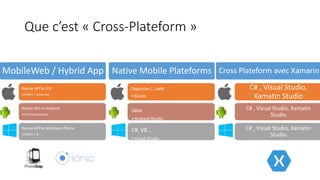
Que c’est « Cross-Plateform »
MobileWeb / Hybrid App
Native API to iOS
•HTML5 / JavaScript
Native API to Android
•HTML5/JavaScript
Native API to Windows Phone
•HTML5 / JS
Native Mobile Plateforms
Objective-C, Swift
•XCode
Java
•Android Studio
C#, VB…
•Visual Studio
Cross Plateform avec Xamarin
C# , Visual Studio,
Xamatin Studio
C# , Visual Studio, Xamatin
Studio
C# , Visual Studio, Xamatin
Studio
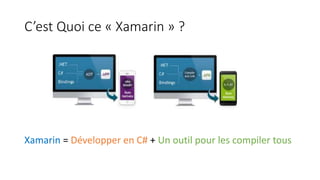
C’est Quoi ce « Xamarin » ?
Xamarin = Développer en C# + Un outil pour les compiler tous
On est où … ?
• SDK Manager ?
• AVD Manager ?
• Nuget Packages Manager ?
• Build, Deploy …
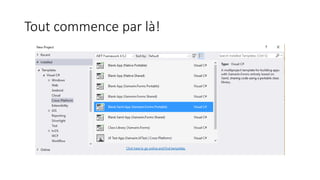
Tout commence par là!
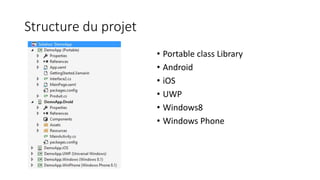
Structure du projet
• Portable class Library
• Android
• iOS
• UWP
• Windows8
• Windows Phone
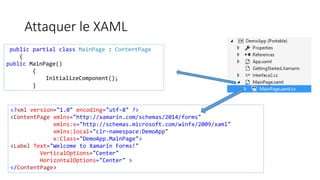
Attaquer le XAML
public partial class MainPage : ContentPage
{
public MainPage()
{
InitializeComponent();
}
<?xml version="1.0" encoding="utf-8" ?>
<ContentPage xmlns="http://xamarin.com/schemas/2014/forms"
xmlns:x="http://schemas.microsoft.com/winfx/2009/xaml"
xmlns:local="clr-namespace:DemoApp"
x:Class="DemoApp.MainPage">
<Label Text="Welcome to Xamarin Forms!"
VerticalOptions="Center"
HorizontalOptions="Center" >
</ContentPage>
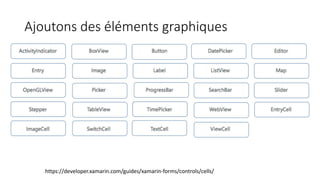
Ajoutons des éléments graphiques
https://developer.xamarin.com/guides/xamarin-forms/controls/cells/
Ajoutons un bouton à notre interface !
Testons MAINTENANT !
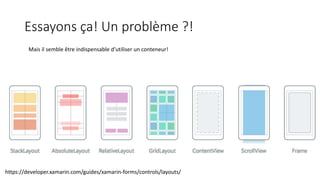
Essayons ça! Un problème ?!
Mais il semble être indispensable d’utiliser un conteneur!
https://developer.xamarin.com/guides/xamarin-forms/controls/layouts/
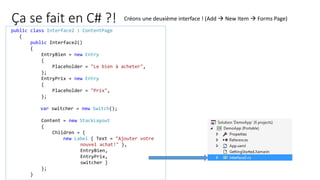
Ça se fait en C# ?!
public class Interface2 : ContentPage
{
public Interface2()
{
EntryBien = new Entry
{
Placeholder = "Le bien à acheter",
};
EntryPrix = new Entry
{
Placeholder = "Prix",
};
var switcher = new Switch();
Content = new StackLayout
{
Children = {
new Label { Text = "Ajouter votre
nouvel achat!" },
EntryBien,
EntryPrix,
switcher }
};
}
Créons une deuxième interface ! (Add  New Item  Forms Page)
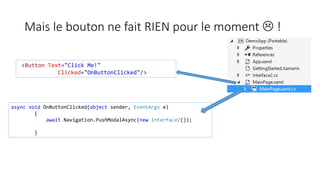
Mais le bouton ne fait RIEN pour le moment  !
<Button Text="Click Me!"
Clicked="OnButtonClicked"/>
async void OnButtonClicked(object sender, EventArgs e)
{
await Navigation.PushModalAsync(new Interface2());
}
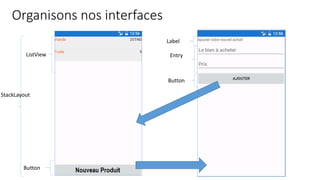
Organisons nos interfaces
ListView
Button
StackLayout
Label
Entry
Button
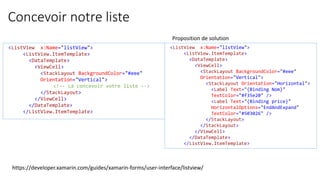
Concevoir notre liste
<ListView x:Name="listView">
<ListView.ItemTemplate>
<DataTemplate>
<ViewCell>
<StackLayout BackgroundColor="#eee"
Orientation="Vertical">
<!–- Là concevoir votre liste -->
</StackLayout>
</ViewCell>
</DataTemplate>
</ListView.ItemTemplate>
<ListView x:Name="listView">
<ListView.ItemTemplate>
<DataTemplate>
<ViewCell>
<StackLayout BackgroundColor="#eee"
Orientation="Vertical">
<StackLayout Orientation="Horizontal">
<Label Text="{Binding Nom}"
TextColor="#f35e20" />
<Label Text="{Binding price}"
HorizontalOptions="EndAndExpand"
TextColor="#503026" />
</StackLayout>
</StackLayout>
</ViewCell>
</DataTemplate>
</ListView.ItemTemplate>
Proposition de solution
https://developer.xamarin.com/guides/xamarin-forms/user-interface/listview/
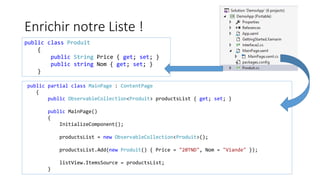
Enrichir notre Liste !
public class Produit
{
public String Price { get; set; }
public string Nom { get; set; }
}
public partial class MainPage : ContentPage
{
public ObservableCollection<Produit> productsList { get; set; }
public MainPage()
{
InitializeComponent();
productsList = new ObservableCollection<Produit>();
productsList.Add(new Produit() { Price = "20TND", Nom = "Viande" });
listView.ItemsSource = productsList;
}
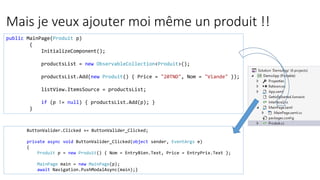
Mais je veux ajouter moi même un produit !!
public MainPage(Produit p)
{
InitializeComponent();
productsList = new ObservableCollection<Produit>();
productsList.Add(new Produit() { Price = "20TND", Nom = "Viande" });
listView.ItemsSource = productsList;
if (p != null) { productsList.Add(p); }
}
ButtonValider.Clicked += ButtonValider_Clicked;
private async void ButtonValider_Clicked(object sender, EventArgs e)
{
Produit p = new Produit() { Nom = EntryBien.Text, Price = EntryPrix.Text };
MainPage main = new MainPage(p);
await Navigation.PushModalAsync(main);}
Mais on a un projet déjà !
Liens utiles
• https://developer.xamarin.com/guides/xamarin-forms/
• https://developer.xamarin.com/guides/xamarin-forms/creating-
mobile-apps-xamarin-forms/
• https://developer.xamarin.com/guides/cross-platform/

Premiers pas avec Xamarin

  • 1.
    Mes Premiers Pasavec Xamarin Mohamed BOURAOUI Bourawi.mohamed@gmail.com
  • 2.
    Que c’est «Cross-Plateform » MobileWeb / Hybrid App Native API to iOS •HTML5 / JavaScript Native API to Android •HTML5/JavaScript Native API to Windows Phone •HTML5 / JS Native Mobile Plateforms Objective-C, Swift •XCode Java •Android Studio C#, VB… •Visual Studio Cross Plateform avec Xamarin C# , Visual Studio, Xamatin Studio C# , Visual Studio, Xamatin Studio C# , Visual Studio, Xamatin Studio
  • 3.
    C’est Quoi ce« Xamarin » ? Xamarin = Développer en C# + Un outil pour les compiler tous
  • 4.
    On est où… ? • SDK Manager ? • AVD Manager ? • Nuget Packages Manager ? • Build, Deploy …
  • 5.
  • 6.
    Structure du projet •Portable class Library • Android • iOS • UWP • Windows8 • Windows Phone
  • 7.
    Attaquer le XAML publicpartial class MainPage : ContentPage { public MainPage() { InitializeComponent(); } <?xml version="1.0" encoding="utf-8" ?> <ContentPage xmlns="http://xamarin.com/schemas/2014/forms" xmlns:x="http://schemas.microsoft.com/winfx/2009/xaml" xmlns:local="clr-namespace:DemoApp" x:Class="DemoApp.MainPage"> <Label Text="Welcome to Xamarin Forms!" VerticalOptions="Center" HorizontalOptions="Center" > </ContentPage>
  • 8.
    Ajoutons des élémentsgraphiques https://developer.xamarin.com/guides/xamarin-forms/controls/cells/
  • 9.
    Ajoutons un boutonà notre interface !
  • 10.
  • 11.
    Essayons ça! Unproblème ?! Mais il semble être indispensable d’utiliser un conteneur! https://developer.xamarin.com/guides/xamarin-forms/controls/layouts/
  • 12.
    Ça se faiten C# ?! public class Interface2 : ContentPage { public Interface2() { EntryBien = new Entry { Placeholder = "Le bien à acheter", }; EntryPrix = new Entry { Placeholder = "Prix", }; var switcher = new Switch(); Content = new StackLayout { Children = { new Label { Text = "Ajouter votre nouvel achat!" }, EntryBien, EntryPrix, switcher } }; } Créons une deuxième interface ! (Add  New Item  Forms Page)
  • 13.
    Mais le boutonne fait RIEN pour le moment  ! <Button Text="Click Me!" Clicked="OnButtonClicked"/> async void OnButtonClicked(object sender, EventArgs e) { await Navigation.PushModalAsync(new Interface2()); }
  • 14.
  • 15.
    Concevoir notre liste <ListViewx:Name="listView"> <ListView.ItemTemplate> <DataTemplate> <ViewCell> <StackLayout BackgroundColor="#eee" Orientation="Vertical"> <!–- Là concevoir votre liste --> </StackLayout> </ViewCell> </DataTemplate> </ListView.ItemTemplate> <ListView x:Name="listView"> <ListView.ItemTemplate> <DataTemplate> <ViewCell> <StackLayout BackgroundColor="#eee" Orientation="Vertical"> <StackLayout Orientation="Horizontal"> <Label Text="{Binding Nom}" TextColor="#f35e20" /> <Label Text="{Binding price}" HorizontalOptions="EndAndExpand" TextColor="#503026" /> </StackLayout> </StackLayout> </ViewCell> </DataTemplate> </ListView.ItemTemplate> Proposition de solution https://developer.xamarin.com/guides/xamarin-forms/user-interface/listview/
  • 16.
    Enrichir notre Liste! public class Produit { public String Price { get; set; } public string Nom { get; set; } } public partial class MainPage : ContentPage { public ObservableCollection<Produit> productsList { get; set; } public MainPage() { InitializeComponent(); productsList = new ObservableCollection<Produit>(); productsList.Add(new Produit() { Price = "20TND", Nom = "Viande" }); listView.ItemsSource = productsList; }
  • 17.
    Mais je veuxajouter moi même un produit !! public MainPage(Produit p) { InitializeComponent(); productsList = new ObservableCollection<Produit>(); productsList.Add(new Produit() { Price = "20TND", Nom = "Viande" }); listView.ItemsSource = productsList; if (p != null) { productsList.Add(p); } } ButtonValider.Clicked += ButtonValider_Clicked; private async void ButtonValider_Clicked(object sender, EventArgs e) { Produit p = new Produit() { Nom = EntryBien.Text, Price = EntryPrix.Text }; MainPage main = new MainPage(p); await Navigation.PushModalAsync(main);}
  • 18.
    Mais on aun projet déjà !
  • 19.
    Liens utiles • https://developer.xamarin.com/guides/xamarin-forms/ •https://developer.xamarin.com/guides/xamarin-forms/creating- mobile-apps-xamarin-forms/ • https://developer.xamarin.com/guides/cross-platform/