MONOGAMECross-Platform Native Mobile Development in Paris
Aloïs DENIEL
@aloisdeniel
07/09/2016
Technical Leader
Xamarin
Mon travail
Aloïs DENIEL
alois.deniel@orange.com
@aloisdeniel
Pourquoi ce sujet ?
Première expérience du C# de par ces technologies
Expérience différente de l’UI classique
Basé sur Xamarin
Répond à des besoins différents
Où ?
Orange Applications for Business
Rennes
Le framework
MONOGAME
Xamarin.NET DirectX OpenGL
SharpDX SDL2
Implémentation open source et
multi-plateformes du framework
de développement graphique
XNA désormais abandonné par
Microsoft. Il est principalement
utilisé pour le développement de
jeux-vidéo en 2D.
Productions reconnues
Jeux-vidéo multiplateformes
Towerfall FEZ Bastion Infinite FlightTransistor
Mercenary
Kings
Outils et APIs
MONOGAME
Xamarin / .NET
C#Visual Studio
Xamarin Studio
Monogame
Content Pipeline
PNG
WAV
MP3
Font
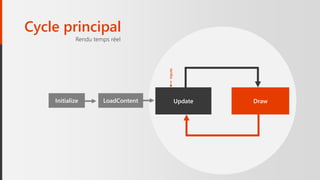
Cycle principal
DrawUpdateInitialize LoadContent
Rendu temps réel
Inputs
Cycle principal
La classe centrale : Game
public class Game : Idisposable
{
// …
protected virtual void Initialize ();
protected virtual void LoadContent ();
protected virtual void Update (GameTime time);
protected virtual void Draw (GameTime time);
}
ContentPipeline
Packaging des ressources
ContentManager
Gestionnaire de ressources
this.Content.RootDirectory = "Content";
protected override void LoadContent()
{
this.ballTexture = this.Content.Load<Texture2D>("assets");
}
protected override void LoadContent()
{
this.texture = Content.Load<Texture2D>("assets");
}
Chargement de texture
Depuis une image
protected override void Draw (GameTime gameTime)
{
graphics.GraphicsDevice.Clear(Color.Black);
spriteBatch.Begin(SpriteSortMode.Immediate);
spriteBatch.Draw(this.texture, this.position1, Color.White);
spriteBatch.Draw(this.texture, this.position2, Color.White);
spriteBatch.Draw(this.texture, this.position3, Color.White);
spriteBatch.End();
Spritebatch
Ordonnanceur de dessin
Begin
Draw
Draw
Draw
End
Tuiles
1 2
3
1 1 1 2
3
3
Portion d’image
Tuiles
var source = new Rectangle(50,0,50,50);
var destination = new Rectangle(150,0,50,50);
spriteBatch.Draw(this.tiles,
sourceRectangle: source,
destinationRectangle: destination);
Source
2
Destination
tiles.png
Portion d’image
Animations
t=1
t=2
Changement de portion
La caméra Ecran
Ecran
RotationTranslation Zoom
La caméra
Ecran Ecran
Translation
1
Matrix.CreateTranslation(-100,0,0)
Translation
La caméra
Ecran
Ecran
Translation
2
Matrix.CreateRotationZ(0.05f)
Rotation
La caméra
Ecran
Ecran
Zoom
2
Matrix.CreateScale(2)
Zoom
La caméra
Var transform = Matrix.CreateTranslation(new Vector3(-100,0,0))
* Matrix.CreateRotationZ(0.05f)
* Matrix.CreateScale(new Vector3(2,2,1));
spriteBatch.Begin(transformMatrix: transform);
Calcul matriciel
Ecran
this.font = Content.Load<SpriteFont>("font");
Polices de caractères
Chargement et affichage
spriteBatch.DrawString(this.font,"Hello World", new Vector2(20,20));
MediaPlayer
MediaPlayer.Play(song);
MediaPlayer.IsRepeating = true;
MediaPlayer.Pause();
Musiques
this.song = Content.Load<Song>("music");
SoundEffect
Son
this.jumpSound.Play(volume,pitch,pan);
this.jumpSound = Content.Load<SoundEffect>("jump");
Capter les entrées de l’utilisateur
var state = Mouse.GetState();
state.X , state.Y, state.LeftButton, state.RightButton, …
var state = Keyboard.GetState();
state.IsKeyDown(Key.A), …
var state = GamePad.GetState(PlayerIndex.One);
state.IsButtonDown(Buttons.A), state.ThumbSticks.Left, …
var state = TouchPanel.GetState();
state.First().Position, state.First().Id, state.First().Pressure, …
Gérer l’irrégularité
update draw update draw update draw
temps
dt = 50ms dt = 20ms
this.ballPosition +=
new Vector2(0, (float)gameTime.ElapsedTime.TotalSeconds * Ball.Speed)
Physique
origine
destination
théorique
destination
obstacle
collision
Collisions AABB
origine
Mouvement / Gravité
A = M * (0, 9.8)
V += A * delta
P += 0.5 * V * delta * delta
Simulation du monde
Entity/Component/System
Couramment utilisé (i.e Unity3D)
Player
int X { get; set; }
int Y { get; set; }
Texture2D Texture { get; set; }
float Health { get; set; }
void Update(int time);
void Draw();
Modèle de développement
Entity
int X { get; set; }
int Y { get; set; }
PositionComponent
float Health { get; set; }
HealthComponent
string Texture { get; set; }
Rectangle Source { get; set; }
Rectangle Destination{ get; set; }
SpriteComponent
RenderSystem RulesSystem
void Draw(); void Update(int time);
Int Identifier { get; set; }
http://goo.gl/oeYUyq
Solutions
Tiled + TiledSharp Affichage de tuiles
Entitas Entity/Component/System Framework
Farseer Moteur physique
Monocle Engine Moteur complet (par Matt Thorson)
Frameworks
Autres solutions techniques
Unity Solution payante
https://github.com/aloisdeniel/awesome-monogame
Lancez-vous!
Architecture différente
Enrichissant car combinaison de plusieurs domaines : mathématiques, physique, dessin, audio,
vidéo, code
Partir d’APIs très simples, pour construire des choses de plus en plus complexes
Soyez créatif Commencez simple
Merci
N’hésitez pas à me contacter
@aloisdeniel
alois.deniel@orange.com

Monogame Introduction (FR)