




Le 11mai 2010
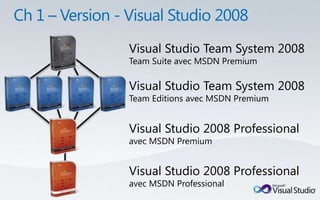
Visual Studio Team System 2008
Team Suite avec MSDN Premium

Visual Studio Team System 2008
Team Editions avec MSDN Premium


Visual Studio 2008 Professional
avec MSDN Premium


Visual Studio 2008 Professional
avec MSDN Professional
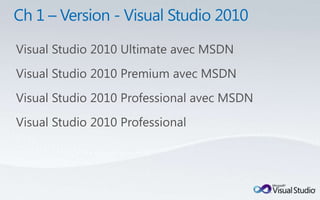
Visual Studio 2010 Ultimate avec MSDN
Visual Studio 2010 Premium avec MSDN
Visual Studio 2010 Professional avec MSDN
Visual Studio 2010 Professional
Visual Studio 2010          IntelliTrace™               Gestion des cas de test
Ultimate               Enreg. et lecture des tests            Test manuel
                           Explorateur                    Modélisation UML
                          d'architecture
                     Concepteur de classe logique       Diagramme de couche
                            Test de charge                      Test Web
Visual Studio 2010   Automatisation des tests           Analyse d'impact surles tests
                     de l'interface utilisateur
                      Profilagedes performances        Analyse de code statique
Premium
                       Couverture du code                  Mesures de code
                     Gestion des modifsde la BDD       Déploiement de la base
                      Test unitaire de la base              de données
                                                       Génération de données
Visual Studio 2010       Outilsdonnées
                            de Silverlight                      de test
                                                        Développement multicœur
Professional          DéveloppementSharePoint          Dév. « cloud computing »
                      Développement Web                 DéveloppementWindows
                      Génération selon l'utilisation    Développement Office
                       Nouvel éditeur WPF                 IDE personnalisable
Visual Studio
Test Elements 2010       Gestion des cas de test                  Test manuel
avec MSDN                  Enreg. et lecture des tests     Config. de la gestion du labo


Visual Studio                           Install./Suppr. de l'env. virtuel
Team Lab Management 2010                  Environnement du modèle
                                        Environnement du point de contrôle


Visual Studio                                                Contrôle de version
Team Foundation Server 2010                                 Automatisation de version
                              Archivage protégé              Création de rapports
                        Visualisation par branche          Gestion des cas de test
                         Outils de planification Agile        Portail collaboratif
Maturité des
Efficacité                        Extensibilité     Actualité
                 technologies

                    Jquery (
 IDE en WPF         ASP.NET)                          Multicore
                                        IDE
                                   customization
                     Ajax lib
Box selection
                                                     Test unitaire

                      WWF
Call hierarchy
                                                    Test-driven dev
                      WCF            Managed
Code cleaner                        Extensibility
                                    Framework          Cloud
                   WPF ( multi-                      computing (
Langages Adv.        touch)                            Azure)
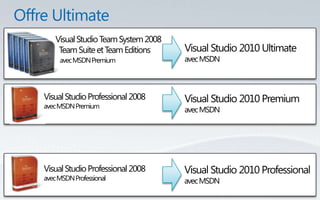
Visual Studio Team System 2008
     Team Suite et Team Editions     Visual Studio 2010 Ultimate
     avec MSDN Premium               avec MSDN


Visual Studio Professional 2008      Visual Studio 2010 Premium
avec MSDN Premium
                                     avec MSDN


Visual Studio Professional 2008      Visual Studio 2010 Professional
avec MSDN Professional               avec MSDN
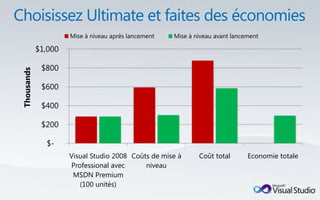
Mise à niveau après lancement   Mise à niveau avant lancement

            $1,000

             $800
Thousands


             $600

             $400

             $200

              $-
                     Visual Studio 2008 Coûts de mise à      Coût total       Economie totale
                     Professional avec      niveau
                      MSDN Premium
                        (100 unités)
© 2009 Microsoft Corporation. Tous droits réservés. Microsoft, Visual Studio, le logo Visual Studio et [liste des autres marques déposées référencées] sont des marques déposées du groupe de sociétés Microsoft.

Les informations contenues dans le présent document sont fournies à titre informatif uniquement et représentent le point de vue actuel de Microsoft Corporation à la date de cette présentation. Dans la mesure où
Microsoft doit s'adapter aux conditions fluctuantes du marché, ces informations ne sauraient être interprétées comme un engagement de la part de Microsoft, et Microsoft ne garantit en aucun cas l'exactitude des
                                                                             informations fournies après la date de cette présentation.
                               MICROSOFT N’ACCORDE AUCUNE GARANTIE, EXPLICITE, IMPLICITE OU LÉGALE QUANT AUX INFORMATIONS FIGURANT DANS CETTE PRÉSENTATION.

Visual Studio 2010

  • 1.
  • 5.
    Visual Studio TeamSystem 2008 Team Suite avec MSDN Premium Visual Studio Team System 2008 Team Editions avec MSDN Premium Visual Studio 2008 Professional avec MSDN Premium Visual Studio 2008 Professional avec MSDN Professional
  • 6.
    Visual Studio 2010Ultimate avec MSDN Visual Studio 2010 Premium avec MSDN Visual Studio 2010 Professional avec MSDN Visual Studio 2010 Professional
  • 10.
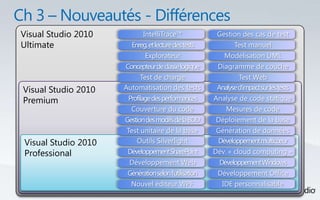
    Visual Studio 2010 IntelliTrace™ Gestion des cas de test Ultimate Enreg. et lecture des tests Test manuel Explorateur Modélisation UML d'architecture Concepteur de classe logique Diagramme de couche Test de charge Test Web Visual Studio 2010 Automatisation des tests Analyse d'impact surles tests de l'interface utilisateur Profilagedes performances Analyse de code statique Premium Couverture du code Mesures de code Gestion des modifsde la BDD Déploiement de la base Test unitaire de la base de données Génération de données Visual Studio 2010 Outilsdonnées de Silverlight de test Développement multicœur Professional DéveloppementSharePoint Dév. « cloud computing » Développement Web DéveloppementWindows Génération selon l'utilisation Développement Office Nouvel éditeur WPF IDE personnalisable
  • 11.
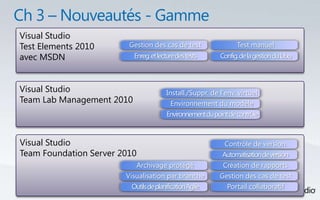
    Visual Studio Test Elements2010 Gestion des cas de test Test manuel avec MSDN Enreg. et lecture des tests Config. de la gestion du labo Visual Studio Install./Suppr. de l'env. virtuel Team Lab Management 2010 Environnement du modèle Environnement du point de contrôle Visual Studio Contrôle de version Team Foundation Server 2010 Automatisation de version Archivage protégé Création de rapports Visualisation par branche Gestion des cas de test Outils de planification Agile Portail collaboratif
  • 13.
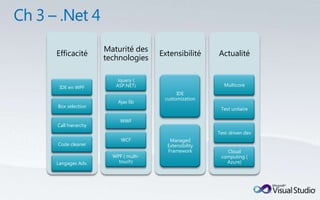
    Maturité des Efficacité Extensibilité Actualité technologies Jquery ( IDE en WPF ASP.NET) Multicore IDE customization Ajax lib Box selection Test unitaire WWF Call hierarchy Test-driven dev WCF Managed Code cleaner Extensibility Framework Cloud WPF ( multi- computing ( Langages Adv. touch) Azure)
  • 17.
    Visual Studio TeamSystem 2008 Team Suite et Team Editions Visual Studio 2010 Ultimate avec MSDN Premium avec MSDN Visual Studio Professional 2008 Visual Studio 2010 Premium avec MSDN Premium avec MSDN Visual Studio Professional 2008 Visual Studio 2010 Professional avec MSDN Professional avec MSDN
  • 18.
    Mise à niveauaprès lancement Mise à niveau avant lancement $1,000 $800 Thousands $600 $400 $200 $- Visual Studio 2008 Coûts de mise à Coût total Economie totale Professional avec niveau MSDN Premium (100 unités)
  • 19.
    © 2009 MicrosoftCorporation. Tous droits réservés. Microsoft, Visual Studio, le logo Visual Studio et [liste des autres marques déposées référencées] sont des marques déposées du groupe de sociétés Microsoft. Les informations contenues dans le présent document sont fournies à titre informatif uniquement et représentent le point de vue actuel de Microsoft Corporation à la date de cette présentation. Dans la mesure où Microsoft doit s'adapter aux conditions fluctuantes du marché, ces informations ne sauraient être interprétées comme un engagement de la part de Microsoft, et Microsoft ne garantit en aucun cas l'exactitude des informations fournies après la date de cette présentation. MICROSOFT N’ACCORDE AUCUNE GARANTIE, EXPLICITE, IMPLICITE OU LÉGALE QUANT AUX INFORMATIONS FIGURANT DANS CETTE PRÉSENTATION.

Notes de l'éditeur

  • #5 Of course, a new Visual Studio would be incomplete without a new MSDN.(as an aside: customers with Volume Licensing Agreements get MSDN buy purchasing Software Assurance coverage for their Visual Studio purchases).
  • #6 Today there are seven (7) different versions of Visual Studio with MSDN – not including the Express editions. [CLICK]
  • #7 With the release of Visual Studio 2010 we are moving to a nested-model, with three variations – good, better and best.[CLICK]Visual Studio 2010 Professional with or without MSDN. essential tool for basic development tasks to assist developers in implementing their ideas easily. added capabilities for SharePoint and Cloud development, among others.[CLICK]Visual Studio 2010 Premium with MSDN. - complete toolset for developers to deliver scalable, high quality applications, and introduces capabilities previously associated with our Visual Studio Team System products, including offline database development and static code analysis, as well as new capabilities including Test Impact Analysis and Coded UI Testing.[CLICK]Visual Studio 2010 Ultimate. ALM application lifecycle management tools for teams to ensure quality results from design to deployment.IntelliTrace(the new historical debugger), architecture tools, testing tools, and everything in Premium and Professional.
  • #10 I’ve told you about the simplification of the Visual Studio 2010 product line, and about the new value coming in MSDN. Now let me tell you about a special offer we have to help you move from Visual Studio 2008 to Visual Studio 2010.
  • #11 NABILplease go to www.microsoft.com.vstudio.
  • #12 NABILThere are some additional products in the Visual Studio 2010 family.Team Foundation Server 2010 is the center of gravity – the hub for a development team. version control repository, a test case management database, a work item tracking and change management system, support of build automation and a comprehensive reporting solution built on SQL Server Reporting Services. Some of the new capabilities of Team Foundation Server include support for gated check-in, branch visualization and drag-n-drop merge, and new Agile Planning tools.[CLICK]Team Lab Management 2010 enables teams to configure and manage virtual lab environment.Team Lab Management works with System Center Virtual Machine Manage (SCVMM) enabling teams to create environment templates, provision ring-fenced environments, and checkpoint those environments. Those checkpoints can be attached to bugs filed using the Test and Lab Manager enabling the person fixing the bug to open the environment right to the appropriate point in the application flow.[CLICK]Visual Studio Test Elements 2010 is the essential tool for anyone engaging in test case management or manual test execution in the development lifecycle. This tool is designed for the generalist tester – someone who tests applications, but who is not responsible for writing code. This product includes Microsoft Test and Lab Manager (the Visual Studio IDE is not included). [CLICK]
  • #16 I’ve told you about the simplification of the Visual Studio 2010 product line, and about the new value coming in MSDN. Now let me tell you about a special offer we have to help you move from Visual Studio 2008 to Visual Studio 2010.
  • #17 I’ve told you about the simplification of the Visual Studio 2010 product line, and about the new value coming in MSDN. Now let me tell you about a special offer we have to help you move from Visual Studio 2008 to Visual Studio 2010.
  • #18 With The Ultimate Offer, if you have an MSDN Premium subscription (software assurance coverage for those of you with Volume Licensing agreements) when Visual Studio 2010 launches, we will move you up one level in the product line. For example, if you have any version of Visual Studio Team System 2008 with MSDN Premium, when Visual Studio 2010 launches you will move you up to Visual Studio 2010 Ultimate with MSDN. If you have Visual Studio 2008 Professional with MSDN Premium you will move you up to Visual Studio 2010 Premium with MSDN.You don’t have to do anything. As long as your MSDN Premium subscription is current when Visual Studio 2010 launches, you will be moved up. There is no additional cost until your MSDN Subscription is up for renewal. At that time you can decide if you want to continue with the new higher-level product, and begin paying the new renewal rate, or renew-down to the next lower-level product and continue paying the rate you are now.