Stream processing et SQL
Bruno Bonnin
@_bruno_b_
#web2day
About me
GDPR
Data Governance
Data Fabric
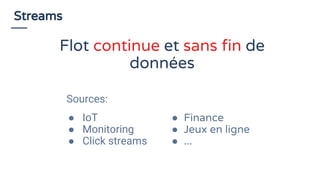
Streams
Sources:
● IoT
● Monitoring
● Click streams
● Finance
● Jeux en ligne
● ...
Flot continue et sans fin de
données
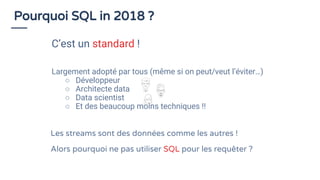
Largement adopté par tous (même si on peut/veut l’éviter…)
○ Développeur
○ Architecte data
○ Data scientist
○ Et des beaucoup moins techniques !!
Pourquoi SQL in 2018 ?
C’est un standard !
Les streams sont des données comme les autres !
Alors pourquoi ne pas utiliser SQL pour les requêter ?
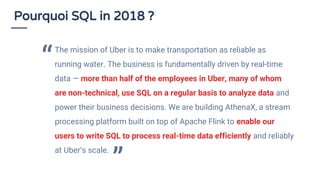
Pourquoi SQL in 2018 ?
The mission of Uber is to make transportation as reliable as
running water. The business is fundamentally driven by real-time
data — more than half of the employees in Uber, many of whom
are non-technical, use SQL on a regular basis to analyze data and
power their business decisions. We are building AthenaX, a stream
processing platform built on top of Apache Flink to enable our
users to write SQL to process real-time data efficiently and reliably
at Uber’s scale.
“
”
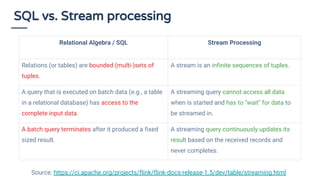
SQL vs. Stream processing
Relational Algebra / SQL Stream Processing
Relations (or tables) are bounded (multi-)sets of
tuples.
A stream is an infinite sequences of tuples.
A query that is executed on batch data (e.g., a table
in a relational database) has access to the
complete input data.
A streaming query cannot access all data
when is started and has to "wait" for data to
be streamed in.
A batch query terminates after it produced a fixed
sized result.
A streaming query continuously updates its
result based on the received records and
never completes.
Source: https://ci.apache.org/projects/flink/flink-docs-release-1.5/dev/table/streaming.html
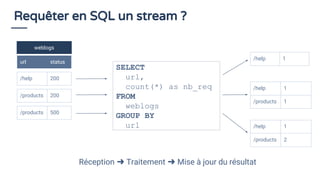
Requêter en SQL un stream ?
weblogs
url status
/help 200
SELECT
url,
count(*) as nb_req
FROM
weblogs
GROUP BY
url
/help 1
/help 1
/products 1
/help 1
/products 2
/products 200
/products 500
Réception ➜ Traitement ➜ Mise à jour du résultat
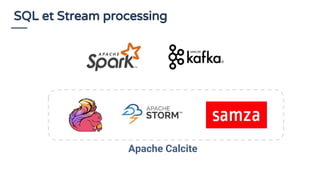
SQL et Stream processing
Apache Calcite
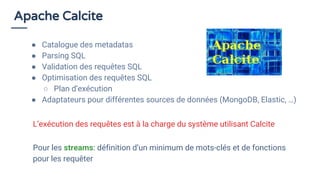
Apache Calcite
● Catalogue des metadatas
● Parsing SQL
● Validation des requêtes SQL
● Optimisation des requêtes SQL
○ Plan d’exécution
● Adaptateurs pour différentes sources de données (MongoDB, Elastic, …)
Pour les streams: définition d’un minimum de mots-clés et de fonctions
pour les requêter
L’exécution des requêtes est à la charge du système utilisant Calcite
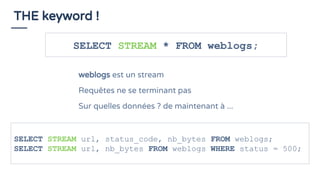
THE keyword !
SELECT STREAM * FROM weblogs;
weblogs est un stream
Requêtes ne se terminant pas
Sur quelles données ? de maintenant à ...
SELECT STREAM url, status_code, nb_bytes FROM weblogs;
SELECT STREAM url, nb_bytes FROM weblogs WHERE status = 500;
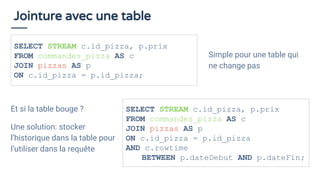
Jointure avec une table
Et si la table bouge ?
Une solution: stocker
l’historique dans la table pour
l’utiliser dans la requête
SELECT STREAM c.id_pizza, p.prix
FROM commandes_pizza AS c
JOIN pizzas AS p
ON c.id_pizza = p.id_pizza;
Simple pour une table qui
ne change pas
SELECT STREAM c.id_pizza, p.prix
FROM commandes_pizza AS c
JOIN pizzas AS p
ON c.id_pizza = p.id_pizza
AND c.rowtime
BETWEEN p.dateDebut AND p.dateFin;
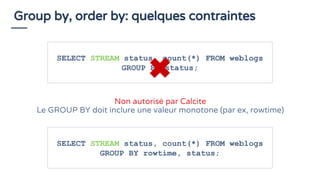
Group by, order by: quelques contraintes
SELECT STREAM status, count(*) FROM weblogs
GROUP BY status;
Non autorisé par Calcite
Le GROUP BY doit inclure une valeur monotone (par ex, rowtime)
SELECT STREAM status, count(*) FROM weblogs
GROUP BY rowtime, status;
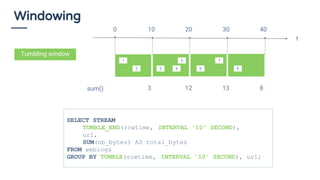
Windowing
sum() 3 12 13 8
Tumbling window
SELECT STREAM
TUMBLE_END(rowtime, INTERVAL '10' SECOND),
url,
SUM(nb_bytes) AS total_bytes
FROM weblogs
GROUP BY TUMBLE(rowtime, INTERVAL '10' SECOND), url;
1
2 3
5
4 6
7
8
t
0 10 20 30 40
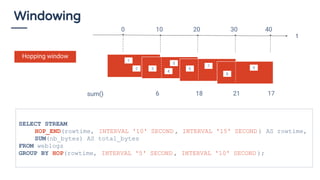
Windowing
Hopping window
SELECT STREAM
HOP_END(rowtime, INTERVAL '10' SECOND , INTERVAL '15' SECOND ) AS rowtime,
SUM(nb_bytes) AS total_bytes
FROM weblogs
GROUP BY HOP(rowtime, INTERVAL '5' SECOND , INTERVAL '10' SECOND );
sum() 6 18 21 17
1
2 3
5
4
6
7
8
t
0 10 20 30 40
9
Démo
https://github.com/bbonnin/talk-stream-processing-et-sql
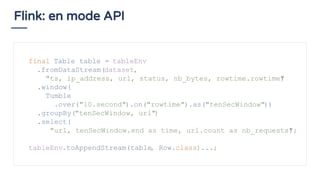
Flink: en mode API
final Table table = tableEnv
.fromDataStream(dataset,
"ts, ip_address, url, status, nb_bytes, rowtime.rowtime")
.window(
Tumble
.over("10.second").on("rowtime").as("tenSecWindow"))
.groupBy("tenSecWindow, url")
.select(
"url, tenSecWindow.end as time, url.count as nb_requests");
tableEnv.toAppendStream(table, Row.class)...;
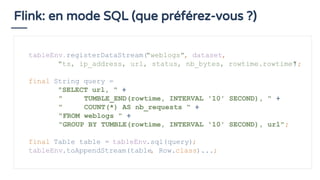
Flink: en mode SQL (que préférez-vous ?)
tableEnv.registerDataStream("weblogs", dataset,
"ts, ip_address, url, status, nb_bytes, rowtime.rowtime");
final String query =
"SELECT url, " +
" TUMBLE_END(rowtime, INTERVAL '10' SECOND), " +
" COUNT(*) AS nb_requests " +
"FROM weblogs " +
"GROUP BY TUMBLE(rowtime, INTERVAL '10' SECOND), url";
final Table table = tableEnv.sql(query);
tableEnv.toAppendStream(table, Row.class)...;
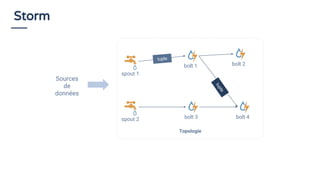
Topologie
spout 1
bolt 1
spout 2 bolt 3 bolt 4
bolt 2
Storm
tuple
tuple
Sources
de
données
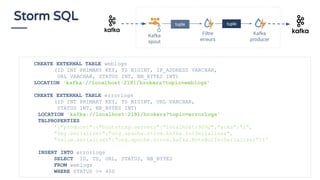
Storm SQL
CREATE EXTERNAL TABLE weblogs
(ID INT PRIMARY KEY, TS BIGINT, IP_ADDRESS VARCHAR,
URL VARCHAR, STATUS INT, NB_BYTES INT)
LOCATION 'kafka://localhost:2181/brokers?topic=weblogs'
CREATE EXTERNAL TABLE errorlogs
(ID INT PRIMARY KEY, TS BIGINT, URL VARCHAR,
STATUS INT, NB_BYTES INT)
LOCATION 'kafka://localhost:2181/brokers?topic=errorlogs'
TBLPROPERTIES
'{"producer":{"bootstrap.servers":"localhost:9092","acks":"1",
"key.serializer":"org.apache.storm.kafka.IntSerializer",
"value.serializer":"org.apache.storm.kafka.ByteBufferSerializer"}}'
INSERT INTO errorlogs
SELECT ID, TS, URL, STATUS, NB_BYTES
FROM weblogs
WHERE STATUS >= 400
Kafka
spout
Filtre
erreurs
Kafka
producer
tupletuple
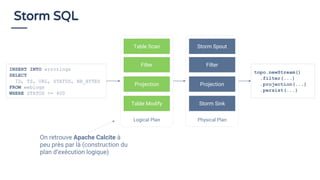
Storm SQL
Logical Plan
Table Scan
Filter
Projection
Table Modify
Physical Plan
Storm Spout
Filter
Projection
Storm Sink
INSERT INTO errorlogs
SELECT
ID, TS, URL, STATUS, NB_BYTES
FROM weblogs
WHERE STATUS >= 400
topo.newStream()
.filter(...)
.projection(...)
.persist(...)
On retrouve Apache Calcite à
peu près par là (construction du
plan d’exécution logique)
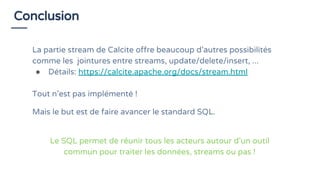
Conclusion
La partie stream de Calcite offre beaucoup d’autres possibilités
comme les jointures entre streams, update/delete/insert, ...
● Détails: https://calcite.apache.org/docs/stream.html
Tout n’est pas implémenté !
Mais le but est de faire avancer le standard SQL.
Le SQL permet de réunir tous les acteurs autour d’un outil
commun pour traiter les données, streams ou pas !
Merci !
@_bruno_b_
#web2day

Stream processing et SQL

  • 1.
    Stream processing etSQL Bruno Bonnin @_bruno_b_ #web2day
  • 2.
  • 3.
  • 4.
    Streams Sources: ● IoT ● Monitoring ●Click streams ● Finance ● Jeux en ligne ● ... Flot continue et sans fin de données
  • 5.
    Largement adopté partous (même si on peut/veut l’éviter…) ○ Développeur ○ Architecte data ○ Data scientist ○ Et des beaucoup moins techniques !! Pourquoi SQL in 2018 ? C’est un standard ! Les streams sont des données comme les autres ! Alors pourquoi ne pas utiliser SQL pour les requêter ?
  • 6.
    Pourquoi SQL in2018 ? The mission of Uber is to make transportation as reliable as running water. The business is fundamentally driven by real-time data — more than half of the employees in Uber, many of whom are non-technical, use SQL on a regular basis to analyze data and power their business decisions. We are building AthenaX, a stream processing platform built on top of Apache Flink to enable our users to write SQL to process real-time data efficiently and reliably at Uber’s scale. “ ”
  • 7.
    SQL vs. Streamprocessing Relational Algebra / SQL Stream Processing Relations (or tables) are bounded (multi-)sets of tuples. A stream is an infinite sequences of tuples. A query that is executed on batch data (e.g., a table in a relational database) has access to the complete input data. A streaming query cannot access all data when is started and has to "wait" for data to be streamed in. A batch query terminates after it produced a fixed sized result. A streaming query continuously updates its result based on the received records and never completes. Source: https://ci.apache.org/projects/flink/flink-docs-release-1.5/dev/table/streaming.html
  • 8.
    Requêter en SQLun stream ? weblogs url status /help 200 SELECT url, count(*) as nb_req FROM weblogs GROUP BY url /help 1 /help 1 /products 1 /help 1 /products 2 /products 200 /products 500 Réception ➜ Traitement ➜ Mise à jour du résultat
  • 9.
    SQL et Streamprocessing Apache Calcite
  • 10.
    Apache Calcite ● Cataloguedes metadatas ● Parsing SQL ● Validation des requêtes SQL ● Optimisation des requêtes SQL ○ Plan d’exécution ● Adaptateurs pour différentes sources de données (MongoDB, Elastic, …) Pour les streams: définition d’un minimum de mots-clés et de fonctions pour les requêter L’exécution des requêtes est à la charge du système utilisant Calcite
  • 11.
    THE keyword ! SELECTSTREAM * FROM weblogs; weblogs est un stream Requêtes ne se terminant pas Sur quelles données ? de maintenant à ... SELECT STREAM url, status_code, nb_bytes FROM weblogs; SELECT STREAM url, nb_bytes FROM weblogs WHERE status = 500;
  • 12.
    Jointure avec unetable Et si la table bouge ? Une solution: stocker l’historique dans la table pour l’utiliser dans la requête SELECT STREAM c.id_pizza, p.prix FROM commandes_pizza AS c JOIN pizzas AS p ON c.id_pizza = p.id_pizza; Simple pour une table qui ne change pas SELECT STREAM c.id_pizza, p.prix FROM commandes_pizza AS c JOIN pizzas AS p ON c.id_pizza = p.id_pizza AND c.rowtime BETWEEN p.dateDebut AND p.dateFin;
  • 13.
    Group by, orderby: quelques contraintes SELECT STREAM status, count(*) FROM weblogs GROUP BY status; Non autorisé par Calcite Le GROUP BY doit inclure une valeur monotone (par ex, rowtime) SELECT STREAM status, count(*) FROM weblogs GROUP BY rowtime, status;
  • 14.
    Windowing sum() 3 1213 8 Tumbling window SELECT STREAM TUMBLE_END(rowtime, INTERVAL '10' SECOND), url, SUM(nb_bytes) AS total_bytes FROM weblogs GROUP BY TUMBLE(rowtime, INTERVAL '10' SECOND), url; 1 2 3 5 4 6 7 8 t 0 10 20 30 40
  • 15.
    Windowing Hopping window SELECT STREAM HOP_END(rowtime,INTERVAL '10' SECOND , INTERVAL '15' SECOND ) AS rowtime, SUM(nb_bytes) AS total_bytes FROM weblogs GROUP BY HOP(rowtime, INTERVAL '5' SECOND , INTERVAL '10' SECOND ); sum() 6 18 21 17 1 2 3 5 4 6 7 8 t 0 10 20 30 40 9
  • 16.
  • 17.
    Flink: en modeAPI final Table table = tableEnv .fromDataStream(dataset, "ts, ip_address, url, status, nb_bytes, rowtime.rowtime") .window( Tumble .over("10.second").on("rowtime").as("tenSecWindow")) .groupBy("tenSecWindow, url") .select( "url, tenSecWindow.end as time, url.count as nb_requests"); tableEnv.toAppendStream(table, Row.class)...;
  • 18.
    Flink: en modeSQL (que préférez-vous ?) tableEnv.registerDataStream("weblogs", dataset, "ts, ip_address, url, status, nb_bytes, rowtime.rowtime"); final String query = "SELECT url, " + " TUMBLE_END(rowtime, INTERVAL '10' SECOND), " + " COUNT(*) AS nb_requests " + "FROM weblogs " + "GROUP BY TUMBLE(rowtime, INTERVAL '10' SECOND), url"; final Table table = tableEnv.sql(query); tableEnv.toAppendStream(table, Row.class)...;
  • 19.
    Topologie spout 1 bolt 1 spout2 bolt 3 bolt 4 bolt 2 Storm tuple tuple Sources de données
  • 20.
    Storm SQL CREATE EXTERNALTABLE weblogs (ID INT PRIMARY KEY, TS BIGINT, IP_ADDRESS VARCHAR, URL VARCHAR, STATUS INT, NB_BYTES INT) LOCATION 'kafka://localhost:2181/brokers?topic=weblogs' CREATE EXTERNAL TABLE errorlogs (ID INT PRIMARY KEY, TS BIGINT, URL VARCHAR, STATUS INT, NB_BYTES INT) LOCATION 'kafka://localhost:2181/brokers?topic=errorlogs' TBLPROPERTIES '{"producer":{"bootstrap.servers":"localhost:9092","acks":"1", "key.serializer":"org.apache.storm.kafka.IntSerializer", "value.serializer":"org.apache.storm.kafka.ByteBufferSerializer"}}' INSERT INTO errorlogs SELECT ID, TS, URL, STATUS, NB_BYTES FROM weblogs WHERE STATUS >= 400 Kafka spout Filtre erreurs Kafka producer tupletuple
  • 21.
    Storm SQL Logical Plan TableScan Filter Projection Table Modify Physical Plan Storm Spout Filter Projection Storm Sink INSERT INTO errorlogs SELECT ID, TS, URL, STATUS, NB_BYTES FROM weblogs WHERE STATUS >= 400 topo.newStream() .filter(...) .projection(...) .persist(...) On retrouve Apache Calcite à peu près par là (construction du plan d’exécution logique)
  • 22.
    Conclusion La partie streamde Calcite offre beaucoup d’autres possibilités comme les jointures entre streams, update/delete/insert, ... ● Détails: https://calcite.apache.org/docs/stream.html Tout n’est pas implémenté ! Mais le but est de faire avancer le standard SQL. Le SQL permet de réunir tous les acteurs autour d’un outil commun pour traiter les données, streams ou pas !
  • 23.