
























































Formation
Autodesk Revit 2018
L'essentiel
Une formation
Alexandre BLONDEAU
Une formation
Rappel cursus Revit
Une formation
Introduction
1. Découverte de Revit
2. Nouveau Projet
3. Modélisation des Murs
4. Modélisation du Sol
5. Bibliothèque de famille RFA
6. Modélisation de toiture
7. Les pièces dans un projet Revit
8. La documentation de projet
9. La mise en page et l'impression
Conclusion
Plan de la formation
Une formation
Public concerné
Architectes
Assistants d’Architectes
Dessinateur – Projeteur
Chargés de Projets
Présentation du projet
Une formation
Alexandre BLONDEAU
Une formation
Plan
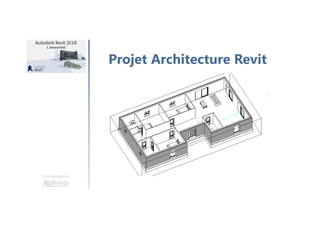
Projet Architecture Revit
Les outils nécessaires
Démo en live
Organisation des fichiers sources
Une formation
Projet Architecture Revit
Une formation
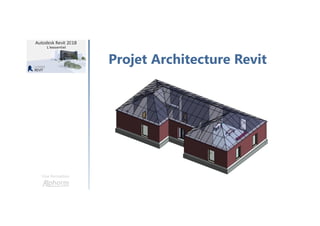
Projet Architecture Revit
Une formation
Présentation des outils
Logiciel Autodesk Revit
Une formation
Introduction
1. Découverte de Revit
2. Nouveau Projet
3. Modélisation des Murs
4. Modélisation du Sol
5. Bibliothèque de famille RFA
6. Modélisation de toiture
7. Les pièces dans un projet Revit
8. La documentation de projet
9. La mise en page et l'impression
Conclusion
Plan de la formation
La page d'accueil de Revit
Une formation
Alexandre BLONDEAU
Merci
L'interface utilisateur
Une formation
Alexandre BLONDEAU
Merci
Paramétrage des options
Une formation
Alexandre BLONDEAU
Merci
Une formation
Public concerné
Architectes
Assistants d’Architectes
Dessinateur – Projeteur
Chargés de Projets
Merci
Démarrer un projet
avec un gabarit
Une formation
Alexandre BLONDEAU
Merci
Placement des niveaux
Une formation
Alexandre BLONDEAU
Merci
Création des quadrillages
Une formation
Alexandre BLONDEAU
Création des coupes
Une formation
Alexandre BLONDEAU
Merci
Configuration d'un mur
Une formation
Alexandre BLONDEAU
Merci
Création d'un mur
Une formation
Alexandre BLONDEAU
Merci
Les options de mur
Une formation
Alexandre BLONDEAU
Présentation du projet
Une formation
Alexandre BLONDEAU
Edition d'un mur
Une formation
Alexandre BLONDEAU
Merci
Configuration d'un sol
Une formation
Alexandre BLONDEAU
Merci
Création d'un sol
Une formation
Alexandre BLONDEAU
Merci
Une formation
Plan
Projet Architecture Revit
Les outils nécessaires
Démo en live
Organisation des fichiers sources
Merci
Attachement des murs au sol
Une formation
Alexandre BLONDEAU
Merci
Chargement des familles
Une formation
Alexandre BLONDEAU
Merci
Placement des familles
de portes et fenêtres
Une formation
Alexandre BLONDEAU
Une formation
Projet Architecture Revit
Placement des familles de
composants d'architecture
Une formation
Alexandre BLONDEAU
Merci
Configuration d'un toit
Une formation
Alexandre BLONDEAU
Merci
Création d'un toit par tracé
Une formation
Alexandre BLONDEAU
Merci
Création des pièces
Une formation
Alexandre BLONDEAU
Merci
Une formation
Projet Architecture Revit
Merci
Les propriétés de pièce
Une formation
Alexandre BLONDEAU
Merci
Duplication des vues
Une formation
Alexandre BLONDEAU
Merci
Création des vues de détail
Une formation
Alexandre BLONDEAU
Merci
Création des vues 3D
Une formation
Alexandre BLONDEAU
Une formation
Présentation des outils
Logiciel Autodesk Revit
Création et gestion d'un
tableau de nomenclature
Une formation
Alexandre BLONDEAU
Merci
La cotation dans les vues
Une formation
Alexandre BLONDEAU
Merci
Etiquetage des éléments
Une formation
Alexandre BLONDEAU
Merci
Merci
Merci
Documentation
d'un cartouche
Une formation
Alexandre BLONDEAU
Merci
La mise en page des vues
Une formation
Alexandre BLONDEAU
La page d'accueil de Revit
Une formation
Alexandre BLONDEAU
Export en DWG et IFC
Une formation
Alexandre BLONDEAU
Merci
Conclusion
Une formation
Alexandre BLONDEAU
Une formation
Bilan
1. Découverte de Revit
2. Nouveau Projet
3. Modélisation des Murs
4. Modélisation du Sol
5. Bibliothèque de famille RFA
6. Modélisation de toiture
7. Les pièces dans un projet Revit
8. La documentation de projet
9. La mise en page et l'impression
Une formation
Prochaine formation
Alphorm.com Formation Autodesk Revit 2018 : L'essentiel

Alphorm.com Formation Autodesk Revit 2018 : L'essentiel