







































































Formation
HTML et CSS
Le Guide du Débutant
Une formation
Carl BRISON
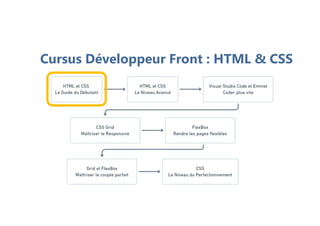
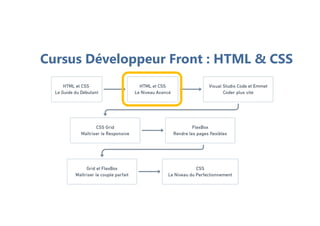
Cursus Développeur Front : HTML & CSS
Une formation
Plan de la formation
Introduction
1. Introduction au langage HTML
2. Notre premier code
3. La partie BODY
4. Les listes
5. Les liens
6. Les images
7. Les tableaux
8. Les formulaires
9. Les balises sémantiques
10. Introduction au langage CSS
11. Les sélecteurs de base
12. Manipulation des boîtes HTML
13. Manipulation de la fenêtre du navigateur
14. Les médias
15. Manipulation des couleurs avec CSS
Conclusion
Une formation
Public concerné
Toute personne désireuse d’apprendre
à concevoir un site internet.
Etudiants débutants en développement web.
Une formation
Connaissances requises
Aucun prérequis demandé.
ooooooo
Présentation
du langage HTML
Une formation
Carl BRISON
Ecrire et interpréter
du HTML
Une formation
Carl BRISON
Une formation
Une formation
Une formation
Une formation
Une formation
Une formation
Une formation
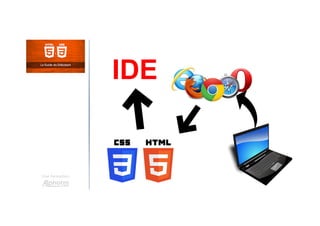
IDE
Composition d'une balise
Une formation
Carl BRISON
Imbrication
des balises HTML
Une formation
Carl BRISON
Editeur de texte
Une formation
Carl BRISON
Une formation
Visual Studio Code
Structure de base
d'une page web
Une formation
Carl BRISON
Notre première page web
Une formation
Carl BRISON
Zoom sur l'entête
Une formation
Carl BRISON
Langue de la page
Une formation
Carl BRISON
Les titres
Une formation
Carl BRISON
Les caractères spéciaux
Une formation
Carl BRISON
Les commentaires
Une formation
Carl BRISON
Les espaces
Une formation
Carl BRISON
Les sauts de ligne
Une formation
Carl BRISON
Restitution du code source
Une formation
Carl BRISON
Le formatage
Une formation
Carl BRISON
Séparateur horizontale
Une formation
Carl BRISON
Documentation
Une formation
Carl BRISON
Les listes non ordonnées
Une formation
Carl BRISON
Les listes ordonnées
Une formation
Carl BRISON
Les listes imbriquées
Une formation
Carl BRISON
Les listes : Application
Une formation
Carl BRISON
Les liens internes
Une formation
Carl BRISON
Les liens internes
complexes
Une formation
Carl BRISON
Les liens externes
Une formation
Carl BRISON
Les liens ancres
Une formation
Carl BRISON
Autres types de lien
Une formation
Carl BRISON
Insérer une image
Une formation
Carl BRISON
Les différentes extensions
Une formation
Carl BRISON
La taille des images
Une formation
Carl BRISON
Création d'un tableau
Une formation
Carl BRISON
Fusion de lignes
Une formation
Carl BRISON
Fusion de colonnes
Une formation
Carl BRISON
Entête et légende
Une formation
Carl BRISON
Définir des zones
Une formation
Carl BRISON
Les bases
du formulaire HTML
Une formation
Carl BRISON
Une formation
La balise FORM et ses attributs
Le champ INPUT et ses attributs
La balise LABEL
La balise TEXTAREA
Le bouton de soumission
Plan
Les autres types
de champ input
Une formation
Carl BRISON
Une formation
Le champ de type email
Le champ de type password
Le champ de type date
Le champ de type url
Le champ de type number
Plan
Les boutons radios
Une formation
Carl BRISON
Les cases à cocher
Une formation
Carl BRISON
Le menu déroulant
Une formation
Carl BRISON
Une valeur par défaut
Une formation
Carl BRISON
Une formation
L'attribut value
L'attribut placeholder
Plan
Rendre un champ obligatoire
Une formation
Carl BRISON
Etablir des zones
Une formation
Carl BRISON
Balises génériques
de type block
Une formation
Carl BRISON
Balises génériques
de type inline
Une formation
Carl BRISON
Balises HTML5
Une formation
Carl BRISON
Plan
Une formation
La balise header
La balise nav
La balise section
La balise article
La balise aside
La balise footer
Présentation
du langage CSS
Une formation
Carl BRISON
Ecriture de notre
premier code CSS
Une formation
Carl BRISON
Où placer le CSS
Une formation
Carl BRISON
Le sélecteur id
Une formation
Carl BRISON
Le sélecteur class
Une formation
Carl BRISON
La hiérarchie en CSS
Une formation
Carl BRISON
Cibler un élément
enfant
Une formation
Carl BRISON
La pseudo classe
hover
Une formation
Carl BRISON
Premier et dernier
enfant
Une formation
Carl BRISON
La pseudo classe
nth-child
Une formation
Carl BRISON
Paire et impaire
Une formation
Carl BRISON
Modifier la largeur
des boîtes
Une formation
Carl BRISON
Modifier la hauteur
des boîtes
Une formation
Carl BRISON
Modifier les marges
externes des boîtes
Une formation
Carl BRISON
Modifier les marges
internes des boîtes
Une formation
Carl BRISON
Modifier les marges
internes des boîtes
Une formation
Carl BRISON
Modifier les bordures
des boîtes
Une formation
Carl BRISON
Changer la couleur
de fond
Une formation
Carl BRISON
Modifier les marges
Une formation
Carl BRISON
Insérer une image
de fond
Une formation
Carl BRISON
Modifier la police
Une formation
Carl BRISON
L'image
Une formation
Carl BRISON
L'audio
Une formation
Carl BRISON
La vidéo
Une formation
Carl BRISON
La balise FIGURE
Une formation
Carl BRISON
Les couleurs
en hexadécimal
Une formation
Carl BRISON
Les couleurs en RGB
Une formation
Carl BRISON
Formation
HTML et CSS
Le Guide du Débutant
Une formation
Carl BRISON
Une formation
Philosophie du langage HTML acquise
Bases du langage HTML acquises
Philosophie du langage CSS acquise
Bases du langage CSS acquises
Bilan
Cursus Développeur Front : HTML & CSS
Alphorm.com Formation HTML et CSS : Le Guide du Débutant

Alphorm.com Formation HTML et CSS : Le Guide du Débutant