


Ajouter des interfaces
« fluent » à vos classes .Net
Eric Moreau, MVP
Moer inc.
eric@moer.ca
www.moer.ca
Interfaces « Fluent »
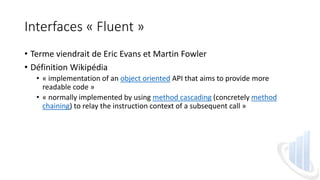
• Terme viendrait de Eric Evans et Martin Fowler
• Définition Wikipédia
• « implementation of an object oriented API that aims to provide more
readable code »
• « normally implemented by using method cascading (concretely method
chaining) to relay the instruction context of a subsequent call »
Interfaces « Fluent »
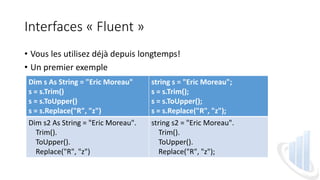
• Vous les utilisez déjà depuis longtemps!
• Un premier exemple
Dim s As String = "Eric Moreau"
s = s.Trim()
s = s.ToUpper()
s = s.Replace("R", "z")
string s = "Eric Moreau";
s = s.Trim();
s = s.ToUpper();
s = s.Replace("R", "z");
Dim s2 As String = "Eric Moreau".
Trim().
ToUpper().
Replace("R", "z")
string s2 = "Eric Moreau".
Trim().
ToUpper().
Replace("R", "z");
Interfaces « Fluent »
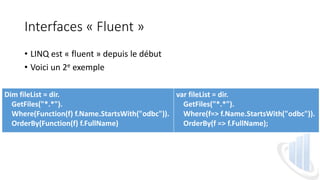
• LINQ est « fluent » depuis le début
• Voici un 2e exemple
Dim fileList = dir.
GetFiles("*.*").
Where(Function(f) f.Name.StartsWith("odbc")).
OrderBy(Function(f) f.FullName)
var fileList = dir.
GetFiles("*.*").
Where(f=> f.Name.StartsWith("odbc")).
OrderBy(f => f.FullName);
Interfaces « Fluent » - Alternatives
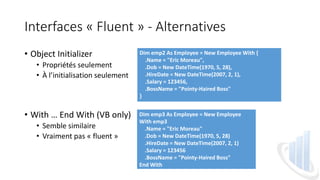
• Object Initializer
• Propriétés seulement
• À l’initialisation seulement
• With … End With (VB only)
• Semble similaire
• Vraiment pas « fluent »
Dim emp2 As Employee = New Employee With {
.Name = "Eric Moreau",
.Dob = New DateTime(1970, 5, 28),
.HireDate = New DateTime(2007, 2, 1),
.Salary = 123456,
.BossName = "Pointy-Haired Boss"
}
Dim emp3 As Employee = New Employee
With emp3
.Name = "Eric Moreau"
.Dob = New DateTime(1970, 5, 28)
.HireDate = New DateTime(2007, 2, 1)
.Salary = 123456
.BossName = "Pointy-Haired Boss"
End With
Interfaces « Fluent » - Ma recette
• Ma recette s’intègre à une classe qui existe déjà sans changer son
comportement actuel
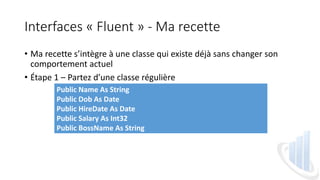
• Étape 1 – Partez d’une classe régulière
Public Name As String
Public Dob As Date
Public HireDate As Date
Public Salary As Int32
Public BossName As String
Interfaces « Fluent » - Ma recette
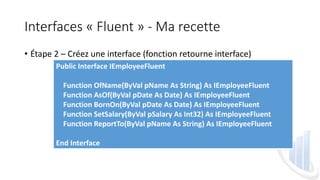
• Étape 2 – Créez une interface (fonction retourne interface)
Public Interface IEmployeeFluent
Function OfName(ByVal pName As String) As IEmployeeFluent
Function AsOf(ByVal pDate As Date) As IEmployeeFluent
Function BornOn(ByVal pDate As Date) As IEmployeeFluent
Function SetSalary(ByVal pSalary As Int32) As IEmployeeFluent
Function ReportTo(ByVal pName As String) As IEmployeeFluent
End Interface
Interfaces « Fluent » - Ma recette
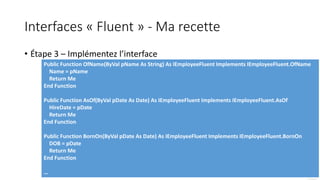
• Étape 3 – Implémentez l’interface
Public Function OfName(ByVal pName As String) As IEmployeeFluent Implements IEmployeeFluent.OfName
Name = pName
Return Me
End Function
Public Function AsOf(ByVal pDate As Date) As IEmployeeFluent Implements IEmployeeFluent.AsOf
HireDate = pDate
Return Me
End Function
Public Function BornOn(ByVal pDate As Date) As IEmployeeFluent Implements IEmployeeFluent.BornOn
DOB = pDate
Return Me
End Function
…
Interfaces « Fluent » - Ma recette
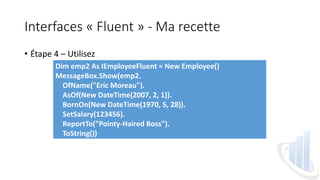
• Étape 4 – Utilisez
Dim emp2 As IEmployeeFluent = New Employee()
MessageBox.Show(emp2.
OfName("Eric Moreau").
AsOf(New DateTime(2007, 2, 1)).
BornOn(New DateTime(1970, 5, 28)).
SetSalary(123456).
ReportTo("Pointy-Haired Boss").
ToString())
Interfaces « Fluent » - Ma recette
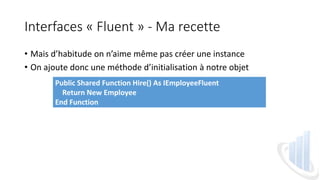
• Mais d’habitude on n’aime même pas créer une instance
• On ajoute donc une méthode d’initialisation à notre objet
Public Shared Function Hire() As IEmployeeFluent
Return New Employee
End Function
Interfaces « Fluent » - Ma recette
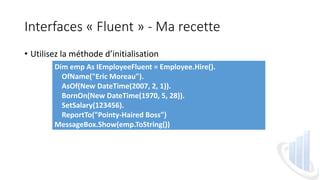
• Utilisez la méthode d’initialisation
Dim emp As IEmployeeFluent = Employee.Hire().
OfName("Eric Moreau").
AsOf(New DateTime(2007, 2, 1)).
BornOn(New DateTime(1970, 5, 28)).
SetSalary(123456).
ReportTo("Pointy-Haired Boss")
MessageBox.Show(emp.ToString())
En conclusion
• Simple
• Meilleure expérience d’utilisation
• « fit » bien avec les nouveaux APIs comme LINQ
• Article de mars 2014
• http://emoreau.com/Entries/Articles/2014/03/Net-fluent-interface.aspx
Ajouter des interfaces
« fluent » à vos classes .Net
Eric Moreau, MVP
Moer inc.
eric@moer.ca
www.moer.ca

Eric Moreau: Fluent interfaces

  • 1.
    Ajouter des interfaces «fluent » à vos classes .Net Eric Moreau, MVP Moer inc. eric@moer.ca www.moer.ca
  • 2.
    Interfaces « Fluent» • Terme viendrait de Eric Evans et Martin Fowler • Définition Wikipédia • « implementation of an object oriented API that aims to provide more readable code » • « normally implemented by using method cascading (concretely method chaining) to relay the instruction context of a subsequent call »
  • 3.
    Interfaces « Fluent» • Vous les utilisez déjà depuis longtemps! • Un premier exemple Dim s As String = "Eric Moreau" s = s.Trim() s = s.ToUpper() s = s.Replace("R", "z") string s = "Eric Moreau"; s = s.Trim(); s = s.ToUpper(); s = s.Replace("R", "z"); Dim s2 As String = "Eric Moreau". Trim(). ToUpper(). Replace("R", "z") string s2 = "Eric Moreau". Trim(). ToUpper(). Replace("R", "z");
  • 4.
    Interfaces « Fluent» • LINQ est « fluent » depuis le début • Voici un 2e exemple Dim fileList = dir. GetFiles("*.*"). Where(Function(f) f.Name.StartsWith("odbc")). OrderBy(Function(f) f.FullName) var fileList = dir. GetFiles("*.*"). Where(f=> f.Name.StartsWith("odbc")). OrderBy(f => f.FullName);
  • 5.
    Interfaces « Fluent» - Alternatives • Object Initializer • Propriétés seulement • À l’initialisation seulement • With … End With (VB only) • Semble similaire • Vraiment pas « fluent » Dim emp2 As Employee = New Employee With { .Name = "Eric Moreau", .Dob = New DateTime(1970, 5, 28), .HireDate = New DateTime(2007, 2, 1), .Salary = 123456, .BossName = "Pointy-Haired Boss" } Dim emp3 As Employee = New Employee With emp3 .Name = "Eric Moreau" .Dob = New DateTime(1970, 5, 28) .HireDate = New DateTime(2007, 2, 1) .Salary = 123456 .BossName = "Pointy-Haired Boss" End With
  • 6.
    Interfaces « Fluent» - Ma recette • Ma recette s’intègre à une classe qui existe déjà sans changer son comportement actuel • Étape 1 – Partez d’une classe régulière Public Name As String Public Dob As Date Public HireDate As Date Public Salary As Int32 Public BossName As String
  • 7.
    Interfaces « Fluent» - Ma recette • Étape 2 – Créez une interface (fonction retourne interface) Public Interface IEmployeeFluent Function OfName(ByVal pName As String) As IEmployeeFluent Function AsOf(ByVal pDate As Date) As IEmployeeFluent Function BornOn(ByVal pDate As Date) As IEmployeeFluent Function SetSalary(ByVal pSalary As Int32) As IEmployeeFluent Function ReportTo(ByVal pName As String) As IEmployeeFluent End Interface
  • 8.
    Interfaces « Fluent» - Ma recette • Étape 3 – Implémentez l’interface Public Function OfName(ByVal pName As String) As IEmployeeFluent Implements IEmployeeFluent.OfName Name = pName Return Me End Function Public Function AsOf(ByVal pDate As Date) As IEmployeeFluent Implements IEmployeeFluent.AsOf HireDate = pDate Return Me End Function Public Function BornOn(ByVal pDate As Date) As IEmployeeFluent Implements IEmployeeFluent.BornOn DOB = pDate Return Me End Function …
  • 9.
    Interfaces « Fluent» - Ma recette • Étape 4 – Utilisez Dim emp2 As IEmployeeFluent = New Employee() MessageBox.Show(emp2. OfName("Eric Moreau"). AsOf(New DateTime(2007, 2, 1)). BornOn(New DateTime(1970, 5, 28)). SetSalary(123456). ReportTo("Pointy-Haired Boss"). ToString())
  • 10.
    Interfaces « Fluent» - Ma recette • Mais d’habitude on n’aime même pas créer une instance • On ajoute donc une méthode d’initialisation à notre objet Public Shared Function Hire() As IEmployeeFluent Return New Employee End Function
  • 11.
    Interfaces « Fluent» - Ma recette • Utilisez la méthode d’initialisation Dim emp As IEmployeeFluent = Employee.Hire(). OfName("Eric Moreau"). AsOf(New DateTime(2007, 2, 1)). BornOn(New DateTime(1970, 5, 28)). SetSalary(123456). ReportTo("Pointy-Haired Boss") MessageBox.Show(emp.ToString())
  • 12.
    En conclusion • Simple •Meilleure expérience d’utilisation • « fit » bien avec les nouveaux APIs comme LINQ • Article de mars 2014 • http://emoreau.com/Entries/Articles/2014/03/Net-fluent-interface.aspx
  • 13.
    Ajouter des interfaces «fluent » à vos classes .Net Eric Moreau, MVP Moer inc. eric@moer.ca www.moer.ca