INSTALLATION DE NCONF AVEC ICINGA 
INSTALLATION DE NCONF AVEC 
ICINGA 
Maintenant qu’Icinga est installer, on convient tous que configurer les nouveau hôtes et 
services via les fichiers de configuration sera une tâche fastidieuse. C’est pour quoi on va 
installer un outil qui nous permettre de gérer nos hôtes de manière plus simple. Cet outil n’est 
autre de NCONF. Pour l’installer faut juste suivre les étapes suivantes 
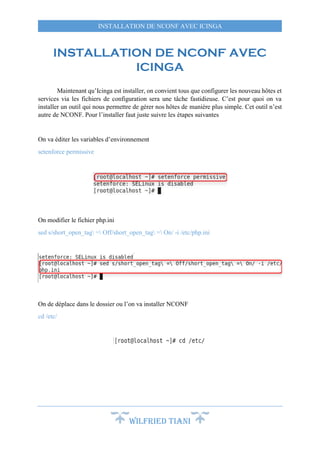
On va éditer les variables d’environnement 
Wilfried TIANI 
setenforce permissive 
On modifier le fichier php.ini 
sed s/short_open_tag = Off/short_open_tag = On/ -i /etc/php.ini 
On de déplace dans le dossier ou l’on va installer NCONF 
cd /etc/
INSTALLATION DE NCONF AVEC ICINGA 
On télécharge l’archive de NCONF 
wget http://garr.dl.sourceforge.net/project/nconf/nconf/1.3.0-0/nconf-1.3.0-0.tgz 
Wilfried TIANI 
On décompresse l’archive 
tar zxvf ./nconf-*.tgz 
On change les droits d’acces à pour le groupe apache 
chown apache:apache /etc/nconf/config 
chown apache:apache /etc/nconf/output 
chown apache:apache /etc/nconf/static_cfg 
chown apache:apache /etc/nconf/temp
INSTALLATION DE NCONF AVEC ICINGA 
On ouvre le SGBD MySQL (le mot de passe est >> root << ) 
Wilfried TIANI 
mysql -u root -p 
On créer la base de données pour NCONF dans nommée >> nconf << 
create database nconf; 
On crée un utilisateur pour notre base de donneées nconf 
grant select, insert, update, delete, create, drop, alter, lock tables on nconf.* to 
'nconf'@'localhost' identified by 'nconf'; 
On applique les precedents modifiacations
INSTALLATION DE NCONF AVEC ICINGA 
Wilfried TIANI 
flush privileges; 
On sort du SGBD MySQL 
quit 
On importe le fichier de configuration de la base de donnée >> nconf << 
mysql -u nconf -p nconf < /etc/nconf/INSTALL/create_database.sql 
On cree le fichier de configuration pour le le site web de Nconf dans Apache 
echo "Alias /nconf /etc/nconf/" > /etc/httpd/conf.d/nconf.conf 
echo "<Directory /etc/nconf/>" >> /etc/httpd/conf.d/nconf.conf 
echo " DirectoryIndex index.php" >> /etc/httpd/conf.d/nconf.conf 
echo " Options FollowSymLinks" >> /etc/httpd/conf.d/nconf.conf 
echo " AllowOverride all" >> /etc/httpd/conf.d/nconf.conf 
echo " Order allow,deny" >> /etc/httpd/conf.d/nconf.conf 
echo " Allow from all" >> /etc/httpd/conf.d/nconf.conf 
echo "</Directory>" >> /etc/httpd/conf.d/nconf.conf
INSTALLATION DE NCONF AVEC ICINGA 
On redémarre le service web pour qu’il prenne en compte notre nouveau fichier 
Wilfried TIANI 
service httpd restart 
Une fois le service web redémarré on ouvre le navigateur et on tape l’adresse suivante 
http://localhost/nconf/INSTALL.php
INSTALLATION DE NCONF AVEC ICINGA 
Wilfried TIANI 
Cliquez sur Next 
On constate que les parametres entrés sont corrects .Cliquez sur Next 
Cliquez sur Next
INSTALLATION DE NCONF AVEC ICINGA 
Wilfried TIANI 
Cliquez sur Next 
Cliquez sur Finish
INSTALLATION DE NCONF AVEC ICINGA 
Maintenant que nous avons configure Nconf , on va rétirer les fichiers de configuration 
rm -rf /etc/nconf/INSTALL /etc/nconf/INSTALL.php /etc/nconf/UPDATE 
/etc/nconf/UPDATE.php 
On se déplace dans le repertoire ou a été installe Nconf 
Wilfried TIANI 
cd /etc/nconf
INSTALLATION DE NCONF AVEC ICINGA 
On télécharge les icons de Nagios pour l’intégrer a Nconf 
wget https://www.monitoringexchange.org/attachment/download/Artwork/Image-Packs/Base- 
Images/imagepak-base.tar.tar 
On décompresse l’achive téléchargé precedement 
tar zxvfC imagepak-base.tar.tar /etc/nconf/img/logos/ 
On édite le fichier /etc/nconf/config/deployment.ini pour qu’il redémarre Icinga a chaque 
application des configurations faites sur Nconf 
echo "" >> /etc/nconf/config/deployment.ini 
echo "[Deploy to localhost]" >> /etc/nconf/config/deployment.ini 
echo "type = local" >> /etc/nconf/config/deployment.ini 
Wilfried TIANI
INSTALLATION DE NCONF AVEC ICINGA 
echo "source_file = "/etc/nconf/output/NagiosConfig.tgz"" >> 
/etc/nconf/config/deployment.ini 
echo "target_file = "/etc/icinga/nconf/"" >> /etc/nconf/config/deployment.ini 
echo "action = extract" >> /etc/nconf/config/deployment.ini 
echo "reload_command = "sudo /etc/init.d/icinga reload"" >> 
/etc/nconf/config/deployment.ini 
Wilfried TIANI 
On modifie les access-list 
setfacl -m user:apache:rx /usr/bin/icinga 
On verifie s’il y a des mise a jour pour la commande >> sudo << 
yum -y install sudo
INSTALLATION DE NCONF AVEC ICINGA 
On édite le fichier /etc/sudoers pour que l’utilisateur Nconf ai tous les droits 
Wilfried TIANI 
echo "" >> /etc/sudoers 
echo "## BEGIN: NCONF SUDO" >> /etc/sudoers 
echo "User_Alias NCONF=apache,icinga" >> /etc/sudoers 
echo 'Defaults:NCONF !requiretty' >> /etc/sudoers 
echo "# icinga Restart" >> /etc/sudoers 
echo "NCONF ALL = NOPASSWD: /etc/init.d/icinga* restart" >> /etc/sudoers 
echo "NCONF ALL = NOPASSWD: /etc/init.d/icinga restart" >> /etc/sudoers 
echo "# icinga reload" >> /etc/sudoers 
echo "NCONF ALL = NOPASSWD: /etc/init.d/icinga* reload" >> /etc/sudoers 
echo "NCONF ALL = NOPASSWD: /etc/init.d/icinga reload" >> /etc/sudoers 
echo "# icinga test config" >> /etc/sudoers 
echo "NCONF ALL = NOPASSWD: /etc/icinga/etc/icinga* -v *" >> /etc/sudoers 
echo "NCONF ALL = NOPASSWD: /etc/icinga/etc/icinga -v *" >> /etc/sudoers 
echo "# icinga test for optim config" >> /etc/sudoers 
echo "NCONF ALL = NOPASSWD: /etc/icinga/etc/icinga* -s *" >> /etc/sudoers 
echo "NCONF ALL = NOPASSWD: /etc/icinga/etc/icinga -s *" >> /etc/sudoers 
echo "## END: NCONFSUDO" >> /etc/sudoers
INSTALLATION DE NCONF AVEC ICINGA 
On cree un dossier >> nconf << dans le répertoire d’installation d’Icinga-Core 
Wilfried TIANI 
mkdir /etc/icinga/nconf 
On modifie les droits 
chown icinga:apache /etc/icinga/nconf/ 
chmod 775 /etc/icinga/nconf/ 
On désactives toutes les fichiers de configurations d’icinga-Core quis sont dans le repertoire 
>> /etc/icinga/etc/objects << 
sed s@cfg_file=/etc/icinga/objects/@#cfg_file=/etc/icinga/objects/@ -i /etc/icinga/icinga.cfg
INSTALLATION DE NCONF AVEC ICINGA 
On redirige les configuration vers le dossier >> nconf << crée dans Icinga-Core 
echo "cfg_dir=/etc/icinga/nconf" >> /etc/icinga/icinga.cfg 
Wilfried TIANI 
Redémarrage des services utilisés 
for i in mysqld ido2db icinga httpd npcd; do /etc/init.d/$i restart; done 
- Test NCONF 
Ouvir le navigateur et taper l’adresse http://localhost/nconf
INSTALLATION DE NCONF AVEC ICINGA 
Et voila NCONF est bien installé 
Wilfried TIANI

Installation nconf

  • 1.
    INSTALLATION DE NCONFAVEC ICINGA INSTALLATION DE NCONF AVEC ICINGA Maintenant qu’Icinga est installer, on convient tous que configurer les nouveau hôtes et services via les fichiers de configuration sera une tâche fastidieuse. C’est pour quoi on va installer un outil qui nous permettre de gérer nos hôtes de manière plus simple. Cet outil n’est autre de NCONF. Pour l’installer faut juste suivre les étapes suivantes On va éditer les variables d’environnement Wilfried TIANI setenforce permissive On modifier le fichier php.ini sed s/short_open_tag = Off/short_open_tag = On/ -i /etc/php.ini On de déplace dans le dossier ou l’on va installer NCONF cd /etc/
  • 2.
    INSTALLATION DE NCONFAVEC ICINGA On télécharge l’archive de NCONF wget http://garr.dl.sourceforge.net/project/nconf/nconf/1.3.0-0/nconf-1.3.0-0.tgz Wilfried TIANI On décompresse l’archive tar zxvf ./nconf-*.tgz On change les droits d’acces à pour le groupe apache chown apache:apache /etc/nconf/config chown apache:apache /etc/nconf/output chown apache:apache /etc/nconf/static_cfg chown apache:apache /etc/nconf/temp
  • 3.
    INSTALLATION DE NCONFAVEC ICINGA On ouvre le SGBD MySQL (le mot de passe est >> root << ) Wilfried TIANI mysql -u root -p On créer la base de données pour NCONF dans nommée >> nconf << create database nconf; On crée un utilisateur pour notre base de donneées nconf grant select, insert, update, delete, create, drop, alter, lock tables on nconf.* to 'nconf'@'localhost' identified by 'nconf'; On applique les precedents modifiacations
  • 4.
    INSTALLATION DE NCONFAVEC ICINGA Wilfried TIANI flush privileges; On sort du SGBD MySQL quit On importe le fichier de configuration de la base de donnée >> nconf << mysql -u nconf -p nconf < /etc/nconf/INSTALL/create_database.sql On cree le fichier de configuration pour le le site web de Nconf dans Apache echo "Alias /nconf /etc/nconf/" > /etc/httpd/conf.d/nconf.conf echo "<Directory /etc/nconf/>" >> /etc/httpd/conf.d/nconf.conf echo " DirectoryIndex index.php" >> /etc/httpd/conf.d/nconf.conf echo " Options FollowSymLinks" >> /etc/httpd/conf.d/nconf.conf echo " AllowOverride all" >> /etc/httpd/conf.d/nconf.conf echo " Order allow,deny" >> /etc/httpd/conf.d/nconf.conf echo " Allow from all" >> /etc/httpd/conf.d/nconf.conf echo "</Directory>" >> /etc/httpd/conf.d/nconf.conf
  • 5.
    INSTALLATION DE NCONFAVEC ICINGA On redémarre le service web pour qu’il prenne en compte notre nouveau fichier Wilfried TIANI service httpd restart Une fois le service web redémarré on ouvre le navigateur et on tape l’adresse suivante http://localhost/nconf/INSTALL.php
  • 6.
    INSTALLATION DE NCONFAVEC ICINGA Wilfried TIANI Cliquez sur Next On constate que les parametres entrés sont corrects .Cliquez sur Next Cliquez sur Next
  • 7.
    INSTALLATION DE NCONFAVEC ICINGA Wilfried TIANI Cliquez sur Next Cliquez sur Finish
  • 8.
    INSTALLATION DE NCONFAVEC ICINGA Maintenant que nous avons configure Nconf , on va rétirer les fichiers de configuration rm -rf /etc/nconf/INSTALL /etc/nconf/INSTALL.php /etc/nconf/UPDATE /etc/nconf/UPDATE.php On se déplace dans le repertoire ou a été installe Nconf Wilfried TIANI cd /etc/nconf
  • 9.
    INSTALLATION DE NCONFAVEC ICINGA On télécharge les icons de Nagios pour l’intégrer a Nconf wget https://www.monitoringexchange.org/attachment/download/Artwork/Image-Packs/Base- Images/imagepak-base.tar.tar On décompresse l’achive téléchargé precedement tar zxvfC imagepak-base.tar.tar /etc/nconf/img/logos/ On édite le fichier /etc/nconf/config/deployment.ini pour qu’il redémarre Icinga a chaque application des configurations faites sur Nconf echo "" >> /etc/nconf/config/deployment.ini echo "" >> /etc/nconf/config/deployment.ini echo "[Deploy to localhost]" >> /etc/nconf/config/deployment.ini echo "type = local" >> /etc/nconf/config/deployment.ini Wilfried TIANI
  • 10.
    INSTALLATION DE NCONFAVEC ICINGA echo "source_file = "/etc/nconf/output/NagiosConfig.tgz"" >> /etc/nconf/config/deployment.ini echo "target_file = "/etc/icinga/nconf/"" >> /etc/nconf/config/deployment.ini echo "action = extract" >> /etc/nconf/config/deployment.ini echo "reload_command = "sudo /etc/init.d/icinga reload"" >> /etc/nconf/config/deployment.ini Wilfried TIANI On modifie les access-list setfacl -m user:apache:rx /usr/bin/icinga On verifie s’il y a des mise a jour pour la commande >> sudo << yum -y install sudo
  • 11.
    INSTALLATION DE NCONFAVEC ICINGA On édite le fichier /etc/sudoers pour que l’utilisateur Nconf ai tous les droits Wilfried TIANI echo "" >> /etc/sudoers echo "" >> /etc/sudoers echo "## BEGIN: NCONF SUDO" >> /etc/sudoers echo "User_Alias NCONF=apache,icinga" >> /etc/sudoers echo 'Defaults:NCONF !requiretty' >> /etc/sudoers echo "# icinga Restart" >> /etc/sudoers echo "NCONF ALL = NOPASSWD: /etc/init.d/icinga* restart" >> /etc/sudoers echo "NCONF ALL = NOPASSWD: /etc/init.d/icinga restart" >> /etc/sudoers echo "# icinga reload" >> /etc/sudoers echo "NCONF ALL = NOPASSWD: /etc/init.d/icinga* reload" >> /etc/sudoers echo "NCONF ALL = NOPASSWD: /etc/init.d/icinga reload" >> /etc/sudoers echo "# icinga test config" >> /etc/sudoers echo "NCONF ALL = NOPASSWD: /etc/icinga/etc/icinga* -v *" >> /etc/sudoers echo "NCONF ALL = NOPASSWD: /etc/icinga/etc/icinga -v *" >> /etc/sudoers echo "# icinga test for optim config" >> /etc/sudoers echo "NCONF ALL = NOPASSWD: /etc/icinga/etc/icinga* -s *" >> /etc/sudoers echo "NCONF ALL = NOPASSWD: /etc/icinga/etc/icinga -s *" >> /etc/sudoers echo "## END: NCONFSUDO" >> /etc/sudoers
  • 12.
    INSTALLATION DE NCONFAVEC ICINGA On cree un dossier >> nconf << dans le répertoire d’installation d’Icinga-Core Wilfried TIANI mkdir /etc/icinga/nconf On modifie les droits chown icinga:apache /etc/icinga/nconf/ chmod 775 /etc/icinga/nconf/ On désactives toutes les fichiers de configurations d’icinga-Core quis sont dans le repertoire >> /etc/icinga/etc/objects << sed s@cfg_file=/etc/icinga/objects/@#cfg_file=/etc/icinga/objects/@ -i /etc/icinga/icinga.cfg
  • 13.
    INSTALLATION DE NCONFAVEC ICINGA On redirige les configuration vers le dossier >> nconf << crée dans Icinga-Core echo "cfg_dir=/etc/icinga/nconf" >> /etc/icinga/icinga.cfg Wilfried TIANI Redémarrage des services utilisés for i in mysqld ido2db icinga httpd npcd; do /etc/init.d/$i restart; done - Test NCONF Ouvir le navigateur et taper l’adresse http://localhost/nconf
  • 14.
    INSTALLATION DE NCONFAVEC ICINGA Et voila NCONF est bien installé Wilfried TIANI