palais des
congrès
Paris


7, 8 et 9
février 2012
Développement Web
pour Mobiles (RIA217)

Aurélien Verla        Giovanni Clément
Directeur Technique        Expert .NET
Wygwam                       Wygwam
Vous êtes dans l’AMPHI BLEU
Slides Wygwam
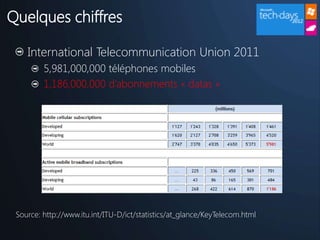
Quelques chiffres

    International Telecommunication Union 2011
         5,981,000,000 téléphones mobiles
         1,186,000,000 d’abonnements « datas »


 Source: http://www.itu.int/ITU-D/ict/statistics/at_glance/KeyTelecom.html
Enjeux techniques


  S’adapter aux différents type de « devices »

  Atteindre une productivité maximale en s’adaptant à
  chaque « device »

  Tendre vers un « Layout » unique
Slides a plus tard

   Exposer les problématiques
   Pas de souris, clavier etc (conf W3C)
   Taille de l’écran CSS3

   Capacité à moduler en fonction du device MVC4
     Home.mobile.cshtml
     Home.iphone.cshtml


   Uniformisation du Layout jQueryMobile
DEMO

« Old School »
« Old School »

  Compatible WebForms, MVC 2, MCV 3

  Request.Browser.IsMobileDevice

  51Degrees.mobi
     http://51degrees.codeplex.com


  WURFL Devices Database
     http://wurfl.sourceforge.net/
ADAPTER

  Image WP7 + iPhone (taille connue)
  Images reste du monde (bordel)
  Texte niveau 1
    Texte niveau 2
       Texte niveau 3
           Texte niveau 4
               Texte niveau 5
DEMO

CSS 3.0 Media Queries
ADAPTER


  CSS 3.0 Media Queries
     http://www.w3.org/TR/css3-mediaqueries/


  Capacité de faire des règles de styles conditionnelles

  Permet d’adapter la mise en page en fonction de la
  taille d’affichage et/ou de son orientation
PRODUCTIVITE

  Image WP7 + iPhone (taille connue)
  Images reste du monde (bordel)
  Texte niveau 1
    Texte niveau 2
       Texte niveau 3
           Texte niveau 4
               Texte niveau 5
DEMO

ASP.NET MVC 4.0 Preview
PRODUCTIVITE


  Créer facilement des vues dites « mobile »
     *.mobile.cshtml


  Gestion du DisplayMode pour du spécifique
     *.ipad.cshtml


  Nouveaux Templates Visual Studio
LAYOUT


  Bla bla uniformisation
     *.mobile.cshtml


  Gestion du DisplayMode pour du spécifique
     *.ipad.cshtml
LAYOUT

  Intégration de JQuery Mobile
    Template de site Mobile
    Nuget package : jQuery.Mobile.MVC


  User interface Framework

  Progressive Enchancement ?

  http://jquerymobile.com
DEMO

jQuery Mobile
LAYOUT

  Support de jQuery Mobile par Microsoft

  Template Visual Studio « Mobile Compliant »

  Theming Framework

  http://jquerymobile.com
LAYOUT

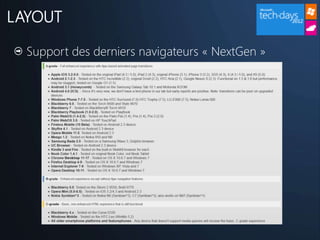
  Support des derniers navigateurs « NextGen »
PERFORMANCES

  System.Web.Optimization
    .NET 4.5


  Javascript Combining
   BundleTable.Bundles.EnableDefaultBundles();
   Dynamic custom bundle => Site Mobile


  Minification
   JSMinify
   CSSMinify
DEMO

UN PEU DE FUN
Vous êtes dans l’AMPHI BLEU
Texte niveau 1
   Texte niveau 2
      Texte niveau 3
          Texte niveau 4
              Texte niveau 5
VIDEO
ANNONCE
DEMO
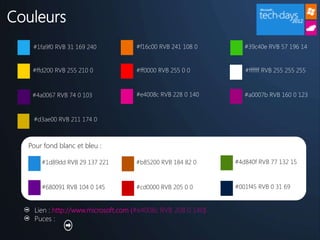
Couleurs
   #1fa9f0 RVB 31 169 240           #f16c00 RVB 241 108 0        #39c40e RVB 57 196 14


   #ffd200 RVB 255 210 0            #ff0000 RVB 255 0 0          #ffffff RVB 255 255 255


   #4a0067 RVB 74 0 103             #e4008c RVB 228 0 140        #a0007b RVB 160 0 123


   #d3ae00 RVB 211 174 0


  Pour fond blanc et bleu :

      #1d89dd RVB 29 137 221        #b85200 RVB 184 82 0      #4d840f RVB 77 132 15


      #680091 RVB 104 0 145         #cd0000 RVB 205 0 0       #001f45 RVB 0 31 69


    Lien : http://www.microsoft.com (#e4008c RVB 208 0 140)
    Puces :
Layout

Grids                                                   Reductive design
Grid systems help to create meaningful, consistent      Fewer, carefully used elements help to reflect the
organization of information and elements to tell rich   innovative, modern look of our brand. Using our
stories.                                                colors, type, logos, grid, the right image(s), and simple
                                                        clean approach you can build almost anything. Product
More than grids, structured information.
                                                        derived images – icons, screen shots, help to
                                                        communicate the way in which Microsoft software can
                                                        help improve peoples lives.
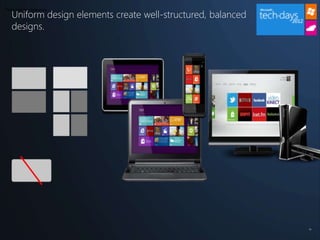
Uniform design elements create well-structured, balanced
Type and transparency


   designs.


                                                              33
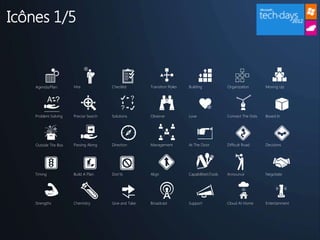
Icônes 1/5


    Agenda/Plan       Hire             Checklist       Transition Roles   Building             Organization       Moving Up


    Problem Solving   Precise Search   Solutions       Observe            Love                 Connect The Dots   Boxed In


    Outside The Box   Passing Along    Direction       Management         At The Door          Difficult Road     Decisions


    Timing            Build A Plan     Don’ts          Align              CapabilitiesTools   Announce           Negotiate


    Strengths         Chemistry        Give and Take   Broadcast          Support              Cloud At Home      Entertainment
Icônes 2/5


   WiFi                Storage             Hubs                Computing      Database        Data Transfer   Data Download


   IT Infrastructure   IT Infrastructure   IT Infrastructure   Caution        Organize        Synergy         Debug


   Virtualization      Innovation          Data Security       Telepresence   Social Search   Basic Devices   Share


   Positioning         The Target          Strategy            Growth         Footprint       Marketplace     Security/Privacy


   Balance             ID                  Payment             Email          Global          Places          Phone
Icônes 3/5


   Cloud    Devices   NUI          Time Animation   Games        Gaming          Strategy


   Timing   Brain     Innovation   Strategy         Cafe         Vacation        Merge/Vise


   Home     Travel    TV           Office           Xbox         Plug In         Caution


   Tools    Fix       In Process   Remake           Drive/Nail   Plumbing/Root   Build/Wall


                                                                                   I have a quote
                                                                                   for you, I think...

   Cut      Leak      Calendar     Cloud Comp       Passion      Role/Position
Icônes 4/5


   Facebook    PC          Tweet     Message   Mail   Photos     Messenger


                                                            “”

   Video       Like        Devices   Outlook   TV     Txt        Devices


   RSS Feeds   Voicemail
Icônes 5/5
Graphiques

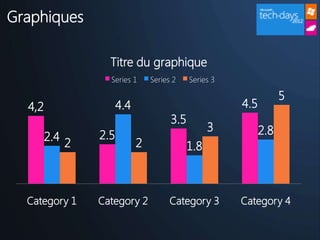
                    Titre du graphique
                    Series 1      Series 2    Series 3

                                                                     5
  4,2                   4.4                              4.5
                                        3.5
                                                    3          2.8
        2.4       2.5
              2               2               1.8


  Category 1      Category 2            Category 3       Category 4

Techdays 2012 - Développement Web Mobile avec Microsoft

  • 1.
  • 2.
    Développement Web pour Mobiles(RIA217) Aurélien Verla Giovanni Clément Directeur Technique Expert .NET Wygwam Wygwam
  • 3.
    Vous êtes dansl’AMPHI BLEU
  • 4.
  • 5.
    Quelques chiffres International Telecommunication Union 2011 5,981,000,000 téléphones mobiles 1,186,000,000 d’abonnements « datas » Source: http://www.itu.int/ITU-D/ict/statistics/at_glance/KeyTelecom.html
  • 6.
    Enjeux techniques S’adapter aux différents type de « devices » Atteindre une productivité maximale en s’adaptant à chaque « device » Tendre vers un « Layout » unique
  • 7.
    Slides a plustard Exposer les problématiques Pas de souris, clavier etc (conf W3C) Taille de l’écran CSS3 Capacité à moduler en fonction du device MVC4  Home.mobile.cshtml  Home.iphone.cshtml Uniformisation du Layout jQueryMobile
  • 8.
  • 9.
    « Old School» Compatible WebForms, MVC 2, MCV 3 Request.Browser.IsMobileDevice 51Degrees.mobi http://51degrees.codeplex.com WURFL Devices Database http://wurfl.sourceforge.net/
  • 10.
    ADAPTER ImageWP7 + iPhone (taille connue) Images reste du monde (bordel) Texte niveau 1 Texte niveau 2 Texte niveau 3 Texte niveau 4 Texte niveau 5
  • 11.
  • 12.
    ADAPTER CSS3.0 Media Queries http://www.w3.org/TR/css3-mediaqueries/ Capacité de faire des règles de styles conditionnelles Permet d’adapter la mise en page en fonction de la taille d’affichage et/ou de son orientation
  • 13.
    PRODUCTIVITE ImageWP7 + iPhone (taille connue) Images reste du monde (bordel) Texte niveau 1 Texte niveau 2 Texte niveau 3 Texte niveau 4 Texte niveau 5
  • 14.
  • 15.
    PRODUCTIVITE Créerfacilement des vues dites « mobile » *.mobile.cshtml Gestion du DisplayMode pour du spécifique *.ipad.cshtml Nouveaux Templates Visual Studio
  • 16.
    LAYOUT Blabla uniformisation *.mobile.cshtml Gestion du DisplayMode pour du spécifique *.ipad.cshtml
  • 17.
    LAYOUT Intégrationde JQuery Mobile  Template de site Mobile  Nuget package : jQuery.Mobile.MVC User interface Framework Progressive Enchancement ? http://jquerymobile.com
  • 18.
  • 19.
    LAYOUT Supportde jQuery Mobile par Microsoft Template Visual Studio « Mobile Compliant » Theming Framework http://jquerymobile.com
  • 20.
    LAYOUT Supportdes derniers navigateurs « NextGen »
  • 21.
    PERFORMANCES System.Web.Optimization  .NET 4.5 Javascript Combining  BundleTable.Bundles.EnableDefaultBundles();  Dynamic custom bundle => Site Mobile Minification  JSMinify  CSSMinify
  • 22.
  • 23.
    Vous êtes dansl’AMPHI BLEU
  • 24.
    Texte niveau 1 Texte niveau 2 Texte niveau 3 Texte niveau 4 Texte niveau 5
  • 28.
  • 29.
  • 30.
  • 31.
    Couleurs #1fa9f0 RVB 31 169 240 #f16c00 RVB 241 108 0 #39c40e RVB 57 196 14 #ffd200 RVB 255 210 0 #ff0000 RVB 255 0 0 #ffffff RVB 255 255 255 #4a0067 RVB 74 0 103 #e4008c RVB 228 0 140 #a0007b RVB 160 0 123 #d3ae00 RVB 211 174 0 Pour fond blanc et bleu : #1d89dd RVB 29 137 221 #b85200 RVB 184 82 0 #4d840f RVB 77 132 15 #680091 RVB 104 0 145 #cd0000 RVB 205 0 0 #001f45 RVB 0 31 69 Lien : http://www.microsoft.com (#e4008c RVB 208 0 140) Puces :
  • 32.
    Layout Grids Reductive design Grid systems help to create meaningful, consistent Fewer, carefully used elements help to reflect the organization of information and elements to tell rich innovative, modern look of our brand. Using our stories. colors, type, logos, grid, the right image(s), and simple clean approach you can build almost anything. Product More than grids, structured information. derived images – icons, screen shots, help to communicate the way in which Microsoft software can help improve peoples lives.
  • 33.
    Uniform design elementscreate well-structured, balanced Type and transparency designs. 33
  • 34.
    Icônes 1/5 Agenda/Plan Hire Checklist Transition Roles Building Organization Moving Up Problem Solving Precise Search Solutions Observe Love Connect The Dots Boxed In Outside The Box Passing Along Direction Management At The Door Difficult Road Decisions Timing Build A Plan Don’ts Align CapabilitiesTools Announce Negotiate Strengths Chemistry Give and Take Broadcast Support Cloud At Home Entertainment
  • 35.
    Icônes 2/5 WiFi Storage Hubs Computing Database Data Transfer Data Download IT Infrastructure IT Infrastructure IT Infrastructure Caution Organize Synergy Debug Virtualization Innovation Data Security Telepresence Social Search Basic Devices Share Positioning The Target Strategy Growth Footprint Marketplace Security/Privacy Balance ID Payment Email Global Places Phone
  • 36.
    Icônes 3/5 Cloud Devices NUI Time Animation Games Gaming Strategy Timing Brain Innovation Strategy Cafe Vacation Merge/Vise Home Travel TV Office Xbox Plug In Caution Tools Fix In Process Remake Drive/Nail Plumbing/Root Build/Wall I have a quote for you, I think... Cut Leak Calendar Cloud Comp Passion Role/Position
  • 37.
    Icônes 4/5 Facebook PC Tweet Message Mail Photos Messenger “” Video Like Devices Outlook TV Txt Devices RSS Feeds Voicemail
  • 38.
  • 40.
    Graphiques Titre du graphique Series 1 Series 2 Series 3 5 4,2 4.4 4.5 3.5 3 2.8 2.4 2.5 2 2 1.8 Category 1 Category 2 Category 3 Category 4