LiveCoding : Hello World avec Intents et Events
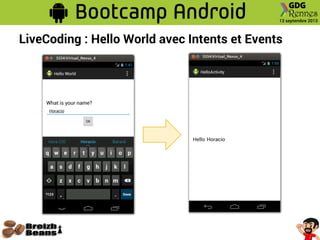
● Objectif : Première application interactive
○ Un premier écran avec un champ pour saisir son nom et un bouton
qui amène au deuxième écran
○ Un deuxième écran avec un Hello $NOM personnalisé
● Concepts à voir
○ Création d'une application avec plusieurs Activités
○ Création d'un Gabarit à plusieurs composants
○ Utilisation des Event Listeners pour écouter des Évenements
○ Utilisation des Intent pour changer d'Activité
LiveCoding : Hello World avec Intents et Events
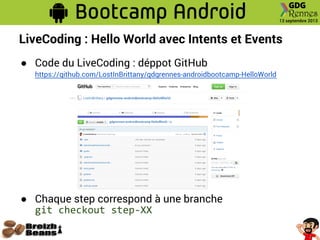
● Code du LiveCoding : déppot GitHub
https://github.com/LostInBrittany/gdgrennes-androidbootcamp-HelloWorld
● Chaque step correspond à une branche
git checkout step-XX
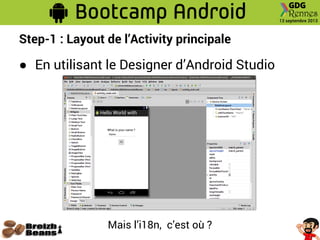
Step-1 : Layout de l’Activity principale
● En utilisant le Designer d’Android Studio
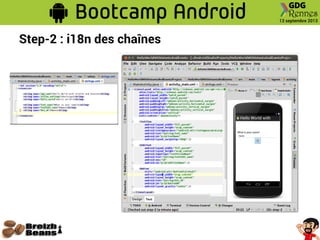
Mais l’i18n, c’est où ?
Step-2 : i18n des chaînes
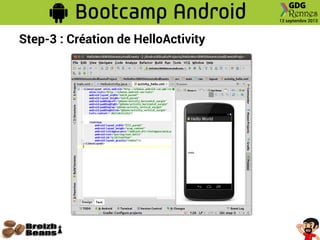
Step-3 : Création de HelloActivity
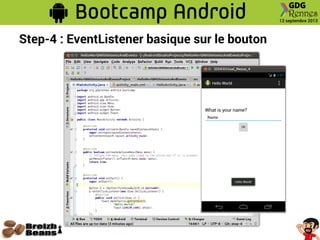
Step-4 : EventListener basique sur le bouton
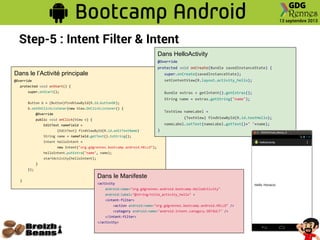
Step-5 : Intent Filter & Intent
Dans le l’Activité principale
@Override
protected void onStart() {
super.onStart();
Button b = (Button)findViewById(R.id.buttonOK);
b.setOnClickListener(new View.OnClickListener() {
@Override
public void onClick(View v) {
EditText nameField =
(EditText) findViewById(R.id.editTextName)
String name = nameField.getText().toString();
Intent helloIntent =
new Intent("org.gdgrennes.bootcamp.android.HELLO");
helloIntent.putExtra("name", name);
startActivity(helloIntent);
}
});
}
Dans le Manifeste
<activity
android:name="org.gdgrennes.android.bootcamp.HelloActivity"
android:label="@string/title_activity_hello" >
<intent-filter>
<action android:name="org.gdgrennes.bootcamp.android.HELLO" />
<category android:name="android.intent.category.DEFAULT" />
</intent-filter>
</activity>
Dans HelloActivity
@Override
protected void onCreate(Bundle savedInstanceState) {
super.onCreate(savedInstanceState);
setContentView(R.layout.activity_hello);
Bundle extras = getIntent().getExtras();
String name = extras.getString("name");
TextView nameLabel =
(TextView) findViewById(R.id.textHello);
nameLabel.setText(nameLabel.getText()+" "+name);
}
LiveCoding : Hello World avec Intents et Events

GDG Rennes - Bootcamp Initiation Android - Hello World with Events and Intents

  • 2.
    LiveCoding : HelloWorld avec Intents et Events ● Objectif : Première application interactive ○ Un premier écran avec un champ pour saisir son nom et un bouton qui amène au deuxième écran ○ Un deuxième écran avec un Hello $NOM personnalisé ● Concepts à voir ○ Création d'une application avec plusieurs Activités ○ Création d'un Gabarit à plusieurs composants ○ Utilisation des Event Listeners pour écouter des Évenements ○ Utilisation des Intent pour changer d'Activité
  • 3.
    LiveCoding : HelloWorld avec Intents et Events ● Code du LiveCoding : déppot GitHub https://github.com/LostInBrittany/gdgrennes-androidbootcamp-HelloWorld ● Chaque step correspond à une branche git checkout step-XX
  • 4.
    Step-1 : Layoutde l’Activity principale ● En utilisant le Designer d’Android Studio Mais l’i18n, c’est où ?
  • 5.
    Step-2 : i18ndes chaînes
  • 6.
    Step-3 : Créationde HelloActivity
  • 7.
    Step-4 : EventListenerbasique sur le bouton
  • 8.
    Step-5 : IntentFilter & Intent Dans le l’Activité principale @Override protected void onStart() { super.onStart(); Button b = (Button)findViewById(R.id.buttonOK); b.setOnClickListener(new View.OnClickListener() { @Override public void onClick(View v) { EditText nameField = (EditText) findViewById(R.id.editTextName) String name = nameField.getText().toString(); Intent helloIntent = new Intent("org.gdgrennes.bootcamp.android.HELLO"); helloIntent.putExtra("name", name); startActivity(helloIntent); } }); } Dans le Manifeste <activity android:name="org.gdgrennes.android.bootcamp.HelloActivity" android:label="@string/title_activity_hello" > <intent-filter> <action android:name="org.gdgrennes.bootcamp.android.HELLO" /> <category android:name="android.intent.category.DEFAULT" /> </intent-filter> </activity> Dans HelloActivity @Override protected void onCreate(Bundle savedInstanceState) { super.onCreate(savedInstanceState); setContentView(R.layout.activity_hello); Bundle extras = getIntent().getExtras(); String name = extras.getString("name"); TextView nameLabel = (TextView) findViewById(R.id.textHello); nameLabel.setText(nameLabel.getText()+" "+name); }
  • 9.
    LiveCoding : HelloWorld avec Intents et Events