Alimentation et Reporting
  de Bases de données via le
                       WEB


           Daniel GASPAR


01/10/12                   1
Déroulement du module
• Articulation du module :
• Présentation succins de l’HTML
       • Version 4

• Utilisation d’un CMS (Content Management Systems)
       • Utilisation de HTML/PHP/SQL

• Projet / Concours
• Présentation du PHP (Cours réalisé par Olivier LEGOAER)
       • Accès aux bases de données (SQL Requis)

• Projet
• Examen écrit

                                                            2
                              Licence Pro SID
Qu’est-ce qu’une Application Web

• 2 problématiques induites par le sujet.

     • => Qu’est ce qu’un site Web ? Et accès au
       contenu ?

     • => Comment gérer et exploiter un ensemble de
       données ?


                                                   3
                     Licence Pro SID
Qu’est-ce qu’une Application Web

• Une application Web permet de mettre des
  informations à la disposition d'utilisateurs via
  un navigateur (IE, Firefox, Chrome, …).
      • => Pour une Consultation
      • => Pour une Mise à Jour


• Utile pour mettre en forme des données
• Utile pour automatiser certains traitements

                                                     4
                      Licence Pro SID
Applications multiples (Web)


                          5
        Licence Pro SID
Applications multiples (Web)


                           6
         Licence Pro SID
Applications multiples (Web)


                           7
         Licence Pro SID
Applications multiples
         (Web:HTML)


                     8
  Licence Pro SID
LE LANGUAGE HTML
• C’est le langage du Web (toutes les pages sont écrites en html).
• C’est un langage de balises (http://b.kostrzewa.free.fr/html ,
  http://fr.selfhtml.org/html) :
   – de structure du fichier html : html, head, body, meta...
   – de mise en forme du texte : b, font, i, u...
   – de listes : li, ul...
   – de paragraphes : p, br, hr, h1, h2, h3...
   – de tableaux : table, tr, td, th...
   – de liens hypertextes : a...
   – de formulaires : form, input, select, option, textarea...
   – ...


                                                                 9
                            Licence Pro SID
LE LANGUAGE HTML
        STRUCTURE DE FICHIER

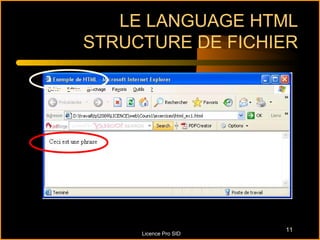
Sous notepad++ : html_ex1.html
<html>
  <head>
     <title> Exemple de HTML </title>
  </head>
  <body> Ceci est une phrase </body>
</html>

                                        10
                 Licence Pro SID
LE LANGUAGE HTML
STRUCTURE DE FICHIER


                       11
     Licence Pro SID
Applications multiples
                              (Web:HTML)

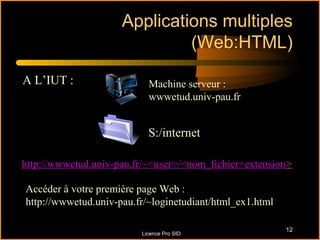
A L’IUT :                  Machine serveur :
                           wwwetud.univ-pau.fr


                           S:/internet

http://wwwetud.univ-pau.fr/~<user>/<nom_fichier+extension>

Accéder à votre première page Web :
http://wwwetud.univ-pau.fr/~loginetudiant/html_ex1.html

                                                          12
                         Licence Pro SID
LE LANGUAGE HTML
                  MISE EN FORME
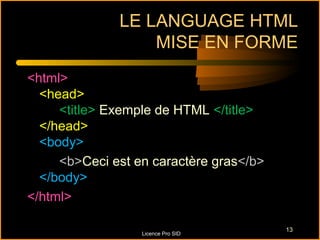
<html>
  <head>
     <title> Exemple de HTML </title>
  </head>
  <body>
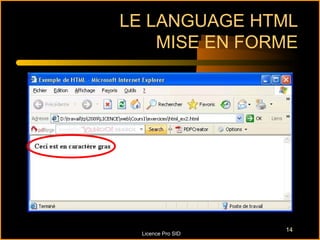
     <b>Ceci est en caractère gras</b>
  </body>
</html>

                                         13
                  Licence Pro SID
LE LANGUAGE HTML
    MISE EN FORME


                    14
  Licence Pro SID
LE LANGUAGE HTML
              LIEN HYPERTEXTE
<html>
  <head>
     <title> Exemple de HTML </title>
  </head>
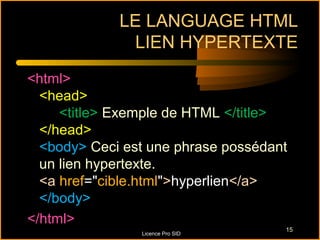
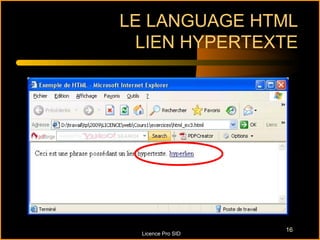
  <body> Ceci est une phrase possédant
  un lien hypertexte.
  <a href="cible.html">hyperlien</a>
  </body>
</html>
                                     15
                Licence Pro SID
LE LANGUAGE HTML
 LIEN HYPERTEXTE


                    16
  Licence Pro SID
LE LANGUAGE HTML
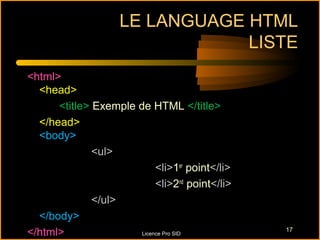
                                LISTE
<html>
  <head>
      <title> Exemple de HTML </title>
  </head>
  <body>
              <ul>
                            <li>1er point</li>
                            <li>2nd point</li>
              </ul>
  </body>
</html>                Licence Pro SID
                                                 17
LE LANGUAGE HTML
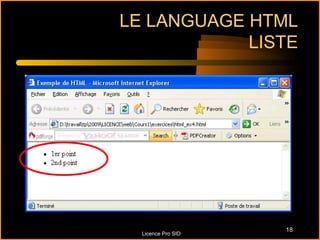
            LISTE


                    18
  Licence Pro SID
LE LANGUAGE HTML
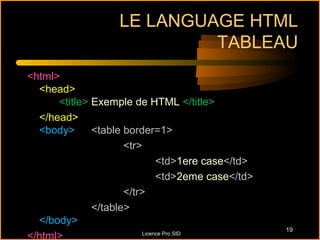
                            TABLEAU
<html>
  <head>
      <title> Exemple de HTML </title>
  </head>
  <body>      <table border=1>
                     <tr>
                              <td>1ere case</td>
                              <td>2eme case</td>
                     </tr>
              </table>
  </body>
                                                   19
</html>                  Licence Pro SID
LE LANGUAGE HTML
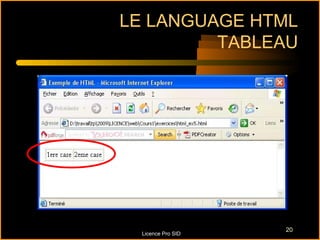
         TABLEAU


                    20
  Licence Pro SID
LE LANGUAGE HTML
                                     TABLEAU
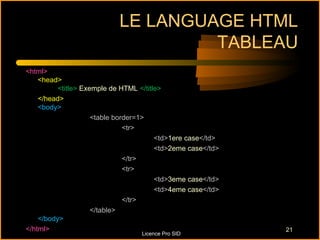
<html>
    <head>
          <title> Exemple de HTML </title>
    </head>
    <body>
                     <table border=1>
                               <tr>
                                        <td>1ere case</td>
                                        <td>2eme case</td>
                               </tr>
                               <tr>
                                        <td>3eme case</td>
                                        <td>4eme case</td>
                               </tr>
                     </table>
    </body>
</html>                                                      21
                                  Licence Pro SID
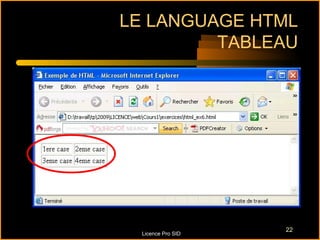
LE LANGUAGE HTML
         TABLEAU


                    22
  Licence Pro SID
LE LANGUAGE HTML
                               TABLEAU
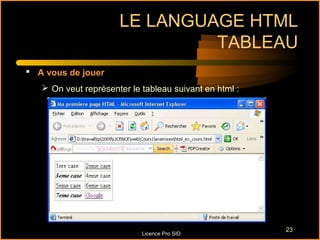
 A vous de jouer
    On veut représenter le tableau suivant en html :


                                                        23
                            Licence Pro SID
LE LANGUAGE HTML
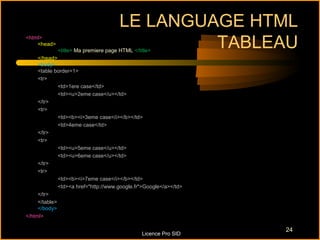
<html>
    <head>                                     TABLEAU
             <title> Ma premiere page HTML </title>
     </head>
     <body>
     <table border=1>
     <tr>
              <td>1ere case</td>
              <td><u>2eme case</u></td>
     </tr>
     <tr>
              <td><b><i>3eme case</i></b></td>
              <td>4eme case</td>
     </tr>
     <tr>
              <td><u>5eme case</u></td>
              <td><u>6eme case</u></td>
     </tr>
     <tr>
              <td><b><i>7eme case</i></b></td>
              <td><a href="http://www.google.fr">Google</a></td>
     </tr>
     </table>
     </body>
</html>

                                                                   24
                                               Licence Pro SID
LE LANGUAGE HTML
Quelques Balises : MISE EN PAGE
•   Alignements CENTER, LEFT , RIGHT

•   P : paragraphe (utilisation : <p>)

•   BR : passage à la ligne (<br>)

•   HR :règle horizontale (utilisation : <hr>)


                                                     25
                                   Licence Pro SID
Questions


  ?

                          26
Licence Pro SID

Alimentation et Reporting de Bases de données via le WEB

  • 1.
    Alimentation et Reporting de Bases de données via le WEB Daniel GASPAR 01/10/12 1
  • 2.
    Déroulement du module •Articulation du module : • Présentation succins de l’HTML • Version 4 • Utilisation d’un CMS (Content Management Systems) • Utilisation de HTML/PHP/SQL • Projet / Concours • Présentation du PHP (Cours réalisé par Olivier LEGOAER) • Accès aux bases de données (SQL Requis) • Projet • Examen écrit 2 Licence Pro SID
  • 3.
    Qu’est-ce qu’une ApplicationWeb • 2 problématiques induites par le sujet. • => Qu’est ce qu’un site Web ? Et accès au contenu ? • => Comment gérer et exploiter un ensemble de données ? 3 Licence Pro SID
  • 4.
    Qu’est-ce qu’une ApplicationWeb • Une application Web permet de mettre des informations à la disposition d'utilisateurs via un navigateur (IE, Firefox, Chrome, …). • => Pour une Consultation • => Pour une Mise à Jour • Utile pour mettre en forme des données • Utile pour automatiser certains traitements 4 Licence Pro SID
  • 5.
  • 6.
  • 7.
  • 8.
    Applications multiples (Web:HTML) 8 Licence Pro SID
  • 9.
    LE LANGUAGE HTML •C’est le langage du Web (toutes les pages sont écrites en html). • C’est un langage de balises (http://b.kostrzewa.free.fr/html , http://fr.selfhtml.org/html) : – de structure du fichier html : html, head, body, meta... – de mise en forme du texte : b, font, i, u... – de listes : li, ul... – de paragraphes : p, br, hr, h1, h2, h3... – de tableaux : table, tr, td, th... – de liens hypertextes : a... – de formulaires : form, input, select, option, textarea... – ... 9 Licence Pro SID
  • 10.
    LE LANGUAGE HTML STRUCTURE DE FICHIER Sous notepad++ : html_ex1.html <html> <head> <title> Exemple de HTML </title> </head> <body> Ceci est une phrase </body> </html> 10 Licence Pro SID
  • 11.
    LE LANGUAGE HTML STRUCTUREDE FICHIER 11 Licence Pro SID
  • 12.
    Applications multiples (Web:HTML) A L’IUT : Machine serveur : wwwetud.univ-pau.fr S:/internet http://wwwetud.univ-pau.fr/~<user>/<nom_fichier+extension> Accéder à votre première page Web : http://wwwetud.univ-pau.fr/~loginetudiant/html_ex1.html 12 Licence Pro SID
  • 13.
    LE LANGUAGE HTML MISE EN FORME <html> <head> <title> Exemple de HTML </title> </head> <body> <b>Ceci est en caractère gras</b> </body> </html> 13 Licence Pro SID
  • 14.
    LE LANGUAGE HTML MISE EN FORME 14 Licence Pro SID
  • 15.
    LE LANGUAGE HTML LIEN HYPERTEXTE <html> <head> <title> Exemple de HTML </title> </head> <body> Ceci est une phrase possédant un lien hypertexte. <a href="cible.html">hyperlien</a> </body> </html> 15 Licence Pro SID
  • 16.
    LE LANGUAGE HTML LIEN HYPERTEXTE 16 Licence Pro SID
  • 17.
    LE LANGUAGE HTML LISTE <html> <head> <title> Exemple de HTML </title> </head> <body> <ul> <li>1er point</li> <li>2nd point</li> </ul> </body> </html> Licence Pro SID 17
  • 18.
    LE LANGUAGE HTML LISTE 18 Licence Pro SID
  • 19.
    LE LANGUAGE HTML TABLEAU <html> <head> <title> Exemple de HTML </title> </head> <body> <table border=1> <tr> <td>1ere case</td> <td>2eme case</td> </tr> </table> </body> 19 </html> Licence Pro SID
  • 20.
    LE LANGUAGE HTML TABLEAU 20 Licence Pro SID
  • 21.
    LE LANGUAGE HTML TABLEAU <html> <head> <title> Exemple de HTML </title> </head> <body> <table border=1> <tr> <td>1ere case</td> <td>2eme case</td> </tr> <tr> <td>3eme case</td> <td>4eme case</td> </tr> </table> </body> </html> 21 Licence Pro SID
  • 22.
    LE LANGUAGE HTML TABLEAU 22 Licence Pro SID
  • 23.
    LE LANGUAGE HTML TABLEAU  A vous de jouer  On veut représenter le tableau suivant en html : 23 Licence Pro SID
  • 24.
    LE LANGUAGE HTML <html> <head> TABLEAU <title> Ma premiere page HTML </title> </head> <body> <table border=1> <tr> <td>1ere case</td> <td><u>2eme case</u></td> </tr> <tr> <td><b><i>3eme case</i></b></td> <td>4eme case</td> </tr> <tr> <td><u>5eme case</u></td> <td><u>6eme case</u></td> </tr> <tr> <td><b><i>7eme case</i></b></td> <td><a href="http://www.google.fr">Google</a></td> </tr> </table> </body> </html> 24 Licence Pro SID
  • 25.
    LE LANGUAGE HTML QuelquesBalises : MISE EN PAGE • Alignements CENTER, LEFT , RIGHT • P : paragraphe (utilisation : <p>) • BR : passage à la ligne (<br>) • HR :règle horizontale (utilisation : <hr>) 25 Licence Pro SID
  • 26.
    Questions ? 26 Licence Pro SID