
















#JSS2015
Les journées
SQL Server 2015
Un événement organisé par GUSS
@GUSS_FRANCE
Isabelle Van Campenhoudt, Membre du Board GUSS
Jean-Pierre Riehl, Membre du Board GUSS
#JSS2015
Bienvenue.
#JSS2015
5 ans de JSS
#JSS2015
10 ans de
La communauté Data & BI Microsoft
#JSS2015
Une communauté
2000 contacts
700 lecteurs
1000 participants
#JSS2015
Une communauté Worldwide
Vidéo "What is PASS ?"
(cliquez)
#JSS2015
Inscrivez-vous
http://sqlpass.org
#JSS2015
#JSS2015
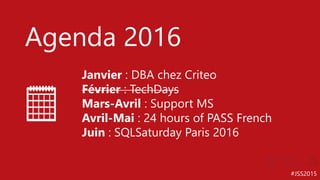
Agenda 2016
Janvier : DBA chez Criteo
Février : TechDays
Mars-Avril : Support MS
Avril-Mai : 24 hours of PASS French
Juin : SQLSaturday Paris 2016
#JSS2015
Les #JSS2015
#JSS2015
Merci à nos sponsors
#JSS2015
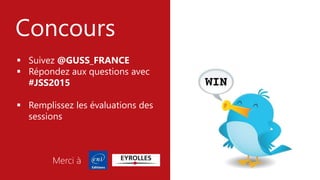
Concours
 Suivez @GUSS_FRANCE
 Répondez aux questions avec
#JSS2015
 Remplissez les évaluations des
sessions
Merci à
#JSS2015
Soirée à l’Explorer
1 place à gagner à
chaque session
#JSS2015
#JSS2015
C’est quoi un DBA en 2016 ?
#JSS2015
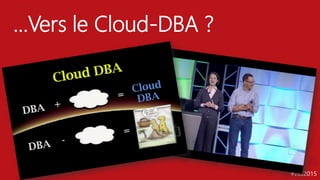
…Vers le Cloud-DBA ?
#JSS2015
Data Deluge ?
#JSS2015
…ou juste un plus gros bocal
#JSS2015
Evolve ?
#JSS2015
#JSS2015
Christian Robert
Fondateur
#JSS2015
SkillInsight
www.skillinsight.biz
#JSS2015
SkillInsight
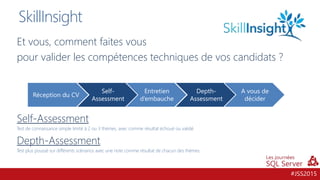
Et vous, comment faites vous
pour valider les compétences techniques de vos candidats ?
Self-Assessment
Test de connaissance simple limité à 2 ou 3 thèmes, avec comme résultat échoué ou validé.
Depth-Assessment
Test plus poussé sur différents scénarios avec une note comme résultat de chacun des thèmes.
Réception du CV
Self-
Assessment
Entretien
d’embauche
Depth-
Assessment
A vous de
décider
#JSS2015
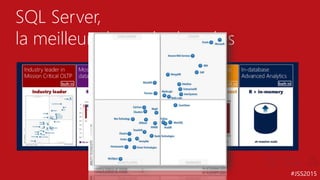
SQL Server,
la meilleure base de données
#JSS2015
Christophe
Laporte
MVP, MCM
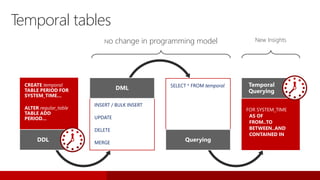
No change in programming model New Insights
INSERT / BULK INSERT
UPDATE
DELETE
MERGE
DML SELECT * FROM temporal
Querying
Temporal tables
CREATE temporal
TABLE PERIOD FOR
SYSTEM_TIME…
ALTER regular_table
TABLE ADD
PERIOD…
DDL
FOR SYSTEM_TIME
AS OF
FROM..TO
BETWEEN..AND
CONTAINED IN
Temporal
Querying
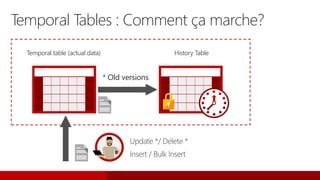
Temporal table (actual data)
Insert / Bulk Insert
* Old versions
Update */ Delete *
Temporal Tables : Comment ça marche?
History Table
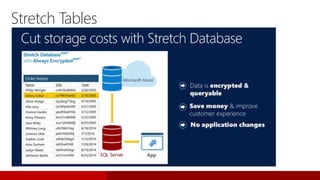
Stretch Tables
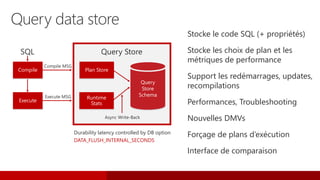
Durability latency controlled by DB option
DATA_FLUSH_INTERNAL_SECONDS
Compile
Execute
Plan Store
Runtime
Stats
Query
Store
Schema
Query data store
Stocke le code SQL (+ propriétés)
Stocke les choix de plan et les
métriques de performance
Support les redémarrages, updates,
recompilations
Performances, Troubleshooting
Nouvelles DMVs
Forçage de plans d’exécution
Interface de comparaison
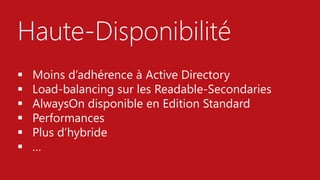
Haute-Disponibilité
 Moins d’adhérence à Active Directory
 Load-balancing sur les Readable-Secondaries
 AlwaysOn disponible en Edition Standard
 Performances
 Plus d’hybride
 …
#JSS2015
Base de données la moins
vulnérable depuis 6 ans
(source NIST 2015)
Sécurité
#JSS2015
David
Barbarin
MVP, MCM
dbo.Patients
Jane Doe
Name
243-24-9812
SSN
USA
Country
Jim Gray 198-33-0987 USA
John Smith 123-82-1095 USA
dbo.Patients
Jane Doe
Name
1x7fg655se2e
SSN
USA
Jim Gray 0x7ff654ae6d USA
John Smith 0y8fj754ea2c USA
Country
Result Set
Jim Gray
Name
Jane Doe
Name
1x7fg655se2e
SSN
USA
Country
Jim Gray 0x7ff654ae6d USA
John Smith 0y8fj754ea2c USA
dbo.Patients
SQL Server
Query
TrustedApps
SELECT Name FROM
Patients WHERE SSN=@SSN
@SSN='198-33-0987'
Result Set
Jim Gray
Name
SELECT Name FROM
Patients WHERE SSN=@SSN
@SSN=0x7ff654ae6d
Column
Encryption
Key
Enhanced
ADO.NET
Library
Column
Master
Key
Client side
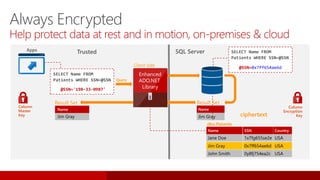
Always Encrypted
Help protect data at rest and in motion, on-premises & cloud
ciphertext
-- user defined function
CREATE FUNCTION Security.fn_securitypredicate
(@Manager AS sysname)
RETURNS TABLE
WITH SCHEMABINDING
AS
RETURN SELECT 1 AS fn_securitypredicate_result
WHERE @Manager = USER_NAME()
OR USER_NAME() = 'BigBoss';
-- security policy
CREATE SECURITY POLICY ManagerFilter
ADD FILTER PREDICATE
Security.fn_securitypredicate(ManagerName)
ON dbo.Salaries WITH (STATE = ON);
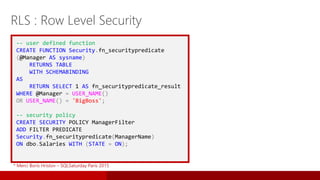
RLS : Row Level Security
* Merci Boris Hristov – SQLSaturday Paris 2015
Operational
analytics for
in-memory tables
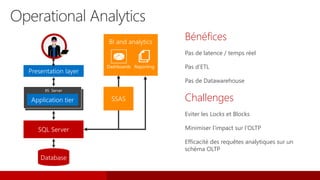
Operational Analytics
Bénéfices
Pas de latence / temps réel
Pas d’ETL
Pas de Datawarehouse
Challenges
Eviter les Locks et Blocks
Minimiser l’impact sur l’OLTP
Efficacité des requêtes analytiques sur un
schéma OLTP
IIS Server
#JSS2015
Théorie de la « crêpe au sucre »
Vous avez Hekaton ?
Vous avez CSI ?
Eh bien avec Hekaton vous
faites une table in-memory et
vous mettez CSI dessus
#JSS2015
IN-MEMORY
#JSS2015
Autres fonctionnalités
Live Query Statistics
Dynamic Data Masking
R in SQL Server
Hybrid
Polybase
Single SSDT
…
#JSS2015
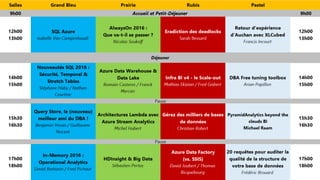
Sessions connexes
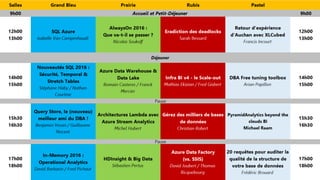
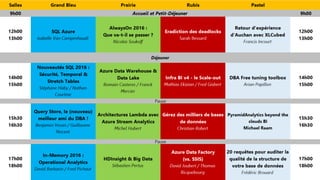
Nouveautés SQL 2016 : Sécurité, Temporal & Stretch Tables
David Barbarin et Sébastien Haby
AlwaysOn 2016
Nicolas Soukoff
In-Memory 2016 : Operational Analytics
Benjamin Vesan et Guillaume Nocent
Query Store, le (nouveau) meilleur ami du DBA
Benjamin Vesan et Guillaume Nocent
#JSS2015
De Nouvelles Architectures
Architecture Lambdas, Big Data, Cortana Analytics, etc.
#JSS2015#JSS2015
Plus d’outils, plus de complexité ?
#JSS2015
SQL Azure
#JSS2015
Azure SQL Databases
V12
DTU
Elasticité
#JSS2015
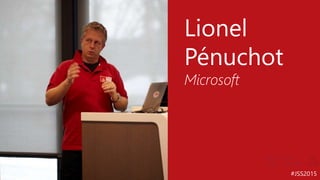
Lionel
Pénuchot
Microsoft
#JSS2015
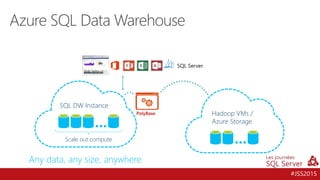
Azure SQL Data Warehouse
PolyBase
Scale out compute
SQL DW Instance
Hadoop VMs /
Azure Storage
Any data, any size, anywhere
#JSS2015
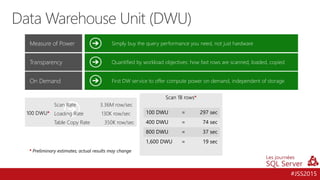
Data Warehouse Unit (DWU)
Simply buy the query performance you need, not just hardware
Quantified by workload objectives: how fast rows are scanned, loaded, copied
Measure of Power
Transparency
First DW service to offer compute power on demand, independent of storageOn Demand
Scan Rate 3.36M row/sec
Loading Rate 130K row/sec
Table Copy Rate 350K row/sec
*
*
100 DWU = 297 sec
400 DWU = 74 sec
800 DWU = 37 sec
1,600 DWU = 19 sec
*
#JSS2015
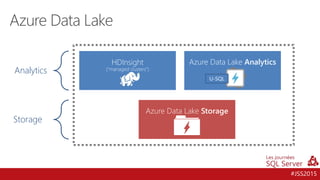
Analytics
Storage
HDInsight
(“managed clusters”)
Azure Data Lake Analytics
Azure Data Lake Storage
Azure Data Lake
U-SQL
#JSS2015
Sébastien
Pertus
Microsoft
#JSS2015
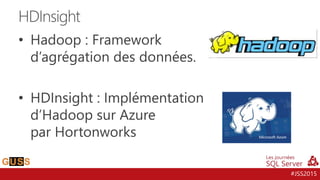
• Hadoop : Framework
d’agrégation des données.
• HDInsight : Implémentation
d’Hadoop sur Azure
par Hortonworks
HDInsight
#JSS2015
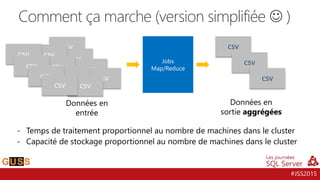
Comment ça marche (version simplifiée  )
Jobs
Map/Reduce
Données en
entrée
Données en
sortie aggrégées
- Temps de traitement proportionnel au nombre de machines dans le cluster
- Capacité de stockage proportionnel au nombre de machines dans le cluster
csv
csv
csv
csv
csv
csv
csv
csv
csv
csv
csv
csv
csv
csv
csv
#JSS2015
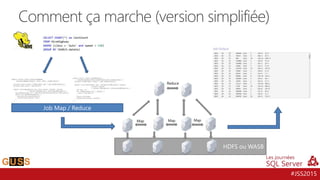
Comment ça marche (version simplifiée)
HDFS ou WASB
Map Map Map
Reduce
Job Map / Reduce
#JSS2015
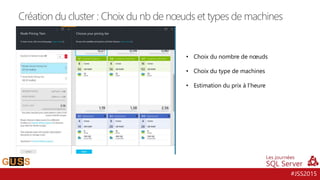
Création du cluster : Choix du nb de nœuds et types de machines
• Choix du nombre de nœuds
• Choix du type de machines
• Estimation du prix à l’heure
#JSS2015
David
Joubert
MVP
#JSS2015
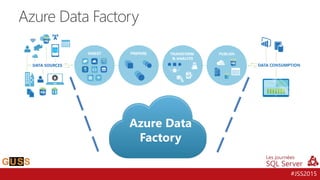
Azure Data Factory
Azure Data
Factory
#JSS2015
Et pour finir…
#JSS2015
57
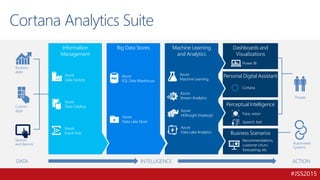
Business Scenarios
Recommendations,
customer churn,
forecasting, etc.
Perceptual Intelligence
Face, vision
Speech, text
Personal Digital Assistant
Cortana
Dashboards and
Visualizations
Power BI
Machine Learning
and Analytics
Azure
Machine Learning
Azure
Stream Analytics
DATA
Business
apps
Custom
apps
Sensors
and devices
INTELLIGENCE ACTION
People
Automated
Systems
Big Data Stores
Azure
SQL Data Warehouse
Information
Management
Azure
Data Factory
Azure
Data Catalog
Azure
Event Hub
Azure
Data Lake Store
Azure
HDInsight (Hadoop)
Azure
Data Lake Analytics
Cortana Analytics Suite
#JSS2015
Merci.
…et bonnes #JSS2015
#JSS2015
#JSS2015
http://GUSS.Pro/jss

JSS2015 - Keynote jour 1

Notes de l'éditeur

  • #27 Source: https://msdn.microsoft.com/en-us/library/dn935015(v=sql.130).aspx How Does Temporal Work? System-versioning for a table is implemented as a pair of tables, a current table and a history table. Within each of these tables, two additional datetime (datetime2 datatype) columns are used to define the period of validity for each record – a system start time (SysStartTime) column and a system end time (SysEndTime) column. The current table contains the current value for each record. The history table contains the each previous value for each record, if any, and the start time and end time for the period for which it was valid. INSERTS: On an INSERT, the system sets the value for the SysStartTime column to the UTC time of the current transaction based on the system clock and assigns the value for the SysEndTime column to the maximum value of 9999-12-31 – this marks the record as open. UPDATES: On an UPDATE, the system stores the previous value of the record in the history table and sets the value for the SysEndTime column to the UTC time of the current transaction based on the system clock. This marks the record as closed, with a period recorded for which the record was valid. In the current table, the record is updated with its new value and the system sets the value for the SysStartTime column to the UTC time for the transaction based on the system clock. The value for the updated record in the current table for the SysEndTime column remains the maximum value of 9999-12-31. DELETES: On a DELETE, the system stores the previous value of the record in the history table and sets the value for the SysEndTime column to the UTC time of the current transaction based on the system clock. This marks this record as closed, with a period recorded for which the previous record was valid. In the current table, the record is removed. Queries of the current table will not return this value. Only queries that deal with history data return data for which a record is closed. MERGE: On a MERGE, MERGE behaves as an INSERT, an UPDATE, or a DELETE based on the condition for each record.
  • #28 Source: https://msdn.microsoft.com/en-us/library/dn935015(v=sql.130).aspx The SYSTEM_TIME period columns used to record the SysStartTime and SysEndTime values must be defined with a datatype of datetime2.
  • #30 Query store is a new feature in that provides DBAs with insight on query plan choice and performance. It simplifies performance troubleshooting by enabling you to quickly find performance differences caused by changes in query plans. The feature automatically captures a history of queries, plans, and runtime statistics, and retains these for your review. It separates data by time windows, allowing you to see database usage patterns and understand when query plan changes happened on the server. The query store presents information by using a Management Studio dialog box, and lets you force the query to one of the selected query plans. For more information, see Monitoring Performance By Using the Query Store.
  • #34 Source: https://msdn.microsoft.com/en-us/library/mt163865(v=sql.130).aspx Always Encrypted is a feature designed to protect sensitive data, such as credit card numbers or national identification numbers (e.g. U.S. social security numbers), stored in SQL Server databases. Always Encrypted allows clients to encrypt sensitive data inside client applications and never reveal the encryption keys to SQL Server. As a result, Always Encrypted provides a separation between those who own the data (and can view it) and those who manage the data (but should have no access). By ensuring on-premises database administrators, cloud database operators, or other high-privileged, but unauthorized users, cannot access the encrypted data, Always Encrypted enables customers to confidently store sensitive data outside of their direct control. This allows organizations to encrypt data at rest and in use for storage in Azure, to enable delegation of on-premises database administration to third parties, or to reduce security clearance requirements for their own DBA staff. Always Encrypted makes encryption transparent to applications. An Always Encrypted-enabled driver installed on the client computer achieves this by automatically encrypting and decrypting sensitive data in the SQL Server client application. The driver encrypts the data in sensitive columns before passing the data to SQL Server, and automatically rewrites queries so that the semantics to the application are preserved. Similarly, the driver transparently decrypts data, stored in encrypted database columns, contained in query results.
  • #37 Ability to run analytics queries concurrently with operational workloads using the same schema Not a replacement for: Extreme analytics queries performance possible using schemas customized (Star/Snowflake) and pre-aggregated cubes Data coming from non-relational sources Data coming from multiple relational sources requiring integrated analytics
  • #47 Enables query capabilities across common Hadoop distributions (HDP & Cloudera) and Hadoop file formats in Azure storage. Polybase for querying & managing non-relational Hadoop and relational data Allows leveraging existing SQL skills and BI tools Supports multiple non-relational file formats Improved time-to-insights & simplified ETL
  • #48 Introducing the concept of a DWU – which is a pivot of a SQL DB DTU. A DTU is a measure of transactions (optimized for OLTP transactions) while a DWU is a measure of query duration (optimized for DW insights). DWUs are a defined measure of performance (tested against the TPC-H dataset) that indicate relative performance to a customer in terms of scan, load, and table copy (shuffle) rate. This presents to a customer as a measure of the time to insight. For example, given the rate of 3.3M rows/sec for 100 DWU, a customer could expect that a scan of a 1B LineItem table in TPC-H would take roughly 297 seconds. An increase of 4x to 400 DWUs would reduce the time of the same query to 74 seconds – providing near linear scale. As a metric of comparison, Redshift offers 4 different SKUs (dense storage large/8xlarge and dense compute large/8xlarge) with varying fixed scan rates. With SQL DW, a customer can chose to balance the cost of DWU (compute) with the time to insight by simply sliding the DWUs up for a duration, executing a query, and then returning to the previous level. This puts the power of computation in the customers hands and away from Amazon choosing only four SKUs that are optimized for their datacenter HW.
  • #56 Comme tu l'as dit JP, on a vu énormément de services de données Azure. Je pense à Azure Data Lake, Azure SQL Datawarehouse, Azure Machine Learning. A ça s'ajoute ce qui était déjà existant comme les blob storage ou les tables dans SQL Azure. Et à aucun moment on a parlé d'un outil pour faire communiquer tout ça. Jusqu'à maintenant, on avait le choix entre code C# et code C#, on a maintenant à disposition un nouveau service de données en GA depuis août : Azure Data Factory  JP : OK, tu nous en dis un peu plus   DJ : Slide avec un beau dessin avec description du produit Alors voila, mes données sources je dois pouvoir les récupérer, faire des transformations, pourquoi pas un peu d’analyse puis les rendre disponibles pour mes outils de reporting. Et bien tout ça je peux le faire directement avec Azure Data Factory, et entièrement dans le cloud.   JP : Ça ressemble à Data flow dans SSIS ?   DJ : De loin seulement. Déjà pour commencer on a pas d’outil dédié, on travaille sur le portail Azure. Et le produit est simple d’utilisation, on travaille avec 4 objets, le tout en JSON On montre le Pipeline, les objets   JP : Alors, comment ça marche, on crée un Job dans un Azure SQL Agent ?   DJ : Non c’est encore plus simple au sein des pipelines je configure des plages de fonctionnement. Dès lors, dès que les datasets d’entrée sont prêts le processus se lance. Ce qui est bien c’est qu’on a pas seulement des transformations de base sur la donnée. Ce qui vient à l’esprit là, c’est du batch Azure Machne Learning ou du lancement de requêtes Pig/Hive sur HDInsight.     JP : OK, c'est dans le cloud mais tu connais mon intérêt pour l'hybride et les Gateway en général.   DJ : et c’est un intérêt partagé. Le grand public n’aurait pas compris qu’on puisse exclusivement récupérer des données dans le Cloud. Comme tu l’as vu en plus, cet outil doit s’intégrer dans un process d’entreprise, je dois donc pouvoir attaquer mes sources de données OnPrem. La réponse est simple, et je sais que tu aimes le produit en plus, c’est la Data Management Gateway. En plus son installation et sa configuration sont implémentées dans Azure Data Factory.