Workshop #3
Elasticsearch, an overview…
Le 10-mar-2016 – Edouard Fajnzilberg & Ludovic Piot
Evénements
les différents événements Oxalide
Workshop #3 - Elasticsearch, an overview…
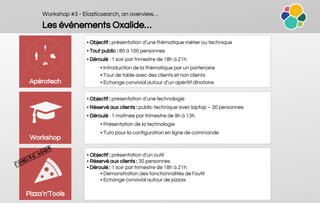
Les événements Oxalide…
• Objectif : présentation d’une thématique métier ou technique
• Tout public : 80 à 100 personnes
• Déroulé : 1 soir par trimestre de 18h à 21h
• Introduction de la thématique par un partenaire
• Tour de table avec des clients et non clients
• Echange convivial autour d’un apéritif dînatoire
• Objectif : présentation d’une technologie
• Réservé aux clients : public technique avec laptop – 30 personnes
• Déroulé : 1 matinée par trimestre de 9h à 13h
• Présentation de la technologie
• Tuto pour la configuration en ligne de commande
• Objectif : présentation d’un outil
• Réservé aux clients : 30 personnes
• Déroulé : 1 soir par trimestre de 18h à 21h
• Démonstration des fonctionnalités de l’outil
• Echange convivial autour de pizzas
Apérotech
Workshop
Pizza’n’Tools
Workshop #3 - Elasticsearch, an overview…
Les speakers…
Edouard Fajnzilberg
Directeur technique
@ kernel42
Ludovic Piot
Team Conseil / Architecture / DevOps
@ Oxalide
@lpiot
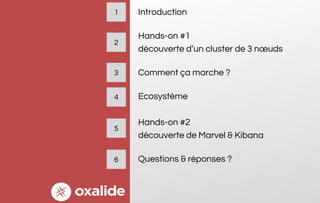
Introduction
Hands-on #1
découverte d’un cluster de 3 nœuds
Comment ça marche ?
Ecosystème
Hands-on #2
découverte de Marvel & Kibana
Questions & réponses ?
1
3
2
4
5
6
Introduction
Introduction
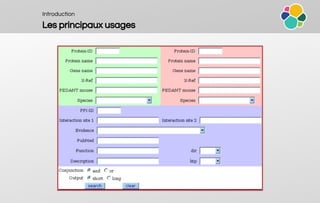
Les principaux usages
Introduction
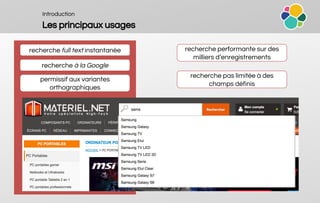
Les principaux usages
recherche full text instantanée
recherche à la Google
permissif aux variantes
orthographiques
recherche performante sur des
milliers d’enregistrements
recherche pas limitée à des
champs définis
Introduction
Les principaux usages
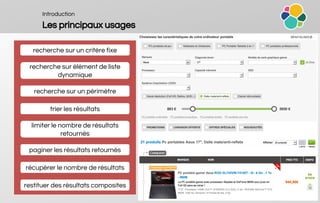
recherche sur un critère fixe
recherche sur élément de liste
dynamique
recherche sur un périmètre
trier les résultats
limiter le nombre de résultats
retournés
paginer les résultats retournés
récupérer le nombre de résultats
restituer des résultats composites
Introduction
Les principaux usages
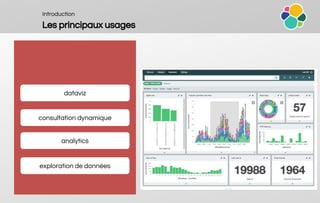
dataviz
consultation dynamique
analytics
exploration de données
Introduction
Elasticsearch, pourquoi c’est cool ?
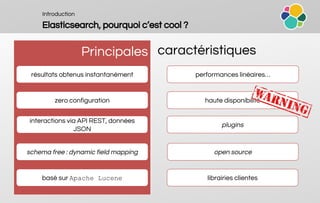
Principales caractéristiques
résultats obtenus instantanément performances linéaires…
haute disponibilité
interactions via API REST, données
JSON
librairies clientes
open source
zero configuration
schema free : dynamic field mapping
basé sur Apache Lucene
plugins
Hands-on #1
découverte d’un cluster de 3 nœuds
Hands-on #1
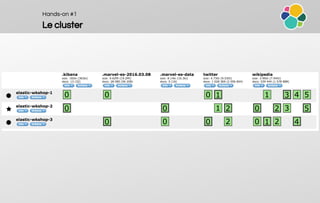
Le cluster
Hands-on #1
API REST
verbe HTTP Type de ressources Exemple
GET
Documents
/twitter/tweet/AVNXnwSH24f3KF5HzrfR?pretty
PUT / POST
/twitter/tweet/AVNXnwSH24f3KF5HzrfR/_create
/twitter/tweet/AVNXnwSH24f3KF5HzrfR?version=1
/twitter/tweet/AVNXnwSH24f3KF5HzrfR?version=5&version_type=external
DELETE /twitter/tweet/AVNXnwSH24f3KF5HzrfR
POST Recherche
/twitter/tweet/_search
/twitter/_search
/_search
GET
Metadonnées
/twitter/_status
/_cluster/status | state | health | settings
/nodes | index/_stats
/_stats
/_search
/_cat
POST /_shutdown (supprimé en v2.x)
http://host:port/[index]/[type]/[_action/id] : remember where / what / which
Hands-on #1
Recherche et document JSON
Query DSL (JSON) Document JSON
{ "query": {
"filtered": {
"query": {
"match_all": {}
},
"filter": {
"and": [
{
"range" : {
"b" : {
"from" : 4,
"to" : "8"
}
},
},
{
"term": {
"a": "john"
}
}
]}}
}
}
{
"name": "John Smith",
"age": 42,
"confirmed": true,
"join_date": "2014-06-01",
"home": {
"lat": 51.5,
"lon": 0.1
},
"accounts": [
{
"type": "facebook",
"id": "johnsmith"
},
{
"type": "twitter",
"id": "johnsmith"
}
]
}
Hands-on #1
Configuration du cluster
Script de démarrage Fichier de configuration
$ cat …/config/elasticsearch.yml
# Use a descriptive name for your cluster:
cluster.name: elastic-wkshop
# Use a descriptive name for the node:
node.name: elastic-wkshop-1
# Path to directory where to store the data:
path.data: /es/data
# Path to log files:
path.logs: /es/logs
# Lock the memory on startup:
bootstrap.mlockall: true
# Set the bind address to a specific IP (IPv4 or IPv6):
network.host: 172.31.23.121
# Set a custom port for HTTP:
http.port: 9200
# Pass an initial list of hosts to perform discovery when new node is started:
discovery.zen.ping.unicast.hosts: ["elastic-wkshop-
1", "elastic-wkshop-2", "elastic-wkshop-3"]
# Prevent the "split brain" by configuring the majority of nodes (total number
of nodes / 2 + 1):
discovery.zen.minimum_master_nodes: 2
$ cat …/bin/elasticsearch
ES_JAVA_OPTS="-Xms8192m -
Xmx8192m"
ES_HEAP_SIZE="8g"
Comment ça marche ?
Comment ça marche ?
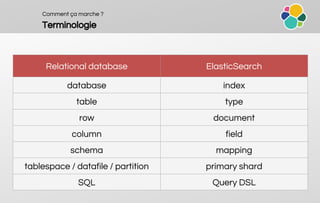
Terminologie
Relational database ElasticSearch
database index
table type
row document
column field
schema mapping
tablespace / datafile / partition primary shard
SQL Query DSL
Comment ça marche ?
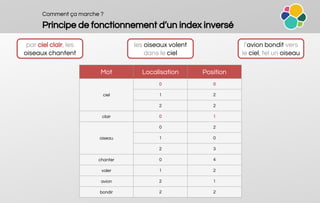
Principe de fonctionnement d’un index inversé
par ciel clair, les
oiseaux chantent
les oiseaux volent
dans le ciel
l’avion bondit vers
le ciel, tel un oiseau
Mot Localisation Position
ciel
0 0
1 2
2 2
clair 0 1
oiseau
0 2
1 0
2 3
chanter 0 4
voler 1 2
avion 2 1
bondir 2 2
Comment ça marche ?
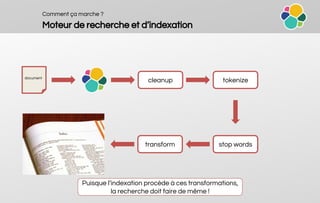
Moteur de recherche et d’indexation
document
cleanup tokenize
stop wordstransform
Puisque l’indexation procède à ces transformations,
la recherche doit faire de même !
Comment ça marche ?
Segments
un index inversé par champ
segment immutable
consolidation des segments au fil de l’
eau
Système distribué
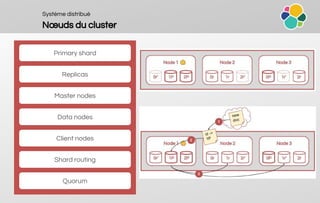
Nœuds du cluster
Primary shard
Replicas
Master nodes
Data nodes
Client nodes
Shard routing
Quorum
Système distribué
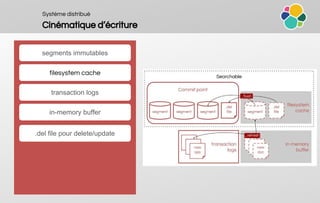
Cinématique d’écriture
segments immutables
filesystem cache
transaction logs
in-memory buffer
.del file pour delete/update
Comment ça marche ?
Mapping
Principes
PUT /[index]/_mapping
Mapping par défaut : {“_default_”: {}}
Dans un même index, tous les champs
du même nom DOIVENT avoir le même
mapping même si ils appartiennent à
des types différents
Exemple
{
"twitter": {
"mappings": {
"tweet": {
"properties": {
"date": {
"type": "date",
"format": "yyyy-MM-dd"
},
"text": {
"type": "string",
"index": "analyzed"
},
"user_id": {
"type": "long"
}
}
}
}
}
}
Comment ça marche ?
Mapping
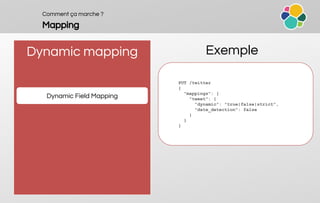
Dynamic mapping
Dynamic Field Mapping
Exemple
PUT /twitter
{
"mappings": {
"tweet": {
"dynamic": "true|false|strict",
"date_detection": false
}
}
}
Comment ça marche ?
Mapping
Dynamic mapping
Default Mapping
Exemple
{
"twitter": {
"mappings": {
"_default_": {
"dynamic_templates": [{
"strings": {
"match_mapping_type": "string",
"mapping": {
"type": "string",
"fields": {
"raw": {
"type": "string",
"index": "not_analyzed",
"ignore_above": 256
}
}
}
}
}]
}
}
}
}
Dynamic Templates
Comment ça marche ?
Mapping
Dynamic Mapping
Index Template
Exemple
PUT /_template/template_twitter
{
"template" : "twitter-*",
"settings" : {
"number_of_shards" : 1
},
"mappings" : {
"tweet" : {
[...]
}
}
}
Comment ça marche ?
Mapping
Mise à jour
On peut ajouter un nouveau field
On ne peut pas changer un field existant
Solution
On ne peut pas supprimer un mapping
(2.x)
Créer un nouvel index et tout ré-indexer :
Scroll Query + Bulk API
Alias d’index :
● index_v1
● index_v2
● index_v3
index => index_v3
PUT /[index]/_alias/[alias]
Comment ça marche ?
Aggregations
Comment s’en servir
POST /twitter/tweet/_search
{
"query": [...],
"aggregations" : {
"<aggregation_name>" : {
"<aggregation_type>" : {
<aggregation_body>
}
[,"aggregations" : { [<sub_aggregation>]+ } ]?
}
[,"<aggregation_name_2>" : { ... } ]*
}
}
Comment ça marche ?
Aggregations
Buckets Exemple
Buckets ≈ GROUP BY
Buckets => doc_count
Buckets inside Buckets
{
[...],
"aggregations": {
"hashtags": {
"buckets": [
{
"key": "IWD2016",
"doc_count": 4
},
{
"key": "heforshe",
"doc_count": 2
},
{
"key": "women",
"doc_count": 2
}
]
}
}
}
Comment ça marche ?
Aggregations
Metrics Exemple
Metrics ≈ SUM/AVG/MIN/MAX
Metrics inside Buckets
Metrics inside Metrics
{
[...],
"aggregations": {
"user_follower_stats": {
"count": 4871628,
"min": 0,
"max": 72529214,
"avg": 5242.441252493007,
"sum": 25539223594
}
}
}
Comment ça marche ?
Aggregations
Mutiple Exemple
{
[...],
"aggregations": {
"grades_stats": {
"count": 6,
"min": 60,
"max": 98,
"avg": 78.5,
"sum": 471
},
"user_follower_stats": {
"count": 456,
"min": 0,
"max": 9868,
"avg": 78.5,
"sum": 785786735
}
}
}
{
"aggregations": {
"grades_stats": {
"stats": {
"field": "grades"
},
},
"user_follower_stats": {
"stats": {
"field": "followers_count"
},
}
}
}
Comment ça marche ?
Aggregations
Nestable Exemple
"aggregations": {
"hashtag": {
"buckets": [
{
"key": "internationalwomensday",
"doc_count": 3334427,
"retweeted": {
"buckets": [
{
"key": 0,
"doc_count": 1334426
},
{
"key": 1,
"doc_count": 2000001
}
]
}
}
]
}
}
{
"aggregations": {
"hashtag": {
"terms": {
"field": "hastags"
},
"aggregations": {
"retweeted": {
"terms": {
"field": "retweeted"
}
}
}
}
}
}
Comment ça marche ?
Aggregations
Sortable Exemple
"aggregations": {
"hashtag": {
"buckets": [
{
"key": "a",
"doc_count": 64987,
},
{
"key": "b",
"doc_count": 789,
},
{
"key": "b",
"doc_count": 236,
}
]
}
}
{
"aggregations": {
"hashtag": {
"terms": {
"field": "hastag",
"order": {
"_term": "asc"
}
}
}
}
}
Comment ça marche ?
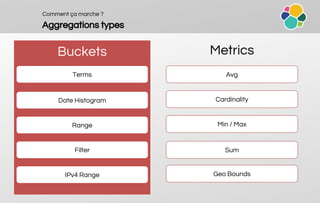
Aggregations types
Buckets Metrics
Terms
Date Histogram
Avg
Filter
IPv4 Range
Range
Cardinality
Min / Max
Sum
Geo Bounds
Comment ça marche ?
Aggregations
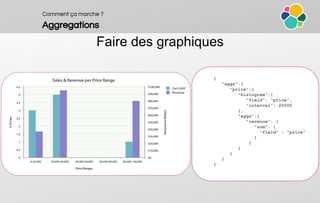
{
"aggs":{
"price":{
"histogram":{
"field": "price",
"interval": 20000
},
"aggs":{
"revenue": {
"sum": {
"field" : "price"
}
}
}
}
}
}
Faire des graphiques
Comment ça marche ?
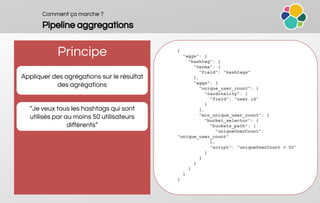
Pipeline aggregations
Principe
Appliquer des agrégations sur le résultat
des agrégations
“Je veux tous les hashtags qui sont
utilisés par au moins 50 utilisateurs
différents”
{
"aggs": {
"hashtag": {
"terms": {
"field": "hashtags"
},
"aggs": {
"unique_user_count": {
"cardinality": {
"field": "user.id"
}
},
"min_unique_user_count": {
"bucket_selector": {
"buckets_path": {
"uniqueUserCount":
"unique_user_count"
},
"script": "uniqueUserCount > 50"
}
}
}
}
}
}
Ecosystème
Ecosystème
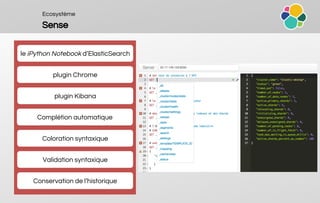
Sense
Complétion automatique
Coloration syntaxique
Validation syntaxique
Conservation de l’historique
plugin Chrome
plugin Kibana
le iPython Notebook d’ElasticSearch
Ecosystème
Logstash & Beats
ETL en Java
support de plugins
input {
twitter {
consumer_key => "…"
consumer_secret => "…"
oauth_token => "…"
oauth_token_secret => "…"
full_tweet => true
keywords => [ "journeedesdroitsdesfemmes",
"journeedelafemme" ]
}
}
filter {
}
output {
stdout { codec => dots }
elasticsearch {
hosts => [ "172.31.23.121" ]
index => "twitter"
document_type => "tweet"
template_name => "tpl_twitter"
}
}
configuration en JSON
Beats = framework Go
Ecosystème
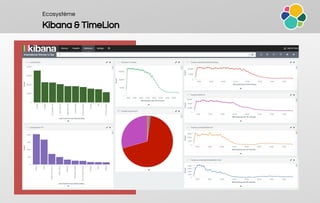
Kibana & TimeLion
Ecosystème
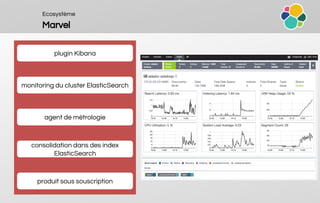
Marvel
plugin Kibana
consolidation dans des index
ElasticSearch
monitoring du cluster ElasticSearch
agent de métrologie
produit sous souscription
Ecosystème
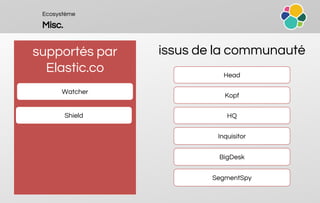
Misc.
supportés par
Elastic.co
issus de la communauté
Shield
Inquisitor
Head
HQ
Kopf
Watcher
BigDesk
SegmentSpy
Hands-on #2
découverte de Marvel & Kibana
Questions & réponses
Oxalide © 2015 – Documents confidentiels
Ou contactez directement :
Maxime KURKDJIAN – Directeur associé
Tel : +33 1 75 77 16 58 / mku
Sébastien LUCAS – Directeur associé
Tel : +33 1 75 77 16 59 / slu@oxalide.com
Siège social & NOC :
25 Boulevard de Strasbourg – 75010 Paris
Tel : +33 1 75 77 16 66
e-mail : commercial@oxalide.com
Oxalide © 2015 – Documents confidentiels

Oxalide Workshop #3 - Elasticearch, an overview

  • 1.
    Workshop #3 Elasticsearch, anoverview… Le 10-mar-2016 – Edouard Fajnzilberg & Ludovic Piot
  • 2.
  • 3.
    Workshop #3 -Elasticsearch, an overview… Les événements Oxalide… • Objectif : présentation d’une thématique métier ou technique • Tout public : 80 à 100 personnes • Déroulé : 1 soir par trimestre de 18h à 21h • Introduction de la thématique par un partenaire • Tour de table avec des clients et non clients • Echange convivial autour d’un apéritif dînatoire • Objectif : présentation d’une technologie • Réservé aux clients : public technique avec laptop – 30 personnes • Déroulé : 1 matinée par trimestre de 9h à 13h • Présentation de la technologie • Tuto pour la configuration en ligne de commande • Objectif : présentation d’un outil • Réservé aux clients : 30 personnes • Déroulé : 1 soir par trimestre de 18h à 21h • Démonstration des fonctionnalités de l’outil • Echange convivial autour de pizzas Apérotech Workshop Pizza’n’Tools
  • 4.
    Workshop #3 -Elasticsearch, an overview… Les speakers… Edouard Fajnzilberg Directeur technique @ kernel42 Ludovic Piot Team Conseil / Architecture / DevOps @ Oxalide @lpiot
  • 5.
    Introduction Hands-on #1 découverte d’uncluster de 3 nœuds Comment ça marche ? Ecosystème Hands-on #2 découverte de Marvel & Kibana Questions & réponses ? 1 3 2 4 5 6
  • 6.
  • 7.
  • 8.
    Introduction Les principaux usages recherchefull text instantanée recherche à la Google permissif aux variantes orthographiques recherche performante sur des milliers d’enregistrements recherche pas limitée à des champs définis
  • 9.
    Introduction Les principaux usages recherchesur un critère fixe recherche sur élément de liste dynamique recherche sur un périmètre trier les résultats limiter le nombre de résultats retournés paginer les résultats retournés récupérer le nombre de résultats restituer des résultats composites
  • 10.
    Introduction Les principaux usages dataviz consultationdynamique analytics exploration de données
  • 11.
    Introduction Elasticsearch, pourquoi c’estcool ? Principales caractéristiques résultats obtenus instantanément performances linéaires… haute disponibilité interactions via API REST, données JSON librairies clientes open source zero configuration schema free : dynamic field mapping basé sur Apache Lucene plugins
  • 12.
    Hands-on #1 découverte d’uncluster de 3 nœuds
  • 13.
  • 14.
    Hands-on #1 API REST verbeHTTP Type de ressources Exemple GET Documents /twitter/tweet/AVNXnwSH24f3KF5HzrfR?pretty PUT / POST /twitter/tweet/AVNXnwSH24f3KF5HzrfR/_create /twitter/tweet/AVNXnwSH24f3KF5HzrfR?version=1 /twitter/tweet/AVNXnwSH24f3KF5HzrfR?version=5&version_type=external DELETE /twitter/tweet/AVNXnwSH24f3KF5HzrfR POST Recherche /twitter/tweet/_search /twitter/_search /_search GET Metadonnées /twitter/_status /_cluster/status | state | health | settings /nodes | index/_stats /_stats /_search /_cat POST /_shutdown (supprimé en v2.x) http://host:port/[index]/[type]/[_action/id] : remember where / what / which
  • 15.
    Hands-on #1 Recherche etdocument JSON Query DSL (JSON) Document JSON { "query": { "filtered": { "query": { "match_all": {} }, "filter": { "and": [ { "range" : { "b" : { "from" : 4, "to" : "8" } }, }, { "term": { "a": "john" } } ]}} } } { "name": "John Smith", "age": 42, "confirmed": true, "join_date": "2014-06-01", "home": { "lat": 51.5, "lon": 0.1 }, "accounts": [ { "type": "facebook", "id": "johnsmith" }, { "type": "twitter", "id": "johnsmith" } ] }
  • 16.
    Hands-on #1 Configuration ducluster Script de démarrage Fichier de configuration $ cat …/config/elasticsearch.yml # Use a descriptive name for your cluster: cluster.name: elastic-wkshop # Use a descriptive name for the node: node.name: elastic-wkshop-1 # Path to directory where to store the data: path.data: /es/data # Path to log files: path.logs: /es/logs # Lock the memory on startup: bootstrap.mlockall: true # Set the bind address to a specific IP (IPv4 or IPv6): network.host: 172.31.23.121 # Set a custom port for HTTP: http.port: 9200 # Pass an initial list of hosts to perform discovery when new node is started: discovery.zen.ping.unicast.hosts: ["elastic-wkshop- 1", "elastic-wkshop-2", "elastic-wkshop-3"] # Prevent the "split brain" by configuring the majority of nodes (total number of nodes / 2 + 1): discovery.zen.minimum_master_nodes: 2 $ cat …/bin/elasticsearch ES_JAVA_OPTS="-Xms8192m - Xmx8192m" ES_HEAP_SIZE="8g"
  • 17.
  • 18.
    Comment ça marche? Terminologie Relational database ElasticSearch database index table type row document column field schema mapping tablespace / datafile / partition primary shard SQL Query DSL
  • 19.
    Comment ça marche? Principe de fonctionnement d’un index inversé par ciel clair, les oiseaux chantent les oiseaux volent dans le ciel l’avion bondit vers le ciel, tel un oiseau Mot Localisation Position ciel 0 0 1 2 2 2 clair 0 1 oiseau 0 2 1 0 2 3 chanter 0 4 voler 1 2 avion 2 1 bondir 2 2
  • 20.
    Comment ça marche? Moteur de recherche et d’indexation document cleanup tokenize stop wordstransform Puisque l’indexation procède à ces transformations, la recherche doit faire de même !
  • 21.
    Comment ça marche? Segments un index inversé par champ segment immutable consolidation des segments au fil de l’ eau
  • 22.
    Système distribué Nœuds ducluster Primary shard Replicas Master nodes Data nodes Client nodes Shard routing Quorum
  • 23.
    Système distribué Cinématique d’écriture segmentsimmutables filesystem cache transaction logs in-memory buffer .del file pour delete/update
  • 24.
    Comment ça marche? Mapping Principes PUT /[index]/_mapping Mapping par défaut : {“_default_”: {}} Dans un même index, tous les champs du même nom DOIVENT avoir le même mapping même si ils appartiennent à des types différents Exemple { "twitter": { "mappings": { "tweet": { "properties": { "date": { "type": "date", "format": "yyyy-MM-dd" }, "text": { "type": "string", "index": "analyzed" }, "user_id": { "type": "long" } } } } } }
  • 25.
    Comment ça marche? Mapping Dynamic mapping Dynamic Field Mapping Exemple PUT /twitter { "mappings": { "tweet": { "dynamic": "true|false|strict", "date_detection": false } } }
  • 26.
    Comment ça marche? Mapping Dynamic mapping Default Mapping Exemple { "twitter": { "mappings": { "_default_": { "dynamic_templates": [{ "strings": { "match_mapping_type": "string", "mapping": { "type": "string", "fields": { "raw": { "type": "string", "index": "not_analyzed", "ignore_above": 256 } } } } }] } } } } Dynamic Templates
  • 27.
    Comment ça marche? Mapping Dynamic Mapping Index Template Exemple PUT /_template/template_twitter { "template" : "twitter-*", "settings" : { "number_of_shards" : 1 }, "mappings" : { "tweet" : { [...] } } }
  • 28.
    Comment ça marche? Mapping Mise à jour On peut ajouter un nouveau field On ne peut pas changer un field existant Solution On ne peut pas supprimer un mapping (2.x) Créer un nouvel index et tout ré-indexer : Scroll Query + Bulk API Alias d’index : ● index_v1 ● index_v2 ● index_v3 index => index_v3 PUT /[index]/_alias/[alias]
  • 29.
    Comment ça marche? Aggregations Comment s’en servir POST /twitter/tweet/_search { "query": [...], "aggregations" : { "<aggregation_name>" : { "<aggregation_type>" : { <aggregation_body> } [,"aggregations" : { [<sub_aggregation>]+ } ]? } [,"<aggregation_name_2>" : { ... } ]* } }
  • 30.
    Comment ça marche? Aggregations Buckets Exemple Buckets ≈ GROUP BY Buckets => doc_count Buckets inside Buckets { [...], "aggregations": { "hashtags": { "buckets": [ { "key": "IWD2016", "doc_count": 4 }, { "key": "heforshe", "doc_count": 2 }, { "key": "women", "doc_count": 2 } ] } } }
  • 31.
    Comment ça marche? Aggregations Metrics Exemple Metrics ≈ SUM/AVG/MIN/MAX Metrics inside Buckets Metrics inside Metrics { [...], "aggregations": { "user_follower_stats": { "count": 4871628, "min": 0, "max": 72529214, "avg": 5242.441252493007, "sum": 25539223594 } } }
  • 32.
    Comment ça marche? Aggregations Mutiple Exemple { [...], "aggregations": { "grades_stats": { "count": 6, "min": 60, "max": 98, "avg": 78.5, "sum": 471 }, "user_follower_stats": { "count": 456, "min": 0, "max": 9868, "avg": 78.5, "sum": 785786735 } } } { "aggregations": { "grades_stats": { "stats": { "field": "grades" }, }, "user_follower_stats": { "stats": { "field": "followers_count" }, } } }
  • 33.
    Comment ça marche? Aggregations Nestable Exemple "aggregations": { "hashtag": { "buckets": [ { "key": "internationalwomensday", "doc_count": 3334427, "retweeted": { "buckets": [ { "key": 0, "doc_count": 1334426 }, { "key": 1, "doc_count": 2000001 } ] } } ] } } { "aggregations": { "hashtag": { "terms": { "field": "hastags" }, "aggregations": { "retweeted": { "terms": { "field": "retweeted" } } } } } }
  • 34.
    Comment ça marche? Aggregations Sortable Exemple "aggregations": { "hashtag": { "buckets": [ { "key": "a", "doc_count": 64987, }, { "key": "b", "doc_count": 789, }, { "key": "b", "doc_count": 236, } ] } } { "aggregations": { "hashtag": { "terms": { "field": "hastag", "order": { "_term": "asc" } } } } }
  • 35.
    Comment ça marche? Aggregations types Buckets Metrics Terms Date Histogram Avg Filter IPv4 Range Range Cardinality Min / Max Sum Geo Bounds
  • 36.
    Comment ça marche? Aggregations { "aggs":{ "price":{ "histogram":{ "field": "price", "interval": 20000 }, "aggs":{ "revenue": { "sum": { "field" : "price" } } } } } } Faire des graphiques
  • 37.
    Comment ça marche? Pipeline aggregations Principe Appliquer des agrégations sur le résultat des agrégations “Je veux tous les hashtags qui sont utilisés par au moins 50 utilisateurs différents” { "aggs": { "hashtag": { "terms": { "field": "hashtags" }, "aggs": { "unique_user_count": { "cardinality": { "field": "user.id" } }, "min_unique_user_count": { "bucket_selector": { "buckets_path": { "uniqueUserCount": "unique_user_count" }, "script": "uniqueUserCount > 50" } } } } } }
  • 38.
  • 39.
    Ecosystème Sense Complétion automatique Coloration syntaxique Validationsyntaxique Conservation de l’historique plugin Chrome plugin Kibana le iPython Notebook d’ElasticSearch
  • 40.
    Ecosystème Logstash & Beats ETLen Java support de plugins input { twitter { consumer_key => "…" consumer_secret => "…" oauth_token => "…" oauth_token_secret => "…" full_tweet => true keywords => [ "journeedesdroitsdesfemmes", "journeedelafemme" ] } } filter { } output { stdout { codec => dots } elasticsearch { hosts => [ "172.31.23.121" ] index => "twitter" document_type => "tweet" template_name => "tpl_twitter" } } configuration en JSON Beats = framework Go
  • 41.
  • 42.
    Ecosystème Marvel plugin Kibana consolidation dansdes index ElasticSearch monitoring du cluster ElasticSearch agent de métrologie produit sous souscription
  • 43.
    Ecosystème Misc. supportés par Elastic.co issus dela communauté Shield Inquisitor Head HQ Kopf Watcher BigDesk SegmentSpy
  • 44.
  • 45.
  • 46.
    Oxalide © 2015– Documents confidentiels Ou contactez directement : Maxime KURKDJIAN – Directeur associé Tel : +33 1 75 77 16 58 / mku Sébastien LUCAS – Directeur associé Tel : +33 1 75 77 16 59 / slu@oxalide.com Siège social & NOC : 25 Boulevard de Strasbourg – 75010 Paris Tel : +33 1 75 77 16 66 e-mail : commercial@oxalide.com Oxalide © 2015 – Documents confidentiels