TechDays Camp 2015
Office 365
Gilles Pommier
MVP Office 365
Smartview
Patrick Guimonet
MVP Office 365
Microsoft Regional Director
Abalon
Agenda
Introduction
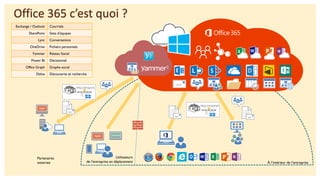
Office 365 c’est quoi ?
Exchange / Outlook Courriels
SharePoint Sites d’équipes
Lync Conversations
OneDrive Fichiers personnels
Yammer Réseau Social
Power BI Décisionnel
Office Graph Graphe social
Delve Découverte et recherche
À l’intérieur de l’entreprise
Partenaires
externes
Utilisateurs
de l’entreprise en déplacement
Stockage des fichiers
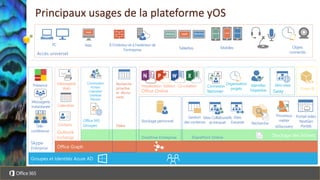
Principaux usages de la plateforme yOS
Yammer
Connexion
Organisation
projets
Identifier
l’expertise
Skype
Enterprise
Présence
Télé-
conférence
Messagerie
instantanée
Accès universel
PC Mac
Tablettes Mobiles
À l’intérieur et à l’extérieur de
l’entreprise
Stockage personnel
OneDrive Entreprise
Office Online
Visualisation Edition Co-création
Office Graph
Groupes et Identités Azure AD
Power BI
Messagerie
Web
Calendrier
Contacts
Outlook
Exchange
Sites Collaboratifs
et Intranet
Sites
Extranet Recherche
Processus
métier
eDiscovery
Gestion
des contenus
Portail vidéo
NextGen
Portals
SharePoint Online
Sway
Mini-sites
Objets
connectés
Office 365
Groupes
Conversation
Fichiers
Calendrier
OneNote
Planner
Recherche
proactive
et décou-
verte
Delve
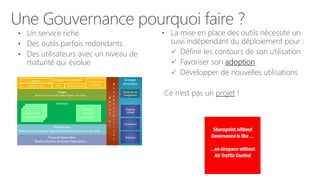
Une Gouvernance pourquoi faire ?
• Un service riche
• Des outils parfois redondants
• Des utilisateurs avec un niveau de
maturité qui évolue
• La mise en place des outils nécessite un
suivi indépendant du déploiement pour :
 Définir les contours de son utilisation
 Favoriser son adoption
 Développer de nouvelles utilisations
Ce n’est pas un projet !
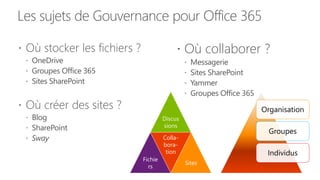
Les sujets de Gouvernance pour Office 365
 Où stocker les fichiers ?
 OneDrive
 Groupes Office 365
 Sites SharePoint
 Où créer des sites ?
 Blog
 SharePoint
 Sway
 Où collaborer ?
 Messagerie
 Sites SharePoint
 Yammer
 Groupes Office 365
Organisation
Groupes
Individus
Discus
sions
Fichie
rs
Colla-
bora-
tion
Sites
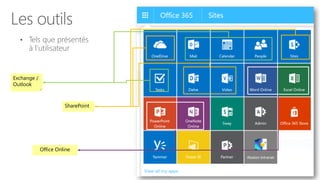
Les outils
• Tels que présentés
à l’utilisateur
Exchange /
Outlook
SharePoint
Office Online
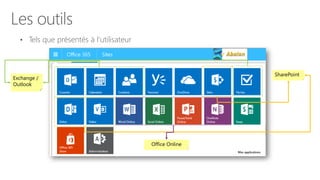
Les outils
• Tels que présentés à l’utilisateur
Exchange /
Outlook
SharePoint
Office Online
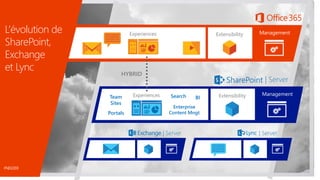
L’évolution de
SharePoint,
Exchange
et Lync
ManagementExtensibilityExperiences
| Server
Experiences ManagementExtensibility
| Server | Server
HYBRID
Team
Sites
Portals
Search
Enterprise
Content Mngt
BI
FND2203
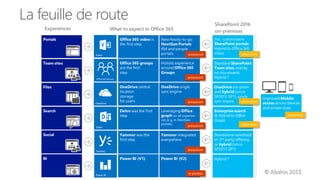
La feuille de route
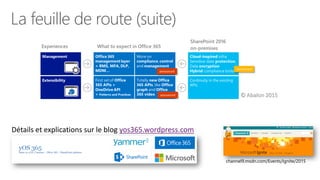
La feuille de route (suite)
channel9.msdn.com/Events/Ignite/2015
Détails et explications sur le blog yos365.wordpress.com
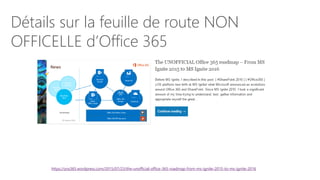
Détails sur la feuille de route NON
OFFICELLE d’Office 365
https://yos365.wordpress.com/2015/07/23/the-unofficial-office-365-roadmap-from-ms-ignite-2015-to-ms-ignite-2016
Démo
OneDrive
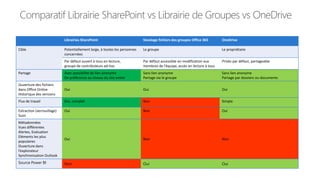
Comparatif Librairie SharePoint vs Librairie de Groupes vs OneDrive
Librairies SharePoint Stockage fichiers des groupes Office 365 OneDrive
Cible Potentiellement large, à toutes les personnes
concernées
Le groupe Le propriétaire
Par défaut ouvert à tous en lecture,
groupe de contributeurs ad-hoc
Par défaut accessible en modification aux
membres de l’équipe, accès en lecture à tous
Privés par défaut, partageable
Partage Avec possibilité de lien anonyme
De préférence au niveau du site entier
Sans lien anonyme
Partage via le groupe
Sans lien anonyme
Partage par dossiers ou documents
Ouverture des fichiers
dans Office Online
Historique des versions
Oui Oui Oui
Flux de travail Oui, complet Non Simple
Extraction (verrouillage)
Suivi
Oui Non Oui
Métadonnées
Vues différentes
Alertes, Evaluation
Eléments les plus
populaires
Ouverture dans
l’explorateur
Synchronisation Outlook
Oui Non Non
Source Power BI Non Oui Oui
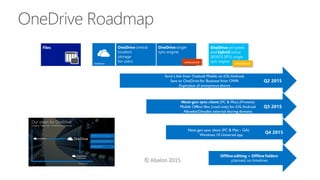
OneDrive Roadmap
Démo
Delve
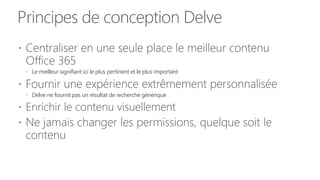
Principes de conception Delve
 Centraliser en une seule place le meilleur contenu
Office 365
 Le meilleur signifiant ici le plus pertinent et le plus important
 Fournir une expérience extrêmement personnalisée
 Delve ne fournit pas un résultat de recherche générique
 Enrichir le contenu visuellement
 Ne jamais changer les permissions, quelque soit le
contenu
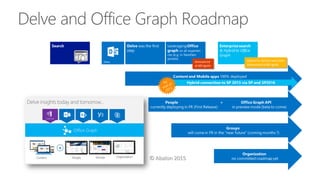
Delve and Office Graph Roadmap
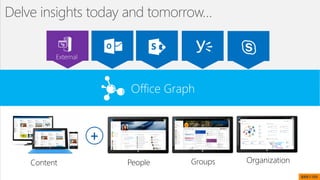
Office Graph
Content
+
Delve insights today and tomorrow…
People Groups Organization
BRK1105
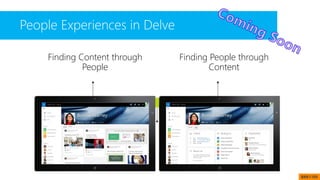
Finding Content through
People
Finding People through
Content
Why people?
Evolution of Delve
A few slides Wrap-up
People Experiences in Delve
BRK1105
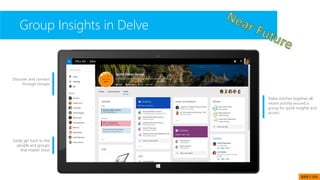
Group Insights in Delve
Discover and connect
through Groups
Easily get back to the
people and groups
that matter most
Delve stitches together all
recent activity around a
group for quick insights and
access
BRK1105
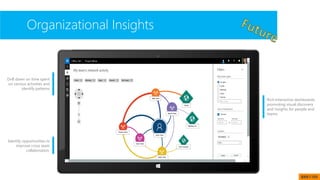
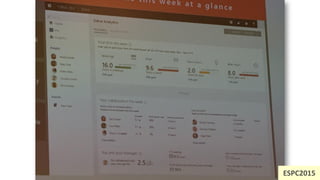
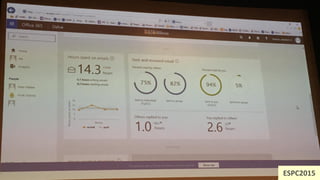
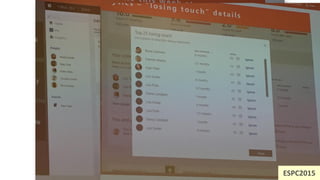
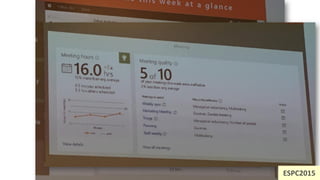
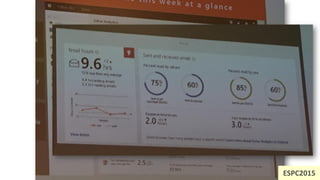
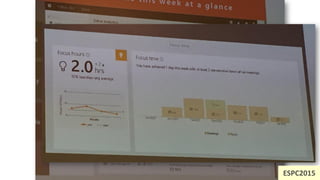
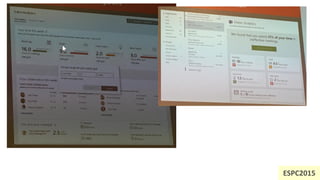
Organizational Insights
Drill down on time spent
on various activities and
identify patterns
Identify opportunities to
improve cross team
collaboration.
Rich Interactive dashboards,
promoting visual discovery
and insights for people and
teams
BRK1105
ESPC2015
ESPC2015
ESPC2015
ESPC2015
ESPC2015
ESPC2015
ESPC2015
ESPC2015
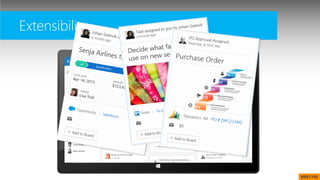
Extensibility
BRK1105
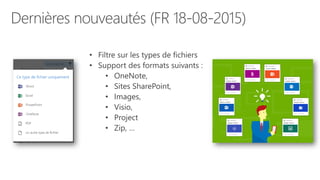
• OneNote,
• Sites SharePoint,
• Images,
• Visio,
• Project
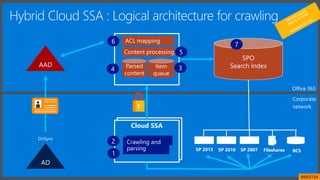
DirSync
SP 2013 SP 2010 SP 2007 Fileshares BCS
Cloud SSA
SPO
Search Index
1
2
34
5
6 7
Hybrid Cloud SSA : Logical architecture for crawling
Corporate
network
Office 365
BRK3134
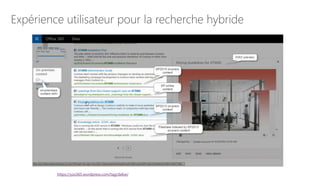
Expérience utilisateur pour la recherche hybride
https://yos365.wordpress.com/tag/delve/
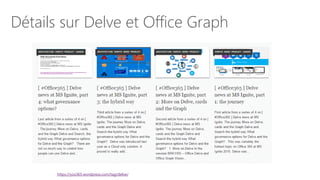
Détails sur Delve et Office Graph
https://yos365.wordpress.com/tag/delve/
Démo
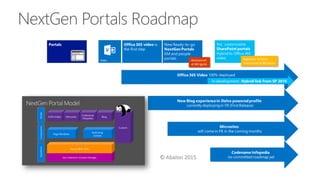
Office 365 video
Nouveau Blog
NextGen Portals Roadmap
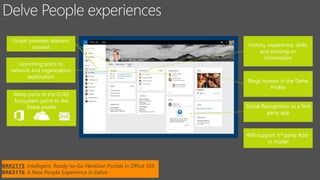
History, experience, skills,
and working on
information
Launching point to
network and organization
exploration
Social Recognition as a first
party app
Will support 3rd party Add-
in model
Graph provides relevant
context
Many parts of the O365
Ecosystem point to the
Delve profile
Blogs homed in the Delve
Profile
BRK2173: Intelligent, Ready-to-Go NextGen Portals in Office 365
BRK2176: A New People Experience in Delve
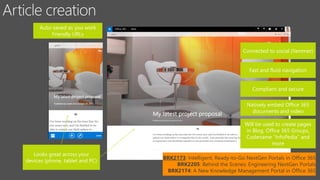
Auto-saved as you work
Friendly URLs
Looks great across your
devices (phone, tablet and PC)
Connected to social (Yammer)
Fast and fluid navigation
Compliant and secure
Natively embed Office 365
documents and video
Will be used to create pages
in Blog, Office 365 Groups,
Codename “InfoPedia” and
more
BRK2173: Intelligent, Ready-to-Go NextGen Portals in Office 365
BRK2205: Behind the Scenes: Engineering NextGen Portals
BRK2174: A New Knowledge Management Portal in Office 365
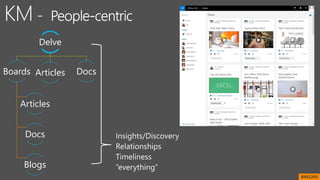
Delve
Boards
Articles
Docs
Blogs
Articles Docs
BRK2205
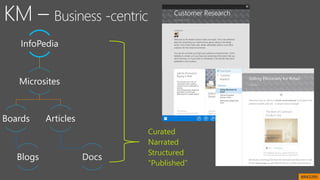
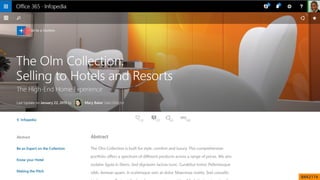
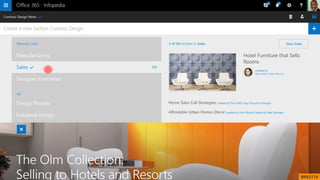
InfoPedia
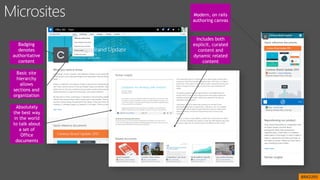
Microsites
Boards
Blogs
Articles
Docs
Curated
Narrated
Structured
“Published”
BRK2205
Basic site
hierarchy
allows
sections and
organization
Includes both
explicit, curated
content and
dynamic related
content
Absolutely
the best way
in the world
to talk about
a set of
Office
documents
Badging
denotes
authoritative
content
Modern, on rails
authoring canvas
BRK2205
BRK2174
BRK2174
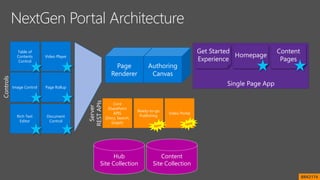
Content
Site Collection
Hub
Site Collection
Controls
Document
Control
Rich Text
Editor
Video Player
Page RollupImage Control
Table of
Contents
Control
Server
RESTAPIs
Video Portal
Core
SharePoint
APIS
(Docs, Search,
Graph)
Ready-to-go
Publishing
BRK2174
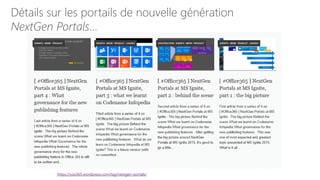
Détails sur les portails de nouvelle génération
NextGen Portals…
https://yos365.wordpress.com/tag/nextgen-portals/
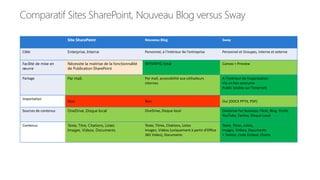
Comparatif Sites SharePoint, Nouveau Blog versus Sway
Site SharePoint Nouveau Blog Sway
Cible Enterprise, Interne Personnel, à l’intérieur de l’entreprise Personnel et Groupes, Interne et externe
Facilité de mise en
œuvre
Nécessite la maitrise de la fonctionnalité
de Publication SharePoint
WYSIWYG total Canvas + Preview
Partage Par mail, Par mail, accessibilité aux utilisateurs
internes
A l’intérieur de l’organisation
Via un lien anonyme
Public (visible sur l’Internet)
Importation
Non Non Oui (DOCX PPTX, PDF)
Sources de contenus OneDrive, Disque local OneDrive, Disque local OneDrive For Business, Flickr, Bing, PicHit,
YouTube, Twitter, Disque Local
Contenus Texte, Titre, Citations, Listes
Images, Videos, Documents
Texte, Titres, Citations, Listes
Images, Vidéos (uniquement à partir d’Office
365 Video), Documents
Texte, Titres, Listes,
Images, Vidéos, Documents
+ Twitter, Code Embed, Charts
Démo
Groupes Office 365
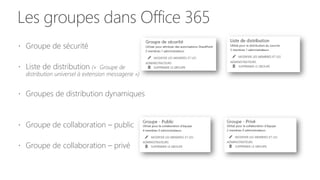
Les groupes dans Office 365
 Groupe de sécurité
 Liste de distribution (« Groupe de
distribution universel à extension messagerie »)
 Groupes de distribution dynamiques
 Groupe de collaboration – public
 Groupe de collaboration – privé
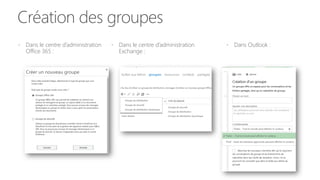
Création des groupes
 Dans le centre d’administration
Office 365 :
 Dans Outlook : Dans le centre d’administration
Exchange :
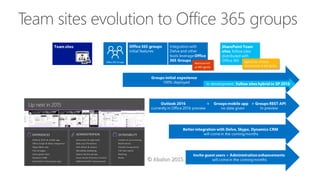
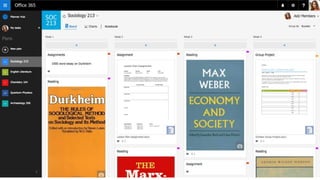
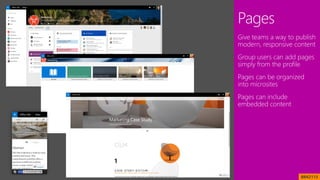
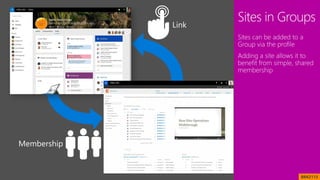
Team sites evolution to Office 365 groups
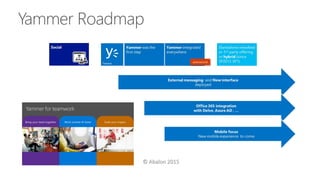
Yammer Roadmap
Recapping Yammer highlights and key takeaways from Ignite
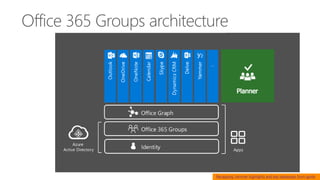
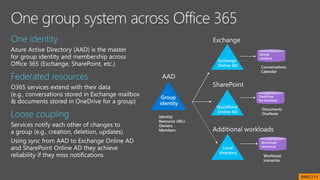
Office 365 Groups architecture
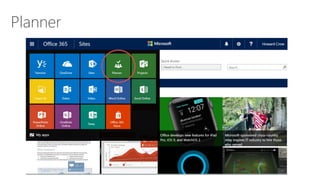
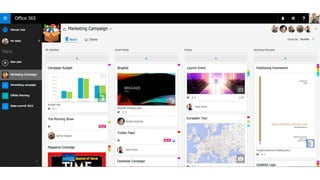
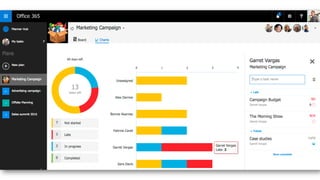
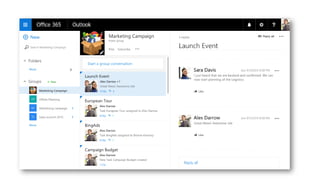
Planner
BRK2113
BRK2113
BRK2113
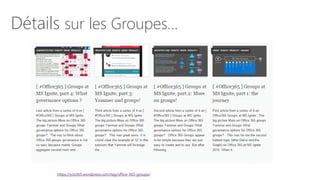
Détails sur les Groupes…
https://yos365.wordpress.com/tag/office-365-groups/
Démo
Power BI
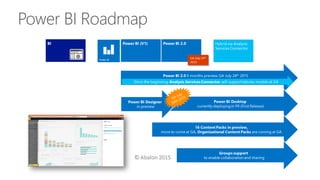
Power BI Roadmap
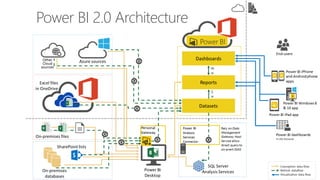
Power BI 2.0 Architecture
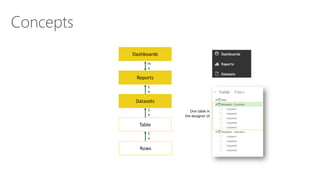
Concepts
Dashboards
Reports
Datasets
m
n
1
n
One table in
the designer UI
1
n
Table
Rows
1
n
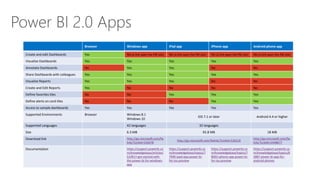
Power BI 2.0 Apps
Browser Windows app iPad app iPhone app Android phone app
Create and edit Dashboards Yes No (a link open the PBI site) No (a link open the PBI site) No (a link open the PBI site) No (a link open the PBI site)
Visualize Dashboards Yes Yes Yes Yes Yes
Annotate Dashboards No Yes Yes No No
Share Dashboards with colleagues Yes Yes Yes Yes Yes
Visualize Reports Yes Yes Yes No No
Create and Edit Reports Yes No No No No
Define favorites tiles No No Yes Yes Yes
Define alerts on card tiles No No No Yes Yes
Access to sample dashboards Yes Yes Yes Yes Yes
Supported Environments Browser Windows 8.1
Windows 10
iOS 7.1 or later Android 4.4 or higher
Supported Languages 42 languages 32 languages
Size 6.3 MB 92.8 MB 18 MB
Download link http://go.microsoft.com/fw
link/?LinkId=526478
http://go.microsoft.com/fwlink/?LinkId=526218
http://go.microsoft.com/fw
link/?LinkID=5448677
Documentation https://support.powerbi.co
m/knowledgebase/articles/
510917-get-started-with-
the-power-bi-for-windows-
app
https://support.powerbi.co
m/knowledgebase/topics/7
7999-ipad-app-power-bi-
for-ios-preview
https://support.powerbi.co
m/knowledgebase/topics/7
8002-iphone-app-power-bi-
for-ios-preview
https://support.powerbi.co
m/knowledgebase/topics/8
5887-power-bi-app-for-
android-phones
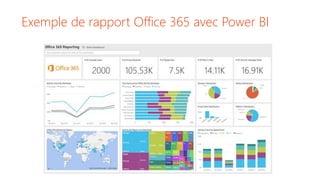
Exemple de rapport Office 365 avec Power BI
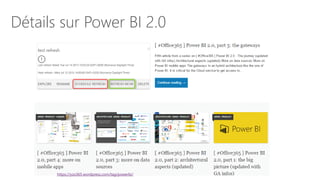
Détails sur Power BI 2.0
https://yos365.wordpress.com/tag/powerbi/
Démo
Mobilité
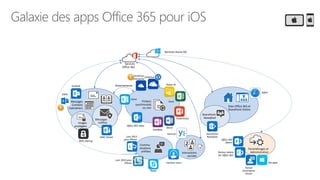
Galaxie des apps Office 365 pour iOS
Messages
Contacts
Calendriers
Messages
chiffrés
Fichiers
synchronisés
ou non
Attachements
Sites Office 365 et
SharePoint Online
Commu-
nications
unifiées Interactions
sociales
SharePoint
Newsfeed
Paramétrages et
Administration
Services
Office 365
Services Azure AD
images
protégées
Outlook
OME Viewer Lync 2013
pour iPhone
Lync 2010 pour
iPhone
Skype
Yammer now !
Yammer
OneNote
Word
Excel
PowerPoint
Safari
SharePoint
Newsfeed
Office 365
Admin
My apps
Partner Admin
for Office 365
Portail
d’entreprise
Intune
RMS sharing
OneDrive
Entreprise
Office 365 video
Power BI
Delve
OWA
OneDrive
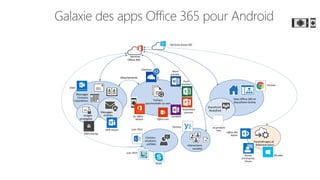
Galaxie des apps Office 365 pour Android
Messages
Contacts
Calendriers
Messages
chiffrés
Fichiers
synchronisés ou non
Attachements
Sites Office 365 et
SharePoint Online
Commu-
nications
unifiées Interactions
sociales
SharePoint
Newsfeed
Paramétrages et
Administration
Services
Office 365
Services Azure AD
images
protégées
OWA
OME Viewer Lync 2013
Lync 2010
Skype
Yammer
OneNote
Word
preview
Excel
preview
PowerPoint
preview
OneDrive
Chrome
via produits
tiers
Office 365
Admin
My appsPortail
d’entreprise
Intune
RMS sharing
Ou Office
Mobile Office Lens
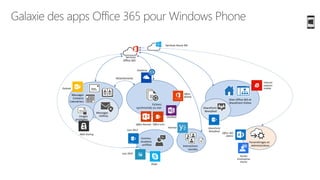
Galaxie des apps Office 365 pour Windows Phone
Messages
Contacts
Calendriers
Messages
chiffrés
Fichiers
synchronisés ou non
Attachements
Sites Office 365 et
SharePoint Online
Commu-
nications
unifiées Interactions
sociales
SharePoint
Newsfeed
Paramétrages et
Administration
Services
Office 365
Services Azure AD
images
protégées
Outlook
Lync 2013
Lync 2010
Skype
Yammer
OneNote
OneDrive
Internet
explorer
mobile
SharePoint
Newsfeed
Office 365
Admin
Portail
d’entreprise
Intune
RMS sharing
Office
Mobile
Office LensOffice Remote
Démo
Office 365 Admin Center
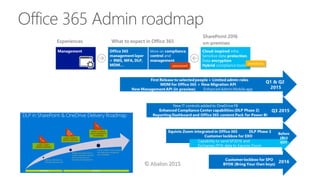
Office 365 Admin roadmap
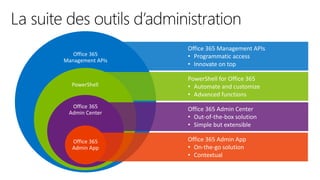
La suite des outils d’administration
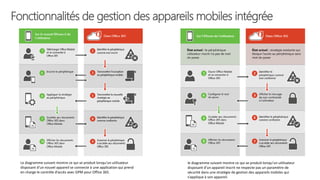
Fonctionnalités de gestion des appareils mobiles intégrée
Le diagramme suivant montre ce qui se produit lorsqu’un utilisateur
disposant d’un nouvel appareil se connecte à une application qui prend
en charge le contrôle d’accès avec GPM pour Office 365.
le diagramme suivant montre ce qui se produit lorsqu’un utilisateur
disposant d’un appareil inscrit ne respecte pas un paramètre de
sécurité dans une stratégie de gestion des appareils mobiles qui
s’applique à son appareil.
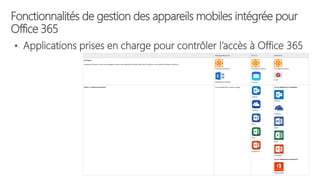
Fonctionnalités de gestion des appareils mobiles intégrée pour
Office 365
• Applications prises en charge pour contrôler l’accès à Office 365
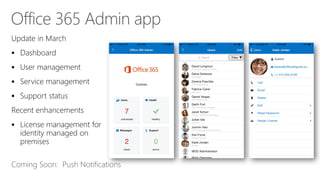
Office 365 Admin app





Coming Soon: Push Notifications
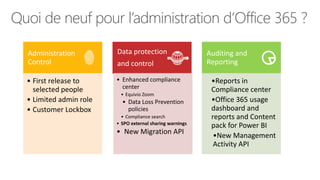
Quoi de neuf pour l’administration d’Office 365 ?
Administration
Control
• First release to
selected people
• Limited admin role
• Customer Lockbox
Data protection
and control
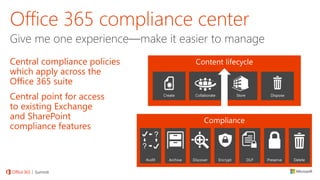
• Enhanced compliance
center
• Equivio Zoom
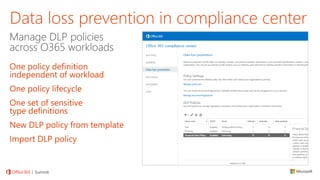
• Data Loss Prevention
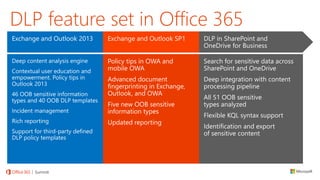
policies
• Compliance search
• SPO external sharing warnings
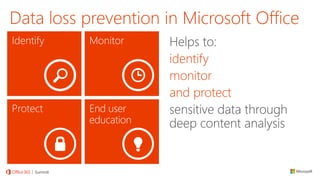
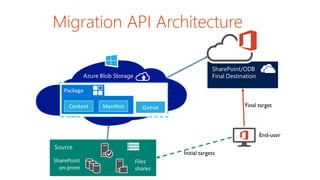
• New Migration API
Auditing and
Reporting
•Reports in
Compliance center
•Office 365 usage
dashboard and
reports and Content
pack for Power BI
•New Management
Activity API
Migration API Architecture
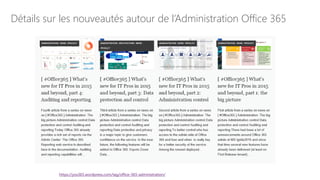
Détails sur les nouveautés autour de l’Administration Office 365
https://yos365.wordpress.com/tag/office-365-administration/
Office 365 API : Quel Objectif ?
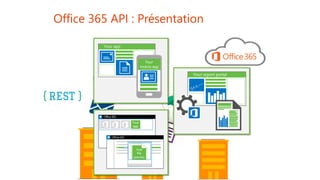
Office 365 API : Présentation
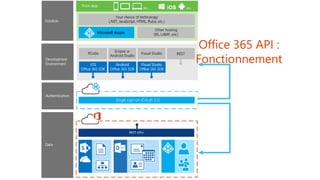
Office 365 API :
Fonctionnement
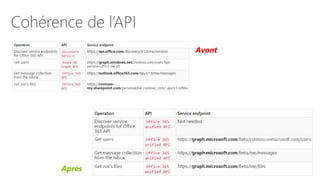
Cohérence de l’API
Avant
Après
PowerShell & Office365 : Pourquoi
l’utiliser ?
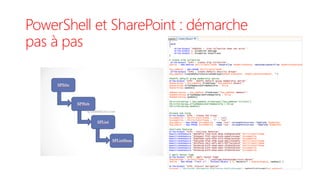
PowerShell et SharePoint : démarche
pas à pas
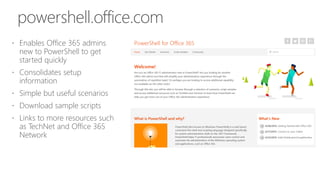
 Enables Office 365 admins
new to PowerShell to get
started quickly
 Consolidates setup
information
 Simple but useful scenarios
 Download sample scripts
 Links to more resources such
as TechNet and Office 365
Network
powershell.office.com
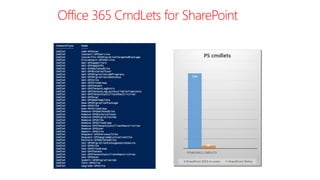
Office 365 CmdLets for SharePoint
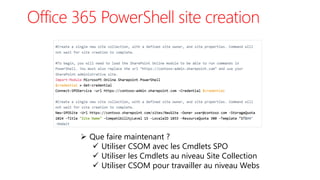
Office 365 PowerShell site creation
 Que faire maintenant ?
 Utiliser CSOM avec les Cmdlets SPO
 Utiliser les Cmdlets au niveau Site Collection
 Utiliser CSOM pour travailler au niveau Webs
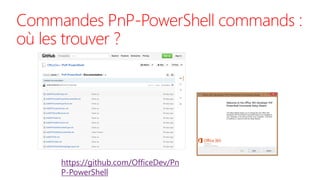
Commandes PnP-PowerShell commands :
où les trouver ?
https://github.com/OfficeDev/Pn
P-PowerShell
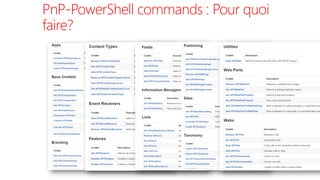
PnP-PowerShell commands : Pour quoi
faire?
Old School PowerShell
Add-Type –Path 'C:Program FilesCommon FilesMicrosoft SharedWeb Server
Extensions16ISAPIMicrosoft.SharePoint.Client.Runtime.dll’
$url=https://test.sharepoint.com/sites/PnP
$O365Credential= new-object
Microsoft.SharePoint.Client.SharePointOnlineCredentials($creds.UserName,$creds.Password)
$ctx= new-object Microsoft.SharePoint.Client.ClientContext($url)
$ctx.Credentials = $O365Credential
…
$fieldXml="<Field Type=""Choice"" Name=""SPSLocation"" DisplayName=""Location"" ID=""{ba27f512-27bc-4d07-
bdd4-2ee61bc5bcb4}"" Group=""Demo Group"“
Required=""TRUE""><CHOICES><CHOICE>Brussels</CHOICE><CHOICE>Belgium</CHOICE><CHOICE>Paris</CHOICE></CHOICE
S></Field>
$field= $list.Fields.AddFieldAsXml ($fieldXml, $true,
[Microsoft.SharePoint.Client.AddFieldOptions]::AddFieldToDefaultView);
$ctx.Load($list);
$ctx.ExecuteQuery();
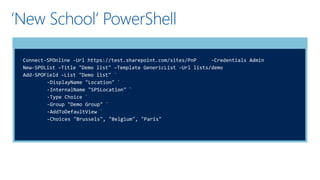
‘New School’ PowerShell
Connect-SPOnline -Url https://test.sharepoint.com/sites/PnP -Credentials Admin
New-SPOList –Title "Demo list" –Template GenericList -Url lists/demo
Add-SPOField –List "Demo list" `
-DisplayName "Location" `
-InternalName "SPSLocation" `
-Type Choice `
-Group "Demo Group" `
-AddToDefaultView `
-Choices "Brussels", "Belgium", "Paris"
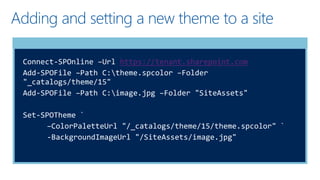
Adding and setting a new theme to a site
Connect-SPOnline –Url https://tenant.sharepoint.com
Add-SPOFile –Path C:theme.spcolor –Folder
"_catalogs/theme/15"
Add-SPOFile –Path C:image.jpg –Folder "SiteAssets"
Set-SPOTheme `
–ColorPaletteUrl "/_catalogs/theme/15/theme.spcolor" `
-BackgroundImageUrl "/SiteAssets/image.jpg"
Démo
Office 365 API and
PowerShell
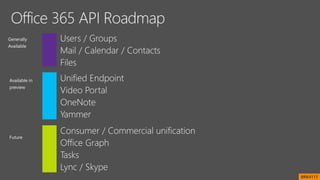
Generally
Available
Future
Available in
preview
BRK4117


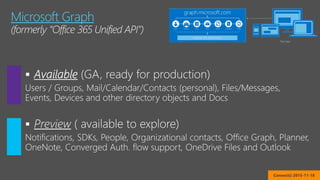
Microsoft Graph
Connect() 2015-11-18
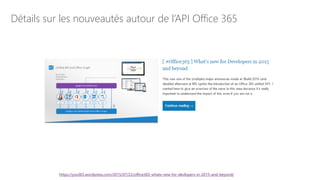
Détails sur les nouveautés autour de l’API Office 365
https://yos365.wordpress.com/2015/07/22/office365-whats-new-for-devlopers-in-2015-and-beyond/
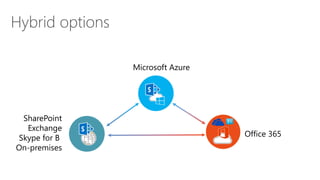
Hybrid options
SharePoint
Exchange
Skype for B
On-premises
Office 365
Microsoft Azure
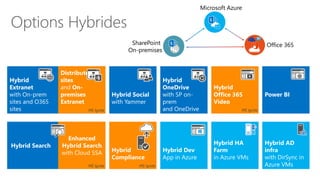
Options Hybrides
Enhanced
Hybrid Search
with Cloud SSA
MS Ignite
Hybrid
Extranet
with On-prem
sites and O365
sites
Hybrid Social
with Yammer
Hybrid Dev
App in Azure
Hybrid HA
Farm
in Azure VMs
Hybrid AD
infra
with DirSync in
Azure VMs
Hybrid Search
Power BI
Hybrid
OneDrive
with SP on-
prem
and OneDrive
Hybrid
Compliance
MS Ignite
Hybrid
Office 365
Video
MS Ignite
SharePoint
On-premises
Office 365
Microsoft Azure
Distributed
sites
and On-
premises
Extranet
MS Ignite
Synthèse
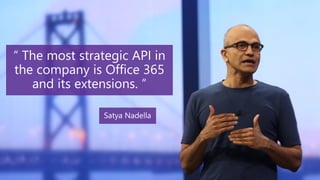
Une API stratégique
Plein de possibilités
Besoin de Gouvernance
Définir des règles
Désactiver ce que vous
n’utilisez pas
Aidez les utilisateurs
Information
Formations rapides
Une suite très riche
Delve
Next-Gen Portals
Office 365 Groups
Skype for Business
Office 365 Resources
Learn more about the evolutions of Office 365:
MS Ignite 2015 http://channel9.msdn.com/Events/Ignite/2015
Next generation Office 365 Controls, Extensibility and Team Productivity
http://channel9.msdn.com/Events/Ignite/2015/FND2101
Office 365 Roadmap http://roadmap.office.com/en-us
Office Blogs http://blogs.office.com
Office 365 Customer Success Center http://success.office.com/
Online documentation https://support.office.com/
My English blog https://yos365.wordpress.com/
© 2015 Microsoft Corporation. All rights reserved. Microsoft, Windows, Microsoft Azure and other product names are or may be registered trademarks and/or trademarks in the U.S. and/or other
countries. The information herein is for informational purposes only and represents the current view of Microsoft Corporation as of the date of this presentation. Because Microsoft must respond
to changing market conditions, it should not be interpreted to be a commitment on the part of Microsoft, and Microsoft cannot guarantee the accuracy of any information provided after the date
of this presentation. MICROSOFT MAKES NO WARRANTIES, EXPRESS, IMPLIED OR STATUTORY, AS TO THE INFORMATION IN THIS PRESENTATION

2015 11-26 Office 365 TechDays Camp

  • 1.
    TechDays Camp 2015 Office365 Gilles Pommier MVP Office 365 Smartview Patrick Guimonet MVP Office 365 Microsoft Regional Director Abalon
  • 2.
  • 3.
  • 5.
    Office 365 c’estquoi ? Exchange / Outlook Courriels SharePoint Sites d’équipes Lync Conversations OneDrive Fichiers personnels Yammer Réseau Social Power BI Décisionnel Office Graph Graphe social Delve Découverte et recherche À l’intérieur de l’entreprise Partenaires externes Utilisateurs de l’entreprise en déplacement
  • 6.
    Stockage des fichiers Principauxusages de la plateforme yOS Yammer Connexion Organisation projets Identifier l’expertise Skype Enterprise Présence Télé- conférence Messagerie instantanée Accès universel PC Mac Tablettes Mobiles À l’intérieur et à l’extérieur de l’entreprise Stockage personnel OneDrive Entreprise Office Online Visualisation Edition Co-création Office Graph Groupes et Identités Azure AD Power BI Messagerie Web Calendrier Contacts Outlook Exchange Sites Collaboratifs et Intranet Sites Extranet Recherche Processus métier eDiscovery Gestion des contenus Portail vidéo NextGen Portals SharePoint Online Sway Mini-sites Objets connectés Office 365 Groupes Conversation Fichiers Calendrier OneNote Planner Recherche proactive et décou- verte Delve
  • 7.
    Une Gouvernance pourquoifaire ? • Un service riche • Des outils parfois redondants • Des utilisateurs avec un niveau de maturité qui évolue • La mise en place des outils nécessite un suivi indépendant du déploiement pour :  Définir les contours de son utilisation  Favoriser son adoption  Développer de nouvelles utilisations Ce n’est pas un projet !
  • 8.
    Les sujets deGouvernance pour Office 365  Où stocker les fichiers ?  OneDrive  Groupes Office 365  Sites SharePoint  Où créer des sites ?  Blog  SharePoint  Sway  Où collaborer ?  Messagerie  Sites SharePoint  Yammer  Groupes Office 365 Organisation Groupes Individus Discus sions Fichie rs Colla- bora- tion Sites
  • 9.
    Les outils • Telsque présentés à l’utilisateur Exchange / Outlook SharePoint Office Online
  • 10.
    Les outils • Telsque présentés à l’utilisateur Exchange / Outlook SharePoint Office Online
  • 11.
    L’évolution de SharePoint, Exchange et Lync ManagementExtensibilityExperiences |Server Experiences ManagementExtensibility | Server | Server HYBRID Team Sites Portals Search Enterprise Content Mngt BI FND2203
  • 12.
  • 13.
    La feuille deroute (suite) channel9.msdn.com/Events/Ignite/2015 Détails et explications sur le blog yos365.wordpress.com
  • 14.
    Détails sur lafeuille de route NON OFFICELLE d’Office 365 https://yos365.wordpress.com/2015/07/23/the-unofficial-office-365-roadmap-from-ms-ignite-2015-to-ms-ignite-2016
  • 15.
  • 16.
    Comparatif Librairie SharePointvs Librairie de Groupes vs OneDrive Librairies SharePoint Stockage fichiers des groupes Office 365 OneDrive Cible Potentiellement large, à toutes les personnes concernées Le groupe Le propriétaire Par défaut ouvert à tous en lecture, groupe de contributeurs ad-hoc Par défaut accessible en modification aux membres de l’équipe, accès en lecture à tous Privés par défaut, partageable Partage Avec possibilité de lien anonyme De préférence au niveau du site entier Sans lien anonyme Partage via le groupe Sans lien anonyme Partage par dossiers ou documents Ouverture des fichiers dans Office Online Historique des versions Oui Oui Oui Flux de travail Oui, complet Non Simple Extraction (verrouillage) Suivi Oui Non Oui Métadonnées Vues différentes Alertes, Evaluation Eléments les plus populaires Ouverture dans l’explorateur Synchronisation Outlook Oui Non Non Source Power BI Non Oui Oui
  • 17.
  • 18.
  • 19.
    Principes de conceptionDelve  Centraliser en une seule place le meilleur contenu Office 365  Le meilleur signifiant ici le plus pertinent et le plus important  Fournir une expérience extrêmement personnalisée  Delve ne fournit pas un résultat de recherche générique  Enrichir le contenu visuellement  Ne jamais changer les permissions, quelque soit le contenu
  • 20.
    Delve and OfficeGraph Roadmap
  • 21.
    Office Graph Content + Delve insightstoday and tomorrow… People Groups Organization BRK1105
  • 22.
    Finding Content through People FindingPeople through Content Why people? Evolution of Delve A few slides Wrap-up People Experiences in Delve BRK1105
  • 23.
    Group Insights inDelve Discover and connect through Groups Easily get back to the people and groups that matter most Delve stitches together all recent activity around a group for quick insights and access BRK1105
  • 24.
    Organizational Insights Drill downon time spent on various activities and identify patterns Identify opportunities to improve cross team collaboration. Rich Interactive dashboards, promoting visual discovery and insights for people and teams BRK1105
  • 25.
  • 26.
  • 27.
  • 28.
  • 29.
  • 30.
  • 31.
  • 32.
  • 33.
  • 34.
    • OneNote, • SitesSharePoint, • Images, • Visio, • Project
  • 35.
    DirSync SP 2013 SP2010 SP 2007 Fileshares BCS Cloud SSA SPO Search Index 1 2 34 5 6 7 Hybrid Cloud SSA : Logical architecture for crawling Corporate network Office 365 BRK3134
  • 36.
    Expérience utilisateur pourla recherche hybride https://yos365.wordpress.com/tag/delve/
  • 37.
    Détails sur Delveet Office Graph https://yos365.wordpress.com/tag/delve/
  • 38.
  • 39.
  • 40.
    History, experience, skills, andworking on information Launching point to network and organization exploration Social Recognition as a first party app Will support 3rd party Add- in model Graph provides relevant context Many parts of the O365 Ecosystem point to the Delve profile Blogs homed in the Delve Profile BRK2173: Intelligent, Ready-to-Go NextGen Portals in Office 365 BRK2176: A New People Experience in Delve
  • 41.
    Auto-saved as youwork Friendly URLs Looks great across your devices (phone, tablet and PC) Connected to social (Yammer) Fast and fluid navigation Compliant and secure Natively embed Office 365 documents and video Will be used to create pages in Blog, Office 365 Groups, Codename “InfoPedia” and more BRK2173: Intelligent, Ready-to-Go NextGen Portals in Office 365 BRK2205: Behind the Scenes: Engineering NextGen Portals BRK2174: A New Knowledge Management Portal in Office 365
  • 42.
  • 43.
  • 44.
    Basic site hierarchy allows sections and organization Includesboth explicit, curated content and dynamic related content Absolutely the best way in the world to talk about a set of Office documents Badging denotes authoritative content Modern, on rails authoring canvas BRK2205
  • 45.
  • 46.
  • 47.
    Content Site Collection Hub Site Collection Controls Document Control RichText Editor Video Player Page RollupImage Control Table of Contents Control Server RESTAPIs Video Portal Core SharePoint APIS (Docs, Search, Graph) Ready-to-go Publishing BRK2174
  • 48.
    Détails sur lesportails de nouvelle génération NextGen Portals… https://yos365.wordpress.com/tag/nextgen-portals/
  • 49.
    Comparatif Sites SharePoint,Nouveau Blog versus Sway Site SharePoint Nouveau Blog Sway Cible Enterprise, Interne Personnel, à l’intérieur de l’entreprise Personnel et Groupes, Interne et externe Facilité de mise en œuvre Nécessite la maitrise de la fonctionnalité de Publication SharePoint WYSIWYG total Canvas + Preview Partage Par mail, Par mail, accessibilité aux utilisateurs internes A l’intérieur de l’organisation Via un lien anonyme Public (visible sur l’Internet) Importation Non Non Oui (DOCX PPTX, PDF) Sources de contenus OneDrive, Disque local OneDrive, Disque local OneDrive For Business, Flickr, Bing, PicHit, YouTube, Twitter, Disque Local Contenus Texte, Titre, Citations, Listes Images, Videos, Documents Texte, Titres, Citations, Listes Images, Vidéos (uniquement à partir d’Office 365 Video), Documents Texte, Titres, Listes, Images, Vidéos, Documents + Twitter, Code Embed, Charts
  • 50.
  • 51.
    Les groupes dansOffice 365  Groupe de sécurité  Liste de distribution (« Groupe de distribution universel à extension messagerie »)  Groupes de distribution dynamiques  Groupe de collaboration – public  Groupe de collaboration – privé
  • 52.
    Création des groupes Dans le centre d’administration Office 365 :  Dans Outlook : Dans le centre d’administration Exchange :
  • 53.
    Team sites evolutionto Office 365 groups
  • 54.
  • 55.
    Recapping Yammer highlightsand key takeaways from Ignite Office 365 Groups architecture
  • 56.
  • 61.
  • 62.
  • 63.
  • 64.
    Détails sur lesGroupes… https://yos365.wordpress.com/tag/office-365-groups/
  • 65.
  • 66.
  • 67.
    Power BI 2.0Architecture
  • 68.
  • 69.
    Power BI 2.0Apps Browser Windows app iPad app iPhone app Android phone app Create and edit Dashboards Yes No (a link open the PBI site) No (a link open the PBI site) No (a link open the PBI site) No (a link open the PBI site) Visualize Dashboards Yes Yes Yes Yes Yes Annotate Dashboards No Yes Yes No No Share Dashboards with colleagues Yes Yes Yes Yes Yes Visualize Reports Yes Yes Yes No No Create and Edit Reports Yes No No No No Define favorites tiles No No Yes Yes Yes Define alerts on card tiles No No No Yes Yes Access to sample dashboards Yes Yes Yes Yes Yes Supported Environments Browser Windows 8.1 Windows 10 iOS 7.1 or later Android 4.4 or higher Supported Languages 42 languages 32 languages Size 6.3 MB 92.8 MB 18 MB Download link http://go.microsoft.com/fw link/?LinkId=526478 http://go.microsoft.com/fwlink/?LinkId=526218 http://go.microsoft.com/fw link/?LinkID=5448677 Documentation https://support.powerbi.co m/knowledgebase/articles/ 510917-get-started-with- the-power-bi-for-windows- app https://support.powerbi.co m/knowledgebase/topics/7 7999-ipad-app-power-bi- for-ios-preview https://support.powerbi.co m/knowledgebase/topics/7 8002-iphone-app-power-bi- for-ios-preview https://support.powerbi.co m/knowledgebase/topics/8 5887-power-bi-app-for- android-phones
  • 70.
    Exemple de rapportOffice 365 avec Power BI
  • 71.
    Détails sur PowerBI 2.0 https://yos365.wordpress.com/tag/powerbi/
  • 72.
  • 73.
    Galaxie des appsOffice 365 pour iOS Messages Contacts Calendriers Messages chiffrés Fichiers synchronisés ou non Attachements Sites Office 365 et SharePoint Online Commu- nications unifiées Interactions sociales SharePoint Newsfeed Paramétrages et Administration Services Office 365 Services Azure AD images protégées Outlook OME Viewer Lync 2013 pour iPhone Lync 2010 pour iPhone Skype Yammer now ! Yammer OneNote Word Excel PowerPoint Safari SharePoint Newsfeed Office 365 Admin My apps Partner Admin for Office 365 Portail d’entreprise Intune RMS sharing OneDrive Entreprise Office 365 video Power BI Delve OWA OneDrive
  • 74.
    Galaxie des appsOffice 365 pour Android Messages Contacts Calendriers Messages chiffrés Fichiers synchronisés ou non Attachements Sites Office 365 et SharePoint Online Commu- nications unifiées Interactions sociales SharePoint Newsfeed Paramétrages et Administration Services Office 365 Services Azure AD images protégées OWA OME Viewer Lync 2013 Lync 2010 Skype Yammer OneNote Word preview Excel preview PowerPoint preview OneDrive Chrome via produits tiers Office 365 Admin My appsPortail d’entreprise Intune RMS sharing Ou Office Mobile Office Lens
  • 75.
    Galaxie des appsOffice 365 pour Windows Phone Messages Contacts Calendriers Messages chiffrés Fichiers synchronisés ou non Attachements Sites Office 365 et SharePoint Online Commu- nications unifiées Interactions sociales SharePoint Newsfeed Paramétrages et Administration Services Office 365 Services Azure AD images protégées Outlook Lync 2013 Lync 2010 Skype Yammer OneNote OneDrive Internet explorer mobile SharePoint Newsfeed Office 365 Admin Portail d’entreprise Intune RMS sharing Office Mobile Office LensOffice Remote
  • 76.
  • 77.
  • 78.
    La suite desoutils d’administration
  • 79.
    Fonctionnalités de gestiondes appareils mobiles intégrée Le diagramme suivant montre ce qui se produit lorsqu’un utilisateur disposant d’un nouvel appareil se connecte à une application qui prend en charge le contrôle d’accès avec GPM pour Office 365. le diagramme suivant montre ce qui se produit lorsqu’un utilisateur disposant d’un appareil inscrit ne respecte pas un paramètre de sécurité dans une stratégie de gestion des appareils mobiles qui s’applique à son appareil.
  • 80.
    Fonctionnalités de gestiondes appareils mobiles intégrée pour Office 365 • Applications prises en charge pour contrôler l’accès à Office 365
  • 81.
    Office 365 Adminapp      Coming Soon: Push Notifications
  • 82.
    Quoi de neufpour l’administration d’Office 365 ? Administration Control • First release to selected people • Limited admin role • Customer Lockbox Data protection and control • Enhanced compliance center • Equivio Zoom • Data Loss Prevention policies • Compliance search • SPO external sharing warnings • New Migration API Auditing and Reporting •Reports in Compliance center •Office 365 usage dashboard and reports and Content pack for Power BI •New Management Activity API
  • 87.
  • 88.
    Détails sur lesnouveautés autour de l’Administration Office 365 https://yos365.wordpress.com/tag/office-365-administration/
  • 89.
    Office 365 API: Quel Objectif ?
  • 90.
    Office 365 API: Présentation
  • 91.
    Office 365 API: Fonctionnement
  • 92.
  • 94.
    PowerShell & Office365: Pourquoi l’utiliser ?
  • 95.
    PowerShell et SharePoint: démarche pas à pas
  • 96.
     Enables Office365 admins new to PowerShell to get started quickly  Consolidates setup information  Simple but useful scenarios  Download sample scripts  Links to more resources such as TechNet and Office 365 Network powershell.office.com
  • 97.
    Office 365 CmdLetsfor SharePoint
  • 98.
    Office 365 PowerShellsite creation  Que faire maintenant ?  Utiliser CSOM avec les Cmdlets SPO  Utiliser les Cmdlets au niveau Site Collection  Utiliser CSOM pour travailler au niveau Webs
  • 99.
    Commandes PnP-PowerShell commands: où les trouver ? https://github.com/OfficeDev/Pn P-PowerShell
  • 100.
    PnP-PowerShell commands :Pour quoi faire?
  • 102.
    Old School PowerShell Add-Type–Path 'C:Program FilesCommon FilesMicrosoft SharedWeb Server Extensions16ISAPIMicrosoft.SharePoint.Client.Runtime.dll’ $url=https://test.sharepoint.com/sites/PnP $O365Credential= new-object Microsoft.SharePoint.Client.SharePointOnlineCredentials($creds.UserName,$creds.Password) $ctx= new-object Microsoft.SharePoint.Client.ClientContext($url) $ctx.Credentials = $O365Credential … $fieldXml="<Field Type=""Choice"" Name=""SPSLocation"" DisplayName=""Location"" ID=""{ba27f512-27bc-4d07- bdd4-2ee61bc5bcb4}"" Group=""Demo Group"“ Required=""TRUE""><CHOICES><CHOICE>Brussels</CHOICE><CHOICE>Belgium</CHOICE><CHOICE>Paris</CHOICE></CHOICE S></Field> $field= $list.Fields.AddFieldAsXml ($fieldXml, $true, [Microsoft.SharePoint.Client.AddFieldOptions]::AddFieldToDefaultView); $ctx.Load($list); $ctx.ExecuteQuery();
  • 103.
    ‘New School’ PowerShell Connect-SPOnline-Url https://test.sharepoint.com/sites/PnP -Credentials Admin New-SPOList –Title "Demo list" –Template GenericList -Url lists/demo Add-SPOField –List "Demo list" ` -DisplayName "Location" ` -InternalName "SPSLocation" ` -Type Choice ` -Group "Demo Group" ` -AddToDefaultView ` -Choices "Brussels", "Belgium", "Paris"
  • 104.
    Adding and settinga new theme to a site Connect-SPOnline –Url https://tenant.sharepoint.com Add-SPOFile –Path C:theme.spcolor –Folder "_catalogs/theme/15" Add-SPOFile –Path C:image.jpg –Folder "SiteAssets" Set-SPOTheme ` –ColorPaletteUrl "/_catalogs/theme/15/theme.spcolor" ` -BackgroundImageUrl "/SiteAssets/image.jpg"
  • 105.
    Démo Office 365 APIand PowerShell
  • 107.
  • 108.
  • 109.
    Détails sur lesnouveautés autour de l’API Office 365 https://yos365.wordpress.com/2015/07/22/office365-whats-new-for-devlopers-in-2015-and-beyond/
  • 110.
    Hybrid options SharePoint Exchange Skype forB On-premises Office 365 Microsoft Azure
  • 111.
    Options Hybrides Enhanced Hybrid Search withCloud SSA MS Ignite Hybrid Extranet with On-prem sites and O365 sites Hybrid Social with Yammer Hybrid Dev App in Azure Hybrid HA Farm in Azure VMs Hybrid AD infra with DirSync in Azure VMs Hybrid Search Power BI Hybrid OneDrive with SP on- prem and OneDrive Hybrid Compliance MS Ignite Hybrid Office 365 Video MS Ignite SharePoint On-premises Office 365 Microsoft Azure Distributed sites and On- premises Extranet MS Ignite
  • 112.
    Synthèse Une API stratégique Pleinde possibilités Besoin de Gouvernance Définir des règles Désactiver ce que vous n’utilisez pas Aidez les utilisateurs Information Formations rapides Une suite très riche Delve Next-Gen Portals Office 365 Groups Skype for Business
  • 113.
    Office 365 Resources Learnmore about the evolutions of Office 365: MS Ignite 2015 http://channel9.msdn.com/Events/Ignite/2015 Next generation Office 365 Controls, Extensibility and Team Productivity http://channel9.msdn.com/Events/Ignite/2015/FND2101 Office 365 Roadmap http://roadmap.office.com/en-us Office Blogs http://blogs.office.com Office 365 Customer Success Center http://success.office.com/ Online documentation https://support.office.com/ My English blog https://yos365.wordpress.com/
  • 114.
    © 2015 MicrosoftCorporation. All rights reserved. Microsoft, Windows, Microsoft Azure and other product names are or may be registered trademarks and/or trademarks in the U.S. and/or other countries. The information herein is for informational purposes only and represents the current view of Microsoft Corporation as of the date of this presentation. Because Microsoft must respond to changing market conditions, it should not be interpreted to be a commitment on the part of Microsoft, and Microsoft cannot guarantee the accuracy of any information provided after the date of this presentation. MICROSOFT MAKES NO WARRANTIES, EXPRESS, IMPLIED OR STATUTORY, AS TO THE INFORMATION IN THIS PRESENTATION