Tcl-Tk :

Créer une interface sous R
Présentation groupe FltauR


     Durieux Eric / Eusebio Pascal   14/11/2012
Introduction


    Pourquoi créer des interfaces :

    Distribuer un ensemble de fonctionnalités développées sous R auprès
    d’utilisateurs n’ayant aucune notion de programmation en R.

    Créer des outils permettant de regrouper l’ensemble des possibilités
    offerte par R :
    gestion et manipulation des données – statistique – cartographie …

    Promouvoir R au sein de l’Institut


2      Tcl-Tk : Interface sous R                                           14/11/2012
Introduction


    Utilisation du langage de script TCL (Tool Command Language)
    agrémenté de la bibliothèque de création d’interface graphique Tk,
    combinaison connue sous le nom de Tcl-Tk.

    L’ensemble est implémenté sous R dans la librairie « tcltk » présente
    dans la distribution de base de R

    La librairie « tcltk2 » enrichit la précédente librairie mais ne sera pas
    utilisée dans ce qui suit.


3      Tcl-Tk : Interface sous R                                                14/11/2012
Fenêtres

    Messages Box:

    library(tcltk)
    msg<-tkmessageBox(message="Voulez-vous quitter?",icon="question",type="yesnocancel",default="yes")


    tclvalue(msg)
    [1] "no"


4       Tcl-Tk : Interface sous R                                                               14/11/2012
Fenêtres

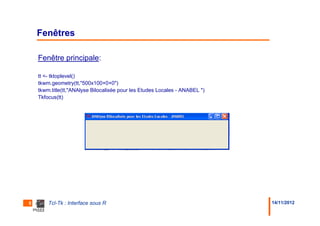
    Fenêtre principale:

    tt <- tktoplevel()
    tkwm.geometry(tt,"500x100+0+0")
    tkwm.title(tt,"ANAlyse Bilocalisée pour les Etudes Locales - ANABEL ")
    Tkfocus(tt)


5       Tcl-Tk : Interface sous R                                            14/11/2012
Fenêtres

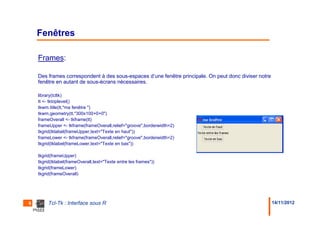
    Frames:

    Des frames correspondent à des sous-espaces d’une fenêtre principale. On peut donc diviser notre
    fenêtre en autant de sous-écrans nécessaires.

    library(tcltk)
    tt <- tktoplevel()
    tkwm.title(tt,"ma fenêtre ")
    tkwm.geometry(tt,"300x100+0+0")
    frameOverall <- tkframe(tt)
    frameUpper <- tkframe(frameOverall,relief="groove",borderwidth=2)
    tkgrid(tklabel(frameUpper,text="Texte en haut"))
    frameLower <- tkframe(frameOverall,relief="groove",borderwidth=2)
    tkgrid(tklabel(frameLower,text="Texte en bas"))

    tkgrid(frameUpper)
    tkgrid(tklabel(frameOverall,text="Texte entre les frames"))
    tkgrid(frameLower)
    tkgrid(frameOverall)


6        Tcl-Tk : Interface sous R                                                                     14/11/2012
Fenêtres

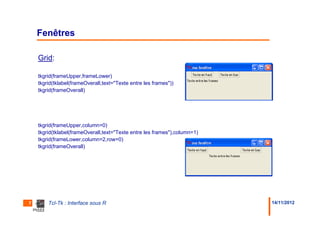
    Grid:

    tkgrid(frameUpper,frameLower)
    tkgrid(tklabel(frameOverall,text="Texte entre les frames"))
    tkgrid(frameOverall)


    tkgrid(frameUpper,column=0)
    tkgrid(tklabel(frameOverall,text="Texte entre les frames"),column=1)
    tkgrid(frameLower,column=2,row=0)
    tkgrid(frameOverall)


7       Tcl-Tk : Interface sous R                                          14/11/2012
Fenêtres

    Afficher une dataframe:
    require(tcltk)
    tclRequire("Tktable")
    myRarray <- c("Name",""James Wettenhall"","R-Help", "Email","wettenhall@wehi.edu.au","R-
    Help@stat.math.ethz.ch")
    dim(myRarray) <- c(3,2)
    tclarray <- tclArray()
      for (i in (0:2))
       for (j in (0:1))
        tclarray[[i,j]] <- myRarray[i+1,j+1]
    tt<-tktoplevel()
    table1 <- tkwidget(tt,"table",variable=tclarray,rows=3,cols=2,titlerows=1,selectmode="extended"
    ,colwidth=25,background="white")
    tkpack(table1)


8       Tcl-Tk : Interface sous R                                                                     14/11/2012
Fenêtres
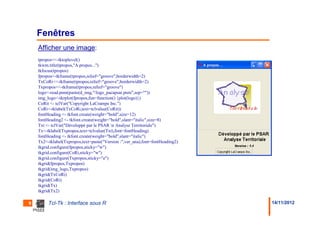
    Afficher une image:
    tpropos<<-tktoplevel()
    tkwm.title(tpropos,"A propos...")
    tkfocus(tpropos)
    fpropos<-tkframe(tpropos,relief="groove",borderwidth=2)
    TxCoRi<<-tkframe(tpropos,relief="groove",borderwidth=2)
    Txpropos<<-tkframe(tpropos,relief="groove")
    logo<-read.pnm(paste(d_img,"/logo_pacapsar.pnm",sep=""))
    img_logo<-tkrplot(fpropos,fun=function() {plot(logo)})
    CoRit <- tclVar("Copyright LaCrampe Inc.")
    CoRi<-tklabel(TxCoRi,text=tclvalue(CoRit))
    fontHeading <- tkfont.create(weight="bold",size=12)
    fontHeading2 <- tkfont.create(weight="bold",slant="italic",size=8)
    Txt <- tclVar("Développé par le PSAR n Analyse Territoriale")
    Tx<-tklabel(Txpropos,text=tclvalue(Txt),font=fontHeading)
    fontHeading <- tkfont.create(weight="bold",slant="italic")
    Tx2<-tklabel(Txpropos,text=paste("Version :",ver_ana),font=fontHeading2)
    tkgrid.configure(fpropos,sticky="w")
    tkgrid.configure(CoRi,sticky="w")
    tkgrid.configure(Txpropos,sticky="e")
    tkgrid(fpropos,Txpropos)
    tkgrid(img_logo,Txpropos)
    tkgrid(TxCoRi)
    tkgrid(CoRi)
    tkgrid(Tx)
    tkgrid(Tx2)

9        Tcl-Tk : Interface sous R                                             14/11/2012
Fenêtres

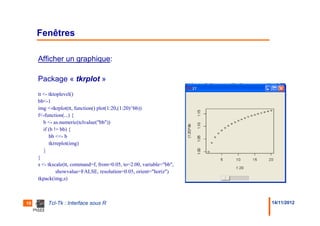
     Afficher un graphique:

     Package « tkrplot »
     tt <- tktoplevel()
     bb<-1
     img <-tkrplot(tt, function() plot(1:20,(1:20)^bb))
     f<-function(...) {
        b <- as.numeric(tclvalue("bb"))
        if (b != bb) {
           bb <<- b
           tkrreplot(img)
        }
     }
     s <- tkscale(tt, command=f, from=0.05, to=2.00, variable="bb",
               showvalue=FALSE, resolution=0.05, orient="horiz")
     tkpack(img,s)


10       Tcl-Tk : Interface sous R                                    14/11/2012
Menus

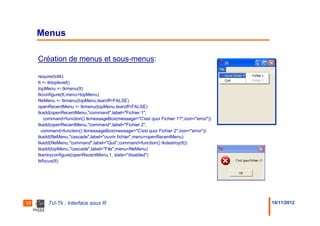
     Création de menus et sous-menus:

     require(tcltk)
     tt <- tktoplevel()
     topMenu <- tkmenu(tt)
     tkconfigure(tt,menu=topMenu)
     fileMenu <- tkmenu(topMenu,tearoff=FALSE)
     openRecentMenu <- tkmenu(topMenu,tearoff=FALSE)
     tkadd(openRecentMenu,"command",label="Fichier 1",
         command=function() tkmessageBox(message="C'est quoi Fichier 1?",icon="error"))
     tkadd(openRecentMenu,"command",label="Fichier 2",
       command=function() tkmessageBox(message="C'est quoi Fichier 2",icon="error"))
     tkadd(fileMenu,"cascade",label="ouvrir fichier",menu=openRecentMenu)
     tkadd(fileMenu,"command",label="Quit",command=function() tkdestroy(tt))
     tkadd(topMenu,"cascade",label="File",menu=fileMenu)
     tkentryconfigure(openRecentMenu,1, state="disabled")
     tkfocus(tt)


11       Tcl-Tk : Interface sous R                                                        14/11/2012
Les widgets

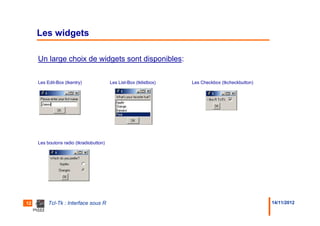
     Un large choix de widgets sont disponibles:

     Les Edit-Box (tkentry)              Les List-Box (tklistbox)   Les Checkbox (tkcheckbutton)


     Les boutons radio (tkradiobutton)


12        Tcl-Tk : Interface sous R                                                                14/11/2012
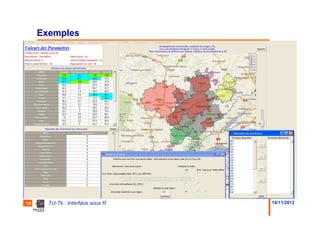
Exemples


13     Tcl-Tk : Interface sous R   14/11/2012
Exemples


14     Tcl-Tk : Interface sous R   14/11/2012
Lancement d’une application R / Tcl-Tk

     Pour lancer une application R comprenant une interface graphique (ou
     non..) sans que l’utilisateur n’ait besoin d’ouvrir R au préalable.


     Créer un raccourci sur le bureau avec pour cible :

     "C:Program FilesRR-2.15.1binR.exe"
     "R_PROFILE=D:applicartoAnabelbinprincipal.r" --silent --no-restore
     --slave --internet2


15      Tcl-Tk : Interface sous R                                         14/11/2012
Biblio


     http://http://bioinf.wehi.edu.au/~wettenhall/RTclTkExamples/


     http://rstat.ouvaton.org/?article19/creer-des-applications-graphiques-avec-r


16      Tcl-Tk : Interface sous R                                                   14/11/2012
Tcl-Tk : Interface sous R


              Merci pour votre attention !


17     Tcl-Tk : Interface sous R             14/11/2012

Fltau r interface

  • 1.
    Tcl-Tk : Créer uneinterface sous R Présentation groupe FltauR Durieux Eric / Eusebio Pascal 14/11/2012
  • 2.
    Introduction Pourquoi créer des interfaces : Distribuer un ensemble de fonctionnalités développées sous R auprès d’utilisateurs n’ayant aucune notion de programmation en R. Créer des outils permettant de regrouper l’ensemble des possibilités offerte par R : gestion et manipulation des données – statistique – cartographie … Promouvoir R au sein de l’Institut 2 Tcl-Tk : Interface sous R 14/11/2012
  • 3.
    Introduction Utilisation du langage de script TCL (Tool Command Language) agrémenté de la bibliothèque de création d’interface graphique Tk, combinaison connue sous le nom de Tcl-Tk. L’ensemble est implémenté sous R dans la librairie « tcltk » présente dans la distribution de base de R La librairie « tcltk2 » enrichit la précédente librairie mais ne sera pas utilisée dans ce qui suit. 3 Tcl-Tk : Interface sous R 14/11/2012
  • 4.
    Fenêtres Messages Box: library(tcltk) msg<-tkmessageBox(message="Voulez-vous quitter?",icon="question",type="yesnocancel",default="yes") tclvalue(msg) [1] "no" 4 Tcl-Tk : Interface sous R 14/11/2012
  • 5.
    Fenêtres Fenêtre principale: tt <- tktoplevel() tkwm.geometry(tt,"500x100+0+0") tkwm.title(tt,"ANAlyse Bilocalisée pour les Etudes Locales - ANABEL ") Tkfocus(tt) 5 Tcl-Tk : Interface sous R 14/11/2012
  • 6.
    Fenêtres Frames: Des frames correspondent à des sous-espaces d’une fenêtre principale. On peut donc diviser notre fenêtre en autant de sous-écrans nécessaires. library(tcltk) tt <- tktoplevel() tkwm.title(tt,"ma fenêtre ") tkwm.geometry(tt,"300x100+0+0") frameOverall <- tkframe(tt) frameUpper <- tkframe(frameOverall,relief="groove",borderwidth=2) tkgrid(tklabel(frameUpper,text="Texte en haut")) frameLower <- tkframe(frameOverall,relief="groove",borderwidth=2) tkgrid(tklabel(frameLower,text="Texte en bas")) tkgrid(frameUpper) tkgrid(tklabel(frameOverall,text="Texte entre les frames")) tkgrid(frameLower) tkgrid(frameOverall) 6 Tcl-Tk : Interface sous R 14/11/2012
  • 7.
    Fenêtres Grid: tkgrid(frameUpper,frameLower) tkgrid(tklabel(frameOverall,text="Texte entre les frames")) tkgrid(frameOverall) tkgrid(frameUpper,column=0) tkgrid(tklabel(frameOverall,text="Texte entre les frames"),column=1) tkgrid(frameLower,column=2,row=0) tkgrid(frameOverall) 7 Tcl-Tk : Interface sous R 14/11/2012
  • 8.
    Fenêtres Afficher une dataframe: require(tcltk) tclRequire("Tktable") myRarray <- c("Name",""James Wettenhall"","R-Help", "Email","wettenhall@wehi.edu.au","R- Help@stat.math.ethz.ch") dim(myRarray) <- c(3,2) tclarray <- tclArray() for (i in (0:2)) for (j in (0:1)) tclarray[[i,j]] <- myRarray[i+1,j+1] tt<-tktoplevel() table1 <- tkwidget(tt,"table",variable=tclarray,rows=3,cols=2,titlerows=1,selectmode="extended" ,colwidth=25,background="white") tkpack(table1) 8 Tcl-Tk : Interface sous R 14/11/2012
  • 9.
    Fenêtres Afficher une image: tpropos<<-tktoplevel() tkwm.title(tpropos,"A propos...") tkfocus(tpropos) fpropos<-tkframe(tpropos,relief="groove",borderwidth=2) TxCoRi<<-tkframe(tpropos,relief="groove",borderwidth=2) Txpropos<<-tkframe(tpropos,relief="groove") logo<-read.pnm(paste(d_img,"/logo_pacapsar.pnm",sep="")) img_logo<-tkrplot(fpropos,fun=function() {plot(logo)}) CoRit <- tclVar("Copyright LaCrampe Inc.") CoRi<-tklabel(TxCoRi,text=tclvalue(CoRit)) fontHeading <- tkfont.create(weight="bold",size=12) fontHeading2 <- tkfont.create(weight="bold",slant="italic",size=8) Txt <- tclVar("Développé par le PSAR n Analyse Territoriale") Tx<-tklabel(Txpropos,text=tclvalue(Txt),font=fontHeading) fontHeading <- tkfont.create(weight="bold",slant="italic") Tx2<-tklabel(Txpropos,text=paste("Version :",ver_ana),font=fontHeading2) tkgrid.configure(fpropos,sticky="w") tkgrid.configure(CoRi,sticky="w") tkgrid.configure(Txpropos,sticky="e") tkgrid(fpropos,Txpropos) tkgrid(img_logo,Txpropos) tkgrid(TxCoRi) tkgrid(CoRi) tkgrid(Tx) tkgrid(Tx2) 9 Tcl-Tk : Interface sous R 14/11/2012
  • 10.
    Fenêtres Afficher un graphique: Package « tkrplot » tt <- tktoplevel() bb<-1 img <-tkrplot(tt, function() plot(1:20,(1:20)^bb)) f<-function(...) { b <- as.numeric(tclvalue("bb")) if (b != bb) { bb <<- b tkrreplot(img) } } s <- tkscale(tt, command=f, from=0.05, to=2.00, variable="bb", showvalue=FALSE, resolution=0.05, orient="horiz") tkpack(img,s) 10 Tcl-Tk : Interface sous R 14/11/2012
  • 11.
    Menus Création de menus et sous-menus: require(tcltk) tt <- tktoplevel() topMenu <- tkmenu(tt) tkconfigure(tt,menu=topMenu) fileMenu <- tkmenu(topMenu,tearoff=FALSE) openRecentMenu <- tkmenu(topMenu,tearoff=FALSE) tkadd(openRecentMenu,"command",label="Fichier 1", command=function() tkmessageBox(message="C'est quoi Fichier 1?",icon="error")) tkadd(openRecentMenu,"command",label="Fichier 2", command=function() tkmessageBox(message="C'est quoi Fichier 2",icon="error")) tkadd(fileMenu,"cascade",label="ouvrir fichier",menu=openRecentMenu) tkadd(fileMenu,"command",label="Quit",command=function() tkdestroy(tt)) tkadd(topMenu,"cascade",label="File",menu=fileMenu) tkentryconfigure(openRecentMenu,1, state="disabled") tkfocus(tt) 11 Tcl-Tk : Interface sous R 14/11/2012
  • 12.
    Les widgets Un large choix de widgets sont disponibles: Les Edit-Box (tkentry) Les List-Box (tklistbox) Les Checkbox (tkcheckbutton) Les boutons radio (tkradiobutton) 12 Tcl-Tk : Interface sous R 14/11/2012
  • 13.
    Exemples 13 Tcl-Tk : Interface sous R 14/11/2012
  • 14.
    Exemples 14 Tcl-Tk : Interface sous R 14/11/2012
  • 15.
    Lancement d’une applicationR / Tcl-Tk Pour lancer une application R comprenant une interface graphique (ou non..) sans que l’utilisateur n’ait besoin d’ouvrir R au préalable. Créer un raccourci sur le bureau avec pour cible : "C:Program FilesRR-2.15.1binR.exe" "R_PROFILE=D:applicartoAnabelbinprincipal.r" --silent --no-restore --slave --internet2 15 Tcl-Tk : Interface sous R 14/11/2012
  • 16.
    Biblio http://http://bioinf.wehi.edu.au/~wettenhall/RTclTkExamples/ http://rstat.ouvaton.org/?article19/creer-des-applications-graphiques-avec-r 16 Tcl-Tk : Interface sous R 14/11/2012
  • 17.
    Tcl-Tk : Interfacesous R Merci pour votre attention ! 17 Tcl-Tk : Interface sous R 14/11/2012