


STRATÉGIE MULTI-SCREEN!
E-marketing
Maitriser tous les écrans
Yohan Founs!
Directeur Mobilité!
+33 6 61 93 88 97
yohan.founs@valtech.fr
@founsy
Ò  ENJEUX & CONTEXTE
Ò  LA STRATÉGIE
Ò  LES INTERFACES
Ò  DES PLATEFORMES
Ò  LA PERFORMENCE
Multiscreen!
Quels enjeux,
quel contexte
CHAOS
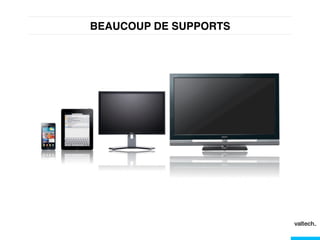
BEAUCOUP DE SUPPORTS!
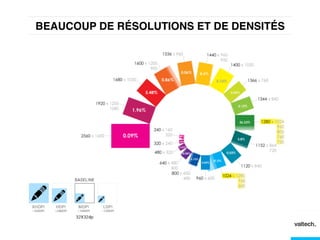
BEAUCOUP DE RÉSOLUTIONS ET DE DENSITÉS!
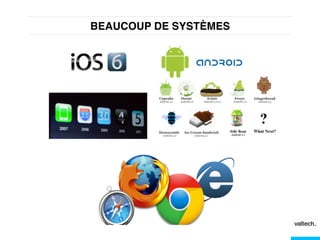
BEAUCOUP DE SYSTÈMES!
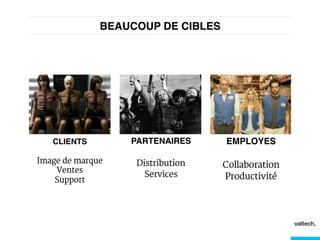
BEAUCOUP DE CIBLES!
EMPLOYES!
Collaboration
Productivité
PARTENAIRES!
Distribution
Services
CLIENTS!
Image de marque
Ventes
Support
DE NOUVEAUX USAGES !
Les innovations ne viennent...
ni des marques
ni des entreprises
LES INNOVATIONS VIENNENT DES
GRANDS ACTEURS DU DIGITAL!
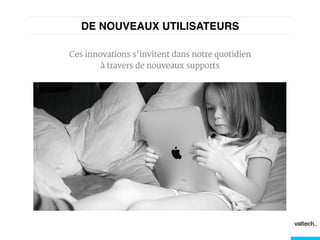
DE NOUVEAUX UTILISATEURS!
Ces innovations s’invitent dans notre quotidien
à travers de nouveaux supports
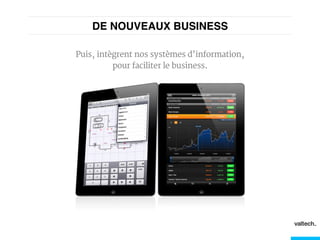
DE NOUVEAUX BUSINESS!
Puis, intègrent nos systèmes d’information,
pour faciliter le business.
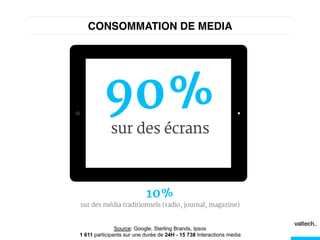
CONSOMMATION DE MEDIA!
90%
sur des écrans
10%
sur des média traditionnels (radio, journal, magazine)
Source: Google, Sterling Brands, Ipsos
1 611 participants sur une durée de 24H - 15 738 Interactions media
OPPORTUNITES
Multiscreen!
Une stratégie
Multi-screen
MULTI-SCREEN
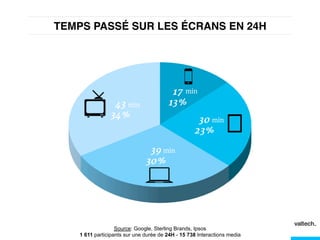
TEMPS PASSÉ SUR LES ÉCRANS EN 24H!
min
min
min
min
Source: Google, Sterling Brands, Ipsos
1 611 participants sur une durée de 24H - 15 738 Interactions media
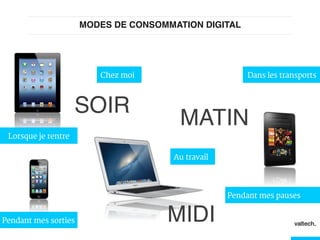
MODES DE CONSOMMATION DIGITAL!
MATIN!
MIDI!
SOIR!
Dans les transportsChez moi
Au travail
Lorsque je rentre
Pendant mes sorties
Pendant mes pauses
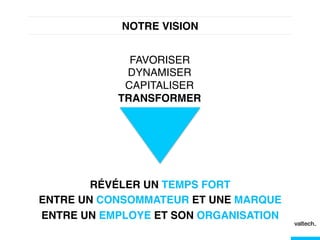
NOTRE VISION!
FAVORISER!
DYNAMISER!
CAPITALISER!
TRANSFORMER!
RÉVÉLER UN TEMPS FORT !
ENTRE UN CONSOMMATEUR ET UNE MARQUE!
ENTRE UN EMPLOYE ET SON ORGANISATION!
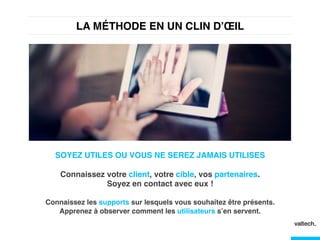
LA MÉTHODE EN UN CLIN D’ŒIL !
SOYEZ UTILES OU VOUS NE SEREZ JAMAIS UTILISES!
!
Connaissez votre client, votre cible, vos partenaires. 

Soyez en contact avec eux !!
!
Connaissez les supports sur lesquels vous souhaitez être présents.
Apprenez à observer comment les utilisateurs s’en servent.!
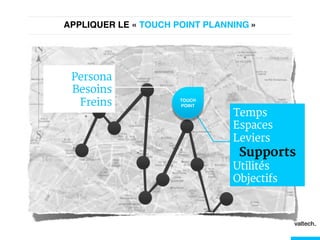
APPLIQUER LE « TOUCH POINT PLANNING »!
Temps
Espaces
Leviers
Supports
Utilités
Objectifs
Persona
Besoins
Freins TOUCH!
POINT!
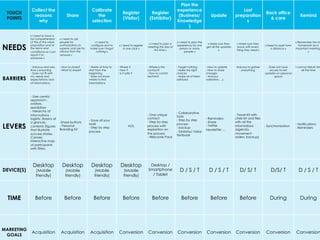
TOUCH
POINTS
Collect the
reasons
why
Share
Calibrate
the
selection
Register
(Visitor)
Register
(Exhibitor)
Plan the
experience
(Business/
Knowledge
)
Update
Last
preparation
s
Back office
& care
Remind
NEEDS
« I need to have a
full comprehension
of the of the value
proposition and of
the terms and
conditions» so I can
report it to
someone »
« I need to ask
people for
authorizations to
superior and ask for
advice from the
network »
« I need to
configure and to
make sure I forgot
nothing »
« I need to register
in one click »
« I need to plan a
meeting this day at
this time »
« I need to plan the
experience for one
person or many
people »
« Make sure they
get all the updates
»
« Make sure they
leave with every
thing they need »
« Need to assist form
a distance »
« Remember him hi
homework an,d
important meetings
»
BARRIERS
- Arduous and very
time consuming
- Does not fit with
my needs and
expectations: lack
of informations,
- How to share?
- What to share?
- Waste of time to
start from the
beginning
- Does not know
where to find
informlations
- Where ?
- How ?
- Is it safe ?
- Where is the
contact?
- How to contat
her/him?
- Forget nothing
- Make the right
choices
- Make all of them
satisfyed
- How to update
- How to share
changes
- Arduous
validation, ...)
Arduous to gather
everything
Does not have
access to last
updates on personal
space
I cannot disturb him
all the time
LEVERS
- User centric
approach :
«visitor»,
«exhibitor»
- hierarchy of
informations :
logistic (basics at
a glance),
contents (figures
that illustrate
success stories,
Cannes,
interactive map
of participants
with filters.
-Share buttons
- Personal
Branding Kit
- Save all your
work
- Step by step
process
AOL
- One unique
contact
- Step by step
process with
explantion on
the process
- Welcome Pack
- Collaborative
tools
- Step by step
process
- backup
- Exhibitor/ Visitor
Textbook
- Reminders
- Share
- Twitter,
newsletter, ...
- Travel Kit with
chek list and files
with all the
informations
(agenda,
movement
orders, backup)
- Synchronisation
- Notifications
- Reminders
DEVICE(S)
Desktop
(Mobile
friendly)
Desktop
(Mobile
friendly)
Desktop
(Mobile
friendly)
Desktop
(Mobile
friendly)
Desktop /
Smartphone
/ Tablet
D / S / T D / S / T D/ S/ T D/S/ T D / S / T
TIME Before Before Before Before Before Before Before Before During During
MARKETING
GOALS
Acquisition Acquisition Acquisition Conversion Conversion Conversion Conversion Conversion Conversion Conversion
25
25
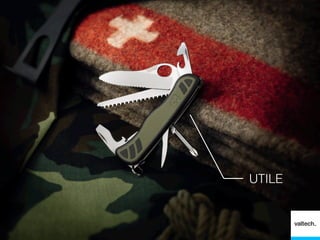
UTILE
Multiscreen!
A l’extrémité :
les interfaces
TOUCH
POINT
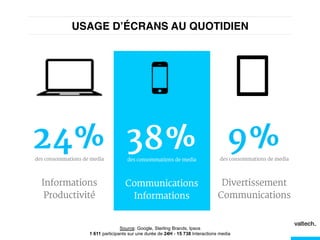
USAGE D’ÉCRANS AU QUOTIDIEN!
24%des consommations de media
Informations
Productivité
38%des consommations de media
Communications
Informations
9%des consommations de media
Divertissement
Communications
Source: Google, Sterling Brands, Ipsos
1 611 participants sur une durée de 24H - 15 738 Interactions media
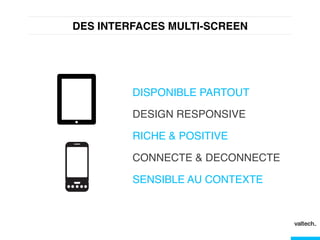
DES INTERFACES MULTI-SCREEN!
DISPONIBLE PARTOUT!
DESIGN RESPONSIVE!
RICHE & POSITIVE!
CONNECTE & DECONNECTE!
SENSIBLE AU CONTEXTE!
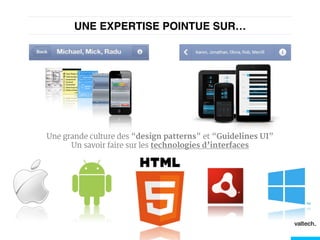
UNE EXPERTISE POINTUE SUR…!
Une grande culture des “design patterns” et “Guidelines UI”
Un savoir faire sur les technologies d’interfaces
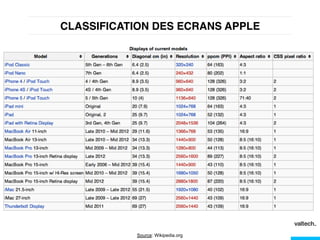
CLASSIFICATION DES ECRANS APPLE!
Source: Wikipedia.org
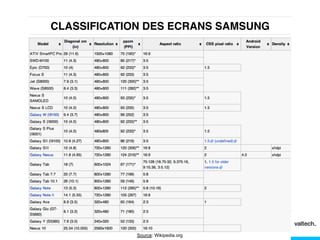
CLASSIFICATION DES ECRANS SAMSUNG!
Source: Wikipedia.org
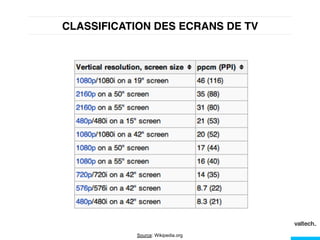
CLASSIFICATION DES ECRANS DE TV!
Source: Wikipedia.org
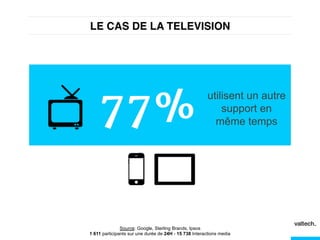
LE CAS DE LA TELEVISION!
77%
Source: Google, Sterling Brands, Ipsos
1 611 participants sur une durée de 24H - 15 738 Interactions media
utilisent un autre
support en
même temps
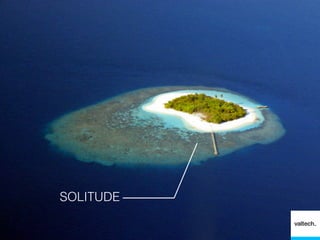
SOLITUDE
Multiscreen!
Au cœur :
Les plateformes
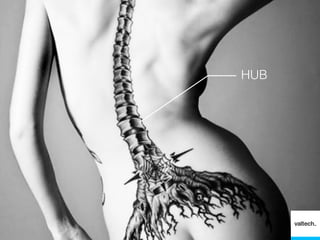
HUB
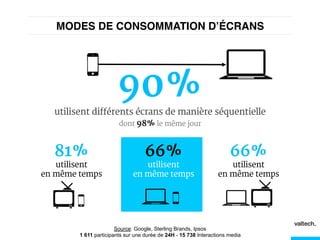
MODES DE CONSOMMATION D’ÉCRANS!
90%
utilisent différents écrans de manière séquentielle
dont 98% le même jour
81%
utilisent
en même temps
66%
utilisent
en même temps
66%
utilisent
en même temps
Source: Google, Sterling Brands, Ipsos
1 611 participants sur une durée de 24H - 15 738 Interactions media
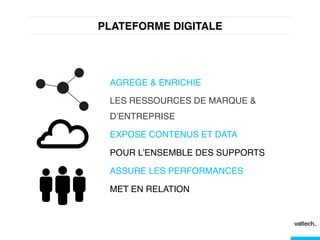
PLATEFORME DIGITALE!
AGREGE & ENRICHIE!
LES RESSOURCES DE MARQUE &
D’ENTREPRISE!
EXPOSE CONTENUS ET DATA!
POUR L’ENSEMBLE DES SUPPORTS!
ASSURE LES PERFORMANCES!
MET EN RELATION!
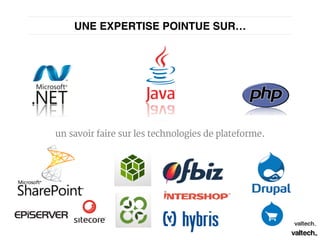
un savoir faire sur les technologies de plateforme.
UNE EXPERTISE POINTUE SUR…!
DES INTERFACES
RICHES
ARCHITECTURES
Multiscreen!
Au final :
La performance
43
PERFORMANT
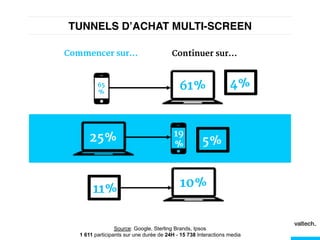
TUNNELS D’ACHAT MULTI-SCREEN!
61%65
%
4%
25% 19
% 5%
11% 10%
Commencer sur... Continuer sur...
Source: Google, Sterling Brands, Ipsos
1 611 participants sur une durée de 24H - 15 738 Interactions media
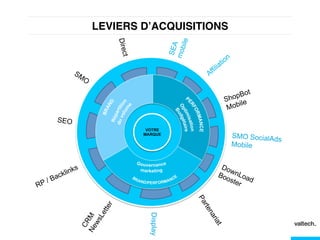
LEVIERS D’ACQUISITIONS !
VOTRE
MARQUE
ShopBot
Mobile
Direct
SMO SocialAds
Mobile
Display
SEO
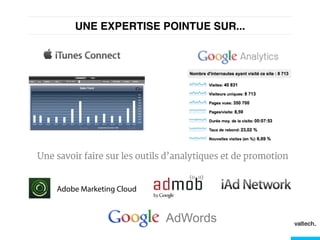
UNE EXPERTISE POINTUE SUR...!
Une savoir faire sur les outils d’analytiques et de promotion
Adobe Marketing Cloud
AdWords
PROMOUVOIR
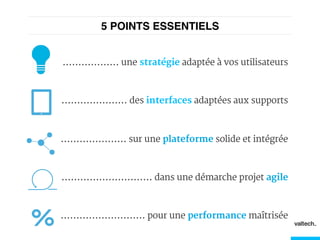
5 POINTS ESSENTIELS!
.................. une stratégie adaptée à vos utilisateurs
..................... des interfaces adaptées aux supports
..................... sur une plateforme solide et intégrée
............................. dans une démarche projet agile
........................... pour une performance maîtrisée
Merci
Yohan Founs!
Directeur Mobilité!
+33 6 61 93 88 97
yohan.founs@valtech.fr
@founsy

Valtech - Stratégie "Multiscreen"

  • 1.
    STRATÉGIE MULTI-SCREEN! E-marketing Maitriser tousles écrans Yohan Founs! Directeur Mobilité! +33 6 61 93 88 97 yohan.founs@valtech.fr @founsy
  • 2.
    Ò  ENJEUX &CONTEXTE Ò  LA STRATÉGIE Ò  LES INTERFACES Ò  DES PLATEFORMES Ò  LA PERFORMENCE
  • 3.
  • 4.
  • 5.
  • 6.
    BEAUCOUP DE RÉSOLUTIONSET DE DENSITÉS!
  • 7.
  • 8.
  • 9.
    DE NOUVEAUX USAGES! Les innovations ne viennent... ni des marques ni des entreprises LES INNOVATIONS VIENNENT DES GRANDS ACTEURS DU DIGITAL!
  • 10.
    DE NOUVEAUX UTILISATEURS! Cesinnovations s’invitent dans notre quotidien à travers de nouveaux supports
  • 11.
    DE NOUVEAUX BUSINESS! Puis,intègrent nos systèmes d’information, pour faciliter le business.
  • 12.
    CONSOMMATION DE MEDIA! 90% surdes écrans 10% sur des média traditionnels (radio, journal, magazine) Source: Google, Sterling Brands, Ipsos 1 611 participants sur une durée de 24H - 15 738 Interactions media
  • 13.
  • 14.
  • 15.
  • 16.
    TEMPS PASSÉ SURLES ÉCRANS EN 24H! min min min min Source: Google, Sterling Brands, Ipsos 1 611 participants sur une durée de 24H - 15 738 Interactions media
  • 18.
    MODES DE CONSOMMATIONDIGITAL! MATIN! MIDI! SOIR! Dans les transportsChez moi Au travail Lorsque je rentre Pendant mes sorties Pendant mes pauses
  • 19.
    NOTRE VISION! FAVORISER! DYNAMISER! CAPITALISER! TRANSFORMER! RÉVÉLER UNTEMPS FORT ! ENTRE UN CONSOMMATEUR ET UNE MARQUE! ENTRE UN EMPLOYE ET SON ORGANISATION!
  • 20.
    LA MÉTHODE ENUN CLIN D’ŒIL ! SOYEZ UTILES OU VOUS NE SEREZ JAMAIS UTILISES! ! Connaissez votre client, votre cible, vos partenaires. 
 Soyez en contact avec eux !! ! Connaissez les supports sur lesquels vous souhaitez être présents. Apprenez à observer comment les utilisateurs s’en servent.!
  • 23.
    APPLIQUER LE «TOUCH POINT PLANNING »! Temps Espaces Leviers Supports Utilités Objectifs Persona Besoins Freins TOUCH! POINT!
  • 24.
    TOUCH POINTS Collect the reasons why Share Calibrate the selection Register (Visitor) Register (Exhibitor) Plan the experience (Business/ Knowledge ) Update Last preparation s Backoffice & care Remind NEEDS « I need to have a full comprehension of the of the value proposition and of the terms and conditions» so I can report it to someone » « I need to ask people for authorizations to superior and ask for advice from the network » « I need to configure and to make sure I forgot nothing » « I need to register in one click » « I need to plan a meeting this day at this time » « I need to plan the experience for one person or many people » « Make sure they get all the updates » « Make sure they leave with every thing they need » « Need to assist form a distance » « Remember him hi homework an,d important meetings » BARRIERS - Arduous and very time consuming - Does not fit with my needs and expectations: lack of informations, - How to share? - What to share? - Waste of time to start from the beginning - Does not know where to find informlations - Where ? - How ? - Is it safe ? - Where is the contact? - How to contat her/him? - Forget nothing - Make the right choices - Make all of them satisfyed - How to update - How to share changes - Arduous validation, ...) Arduous to gather everything Does not have access to last updates on personal space I cannot disturb him all the time LEVERS - User centric approach : «visitor», «exhibitor» - hierarchy of informations : logistic (basics at a glance), contents (figures that illustrate success stories, Cannes, interactive map of participants with filters. -Share buttons - Personal Branding Kit - Save all your work - Step by step process AOL - One unique contact - Step by step process with explantion on the process - Welcome Pack - Collaborative tools - Step by step process - backup - Exhibitor/ Visitor Textbook - Reminders - Share - Twitter, newsletter, ... - Travel Kit with chek list and files with all the informations (agenda, movement orders, backup) - Synchronisation - Notifications - Reminders DEVICE(S) Desktop (Mobile friendly) Desktop (Mobile friendly) Desktop (Mobile friendly) Desktop (Mobile friendly) Desktop / Smartphone / Tablet D / S / T D / S / T D/ S/ T D/S/ T D / S / T TIME Before Before Before Before Before Before Before Before During During MARKETING GOALS Acquisition Acquisition Acquisition Conversion Conversion Conversion Conversion Conversion Conversion Conversion
  • 25.
  • 26.
  • 27.
  • 28.
    USAGE D’ÉCRANS AUQUOTIDIEN! 24%des consommations de media Informations Productivité 38%des consommations de media Communications Informations 9%des consommations de media Divertissement Communications Source: Google, Sterling Brands, Ipsos 1 611 participants sur une durée de 24H - 15 738 Interactions media
  • 29.
    DES INTERFACES MULTI-SCREEN! DISPONIBLE PARTOUT! DESIGNRESPONSIVE! RICHE & POSITIVE! CONNECTE & DECONNECTE! SENSIBLE AU CONTEXTE!
  • 30.
    UNE EXPERTISE POINTUESUR…! Une grande culture des “design patterns” et “Guidelines UI” Un savoir faire sur les technologies d’interfaces
  • 31.
    CLASSIFICATION DES ECRANSAPPLE! Source: Wikipedia.org
  • 32.
    CLASSIFICATION DES ECRANSSAMSUNG! Source: Wikipedia.org
  • 33.
    CLASSIFICATION DES ECRANSDE TV! Source: Wikipedia.org
  • 34.
    LE CAS DELA TELEVISION! 77% Source: Google, Sterling Brands, Ipsos 1 611 participants sur une durée de 24H - 15 738 Interactions media utilisent un autre support en même temps
  • 35.
  • 36.
  • 37.
  • 38.
    MODES DE CONSOMMATIOND’ÉCRANS! 90% utilisent différents écrans de manière séquentielle dont 98% le même jour 81% utilisent en même temps 66% utilisent en même temps 66% utilisent en même temps Source: Google, Sterling Brands, Ipsos 1 611 participants sur une durée de 24H - 15 738 Interactions media
  • 39.
    PLATEFORME DIGITALE! AGREGE &ENRICHIE! LES RESSOURCES DE MARQUE & D’ENTREPRISE! EXPOSE CONTENUS ET DATA! POUR L’ENSEMBLE DES SUPPORTS! ASSURE LES PERFORMANCES! MET EN RELATION!
  • 40.
    un savoir fairesur les technologies de plateforme. UNE EXPERTISE POINTUE SUR…!
  • 41.
  • 42.
  • 43.
  • 44.
    TUNNELS D’ACHAT MULTI-SCREEN! 61%65 % 4% 25%19 % 5% 11% 10% Commencer sur... Continuer sur... Source: Google, Sterling Brands, Ipsos 1 611 participants sur une durée de 24H - 15 738 Interactions media
  • 45.
  • 46.
    UNE EXPERTISE POINTUESUR...! Une savoir faire sur les outils d’analytiques et de promotion Adobe Marketing Cloud AdWords
  • 47.
  • 48.
    5 POINTS ESSENTIELS! ..................une stratégie adaptée à vos utilisateurs ..................... des interfaces adaptées aux supports ..................... sur une plateforme solide et intégrée ............................. dans une démarche projet agile ........................... pour une performance maîtrisée
  • 49.
    Merci Yohan Founs! Directeur Mobilité! +336 61 93 88 97 yohan.founs@valtech.fr @founsy