Formation 2.0
Blended Learning
« Learn. Share. Perform. »
Nos préoccupations:
Comment planifier ?
Dans quel délai ?
Moins de temps disponible, mais
plus efficient.
Comment gérer cela ?
Comment massifier
l’accès et individualiser le
parcours ?
On attend trop ou pas assez
des formations… Quelle est la
valeur ajoutée ?
Des besoins en augmentation,
des budgets en baisse…
Quelles solutions ?
Comment faciliter
l’accès aux
formations ?
Comment motiver
les candidats ?
Quel trajet pour mes
formations ? …
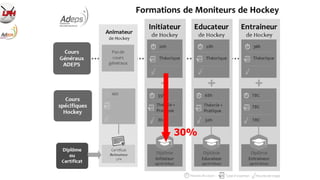
30%
Enquête MSAn + MSIn
 Public cible en fonction du niveau de formation
 Formations globalement satisfaisantes mais besoin de développer:
- SUPPORTS (physiques & digitaux)
- ECHANGES (bonnes pratiques, suivi, mentor, …)
- DUREE (moins de théorie, plus de pratique, diminuer volume, …)
Apporter plus de soutien aux candidats:
5 éléments clés
Source: UK SportCoach-UK Traking Study - 2012
Meilleure communication
Accès à des subsides
+ de mentors/réferents
+ de suivi individuel
Meilleure usage de la technologie
Blended Learning
Blended Learning
in our
Hockey Education Program
FORMATION
DE CADRES FORMATION
DE CADRES
CLUB
CLUB
CLUB
Form Ini
Form Cont
OLD: one-way program NOW: ‘cross-over’ process
Interactivité Interdépendance
Co-création Mentors
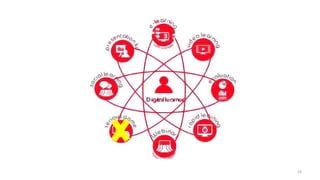
FACE-TO-FACE DIGITAL
Classrooms
Seminars
Workshops
On pitch
Video
Evaluation/Testing
Webinars
Rapid Learning
Collaborative
Learning
Blended Learning
16
17
Type
Définition /
Utilisation
Outils
Exemples/
information
Online learning
Module virtuel permettant
d’apprendre
Adobe captivate
Flash (à outsourcer)
http://www.adobe.com/fr/products/c
aptivate/features.html
Video learning
Vidéo démonstrative Caméra et Camtasia
Youtube - Vidéo externe
https://www.youtube.com/watch?v=
XEtPqpd95nM
Les 500 vidéo de l’ARBH
Rapid learning
Film/dessin animé ou screencast
(présentation commentée)
Film animé : Moovly
Screencast : Camtasia
https://www.moovly.com/
http://www.techsmith.fr/camtasia.ht
ml
Webinar
Formation à distance Gotowebinar http://www.gotomeeting.com/webin
ar/features
Collaborative
learning
Plateforme électronique d’échange
de connaissances
Plateforme online
Facebook ?
Valamis
http://valamis.arcusys.com/home
Testing/
evaluation
Mesurer le niveau de compétences
avant et/ou après
Drillster Actuelle des arbitres ?
Olive – Valamis – ou?
https://hockeyumpire.drillster.net/in
dex.html?lang=fr
https://www.oliverlms.be/fonctionnal
ites_fr.php
http://valamis.arcusys.com/home
Presentation kit
Support pour un formateur
(occasionnel) et pour l’apprenant
Présentation plaçée sur une
plateforme online
Olive – Valamis – ou?
https://www.oliverlms.be/fonctionnal
ites_fr.php
http://valamis.arcusys.com/home
Screencast
Screencast
Screencast
https://screencast-o-matic.com/home
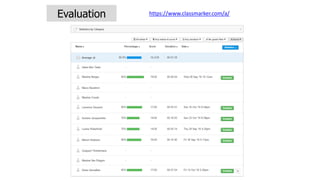
Evaluation https://www.classmarker.com/a/
Rapid Learning
Webinar
OPEN
Joueurs (all)
Parents
LIMITED (login+password via Facebook)
=Coach community
Basics MS Animateur MS Initiateur MS Educateur MS Entraineur
Joueurs 14-18
Parents
Profs EP
Joueurs 18-25
Top joueurs DH-D1
Coachs +30
Top (ex)int+DH
Coachs +35
Web Platform CMS
(info)
Web Platform LMS
(info+échange)- Présentation cours
- Inscriptions
- Accès aux cours
- Accès aux supports
- Par modules/niveaux
- Evaluation
- Trajet
- Statistiques/contrôle
Content
MS
From Content Management System (CMS) to
Learning Management System (LMS)
HUB
NIVEAU
PUBLIC
DIFFUSION
CONTENU
ACCES
COMMUNICATION
Espace personnel : tableau de bord
Trajet de formation individualisé
Bilan/profil personnalisé
PROFIL COACH:
Bilan/profil de compétences
Tactique
Technique
Leadership
Methodologie
Gestion de
groupe
Gestion des
outils
Digital Planning
PHASE 1
INFORMATION
Plate-forme d’information
Open access
PHASE 2
FORMATION: BASICS
Plateforme de formation -
Fonctionnalités de base
- Inscription
- Formation
- Structure des cours
- Médias associés
PHASE 3
FORMATION: DEVELOP
Plateforme de formation complète
USER ACCESS
- Leçons
- Evaluations
- Trajet
- Résultats/stats/contrôle
PHASE 4
COLLABORATE
Plateforme de formation et d’échange
USER (& OPEN?) ACCESS
- Aspect collaboratif
- Partage d’information
WebPlatform
CMS LMS
VIDEO
RAPID
WEBINAR
COLLABORATIVE
TESTING
PRESENTATION
KIT
Youtube Channel
Moovly ?
Gotowebinar
Facebook
Drillster
PPT
MSAn2.0
MSIn2.0
MSEd2.0
MSEnt2.0
ADVANTAGES:
- From passive learning to active learning
- Opportunity to be both apart and together
- Add humaness to your teaching
- Enhances individualization & personalization
ATTENTION POINTS:
- At the start: time consuming & costs (Mutualization !!)
- CHANGE MANAGEMENT !
“There are no stupid questions, so let’s also
agree there are no stupid answers.”

BLENDED LEARNING - Sport

  • 1.
    Formation 2.0 Blended Learning «Learn. Share. Perform. »
  • 5.
    Nos préoccupations: Comment planifier? Dans quel délai ? Moins de temps disponible, mais plus efficient. Comment gérer cela ? Comment massifier l’accès et individualiser le parcours ? On attend trop ou pas assez des formations… Quelle est la valeur ajoutée ? Des besoins en augmentation, des budgets en baisse… Quelles solutions ? Comment faciliter l’accès aux formations ? Comment motiver les candidats ? Quel trajet pour mes formations ? …
  • 6.
  • 7.
    Enquête MSAn +MSIn  Public cible en fonction du niveau de formation  Formations globalement satisfaisantes mais besoin de développer: - SUPPORTS (physiques & digitaux) - ECHANGES (bonnes pratiques, suivi, mentor, …) - DUREE (moins de théorie, plus de pratique, diminuer volume, …)
  • 8.
    Apporter plus desoutien aux candidats: 5 éléments clés Source: UK SportCoach-UK Traking Study - 2012 Meilleure communication Accès à des subsides + de mentors/réferents + de suivi individuel Meilleure usage de la technologie
  • 9.
  • 13.
  • 14.
    FORMATION DE CADRES FORMATION DECADRES CLUB CLUB CLUB Form Ini Form Cont OLD: one-way program NOW: ‘cross-over’ process Interactivité Interdépendance Co-création Mentors
  • 15.
  • 16.
  • 17.
    17 Type Définition / Utilisation Outils Exemples/ information Online learning Modulevirtuel permettant d’apprendre Adobe captivate Flash (à outsourcer) http://www.adobe.com/fr/products/c aptivate/features.html Video learning Vidéo démonstrative Caméra et Camtasia Youtube - Vidéo externe https://www.youtube.com/watch?v= XEtPqpd95nM Les 500 vidéo de l’ARBH Rapid learning Film/dessin animé ou screencast (présentation commentée) Film animé : Moovly Screencast : Camtasia https://www.moovly.com/ http://www.techsmith.fr/camtasia.ht ml Webinar Formation à distance Gotowebinar http://www.gotomeeting.com/webin ar/features Collaborative learning Plateforme électronique d’échange de connaissances Plateforme online Facebook ? Valamis http://valamis.arcusys.com/home Testing/ evaluation Mesurer le niveau de compétences avant et/ou après Drillster Actuelle des arbitres ? Olive – Valamis – ou? https://hockeyumpire.drillster.net/in dex.html?lang=fr https://www.oliverlms.be/fonctionnal ites_fr.php http://valamis.arcusys.com/home Presentation kit Support pour un formateur (occasionnel) et pour l’apprenant Présentation plaçée sur une plateforme online Olive – Valamis – ou? https://www.oliverlms.be/fonctionnal ites_fr.php http://valamis.arcusys.com/home
  • 18.
  • 19.
  • 20.
  • 21.
  • 22.
  • 23.
  • 24.
    OPEN Joueurs (all) Parents LIMITED (login+passwordvia Facebook) =Coach community Basics MS Animateur MS Initiateur MS Educateur MS Entraineur Joueurs 14-18 Parents Profs EP Joueurs 18-25 Top joueurs DH-D1 Coachs +30 Top (ex)int+DH Coachs +35 Web Platform CMS (info) Web Platform LMS (info+échange)- Présentation cours - Inscriptions - Accès aux cours - Accès aux supports - Par modules/niveaux - Evaluation - Trajet - Statistiques/contrôle Content MS From Content Management System (CMS) to Learning Management System (LMS) HUB NIVEAU PUBLIC DIFFUSION CONTENU ACCES COMMUNICATION
  • 25.
    Espace personnel :tableau de bord
  • 26.
    Trajet de formationindividualisé
  • 29.
  • 30.
    PROFIL COACH: Bilan/profil decompétences Tactique Technique Leadership Methodologie Gestion de groupe Gestion des outils
  • 31.
    Digital Planning PHASE 1 INFORMATION Plate-formed’information Open access PHASE 2 FORMATION: BASICS Plateforme de formation - Fonctionnalités de base - Inscription - Formation - Structure des cours - Médias associés PHASE 3 FORMATION: DEVELOP Plateforme de formation complète USER ACCESS - Leçons - Evaluations - Trajet - Résultats/stats/contrôle PHASE 4 COLLABORATE Plateforme de formation et d’échange USER (& OPEN?) ACCESS - Aspect collaboratif - Partage d’information WebPlatform CMS LMS VIDEO RAPID WEBINAR COLLABORATIVE TESTING PRESENTATION KIT Youtube Channel Moovly ? Gotowebinar Facebook Drillster PPT MSAn2.0 MSIn2.0 MSEd2.0 MSEnt2.0
  • 32.
    ADVANTAGES: - From passivelearning to active learning - Opportunity to be both apart and together - Add humaness to your teaching - Enhances individualization & personalization ATTENTION POINTS: - At the start: time consuming & costs (Mutualization !!) - CHANGE MANAGEMENT !
  • 33.
    “There are nostupid questions, so let’s also agree there are no stupid answers.”